
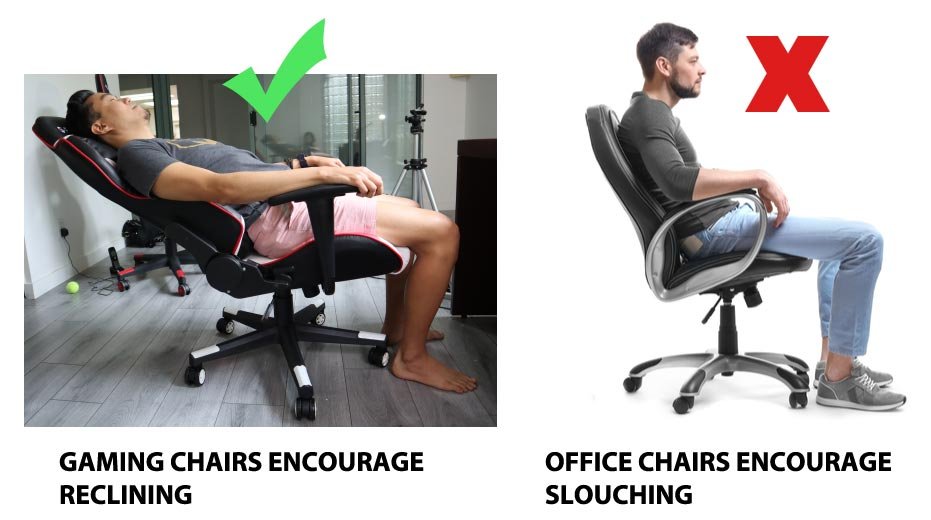
Gamer chairs can be good for your back if they offer proper ergonomic support and are adjusted correctly, but not all models are created equal.
Ever wondered if that sleek, racing-style chair you’ve been eyeing is actually good for your posture? Many gamers spend long hours in front of their screens, and the question “are gamer chairs good for your back” often comes up. It’s a valid concern because prolonged sitting can definitely take a toll.
The truth is, not all gamer chairs offer the same benefits. Some provide great lumbar support and adjustable features, while others prioritize aesthetics over ergonomics. Choosing the right one makes all the difference.

Are Gamer Chairs Good for Your Back? A Deep Dive
So, you’re a gamer, and you’re probably spending a lot of time in your chair. Maybe you’re eyeing one of those cool-looking gamer chairs with all the fancy designs. But here’s the big question: are they actually good for your back? It’s a really important thing to think about, because spending hours sitting, especially in the wrong kind of chair, can lead to some serious back pain. Let’s explore what makes a chair good or bad for your back and figure out if gamer chairs are the heroes or villains when it comes to spine health.
The Basics: What Makes a Chair Good for Your Back?
Before we jump into gamer chairs, let’s talk about the basics of good sitting posture. A good chair should help you maintain the natural curves of your spine. Think of your spine like a gentle “S” shape. A good chair should support this shape, preventing you from slouching or hunching over.
Key Features of an Ergonomic Chair
Here’s what to look for in a chair that promotes good back health:
- Lumbar Support: This is super important! It’s the part of the chair that supports your lower back. It helps to keep the curve in your lower back and prevents back pain. If your chair doesn’t have lumbar support, your lower back can overstrain.
- Adjustable Height: Your feet should be flat on the floor, and your knees should be at a 90-degree angle. An adjustable chair lets you find the right height for your body.
- Adjustable Armrests: Your arms should rest comfortably on the armrests with your shoulders relaxed. If armrests are too high or too low, it can cause tension in your neck and upper back.
- Seat Depth: The seat should be deep enough to support your thighs, but you should be able to sit with a few fingers’ width between the back of your knees and the edge of the seat.
- Swivel Base: This allows you to move around without twisting your back, which reduces strain.
- Breathable Material: Sitting for long periods can get sweaty. A breathable mesh or fabric can help keep you cool and comfortable.
How Do Gamer Chairs Stack Up?
Now, let’s get to the heart of the matter: how do gamer chairs measure up to these ergonomic standards? The truth is, it’s a bit of a mixed bag. Some gamer chairs are designed with ergonomics in mind, while others focus more on style and features. This means, it’s important to look at each chair individually.
The Good: Features That Can Help Your Back
Many gamer chairs do offer some great features that can benefit your back:
- High Backrests: Most gamer chairs have high backrests that support your entire back, and sometimes even your neck. This can be a big help in preventing you from hunching over.
- Built-in Lumbar Support: Many higher-end gamer chairs have adjustable lumbar support cushions, which help to keep your lower back in the correct position.
- Adjustable Recline: Being able to recline your chair can help reduce strain on your back during long gaming sessions. It’s important to note that reclining too far back can actually be bad for your posture, but a reasonable recline can offer relief.
- Adjustable Armrests: Many gamer chairs have adjustable armrests in multiple directions, allowing you to place your arms where they are most comfortable. This promotes good posture by making sure your shoulders are relaxed.
- Headrest: Some gamer chairs include a headrest, which can help prevent neck pain by supporting your head and neck.
The Not-So-Good: Potential Drawbacks
While some gamer chairs are designed for back support, many others fall short. Here’s where things can go wrong:
- Bucket Seat Design: Some gamer chairs have a bucket seat design that can feel restrictive. This may not be a good fit for all body types, and it may not allow for a comfortable seating position if you have wider hips or legs.
- Stiff Padding: Some gamer chairs have very stiff padding which feels uncomfortable for longer gaming sessions. This can lead to pressure points and discomfort which can impact your back.
- Poor Lumbar Support: Not all lumbar support is created equal. Some gamer chairs only offer a minimal lumbar cushion or no support at all. A poorly placed or unsupportive lumbar cushion can lead to back discomfort.
- Lack of Adjustability: Not all gamer chairs come with fully adjustable features. If you can’t adjust the chair height, armrests, or lumbar support, you won’t be able to achieve the optimal position for your body.
- Focus on Aesthetics over Ergonomics: Some gamer chairs prioritize looks over comfort and ergonomics. This means that the chair might look cool, but it could actually hurt your back.
- Price Doesn’t Always Equal Quality: There are some really expensive gamer chairs that have very poor lumbar and back support, and some cheaper options that have better ergonomics and back support than a much costlier chair. It is therefore important to research before you buy your chair.
How to Choose a Gamer Chair That’s Good for Your Back
So, how do you find a gamer chair that’s good for your back? Here are some important tips:
Key Considerations When Buying a Gamer Chair
- Look for Adjustable Lumbar Support: This is very important. Look for chairs that have an adjustable lumbar cushion, or better yet, one that can be adjusted in both height and depth. This way you can find a position that fits your lower back well.
- Make Sure The Chair is Adjustable: Your chair should be adjustable in height, recline, armrest and seat depth. Having these adjustments will allow you to find the correct position to support your back properly.
- Read Reviews: Look for reviews that discuss the chair’s comfort and ergonomic support. Avoid chairs that have negative feedback about back pain or poor adjustability.
- Check the Material: Look for a chair made from breathable material. This helps to keep you cool and comfortable during long gaming sessions. Breathable materials include mesh, breathable fabric or perforated leather.
- Consider Your Body Type: Not all chairs are made for all body types. If you are tall, make sure the chair is high enough and has a tall backrest. If you are wider, avoid bucket seat designs.
- Test It Out: If possible, try out the chair before you buy it. Sit in it for a few minutes and see if it feels comfortable and supportive. If you’re buying online, be sure to check the return policy before committing.
- Don’t Be Fooled By Price: The most expensive gamer chairs do not necessarily have better back support. Research the brands and look for the features that suit your needs.
The Importance of Proper Posture, No Matter What Chair You Use
Even the best gamer chair will be useless if you have poor posture. Here are some tips for maintaining good posture while gaming:
- Sit Upright: Don’t slouch. Keep your back straight and your shoulders relaxed.
- Keep Your Feet Flat on the Floor: Don’t let your feet dangle. If your feet don’t reach the floor comfortably, you may need a footrest.
- Use Proper Screen Height: The top of your screen should be at or slightly below eye level. This helps to reduce neck strain.
- Take Breaks: Don’t sit for hours on end. Get up and move around every 30 minutes to stretch your body and give your back a break.
- Stretch Regularly: Even short stretching sessions during breaks can help in decreasing back pain.
The Alternatives: What Else Can You Do?
If a gamer chair doesn’t seem right for you, or you’re still struggling with back pain, here are a few other options to consider:
Other Options for Comfort While Gaming
- Ergonomic Office Chairs: These are designed specifically for comfort and support, and might be a good option if you don’t like the style of gamer chairs.
- They often come with many adjustments including:
- Adjustable Lumbar support
- Adjustable Height
- Adjustable Armrests
- Adjustable Recline
- They often come with many adjustments including:
- Standing Desks: A standing desk allows you to stand while you game, which is great for your back. You can also try an adjustable desk that allows you to sit or stand.
- Balance Balls: Using a balance ball can help improve your posture and core strength, but they are not ideal for long gaming sessions.
- Regular Exercise: Strengthening your core muscles can help to support your back and improve your posture.
- Physiotherapy: If you have chronic back pain, consider seeing a physiotherapist. They can help you find solutions tailored to your needs.
Gamer Chair vs Office Chair: A Comparison
The debate between gamer chairs and office chairs is ongoing. Let’s break down their key differences in terms of back support.
Key Differences
Here’s a table to give you a side-by-side comparison:
| Feature | Gamer Chair | Office Chair |
|---|---|---|
| Lumbar Support | Variable; some have great support, others lack it. Often a cushion rather than built-in support. | Typically offers good, adjustable lumbar support. Built-in lumbar support is more common. |
| Adjustability | Often high levels of adjustability for recline and armrests but not always seat height or depth. | Generally highly adjustable in multiple categories such as height, armrest, lumbar and tilt. |
| Style | Bold and sporty with racing car aesthetics. | More professional and neutral, focused on function rather than style. |
| Comfort | May be comfortable for short periods, but can lack long term comfort due to stiff padding. | Designed for long hours of sitting with good quality padding and a more ergonomic design. |
| Breathability | Variable; some use breathable mesh, but many use synthetic leather which can be hot. | Often uses mesh or other breathable materials for better air circulation. |
The key takeaway is that neither type of chair is inherently superior. Your choice should depend on your individual needs and preferences.
In the end, the best chair for you is the one that supports your back and helps you to maintain good posture. If you choose a gamer chair, be sure to do your research and choose one with adjustable features, good lumbar support, and breathable materials. Always take breaks and make sure you are using good posture regardless of what chair you choose. Remember, your health comes first, even when you’re enjoying a good gaming session.
Gaming vs. Office Chairs: You Might Not Like This
Final Thoughts
In summary, while some gamer chairs offer adjustable lumbar support and high backs, many prioritize aesthetics over ergonomics. Therefore, a “gamer chair” isn’t automatically good for your back. Careful consideration of its features and your specific needs is crucial. You should always prioritize ergonomic design elements.
Selecting a chair that promotes healthy posture is very important. Ignoring this could lead to back pain. Thus, the answer to the question, “are gamer chairs good for your back”, depends entirely on the specific model and its features.

