
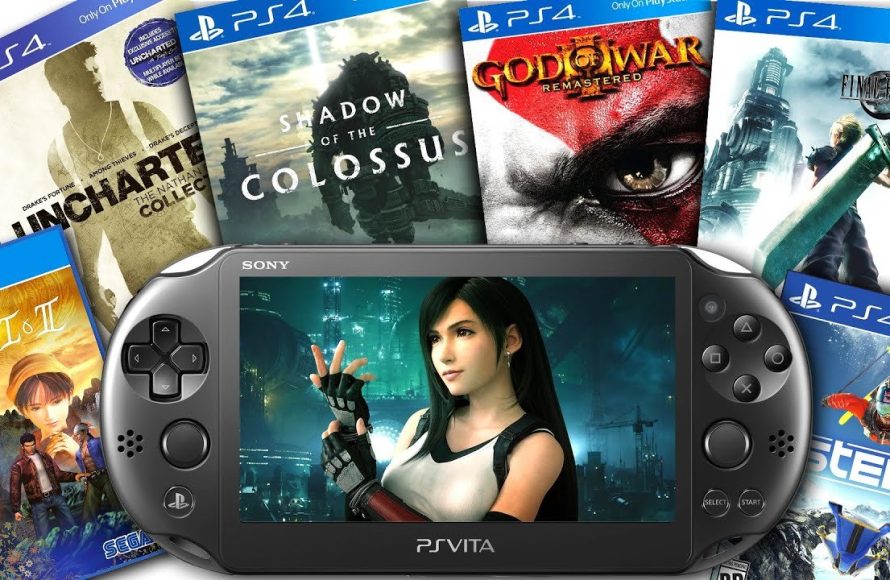
No, a PS Vita cannot directly play PS4 games.
So, you’re wondering if your trusty PS Vita can handle those impressive PS4 titles? It’s a common question for those of us with both consoles. The desire to take those console experiences on the go is definitely understandable.
While the PS Vita is a great handheld, it lacks the processing power to run PS4 games natively. The Vita uses different architecture, making direct gameplay impossible.
However, there are ways to enjoy some PS4 content on the Vita, using Remote Play. This involves connecting to your PS4 and streaming the game. This at least provides a way to play some of the PS4 game library on your vita, even though the Vita cannot directly play PS4 games.

Can a PS Vita Play PS4 Games?
So, you’ve got a cool PlayStation Vita and you’re wondering if it can play those awesome PlayStation 4 games? That’s a great question, and lots of people ask it! Let’s dive into the details and find out exactly what’s possible.
The Power of Remote Play
The short answer is: yes, kind of! Your PS Vita can’t directly play PS4 games like it would play its own games. Think of it like this: your PS Vita isn’t strong enough to run PS4 games all by itself. However, there’s a special feature called Remote Play that lets you play PS4 games on your Vita, but with a little help from your PS4.
Remote Play works by using your home Wi-Fi network. Your PS4 does all the hard work of running the game, and it sends the video and audio to your PS Vita. Then, your Vita sends your button presses back to the PS4. It’s like your Vita is a window into your PS4 game.
How Remote Play Works
Imagine you’re playing your favorite PS4 game on your TV. Now, imagine you could keep playing that same game even if someone else wants to use the TV! That’s what Remote Play lets you do. Here’s a simple breakdown of how it works:
- Your PS4 is the Hero: The PlayStation 4 is the main engine that actually runs the game. It processes all the game information and graphics.
- Wi-Fi is the Bridge: Both your PS4 and your PS Vita need to be connected to the same home Wi-Fi network. This connection allows them to talk to each other.
- Sending the Picture: Your PS4 sends the video and audio from the game to your PS Vita over the Wi-Fi connection.
- Controlling from afar: You use the buttons on your PS Vita to control the game, and those commands travel back over the Wi-Fi to your PS4.
- Playing Anywhere (Almost): This setup means you can play PS4 games on your Vita even if you’re not right next to your TV, as long as you have good Wi-Fi signal.
What You Need for Remote Play
To get Remote Play working, you’ll need a few things:
- A PlayStation 4 Console: This is the heart of the operation. It’s what will be running the game.
- A PlayStation Vita: Of course! You’ll be using this to view and control the game.
- A Strong Wi-Fi Network: A solid and reliable Wi-Fi connection is a must for smooth gameplay. Both your PS4 and PS Vita should be connected to this network.
- A PlayStation Network Account: You need to be logged into the same PlayStation Network account on both your PS4 and Vita.
- The PS Vita Remote Play App: Make sure you have the Remote Play app installed on your PS Vita. You usually download this from the PlayStation Store.
Setting Up Remote Play on Your PS Vita
Setting up Remote Play for the first time might seem a bit tricky, but it’s actually pretty straightforward. Here’s a step-by-step guide to help you out:
Step 1: Prepare Your PS4
- Turn on your PlayStation 4.
- Go to Settings on the PS4’s main menu.
- Scroll down and select Remote Play Connection Settings.
- Make sure that the box next to Enable Remote Play is checked.
Step 2: Connect Your PS Vita to Your Network
- Turn on your PS Vita.
- Make sure your PS Vita is connected to the same Wi-Fi network as your PS4.
- Go to the Settings app on your PS Vita.
- Select Network, then Wi-Fi. Choose your Wi-Fi network and connect.
Step 3: Launch the Remote Play App on Your Vita
- On your PS Vita home screen, locate and open the PS4 Link app (it might be called Remote Play).
- The PS Vita will search for your PS4 console. Make sure both devices are on the same network.
- If the search doesn’t find your PS4, you may need to enter a code on your PS Vita which is shown on your PS4 screen.
- After they connect, you should see your PS4 screen on your Vita!
Step 4: Start Playing
That’s it! Once the connection is established, you should be able to play your PS4 games on your PS Vita screen.
What Games Work Well with Remote Play?
Not all games are perfectly suited for Remote Play, but many work wonderfully. Here’s what to keep in mind:
Games That Work Great
- Single-player Games: These generally work best, as there is less pressure on network stability. Think games like The Last of Us Part II, God of War, or Horizon Zero Dawn.
- Action-Adventure Titles: Games with lots of exploration and story-telling are a fantastic fit for handheld play.
- Turn-Based Games: These tend to be less affected by small network hiccups.
Games That May Not Work as Well
- Fast-Paced Multiplayer Games: Games that require super-fast reflexes, like many online shooters (e.g., Call of Duty or Apex Legends), can suffer with lag or network issues. These might be less enjoyable on Remote Play.
- Games Requiring Precision Timing: Games where a split-second delay makes a huge difference might feel frustrating to play with Remote Play.
Tips for the Best Remote Play Experience
To make sure you have a smooth and enjoyable experience with Remote Play, consider these tips:
- Strong Wi-Fi Signal: This is the most important factor. Make sure your Wi-Fi signal is strong and stable where both your PS4 and PS Vita are located. Avoid playing far away from your Wi-Fi router.
- Close Unnecessary Apps: Close any unnecessary applications or downloads on both your PS4 and PS Vita. This will free up resources and help with smoother performance.
- Use a 5GHz Network if possible: If your router has both 2.4GHz and 5GHz Wi-Fi networks, the 5GHz network usually performs better for Remote Play because it can handle faster speeds and has less interference from other devices.
- Restart your Devices: If you are experiencing problems, try restarting your PS4, Vita, and Wi-Fi router.
- Wired Connection for your PS4: Connecting your PS4 to your router with an Ethernet cable can provide a more stable and reliable connection compared to Wi-Fi. This can lead to a more consistent Remote Play experience.
- Get used to the Vita Controls: The PS Vita doesn’t have the same buttons as the PS4 controller. Some games might use the rear touch pad or front touch screen as extra buttons, so spend some time getting familiar with these controls.
Limitations of Remote Play
While Remote Play is awesome, it’s good to know its limitations:
- Not Native Play: You are not actually running the game on your PS Vita itself. Your PS4 is doing all the processing. This is why it works like a window to your PS4 screen.
- Requires Good Internet Connection: Your experience relies on your home network’s strength and stability. Weak or inconsistent Wi-Fi will make games lag or stutter, so it is vital to have a fast and stable network to make the experience good.
- Battery Life: Remote Play can drain the battery of your PS Vita faster than playing native Vita games. Keep this in mind if you’re playing while away from a charger.
- PS4 Must Be On: Your PS4 needs to be turned on and in rest mode for Remote Play to work.
- Controls: Some complex PS4 games use all of the PS4 controller’s functions. The Vita may not map these functions perfectly. You might need to get used to the difference and how you control some parts of games.
Alternatives to Remote Play
If Remote Play isn’t working out for you, there are other options you might want to explore:
PlayStation Now (Now PlayStation Plus Premium)
PlayStation Now (now part of PlayStation Plus Premium) lets you stream some PS4 games directly to your PS Vita. You don’t need a PS4 for this, but it does require a fast and stable internet connection, and not all PS4 games are available to play. The game streams from PlayStation’s servers, so the connection has to be very good.
PS Vita Games
Don’t forget that the PS Vita has lots of its own great games! Some are similar in genre to PlayStation 4 games and are very fun. They are designed for the PS Vita hardware, and they do not require internet streaming.
Cloud Gaming Services
Other cloud gaming services might let you play on different devices, including some mobile phones. But these services aren’t designed to run on the PS Vita, so they may not work well. Check if your devices support such services before investing.
The PS Vita: A Little Handheld Marvel
Even if you can’t directly play PS4 games on it, the PlayStation Vita is still a fantastic little handheld game system. It has a wonderful library of its own titles and its own unique features. Remote play lets you get more use out of the console, and lets you play PS4 titles that are great for single-player gaming. With a bit of setup and good Wi-Fi, you can extend your PlayStation gaming even further.
Remote Play is a great tool to get more value from both your PS4 and PS Vita consoles. While not a perfect system, it allows you to play a lot of your favorite PS4 games on the go or in another room. Understanding how to set it up, its requirements and limitations, and exploring alternatives will make your gaming experience better. So go ahead and play, and enjoy gaming wherever and whenever you want.
How to Setup Remote Play on PS Vita! (PLAY PS4 GAMES ON PS VITA) (EASY METHOD)
Final Thoughts
Ultimately, the PS Vita cannot natively play PS4 games. Remote Play allows you to access some PS4 titles, however. You must use a stable Wi-Fi connection and have both consoles.
This function acts as a mirror. The PS Vita displays the game running on the PS4. So, the question, ‘can a ps vita play ps4 games’, has a nuanced answer; it can with Remote Play, but it is not direct.

