
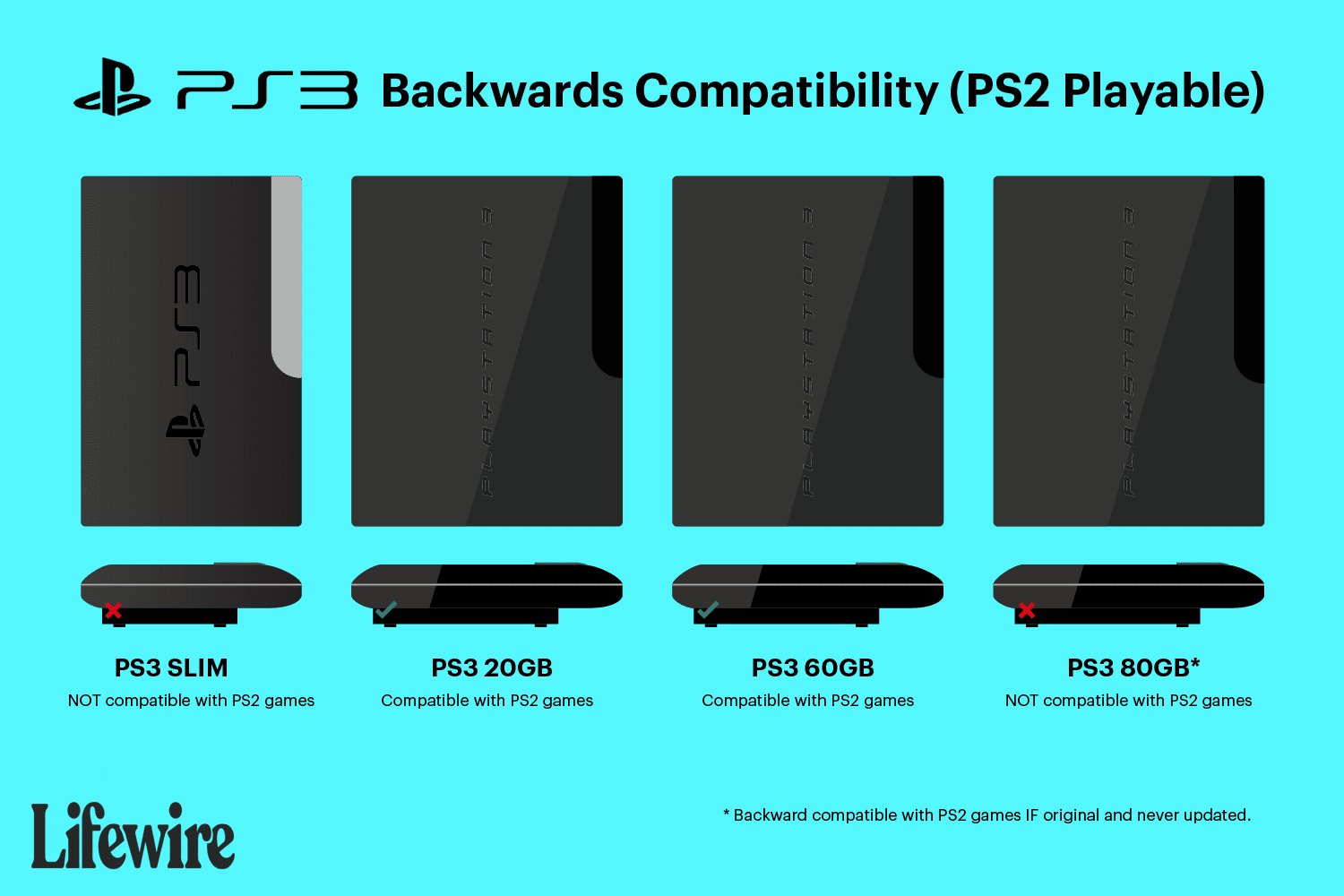
Not all PlayStation 3 consoles can play PlayStation 2 games; only certain early models have the hardware capability.
Wondering if you can relive those classic PS2 adventures on your PlayStation 3? It’s a common question, and the answer isn’t a simple yes or no. The ability for a ps3 to play ps2 games depends entirely on the specific model you own. Early generations of the PS3 included the necessary hardware.
These models came with actual PlayStation 2 components built inside. This allowed full backwards compatibility. However, later versions of the PS3 removed this capability to cut costs. So, it is important to know your console’s specific make.

Can a PS3 Play PS2 Games? The Whole Story
Have you ever looked at your stack of old PlayStation 2 games and wondered if you could play them on your PlayStation 3? It’s a question many gamers have asked. The answer isn’t as simple as a straight yes or no. It depends on which PS3 model you have! Let’s dive deep into this topic and learn all about PS3 and PS2 compatibility.
The Early PS3 Models: The Chosen Ones
When the PlayStation 3 first came out, Sony wanted to make sure people could still play their old PS2 games. So, they built some of the very first PS3 consoles with special hardware inside. This hardware was basically a PlayStation 2 computer inside the PS3! These models, often called “fat” PS3s, could play almost any PS2 game you threw at them. This is because they have actual parts of PS2 console in them.
Identifying a Backward Compatible PS3
So, how do you know if your older PS3 can play PS2 games? There are a few clues. The most reliable way is to check the model number on the back of your console. Look for these specific models:
- CECHAxx: These are the very first PS3s, the 60GB models.
- CECHBxx: These are the 20GB models.
- CECHCxx: These are the 60GB models released in Europe and Australia
- CECHExx: These are the 80GB models.
Note: The “xx” part of the model number represents a region code and is not important for backward compatibility. What matters is the CECHA, CECHB, CECHC, and CECHE prefixes. All of these early models had the best compatibility with PS2 games.
Another telltale sign is the presence of four USB ports on the front of the console. These early models will always have four USB ports on the front. The backward compatible models were the most premium models at the time so had slightly more features.
How the Hardware Worked
These initial PlayStation 3 models had a genuine PlayStation 2 GPU (Graphics Processing Unit) and CPU (Central Processing Unit) built directly onto the motherboard. This meant they could run PS2 games as if they were a real PS2. It was like having two consoles in one! This method was very effective at making sure almost all PS2 games worked flawlessly.
The Shift: Emulation and Partial Compatibility
As time went on, Sony wanted to cut down costs. Making a PS3 with actual PS2 hardware was expensive. So, they made a change. Later PS3 models, starting with the CECHG series, no longer had a physical PS2 chip. These PS3 models, usually the 40GB, 80GB, and 160 GB variants, adopted a different approach using software-based emulation for some PlayStation 2 games.
What is Emulation?
Emulation means using software to make a PS3 pretend to be a PS2. It’s like having an interpreter that translates the PS2 game’s language into a language the PS3 understands. This is very different from having an actual PS2 inside the PS3.
Partial Compatibility: A Limited List
The PlayStation 3 models that use emulation can’t play every PS2 game. Sony created a list of PlayStation 2 games that would work through emulation. This list is pretty long, but it’s not comprehensive. You might find some of your favorite PS2 games aren’t supported by emulation, or that they don’t play correctly. This means you might encounter glitches, slowdowns or other issues. The compatibility list may also vary depending on your region.
To make it easy to understand, let’s see how this emulation actually works:
- Software “Translation”: The PS3 reads the PS2 game disc, the software reads the data and then “translates” it to match PS3’s system.
- Processing Power: Because this is a software based method, the PS3’s main processor must now handle the PS2 game in addition to the system operations, and the PS3 processor must be able to handle both system task and emulation task simultanously.
- Potential Problems: This emulation method can sometimes cause problems that don’t happen on a real PS2. Games could freeze, have visual glitches, or may just not run at all.
How to Check for Emulation-Supported Games
The easiest way to check if your PS2 game is compatible with the emulated models is to search online. Many websites list games that work on PS3 via emulation. You can search, “PS3 PS2 emulation compatible games” or something similar and find many resources. Some guides also provide specific issues you might face for specific games. However, it’s worth remembering, even if your game is listed as compatible, that doesn’t guarantee that it’ll be a perfect experience.
The Slim and Super Slim PS3: No PS2 Support
The PS3 Slim and the Super Slim consoles went even further with cost reduction. These newer models completely removed any form of PS2 compatibility. These PS3 models cannot play PS2 games at all. They don’t have the hardware or emulation features. If you have a slim or super slim PS3, you cannot directly play original PS2 discs on it. The focus had shifted to PS3 games and downloadable content, and backward compatibility was no longer a priority for the newer hardware revisions.
Model Numbers and Identifying Slim/Super Slim PS3
These PS3 models are easily identifiable by the “Slim” and “Super Slim” names, but also their smaller form factor. You can also verify the model number on the back of the consoles. Generally, any model number starting with CECH-2xxx, CECH-3xxx, or CECH-4xxx indicates a model that does not have PS2 backward compatibility.
The Focus on PS3 Games
These models shifted the focus completely to the current generation. Sony was not looking back, and instead, were more interested in pushing PS3 and the newer games. The new models, the PS3 slim and the Super Slim, focused on new designs, storage increases and more energy efficiency, but PS2 backwards compatibility was permanently removed.
PlayStation Store and PS2 Classics
Even if your PS3 can’t play PS2 discs, there is still a way to play some classic PS2 games on any PS3 model! Sony introduced something called “PS2 Classics” on the PlayStation Store. These are downloadable versions of some popular PlayStation 2 games, optimized for the PS3 system. This is an option to play some of the PS2 games, even if you do not have a backward compatible console.
How PS2 Classics Work
PS2 Classics are digital versions of PlayStation 2 games that have been slightly adjusted to work on the PS3. This is different from running the original PS2 disc. Here’s how it works:
- Download and Install: Instead of using a physical disc, you buy and download a PS2 game from the PlayStation Store.
- Digital Emulator: The PS3 runs the PS2 Classic via an emulator, similar to how the partially compatible PS3 models handled PS2 games, but these are usually optimized to run better.
- Limited Selection: Not all PS2 games are available as PS2 Classics. The selection is limited to a few selected titles.
Benefits of PS2 Classics
There are some advantages to playing PS2 games through the PS2 Classics program:
- Wider Availability: You can play a selection of PS2 games on any PS3 model, not just the early ones.
- Improved Performance: Some of these PS2 Classics have better resolution, loading times or frame rates compared to playing on PS2 or on the old backward compatible PS3 models.
- Convenience: You don’t need to switch discs to play a digital game.
Drawbacks of PS2 Classics
There are also some downsides to consider when thinking about PS2 Classics:
- Limited Game Library: The selection is not large, so you may not find your favorite game on this list.
- Cost: You have to buy the games digitally even if you already own them on the disc.
- Dependency on PSN: These digital purchases are dependent on your PlayStation Network account and your access to the PlayStation Store.
A Summary of PS3 and PS2 Compatibility
Let’s recap what we’ve discussed about PS3 and PS2 game compatibility in an easy table:
| PS3 Model Type | PS2 Disc Compatibility | PS2 Classics Availability | Identifying Model |
|---|---|---|---|
| Original “Fat” PS3 (CECHA, CECHB, CECHC, CECHE) | Full, hardware-based compatibility. | Yes, available on PlayStation Store | Four USB ports on the front. Check the model number on the back. |
| Later “Fat” PS3 (CECHG onward) | Partial, software-based emulation. Not all games work. | Yes, available on PlayStation Store | Model number on the back, usually 40GB, 80GB or 160GB models. |
| PS3 Slim | No disc compatibility. | Yes, available on PlayStation Store | Smaller console, model number starting with CECH-2xxx or CECH-3xxx. |
| PS3 Super Slim | No disc compatibility. | Yes, available on PlayStation Store | Even smaller console, model number starting with CECH-4xxx. |
As you can see, understanding which model you have and what it’s capable of is important before you attempt to play your PS2 games. If you don’t have one of the first “fat” PS3 models, using PS2 classics might be the easiest way to play those games. If you do have one of the original models, that’s very good for the backward compatibility that you may want.
The journey of PS2 compatibility on the PS3 is an interesting one that is full of twists and turns. The earliest models gave the absolute best experience to play the games from the PS2 generation, with full hardware based backwards compatibility. However, for other PS3 models, there are some ways to play certain games, such as PS2 Classics. It was a move by Sony to cut down on costs, and it definitely had an impact on the consumers. No matter which model of PS3 you own, understanding what that model can do is important to best know how to play your favorite games.
"Can PS3 Play PS2 Games? Quick Compatibility Guide"#gaming #ps3share #retro #ps2 #snes
Final Thoughts
Only certain PlayStation 3 models play PlayStation 2 games. The original “fat” PS3 consoles with specific model numbers have the hardware to support PS2 titles. This backward compatibility feature is not present in later slim or super slim PS3 versions.
Therefore, ‘can a ps3 play ps2 games’ is not a simple yes or no answer. You must check your exact PS3 model for confirmation. Many people are disappointed to learn they cannot play their old PS2 games on their newer PS3.

