
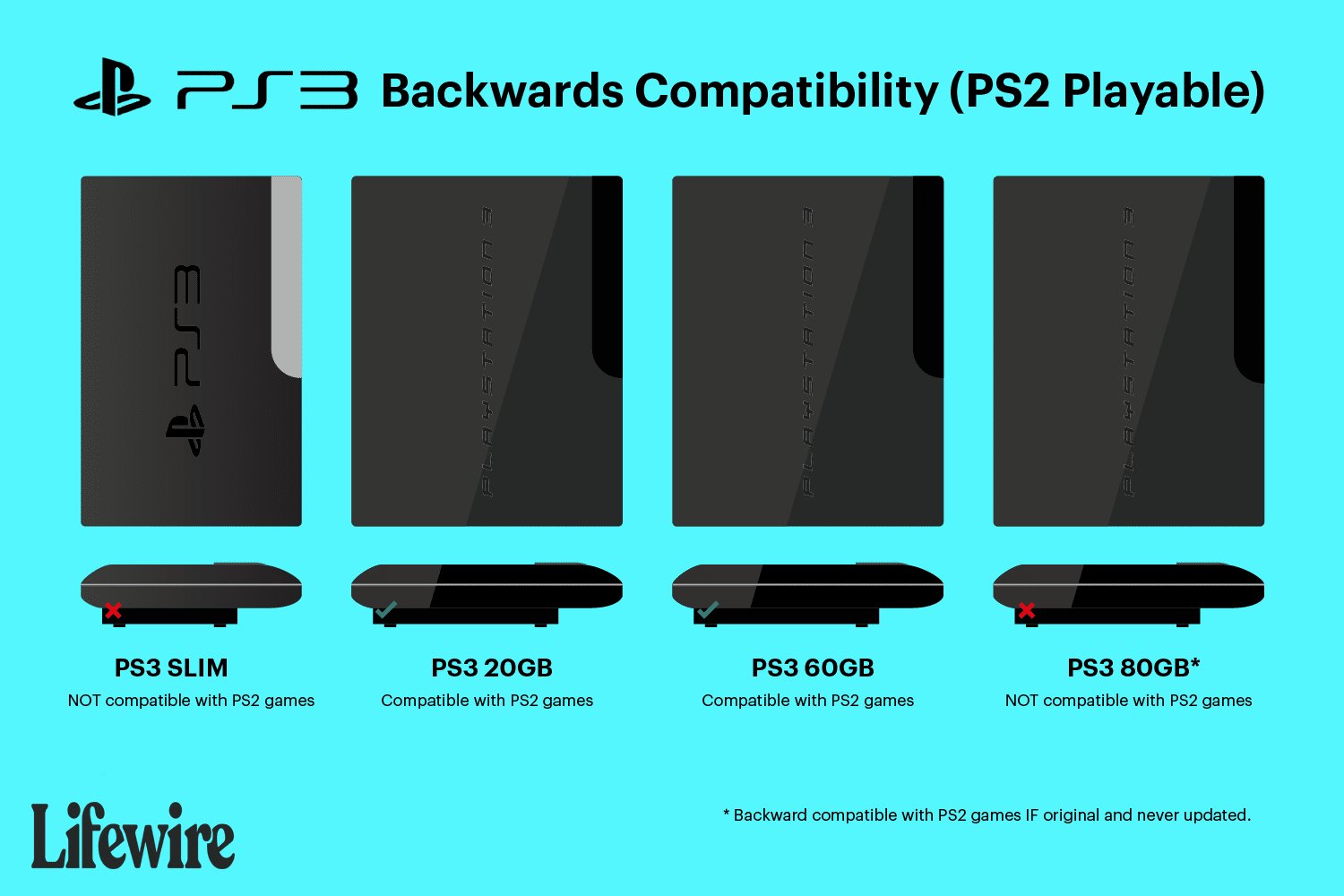
No, a PS3 Slim cannot play PS2 games.
Many gamers have wondered, can a PS3 slim play PS2 games? The answer is quite simple, unfortunately. The PS3 slim model, unlike some of its earlier counterparts, removed the hardware necessary for backwards compatibility with Playstation 2 titles.
This means that you will not be able to insert a PS2 disc and have it run on your PS3 slim console. Sony made this design change to reduce production costs and to focus more on the PS3’s own game library.

Can a PS3 Slim Play PS2 Games? The Truth Revealed
The PlayStation 3, or PS3, is a cool game console that came after the PlayStation 2, or PS2. Many people loved the PS2 because it had so many fun games. When the PS3 came out, lots of gamers wondered, “Can I still play my old PS2 games?” The answer isn’t as simple as yes or no, especially when we talk about the PS3 Slim. Let’s get into the details and find out what’s what!
Understanding PlayStation 3 Models and Backward Compatibility
The PS3 came in different versions, and this matters a lot for playing PS2 games. The first PS3 models, the big, chunky ones, could play PS2 games because they had special hardware inside. This hardware was like a mini-PS2 inside the PS3! It allowed those early PS3s to run PS2 game discs without any problems. These early models are known as the “fat” PS3s.
The Fat PS3: Full Backward Compatibility
These original PS3 consoles were great because they offered full backward compatibility. This means that almost every PS2 game worked perfectly on them. It was a fantastic feature for people who had big collections of PS2 games. The “fat” PS3 models have special chips called the “Emotion Engine” and “Graphics Synthesizer” that are the main components from the PS2. This is the key to making PS2 games work properly.
- Emotion Engine: This chip is the main processor of the PS2.
- Graphics Synthesizer: This chip handles all the graphics and visual stuff in PS2 games.
The Arrival of the PS3 Slim
Then came the PS3 Slim. It was smaller, lighter, and used less power, which was great. But, the PS3 Slim didn’t have those special PS2 chips inside. Instead, the PS3 Slim and the later Super Slim PS3 models removed this hardware. This meant that they could no longer play PS2 games by using the disc. They got rid of this hardware to make the console less costly and simpler to build. The result? Many gamers were disappointed. The ability to play PS2 games was no longer a given.
Why the PS3 Slim Can’t Play PS2 Discs
The big reason the PS3 Slim can’t play PS2 game discs is the absence of the necessary hardware. Sony, the company that made PlayStation, decided to remove the Emotion Engine and Graphics Synthesizer. They did this to lower the cost of making the PS3 and to make it smaller and more efficient. The technology from the PS2 was old at this point and was also more expensive to keep putting in the new PS3 consoles. As a result, the PS3 Slim can not physically read the PS2 game discs. So, if you put a PS2 game disc into a PS3 Slim, nothing will happen.
Cost Reduction and Design Changes
Removing the PS2 hardware significantly reduced the production costs of the PS3 Slim. This also helped make the console smaller and more energy efficient. While it was great for the price, it came at the expense of backward compatibility. This meant gamers who had a lot of PS2 games now had to keep their older PS2 console if they wanted to keep playing their PS2 game discs.
The Rise of PS2 Classics on PSN
Even though the PS3 Slim cannot play PS2 game discs, there is a small bit of good news. Sony introduced the PlayStation Network (PSN). Through PSN, gamers could download digital versions of some popular PS2 games. These games were made to work on the PS3 Slim without needing the original PS2 disc. These are called “PS2 Classics.”
How PS2 Classics Work
PS2 Classics are basically digital files of PS2 games that have been made to run on the PS3. They do not use the original PS2 game discs. You purchase them on the PlayStation Store (PSN) using a PSN account and then you can download them and play them directly on your PS3’s hard drive. Think of them as a PS2 game designed to work inside the PS3 system. This is the main way that most PS3 Slim owners get to experience some old PS2 games on their newer console.
The Limited Selection of PS2 Classics
It is important to know that not all PS2 games are available as PS2 Classics on PSN. There are only some titles that are made available. If your favorite PS2 game isn’t available as a PS2 Classic, then you cannot play it on your PS3 Slim or Super Slim console. The selection was also quite limited and some gamers were sad that many of their favourites never made the list of digitally available games on PSN. Over time, some games were added but many favorites were still missing.
How to Buy and Play PS2 Classics
Buying and playing PS2 Classics is easy:
- Go to the PlayStation Store: On your PS3, find the PlayStation Store in the XMB menu.
- Search for PS2 Classics: Look for the “PS2 Classics” section, or you can search for your favorite title.
- Purchase the game: Use your PSN account to buy the game.
- Download and Install: After purchasing, the game will download to your PS3’s hard drive. Then the PS3 installs the game.
- Play the game: Now you can play the game just like any other PS3 game.
Emulation vs. Hardware Compatibility
It’s important to understand that the PS3 Slim plays PS2 Classics using emulation. Emulation means that the PS3 is using its own hardware to pretend that it is a PS2. The original “fat” PS3s used real hardware to play PS2 games. Emulation means the PS3 Slim can play the games using software tricks. It’s like using a translator to make a language understandable to another person.
What Emulation Means
Emulation is a way for one computer system to act like another. The PS3 Slim does not have the components needed to play a PS2 game from a disc, so it needs to copy the functions of those parts by using software. Emulation can sometimes mean there are small differences in performance or how the game runs, but for the most part, PS2 Classics on the PS3 Slim play quite well.
Other Ways to Experience PS2 Games
If you have a PS3 Slim and you want to play PS2 games that aren’t available as PS2 Classics, you have other options.
Using the Original PS2
The best way to play old PS2 games is by using an actual PS2 console. You can buy used PS2 consoles online or at a local game store. This allows you to play all the games you own. For many gamers with large PS2 collections, this is the only reliable method. If you still have your old PS2, this is perfect.
PlayStation Now (PS Now)
PlayStation Now is a subscription service that gives you access to many games, including some PS2 games. You can stream these games to your PS3, PS4, or PC. This is different from owning the games; you are playing through the internet, and you also pay a monthly fee to use the PlayStation Now service. The quality depends on your internet connection.
Other Options and Considerations
There are some less official ways to try and play PS2 games on a PS3 Slim, but these can be very complicated and can sometimes cause problems with your console. These methods are not supported by Sony. Using these methods also means it could be difficult to get help with issues that may happen with your console or the games.
- Homebrew and Custom Firmware: Some people try to use homebrew software and custom firmware to get the console to play PS2 game images. However, these methods are not simple and can damage your system if not done correctly.
- PC Emulators: PC emulators exist that allow you to play PS2 games on your computer. They can sometimes work better than the PS3 Slim emulation, but setting them up can be more difficult for some gamers.
You need to be very careful if you choose to try these methods. They are not endorsed by PlayStation.
Summary of PS3 Slim and PS2 Games
Let’s recap:
- The original “fat” PS3 models had special hardware and can play PS2 game discs directly.
- The PS3 Slim removed this hardware to reduce cost and size, so it cannot play PS2 game discs.
- The PS3 Slim can play some PS2 games that are available as “PS2 Classics” on PSN. These are digital versions of PS2 games you can download.
- You can still play all your PS2 games on an original PlayStation 2 console.
So, while the PS3 Slim is a great console, it’s not a one-stop shop for all your PS2 gaming needs. You have to be aware of these differences and then choose the method that is right for you.
The ability to play PS2 games on a PS3 has been a frequent question for many years. If you own a PS3 Slim you might be disappointed about the lack of full backward compatibility. However, the option of PS2 classics and the other methods mentioned make it still possible to enjoy some great PS2 games on your PS3 Slim system.
"Can PS3 Play PS2 Games? Quick Compatibility Guide"#gaming #ps3share #retro #ps2 #snes
Final Thoughts
Ultimately, the answer is no, a PS3 Slim cannot play PS2 games directly. Sony removed the hardware necessary for backwards compatibility in these models. This hardware change means that the PS3 Slim does not have the same capabilities.
Therefore, if you want to play PS2 games, you must use a different console. The original, ‘fat’ PS3 model is the only way. This directly answers the question: can a ps3 slim play ps2 games?

