
Yes, DS games work on 2DS.
Wondering if you can revisit your old favorites? Many gamers ask, can DS games work on 2DS? It’s a valid question, considering the different consoles.
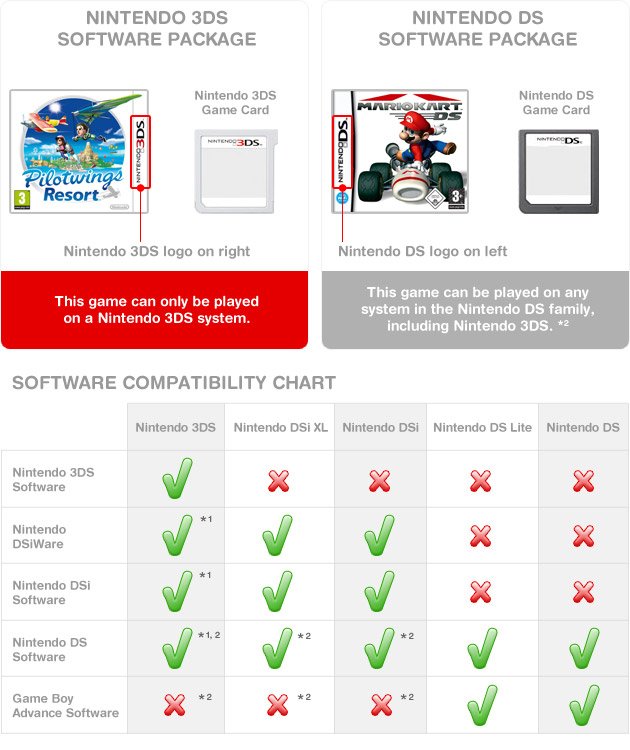
The good news is that the 2DS is designed to play almost all DS game cartridges. So, dust off those classics and get ready to enjoy them on your 2DS.

Can DS Games Work on 2DS? Exploring Compatibility and Playability
So, you’ve got a shiny Nintendo 2DS and a pile of classic Nintendo DS games, and you’re wondering if they’ll play nice together. That’s a very common question! The simple answer is, most of the time, yes! But let’s dive deeper into exactly how this works, what to expect, and any little quirks you might encounter. It’s not just a simple yes or no; there’s a bit more to it than that. We’ll walk through everything you need to know about playing DS games on your 2DS.
Understanding the Nintendo DS and 2DS
Before we get into the nitty-gritty of compatibility, let’s talk a little about the two systems. The original Nintendo DS was a handheld gaming console that introduced the world to dual screens – one of which was a touchscreen. It was super popular! The Nintendo 2DS came later. It was designed as a more affordable and simpler version of the Nintendo 3DS (a system that could display games in 3D) but without the 3D screen effect. The 2DS also has a single screen appearance. But guess what? Despite their differences, they share a very important commonality: they both can play original DS games.
The Magic of Backward Compatibility
The reason why the 2DS can play DS games is because it’s backward compatible. This fancy term just means that a newer system can play games designed for an older one. Nintendo designed the 2DS to have the hardware needed to run DS games perfectly. Think of it like this: your newer video player can still play old DVDs; it’s the same idea. This backward compatibility is fantastic because it means you don’t have to keep your old DS around just to play your favorites. Your 2DS can handle it all!
How DS Games Look and Play on a 2DS
Now that we know that they work, let’s talk about how they work. The good news is, the experience of playing DS games on a 2DS is generally very good. There are a few small differences, but they typically don’t impact gameplay. Let’s look at some key points:
- Screen Display: DS games were designed for two separate screens, whereas the 2DS has one unified screen with a division. The 2DS displays the DS games with black bars on top and bottom, which replicate the dual screen experience. It works very well for playing DS titles.
- Touch Screen Functionality: Just like on the original DS, the touchscreen of the 2DS works perfectly with DS games. You’ll still be able to tap, draw, and interact with the game just as you would have on the older system. This is crucial because many DS games utilize the touch screen for navigation and gameplay.
- Sound Quality: The sound experience will be identical on a 2DS. So you’ll hear the game’s music, sound effects, and dialogue exactly as they were intended to be heard.
- Controls: All of the buttons on the 2DS work perfectly for DS games as well. This means the directional pad (D-pad), buttons (A, B, X, Y), shoulder buttons (L, R), and start and select buttons will function just like they should.
Potential Minor Differences
While the gameplay experience is virtually identical, there are a few very minor cosmetic differences you might notice:
- Screen Resolution: The resolution of the 2DS screen is slightly different from the original DS screens. However, this difference is not significant enough to negatively affect gameplay. You might see that the graphics appear slightly different, but it won’t affect how the game is played.
- Screen Size: The screen on the 2DS is a bit larger than the screens on the original DS. This can actually be a plus as it makes the games easier to see.
These differences are usually barely noticeable during gameplay. The game will still be very playable and enjoyable on your 2DS system.
Using DS Cartridges and Digital Downloads
There are two ways to play DS games on your 2DS: using physical game cartridges and using digital downloads. Let’s see what each method involves:
DS Game Cartridges
This is the classic way to play DS games. If you have physical game cartridges, here’s how it works on the 2DS:
- Locate the Game Card Slot: On the side of your 2DS you’ll find a slot labeled “GAME CARD”. This is where you insert the DS game cartridge.
- Insert the Cartridge: Gently push the DS game cartridge into the slot. You should feel a click when it’s inserted correctly.
- Power On Your 2DS: Turn on your 2DS. The game should automatically start and you’ll see the game’s logo and title.
- Start Playing: Start playing your game. It’s that easy.
Using cartridges is straightforward and requires no extra steps or downloads. It’s the most straightforward way to play your legacy DS titles.
Digital DS Games
It’s important to note that there is no digital distribution for original Nintendo DS games on the Nintendo 2DS/3DS eShop. The Nintendo eShop for 3DS and 2DS only includes games designed for those systems. Therefore, you won’t be able to find downloadable versions of your favorite DS games on the eShop. The only way to play DS games on a 2DS is through physical cartridges. This is something to be aware of when you’re looking at buying and playing your legacy titles on your 2DS device.
Specific DS Game Compatibility Notes
While most DS games work perfectly on a 2DS, there are a few specific things to keep in mind:
- DSi-Enhanced Games: Some games were “enhanced” for the Nintendo DSi, which was a later version of the DS. These enhancements were things like camera usage or the DSi’s built-in browser. However, these games will work just fine on the 2DS, and will run as if on the original DS system without any of the DSi-specific enhancements.
- Homebrew or Modified Games: It is important to know that the 2DS is designed to play legitimate game cartridges. If you try to run modified software or homebrew games on your device, there’s a high chance it may not work and could even cause problems with your system.
- Imported Games: Nintendo systems are region-locked. This means that a cartridge purchased from Europe (PAL) might not work on a 2DS purchased in the United States (NTSC) or Japan (NTSC-J). However, there are some exceptions, and you can research specific titles.
Always ensure you’re using official, region-compatible game cartridges for the best experience. This ensures the maximum playability and compatibility on your 2DS device.
Troubleshooting Common Issues
While generally playing DS games on a 2DS is problem-free, sometimes you might encounter minor glitches. Here are a couple of common issues and how to address them:
Game Not Starting
If your DS game doesn’t start when you insert it, try the following:
- Check the Cartridge: Make sure the game cartridge is clean. Gently wipe the gold connectors with a soft cloth. Dust or dirt can cause connection issues.
- Reinsert the Cartridge: Remove the cartridge and reinsert it firmly. Make sure it clicks into place.
- Try a Different Game: If another DS game works fine, the issue is likely with the first cartridge. It could be damaged.
- System Restart: Sometimes turning your 2DS completely off and back on can resolve any temporary glitch that is stopping the game from working.
Touchscreen Not Responding
If the touchscreen doesn’t seem to work in a DS game, this can happen if there is dirt or some damage to the screen, though this is rare:
- Clean the Screen: Use a soft, lint-free cloth to wipe the touchscreen clean. Sometimes smudges or fingerprints can cause problems.
- Restart the Game: Exit the game and then restart it. Sometimes, this can fix software glitches.
If you are still experiencing issues with the game on the 2DS and you have tried all of the above methods, there may be a fault with either the game cartridge or your system that may require professional assistance. In most cases, these types of issues are rare, and you should be able to enjoy your DS library on your 2DS with no issues at all.
The Joy of Playing DS Games on Your 2DS
Ultimately, the backward compatibility of the 2DS with the entire Nintendo DS game library is a fantastic feature. It opens up a whole world of gaming experiences to 2DS users. You can enjoy games from the past on your current system, introducing new people to them, or reliving old memories. It is another great way to enjoy your classic gaming titles.
This backward compatibility feature enables gamers to play a vast catalog of classic DS titles on the 2DS without any major issue, offering a smooth and enjoyable play. The only thing you need is your DS game cartridges. This is a great way to play classic games from the past and to experience some of the best games from the DS era, all on your Nintendo 2DS. So plug in your favorite DS games, and start playing. There’s a world of entertainment waiting for you!
DS Games on a 3DS?!?
Final Thoughts
Yes, DS games work perfectly on the 2DS. The 2DS console plays all Nintendo DS cartridges without issues. You simply insert the game and play.
Therefore, you can enjoy the wide library of DS titles. The 2DS is backward compatible with DS games. So, regarding whether ‘can ds games work on 2ds’, the answer is a definite yes, making it great for older titles.

