
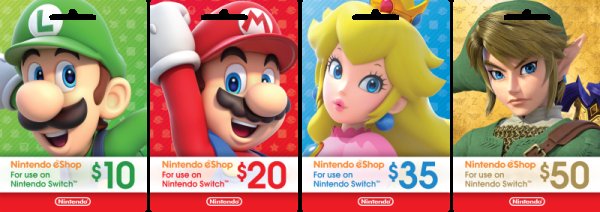
Yes, you can buy a game with different eshop cards, as long as their combined value covers the game’s price.
Ever wondered, “can i buy a game with different eshop cards?” It’s a common question for gamers who often receive these gift cards. It can be frustrating having several cards with smaller balances. This article explains how to combine your eShop funds.
Many platforms allow this practice, making it convenient. You can often add all the cards to your account and then purchase the game. This allows you to effectively use all those gift cards you have received.

Can I Buy a Game with Different eShop Cards?
So, you’ve got a few Nintendo eShop cards lying around, maybe from a birthday or holiday, and you’re itching to buy a new game. But wait, can you use more than one card for a single purchase? That’s a great question, and understanding how eShop cards work together can help you get that game you want even faster. Let’s dive into how these digital funds work and how to combine them.
Understanding Nintendo eShop Cards
First, it’s helpful to understand what an eShop card actually is. Think of them like gift cards, but only for Nintendo’s online store. Each card holds a specific amount of money that you can use to buy digital games, downloadable content (DLC), or even themes for your Nintendo Switch, 3DS, or Wii U. When you redeem an eShop card, the funds are added to your account balance. This balance is then what you use when you make a purchase.
How eShop Cards Work
When you receive an eShop card, it has a code hidden under a scratch-off area. To add the money to your account, you need to go to the Nintendo eShop on your console and enter that code. Once the code is entered correctly, the card’s value is added to your account balance. The funds stay in your account until you spend them. You can even use them later!
- Scratch off the code on the card.
- Go to the Nintendo eShop on your Switch, 3DS, or Wii U.
- Select ‘Redeem Code.’
- Enter the code and confirm.
- The funds will be added to your account.
Using Multiple eShop Cards for a Single Purchase
Here’s the important part: Yes, you absolutely can use multiple eShop cards to buy a single game! Nintendo allows you to combine funds from different eShop cards in your account. This is super handy if you have a few cards with smaller amounts and want to make a bigger purchase.
Combining eShop Funds
The great thing about the Nintendo eShop is that it uses your account balance as a whole. This means when you go to buy a game, the system will take the money from your account balance, no matter how it got there. This means you don’t have to worry about using one specific card when you are paying, you can use all your accumulated funds.
Example Scenario
Let’s say you want to buy a game that costs $50. You have two eShop cards, one with $20 and another with $30. Here’s how it works:
- Redeem the $20 eShop card. Your account balance is now $20.
- Redeem the $30 eShop card. Your account balance is now $50.
- Go to the eShop and choose the $50 game you want.
- Your account balance is used to pay for the game.
- You now own the game and your account balance is $0.
Limitations of eShop Cards
While using multiple eShop cards is usually very easy, there are some limitations you should know about:
Maximum Account Balance
There is a maximum amount of money you can have in your eShop account at one time. While it’s usually quite high, this means if you have many eShop cards, you need to make sure that when you add a new one, that you don’t go over this limit. If this happens, you may need to spend some of your balance before adding more money.
Region Locking
eShop cards are region-locked. This means that an eShop card purchased in the United States will only work on an account set to the United States region. You can’t use a European eShop card on a North American account, or vice versa. Always double-check the region before buying an eShop card to ensure it matches your account’s region.
No Transferability Between Accounts
You cannot transfer funds between different Nintendo accounts. Once you add a card to one account, it will remain on that account. This also means that if you purchase the eShop card from different stores, you can use those different store funds on a single account. So if you had a Walmart, Target and Best Buy eShop card, you could redeem all of them to your account.
Where to Buy eShop Cards
You can find Nintendo eShop cards at many places. Big stores often have them in the gift card sections and you can find them online too. Here are a few places where you can purchase these cards:
- Physical retail stores like Target, Walmart, Best Buy and Gamestop.
- Online retailers like Amazon, Newegg and the Nintendo website.
- Some grocery stores, too.
Managing Your eShop Account
Checking Your Balance
It’s always a good idea to keep an eye on your account balance. To do this, simply go to the Nintendo eShop on your console. Your current balance is usually displayed at the top of the screen. This will help you know how much money you have and if you have enough for the game you want.
Account Settings
Your eShop account settings will also give you other important information, like your purchase history, and whether you have set up any parental controls. You can also manage your payment information there. Make sure you always use correct details when you add money to your account.
Parental Controls
If you’re a parent, it can be helpful to use parental controls in the Nintendo eShop. This lets you control how much money kids can spend and limit the types of games they can buy. This is a great way to manage eShop funds and make sure everyone in your family has a safe gaming experience.
Tips for Using eShop Cards
Keep Track of Your Cards
It’s easy to misplace an eShop card, so make sure to keep them safe. Try keeping them all in one spot, so you know where they are when you need them.
Check for Sales
Nintendo often has sales on games in the eShop, so it’s wise to wait to make a purchase if you can. Sometimes you can get games for a lot less money. This means your combined eShop card funds will stretch further!
Read the Fine Print
Before purchasing any eShop card, it is always a good idea to carefully read the fine print on the back or on the product description if purchasing online. This includes where you can use the card, when it expires, and how to contact Nintendo’s customer support if you have any questions.
Consider a Digital Game Library
Once you start using eShop cards to buy digital games, you will be building a digital library. These games will be linked to your Nintendo account, and will not require a physical game cartridge. For many users, this is a much more convenient way to enjoy games since you don’t have to carry around game cases or worry about losing them.
Plan Your Purchases
With multiple eShop cards to use, it can be tempting to splurge on several games all at once. Make a plan about what games you would like, so you don’t regret any of your purchases, and so your eShop funds are used in the best possible way.
In short, using different Nintendo eShop cards together is totally doable and makes things more convenient. You can combine them to get that big game you’ve been wanting, or slowly purchase a variety of games without any issues. Remember to keep track of your cards and make sure they match the region of your account for a smooth gaming experience.
How to Buy Games from Other Region on Nintendo Switch
Final Thoughts
Yes, you can combine multiple eShop cards to purchase a game. The system allows you to add funds from different cards to your account. This provides flexibility when using various gift cards.
So, if you’re wondering, ‘can i buy a game with different eshop cards’, the answer is a definitive yes. You can use different eShop cards to complete a single purchase. The purchase process is quite simple, just add the funds.

