
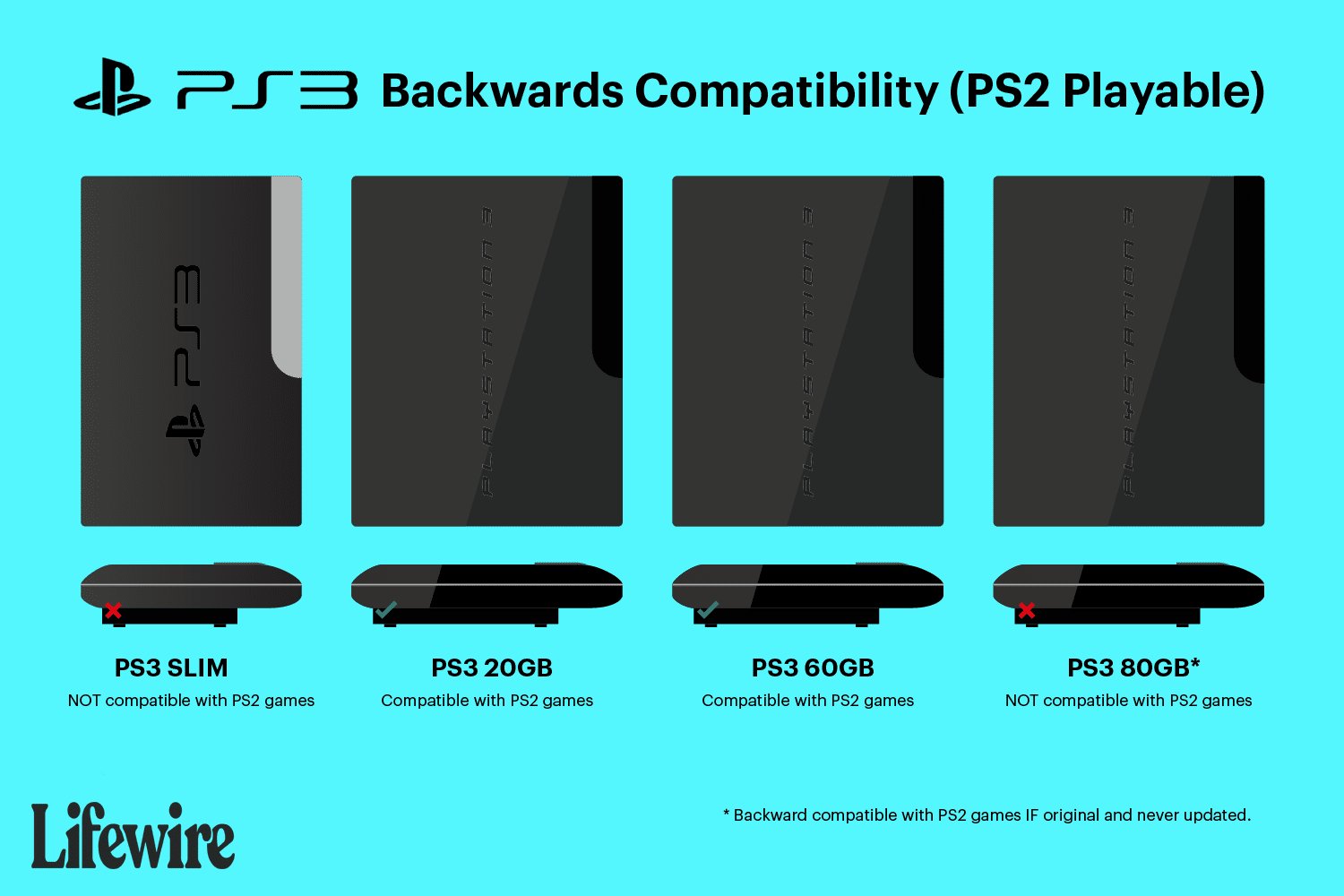
No, not all PS3 models can play PS2 games. Only the original “fat” PS3 models offered backwards compatibility for PS2 games.
Do you have a stack of classic PlayStation 2 games gathering dust, and you’re wondering, “can i play my ps2 games on my ps3?” It’s a question many gamers ponder, especially with older consoles becoming less accessible. It can be frustrating, wanting to revisit those old titles, but the compatibility isn’t straightforward.
The answer isn’t a simple yes or no, as it depends heavily on your specific PS3 model. Sony implemented some backward compatibility initially, but it changed over time. Knowing your console’s limitations is vital to enjoying your vintage collection.

Can I Play My PS2 Games on My PS3?
So, you’ve got a stack of awesome PlayStation 2 games, and now you have a shiny PlayStation 3. It’s natural to wonder, “Can I play my old PS2 games on my new PS3?” It’s a great question, and the answer isn’t a simple “yes” or “no.” It’s a bit more complicated, and we’re here to break it down for you. Let’s dive into the world of PlayStation backward compatibility!
Understanding Backward Compatibility
Backward compatibility is a fancy term that means a newer game console can play games from an older console. Think of it like this: if you had a DVD player, it could usually play your old CDs, right? That’s backward compatibility in action. Some PS3 consoles can play PS2 games, but not all of them. The reason why not all models of PlayStation 3 are capable of playing PlayStation 2 games because it involves extra hardware.
The Original PlayStation 3: The Champion of PS2 Games
The first PlayStation 3 models, often called “fat” PS3s, are the ones that can most likely play your PS2 games. These early models have special hardware inside that’s basically a PS2 system squeezed into the PS3 box. Think of it as having two consoles in one! This amazing feature allowed you to pop in a PS2 disc and enjoy the game without any problems, the same you were used to with your PlayStation 2 console.
- Model Numbers: These are the models you want to look for (CECHAxx, CECHBxx, CECHCxx, and CECHExx). The ‘xx’ will be two numbers that indicate the region of sale. For example, CECHA01 is the original 60GB PS3 in America.
- Hardware Emulation: These models had a physical PS2 processor inside, meaning that they play PS2 games natively. This approach is known as hardware emulation.
- Play All PS2 Games? Almost all PS2 games would work perfectly. There were very rare cases of some games not working due to some bugs in the machine. But this was quite rare.
The Mid-Generation PS3: A Step Backwards?
As time went on, Sony wanted to make the PlayStation 3 cheaper and more efficient to produce. To do this, they removed the PS2 hardware. The next generation of PS3s (models starting with CECHGxx, CECHHxx, CECHJxx and CECHKxx) can not play PlayStation 2 games. These consoles were made with software emulation in mind, but Sony didn’t go ahead with it. So, you are left without the ability to play the library of PS2 game on these PS3 models.
- Software Emulation: While these consoles had the ability to do software emulation, Sony decided against it.
- No PS2 Disc Playback: These consoles were no longer capable of playing PS2 discs.
The Slim and Super Slim PS3: No PS2 Support
The Slim and Super Slim PlayStation 3 models (CECH-20xx, CECH-21xx, CECH-25xx, CECH-30xx, CECH-40xx, CECH-42xx, CECH-43xx) also do not have the ability to play PS2 games. They are fully dedicated to playing PlayStation 3 games only. By this point, the PS3 was more affordable and the technology was far more advanced. Sony focused on building the PS3 ecosystem instead of looking back at previous generations. This means that these models can not play PlayStation 2 games at all.
- PS3 Games Only: These consoles only support PlayStation 3 games.
- Modern Design: These newer versions of the console are sleeker and lighter but don’t offer PS2 backward compatibility.
Identifying Your PS3 Model
So, how do you know which PS3 you have? Don’t worry, it’s pretty easy to find out! Look at the back or bottom of your PS3 console, and you should see a sticker with the model number printed on it. The model number starts with CECH, followed by a letter, then two numbers. Here is the quick summary to know if your console has the ability to play the PS2 games.
- CECHA, CECHB, CECHC, CECHE These models can play PS2 Games
- CECHG, CECHH, CECHJ, CECHK These models cannot play PS2 games.
- CECH-20XX, CECH-21XX, CECH-25XX, CECH-30XX, CECH-40XX, CECH-42XX, CECH-43XX These models cannot play PS2 games.
You can also check the list we have included above. Match your model to the list to be sure if your PS3 is backward compatible or not.
What About Digital PS2 Games on PS3?
Even if your specific PS3 doesn’t have the built-in PS2 compatibility, there’s still a small chance you can still play some PS2 games on it. How is this possible? Well, Sony has released some classic PS2 games as digital downloads on the PlayStation Network store. These are not your original PS2 discs. However, Sony has made some of the most popular PlayStation 2 games available to play on the PlayStation 3 by using software emulation. So, even if your physical PS2 games won’t work, you may be able to find some PS2 classics for sale.
Finding Digital PS2 Games
- PlayStation Store: Check the PlayStation Store on your PS3. Look for the “PS2 Classics” section.
- Limited Selection: Keep in mind that the list of PS2 classics is very small, and Sony is no longer adding any new games. So what is available is what you get.
- Digital Only: These games are downloaded to your PS3 and don’t need a disc.
Why Did Sony Remove PS2 Compatibility?
If the original PS3 could play PS2 games, why did Sony remove this feature? There are a couple of main reasons. First, it made the console much cheaper to produce. The additional hardware of the PS2 inside the PS3 made the console more expensive, and Sony wanted to reduce this cost. Secondly, the removal of the PS2 chips made the console more energy-efficient. Fewer components mean less power is needed. It also simplified the overall design of the console. This made it lighter and smaller. This is why newer PS3s are slimmer. These changes were important for Sony to make the PS3 a commercial success.
- Cost Reduction: Removing extra hardware made the PS3 cheaper.
- Power Efficiency: Removing the PS2 chips made the system use less power.
- Design Simplification: The simplified design was easier and less costly to produce.
Understanding Emulation
Emulation is a process where software tricks one system into acting like another. It is a way of making a computer or gaming system run programs or games that were made for a different system. In the case of the PS3, it can use software to run older PS2 games when the physical hardware is not present. The original PS3 used hardware emulation, which is the perfect emulation, but the other models cannot do that. This has resulted in Sony’s decision to not proceed with software emulation on all the PS3 models.
- Hardware Emulation: The original PS3 uses the actual PS2 chips inside, making it perfect emulation.
- Software Emulation: The PS3 uses software to mimic the PS2 hardware, which can sometimes result in glitches or not fully compatible games.
Other Options for Playing Your PS2 Games
If your PS3 can’t play your PS2 games, don’t worry, there are a few other options you can consider.
Dust Off Your PS2
The most simple option, if you still have your PlayStation 2 console, you can simply hook it up and enjoy playing your games on their original hardware! It’s a great way to experience those games in their original glory. It also has the benefit of no compatibility issues.
PlayStation 2 Emulators on PC
If you have a powerful computer, you can explore using PlayStation 2 emulators. These are programs that let your computer act like a PS2. However, setting these up can be complicated, and getting your games into a digital format can also be tricky. These emulators are also not perfect, and many games can be buggy or have glitches. This is why it is best to play them on their original console. Also, please be aware that there are legal and ethical implications of using emulators and ROMs, and you should only play games that you own.
Other PS2 Retro Consoles
There are also other retro consoles available on the market that can play PS2 games. But the experience is not always the same as playing on an original console. Many of these are emulation-based, which means they will have some minor performance and compatibility problems.
Things to Check Before Buying a PS3 for PS2 Games
If you are thinking of getting a PS3 specifically to play PS2 games, there are a few important things you should double-check to ensure you are getting the right console.
- Model Number: Always check the model number on the console before purchasing it. Make sure the first four letters are CECHA, CECHB, CECHC or CECHE.
- Test the Console: If possible, test the console with a PS2 game before buying. This will ensure it is working correctly.
- Physical Condition: Check for any damage or wear and tear on the console. This can be a sign of problems.
- Read Reviews: Read reviews of the console from other gamers to get an idea of their experience and any potential issues.
Are There Any Advantages to Playing PS2 Games on the PS3?
Even though your PlayStation 2 console works fine, there might be a few reasons why you might want to play them on a PS3. First and foremost, it’s convenience. You can just use a single machine for PS2 and PS3 games instead of having 2 consoles. And second, there is some minor upscaling of PS2 games on the PS3. This can make the games look slightly sharper compared to the original PlayStation 2. However, it might not be noticeable on all TVs.
- Convenience: One machine for both PS2 and PS3 games.
- Slight Upscaling: Some minor improvements to game graphics.
- Saves Space: One console instead of two will save space.
The ability to play PS2 games on a PS3 can be very useful, but it’s important to know what model of PS3 you have, or you are looking to buy. Only the original “fat” models of the PS3 can play PS2 games. The later models do not have this feature. You may find some digital PS2 games on the PlayStation Store, but they are very limited in numbers. If you have the original console, there is no better option than playing on the original machine. You also have some other options like emulators on PC, but those can be buggy and hard to set up. By knowing about the different models and the options available, you can make the right decision for playing your favorite PS2 games.
How can the PS2 play games without a disc?
Final Thoughts
So, can i play my ps2 games on my ps3? The answer isn’t always simple. Many early PS3 models had backward compatibility, allowing you to play PlayStation 2 discs.
However, later PS3 models removed this feature. Therefore, not all PS3 consoles can play your PS2 game collection. Checking your specific console model is must for determining backward compatibility.

