
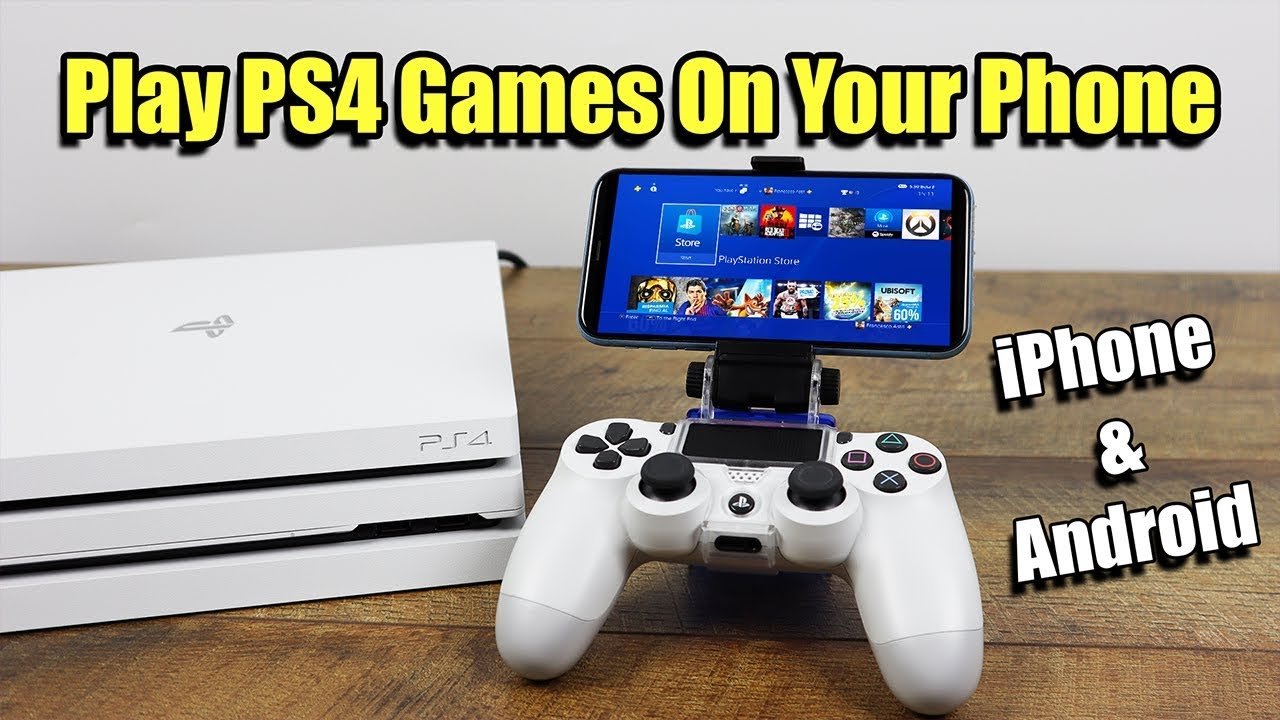
Yes, you can play PlayStation games on your phone through PlayStation Remote Play, cloud gaming services like PlayStation Plus Premium, or by emulating certain older titles.
Here’s the content:
Ever wondered, “Can I play PlayStation games on my phone?” The good news is, the answer is yes! There are several ways you can enjoy your favorite PlayStation titles on your mobile device.
PlayStation Remote Play lets you access your PS4 or PS5 games on your phone. Cloud gaming services give you access to games without needing a console.
Also, for classic games, some emulators can run older PlayStation titles on your phone. This opens up a world of gaming possibilities right in your pocket.

Can I Play PlayStation Games on My Phone?
Yes, you absolutely can play PlayStation games on your phone! The experience varies depending on the method, but several legitimate options exist. This opens up a world of portable PlayStation gaming.
You no longer need to be tethered to your console or TV.
PlayStation Remote Play
PlayStation Remote Play is perhaps the most well-known and direct method. It streams games directly from your PlayStation console to your phone.
This allows you to play games installed on your PS4 or PS5.
How Remote Play Works
Remote Play utilizes your home Wi-Fi network to connect your phone to your console. Your PlayStation console does the heavy lifting of running the game.
Your phone acts as a display and controller interface, streaming the video and sending your inputs back to the console.
Setting Up Remote Play
First, you’ll need to download the PlayStation Remote Play app from your phone’s app store (Google Play Store for Android or App Store for iOS). Make sure your PlayStation console is connected to your home network via Ethernet cable for the best performance.
Enable Remote Play on your PlayStation console in the settings menu.
Remote Play on PS4 vs. PS5
The Remote Play experience is similar on both PS4 and PS5. However, the PS5 offers potentially better streaming quality and performance.
This is due to the PS5’s more powerful hardware.
Remote Play Limitations
Remote Play requires a constant, stable internet connection. Lag and latency can be issues if your network isn’t up to par.
The range is limited to your home network unless you configure a VPN.
PlayStation Plus Cloud Streaming
PlayStation Plus offers cloud streaming as part of its Premium tier. This lets you play select PS5, PS4, and classic PlayStation games on your phone without needing to own them or have them installed on a console.
It’s a different approach compared to Remote Play.
How Cloud Streaming Works
Instead of streaming from your own console, the games are streamed from Sony’s servers. This means you don’t need a PlayStation console at home.
All you need is a PlayStation Plus Premium subscription and a compatible device.
PlayStation Plus Tiers and Cloud Streaming Access
Cloud streaming is exclusive to the PlayStation Plus Premium tier. The Essential and Extra tiers do not include this feature.
This means a higher subscription cost.
Available Games for Cloud Streaming
The selection of games available for cloud streaming changes periodically. Sony adds and removes games from the library.
You can find the current list on the PlayStation website or app.
Cloud Streaming Limitations
Cloud streaming is heavily dependent on your internet connection. A fast and stable connection is essential for a playable experience.
Game availability varies by region.
Using Emulators (Proceed with Caution)
Emulators are programs that allow you to play games from older consoles on your phone. While this sounds appealing, using them to play PlayStation games is complex and often legally dubious.
There are significant ethical and practical considerations.
Legality of Emulators
Emulators themselves are generally legal. However, downloading and playing ROMs (game files) of copyrighted games is illegal in most jurisdictions.
You should only use ROMs of games that you legally own.
Emulator Options for Android
Several PlayStation emulators are available for Android devices. These include emulators for the original PlayStation (PS1) and PlayStation Portable (PSP).
However, PlayStation 2 (PS2) emulation on Android is still limited.
Popular PlayStation Emulators for Android
Some popular options include DuckStation (PS1), PPSSPP (PSP), and AetherSX2 (PS2, though development has ceased). Compatibility and performance vary.
Thorough research is essential.
Risks of Using Emulators
Downloading ROMs from unofficial sources carries risks. These files can contain malware or viruses.
Also, emulators can be complex to set up and configure.
Mobile Games Based on PlayStation Franchises
Another way to experience PlayStation games on your phone is through mobile games based on popular PlayStation franchises. These are games specifically designed for mobile devices.
They often feature familiar characters and worlds.
Examples of PlayStation Mobile Games
Gameplay Differences
These mobile games often have simplified gameplay mechanics compared to their console counterparts. This is to make them suitable for touch screen controls and shorter play sessions.
They may also incorporate free-to-play elements.
Controller Options for Mobile PlayStation Gaming
Using a controller can significantly improve your mobile PlayStation gaming experience. Touch screen controls can be awkward, especially for complex games.
A physical controller offers better precision and responsiveness.
PlayStation Controllers on Mobile
You can connect a DualShock 4 (PS4) or DualSense (PS5) controller to your phone via Bluetooth. This works with both Remote Play and emulators.
It also works with some mobile games that support controllers.
Connecting a DualShock 4/DualSense Controller
Put your controller in pairing mode by holding down the PlayStation button and the Share button (or Create button on the DualSense) until the light bar flashes. Then, connect to the controller via your phone’s Bluetooth settings.
Refer to your phone’s documentation.
Third-Party Mobile Gaming Controllers
Several third-party controllers are designed specifically for mobile gaming. These often offer features like phone clips and compact designs.
Consider these options if you want a more portable solution.
Optimizing Your Phone for Gaming
To get the best possible PlayStation gaming experience on your phone, it’s essential to optimize your device. This includes managing resources and adjusting settings.
You want to minimize lag and maximize performance.
Closing Background Apps
Closing unnecessary background apps can free up memory and processing power. This can improve the performance of Remote Play, cloud streaming, or emulators.
It prevents other apps from consuming resources.
Adjusting Graphics Settings (Emulators)
If you’re using an emulator, you can often adjust the graphics settings to improve performance. Lowering the resolution or disabling certain features can reduce the load on your phone’s processor.
Experiment with different settings.
Using a Fast Charger and Avoiding Overheating
Gaming can drain your phone’s battery quickly. Using a fast charger can help keep your phone powered up.
Also, avoid prolonged gaming sessions in hot environments to prevent overheating.
Troubleshooting Common Issues
You might encounter issues when playing PlayStation games on your phone. These can range from connection problems to performance issues.
Knowing how to troubleshoot common problems can save you frustration.
Connection Problems
If you’re having trouble connecting to Remote Play or cloud streaming, check your internet connection. Make sure your phone and console (if using Remote Play) are connected to the same network.
Restart your router if necessary.
Lag and Latency Issues
Lag and latency can ruin your gaming experience. Try moving closer to your Wi-Fi router or using a wired Ethernet connection for your console (for Remote Play).
Close other applications that are using your network bandwidth.
Emulator Compatibility Issues
Not all games are compatible with all emulators. If a game isn’t working properly, try using a different emulator or searching online for compatibility information.
Check emulator forums for solutions.
Security Considerations
When playing PlayStation games on your phone, especially using emulators, it’s important to be aware of security risks. Protect your device from malware and unauthorized access.
Take precautions to safeguard your data.
Downloading ROMs Safely
Only download ROMs from reputable sources. Avoid websites that seem suspicious or offer cracked software.
Scan downloaded files with an antivirus program.
Protecting Your PlayStation Account
If you’re using Remote Play or cloud streaming, make sure your PlayStation account is secure. Use a strong password and enable two-factor authentication.
Be cautious of phishing scams.
Emulator Permissions
Be mindful of the permissions you grant to emulators. Only grant necessary permissions and avoid emulators that request excessive access to your device.
Read app reviews before installing.
Future of Mobile PlayStation Gaming
The future of mobile PlayStation gaming looks promising. As mobile technology continues to improve, we can expect even better gaming experiences on our phones.
Advancements are ongoing.
Cloud Gaming Advancements
Cloud gaming technology is constantly evolving. We can expect lower latency, improved graphics, and a wider selection of games in the future.
This will make mobile gaming more accessible.
Mobile Hardware Improvements
Mobile phones are becoming increasingly powerful. This will allow them to run more demanding games and emulators.
Expect better performance and graphics.
Potential for Native Mobile PlayStation Games
Sony may eventually release more native PlayStation games for mobile devices. This would provide a more seamless and optimized gaming experience.
This could be a significant development.
The PS5 Smart Phone!
Final Thoughts
Yes, you can play PlayStation games on your phone using Remote Play. You must have a PlayStation console (PS4 or PS5) and a stable internet connection.
The PlayStation Remote Play app lets you access and control your PlayStation from your phone. Games will be playable via WiFi.
So, to answer your question directly: can i play playstation games on my phone? The answer is yes, with Remote Play!

