
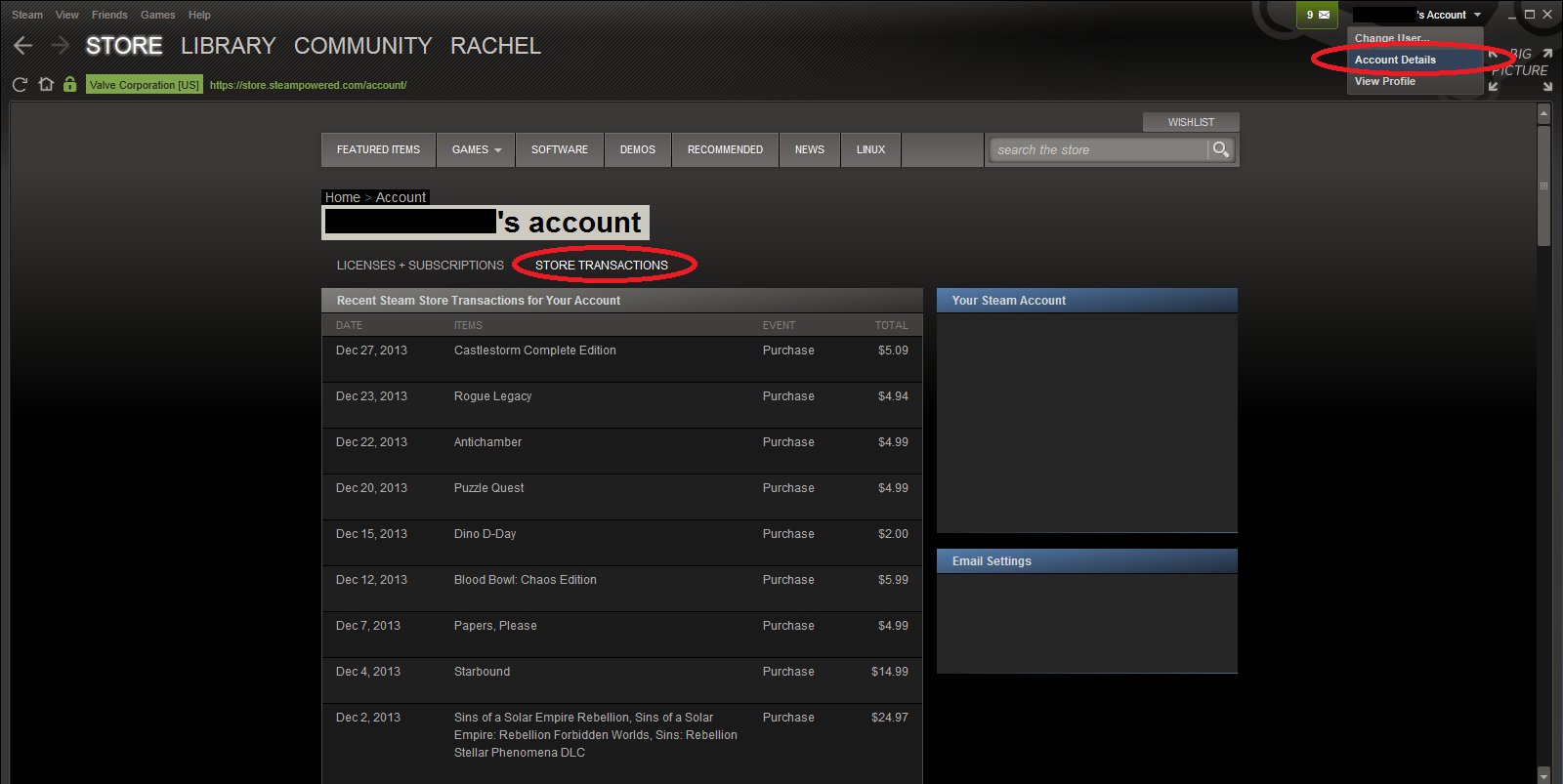
Yes, you can easily see how much you paid for steam games by viewing your Steam purchase history within your account settings.
Ever wondered about the total dent your gaming habit has made in your wallet? If the question “can i see how much i paid for steam games” has crossed your mind, you’re not alone. Many players find themselves curious about their spending on the platform.
Thankfully, Steam provides a straightforward way to track your expenditures. Accessing your purchase history is simpler than you might think, and this information allows you to manage your budget better and reflect on your gaming acquisitions.

Can I See How Much I Paid For Steam Games?
Ever wondered where all your money went? If you’re a gamer on Steam, you’ve probably built up quite a library over time. It’s easy to get lost in the fun and forget just how much you’ve spent. But don’t worry, you can find out! Steam provides a few ways to peek at your purchase history. Let’s look at how you can check how much you’ve invested in your digital game collection.
Accessing Your Steam Purchase History
The first step in finding out your total Steam spending is to locate your purchase history. This isn’t buried too deep, luckily! Here’s a simple breakdown of how to do it:
- Open Steam: Make sure you’re logged into your Steam account.
- Click Your Username: At the top of the Steam client, find your username (usually next to the Community tab). Click on it.
- Select “Account Details”: From the dropdown menu, choose “Account Details.” This is where you’ll find all sorts of information about your Steam account.
- View Purchase History: On the Account Details page, look for “View purchase history.” Click this option, and you’ll be taken to a page with all your transactions.
This page shows you every transaction made through your Steam account. You can see the name of each game, the date you bought it, and how much you paid. Now, let’s talk about sorting and analyzing this information, as seeing all the transactions can be overwhelming.
Understanding Your Purchase History
Once you’re on the purchase history page, you will see every single purchase you’ve ever made on Steam. It’s important to understand how this information is presented, and what you can do with it. Here’s what you need to know:
Transaction Details
Each transaction entry shows the following:
- Date: The exact date you bought the game.
- Item: The name of the game or other item you purchased, like DLC or in-game content.
- Type: This indicates whether it was a game purchase, a wallet top-up, or something else.
- Cost: The price you paid for the item.
Filtering Options
Steam offers some basic filters to help you sort your transactions, although it doesn’t provide ways to calculate the total amount easily. Here are the available filters:
- Date Range: You can select a specific date range to view transactions from a particular period. This is useful if you want to see how much you spent in a month or a year.
- Transaction Type: Filter transactions based on type such as purchases, wallet top-ups, etc.
Calculating Your Total Steam Spending
Okay, this is the important part – finding out the total amount you’ve spent on Steam games. Unfortunately, Steam doesn’t give you a simple, single number that tells you your overall spending. You’ll need to do a little bit of math. Don’t worry, it’s not too hard! Here are the different methods you can use:
Manual Calculation
The most straightforward (but most tedious) way is to add up each transaction yourself. This is not ideal if you have a lot of purchases. Let’s go through the steps:
- Go to Your Purchase History: As described before, get to your purchase history page.
- Scroll and Add: Scroll down and add up the cost of every purchase you have made. This might take a while, depending on how many games you have.
- Use a Calculator: It’s a good idea to have a calculator handy for this.
Pros: This is simple to understand and doesn’t require any extra tools.
Cons: It’s time-consuming, and mistakes can happen easily. Plus, it will be really painful if you have 100s of transactions.
Using a Spreadsheet
A much better method is to export your purchase history (if you have a large number of purchases) into a spreadsheet and let the spreadsheet program do the math for you. Here is how to do it:
- Manually Transfer or Copy: Unfortunately, Steam does not have an export button. You will have to manually copy all the data from the steam purchase history page into an excel/ google sheets. This would still be better than the manual calculation method as you won’t be calculating the sum manually.
- Sum the Amount Column: Once all your purchase data is transferred into a spreadsheet, use the sum function in your software. In most spreadsheet programs, this is done by using =SUM(first cell : last cell).
Pros: Spreadsheet programs can help you quickly and correctly calculate your total spending.
Cons: There is no easy “export” function, so you need to copy the purchase data yourself. However, it is worth the effort.
Using Third-Party Websites
There are several third-party websites that claim to calculate your total Steam spending. However, these are not officially endorsed by Steam, so you should be cautious when using these sites. Here’s what you should consider before using such sites:
- Security Risks: These sites usually require you to log in with your Steam account or provide your Steam ID. Sharing your information with unofficial websites can put your account at risk. It is best to not use these unless you are fully aware of the risks involved.
- Accuracy: The accuracy of these third-party sites can vary. Some might not include all your transactions or might not calculate the total correctly.
- Privacy: The privacy policy of the website is very important. Ensure that you are ok with how the site handles your information.
Pros: Some sites claim to calculate total spending automatically, saving you time.
Cons: Security, accuracy, and privacy concerns are huge, and it’s better to avoid using these unless you are extremely careful.
Other Factors Affecting Your Steam Spending
While your purchase history shows your direct game purchases, there are other things you may have spent money on through Steam. These could also be considered as part of your “Steam spending”. Let’s consider what they are:
Steam Wallet Funds
You can add funds to your Steam Wallet using various methods. These funds can then be used to buy games, DLC, or other items on Steam. The total amount of money you added to your Steam Wallet is another way to estimate how much money you have spent through Steam. This can be viewed as your overall investment into the Steam eco-system.
In-Game Purchases
Many games on Steam have in-game purchases. These can be for things like virtual items, skins, or other in-game currency. These purchases will also show up in your purchase history.
Marketplace Transactions
Steam has a marketplace where users can buy and sell items from their games, like cards or weapon skins. Buying items on the marketplace also adds to your spending. You should keep this in mind while calculating the total amount of spending. You can always check your market transaction in the community section.
Why Track Your Steam Spending?
You might be wondering, why even bother tracking how much you’ve spent on Steam? Here are a few good reasons:
- Budgeting: It helps you understand your gaming spending habits and stick to a budget. It’s easy to overspend on games if you don’t keep track.
- Financial Awareness: It allows you to see where your money is actually going. Seeing the total amount spent might be a shocking number, but it provides important insight into your spending.
- Informed Decisions: If you’re thinking of buying more games, knowing your past spending habits can help you make more informed decisions.
- Curiosity: It’s fun and interesting to see just how much you’ve invested in your gaming hobby. You get an idea of how much you have put into it.
Tips for Managing Steam Spending
Here are a few tips to help you manage your Steam spending:
Set a Budget
Decide how much you’re comfortable spending on games each month or year and stick to it. This will help you with financial planning.
Wait for Sales
Steam has frequent sales, so try to wait for the games you want to go on sale before buying them. You can save quite a bit of money this way.
Use Wishlists
Add games you are interested in to your wishlist. Steam will notify you when they go on sale. This helps you avoid buying games that are not interesting for you.
Consider Bundles
Game bundles are often a good way to get multiple games at a lower price than buying them individually. Keep an eye out for these.
Be Mindful of In-Game Purchases
Be careful with in-game purchases and only spend on things you really want or need. These purchases can add up quickly.
Check for Refunds
If you buy a game and don’t like it or it doesn’t work on your system, consider requesting a refund. Steam has a refund policy that helps protect you.
Keeping track of your spending habits on Steam helps you maintain a balance between gaming and your finances. Now you are ready to track your purchase history!
In conclusion, while Steam doesn’t provide a single button to reveal your total spending, it provides a transparent record of all transactions. You can easily access your purchase history, and with some manual effort or a spreadsheet, you can calculate exactly how much you’ve invested in your digital game library. This understanding can help you be more aware of your gaming expenses and make better financial decisions in the future. With the tips and information provided, managing and understanding your spending on Steam becomes an achievable task, helping you to continue enjoying your favorite games responsibly.
How To Check Steam Money Spent – (Full Guide)
Final Thoughts
Yes, you can easily see your Steam purchase history. Locate the “Account Details” section in Steam. Then select “View Purchase History”. This area displays each transaction, including the amount spent.
Therefore, the answer to ‘can i see how much i paid for steam games’ is definitively yes. Reviewing this section allows you to track your spending over time on your game collection. This will help keep spending in check.

