
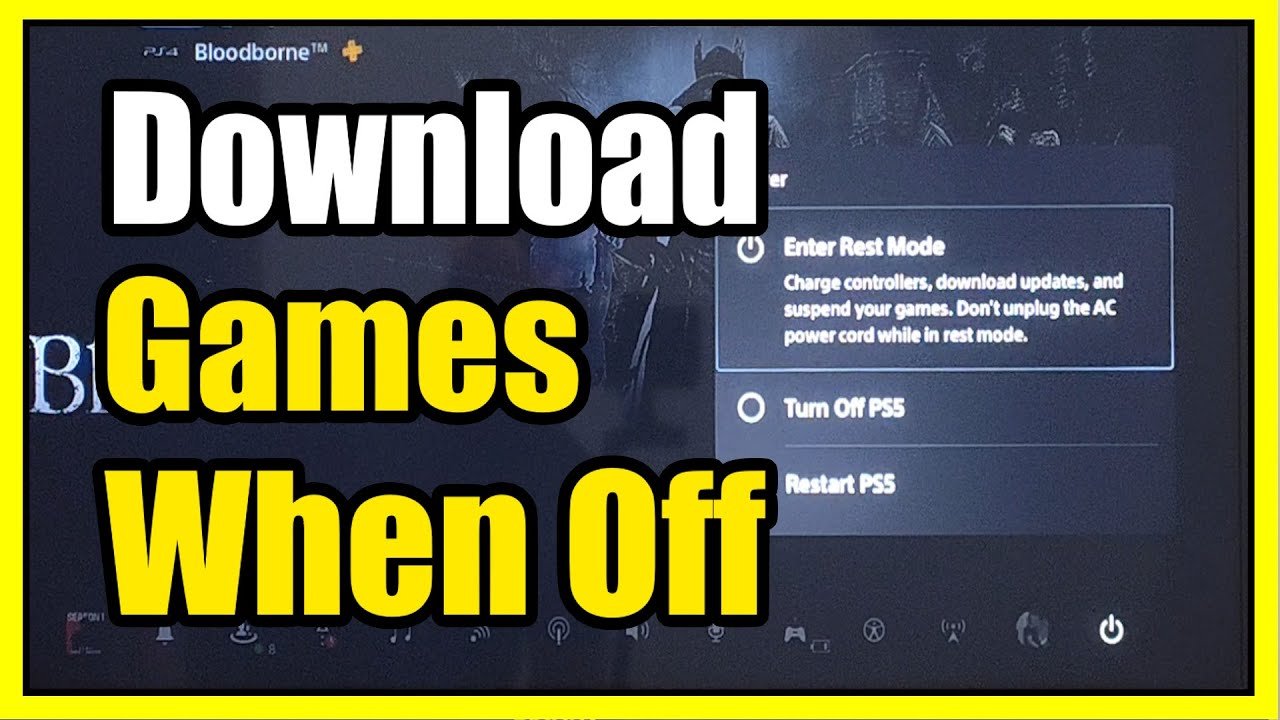
Yes, you can turn off your PS5 while downloading a game, but it needs to be in rest mode for the download to continue.
Ever felt the urge to shut down your console after starting a hefty download? You might be wondering, can i turn off my ps5 while downloading a game? It’s a common question for many gamers eager to hop into their new virtual world.
The good news is, you don’t have to leave your PS5 fully powered on. Your console has a low-power state called rest mode that allows downloads to proceed even when the system seems off. Just remember to place it in that mode instead of fully powering it down.

Can I Turn Off My PS5 While Downloading a Game?
It’s a question many PlayStation 5 gamers ask: “Can I turn off my PS5 while downloading a game?” It’s super convenient to start a big download and then want to just relax, or maybe head to bed, instead of waiting for it to finish. The good news is, your PS5 has a special trick that lets downloads keep going even when you aren’t actively playing!
The Power of Rest Mode on PS5
Instead of completely turning off your PlayStation 5, you want to use something called “Rest Mode.” Think of it like putting your PS5 to sleep. It uses very little power, but it stays connected to the internet. This is important, because that’s how the game download can continue.
When you completely turn off your PS5, it shuts down everything. The internet connection goes off, and the download stops. That’s not what you want if you’re downloading a huge game. Rest Mode is designed specifically to keep background tasks, like downloads, running smoothly. This means you don’t have to wait around with your console turned on all day.
How to Put Your PS5 in Rest Mode
Putting your PS5 in Rest Mode is super easy. Here’s how you do it:
- Press the PlayStation button on your controller (the button with the PS logo).
- Go to the “Power” menu (usually the last icon on the right side of the row).
- Select “Enter Rest Mode.”
Your PS5 screen will go black, and the light on the console will change to an orange color. This means your console is now in Rest Mode, and the game is still downloading.
Benefits of Using Rest Mode for Downloads
Using Rest Mode for downloads offers some significant benefits. Let’s check them out:
- Saves Energy: Rest Mode uses much less power than when your PS5 is fully on. It’s kinder to your electricity bill and the environment!
- Faster Downloads: Since the PS5 is still connected to the internet, your downloads can keep going without interruption. You don’t have to leave the console fully on just to get a game to finish downloading.
- Convenience: You don’t need to wait around while a game downloads. Put your PS5 in Rest Mode and go do other fun things. The game will be there when you’re ready to play.
- Background Updates: Rest mode also allows other things to happen behind the scenes, like system software updates. Your PS5 can get the latest updates without you having to be there.
Think of Rest Mode as your helper, ensuring your game library is ready when you are!
When Not to Use Rest Mode
While Rest Mode is great, there are a few times you might want to avoid using it:
- Storms and Power Outages: If you know a big storm is coming or if you have unreliable electricity, it’s better to fully turn off your PS5. This will protect it from potential damage from a power surge.
- System Issues: If you notice your PS5 acting strangely, like freezing or being very slow, it might be better to fully power it down and then restart it. Sometimes a full restart can fix little issues.
- Extended Periods of Non-Use: If you won’t use your PS5 for a long time, like going on a trip for a week, it’s better to shut it down completely. This saves a tiny bit more electricity.
These are just special situations. Most of the time, Rest Mode is perfect for keeping your downloads running.
Understanding Download Speeds in Rest Mode
Sometimes, you might wonder if your download speed is slower in Rest Mode. This can happen, but it’s usually not much of a difference. Your internet speed will always be the biggest factor in how quickly a game downloads. However, here are a few things that can influence download speeds, even in Rest Mode:
Factors Affecting Download Speed
- Internet Connection: Your internet plan and speed are the most important. If you have a slower internet connection, your downloads will be slower, no matter what.
- Wi-Fi vs. Ethernet: Using an Ethernet cable to connect your PS5 to your router is usually faster and more reliable than using Wi-Fi. If you can, plug in an Ethernet cable.
- Network Congestion: If many devices in your house use the internet at the same time, the speed can be slower. When everyone’s trying to watch videos or play online games at the same time, there might be less speed for your PS5.
- PlayStation Network Traffic: Sometimes, many people are downloading games at the same time, and this can slow things down. If lots of players are downloading new releases at once, your download might be a little slower, even in Rest Mode.
- Distance from Router: If you are using Wi-Fi, being closer to the router usually gives a better signal and faster speeds. Try moving your PS5 closer if you are having issues.
If you are experiencing slow download speeds, check these things first.
Troubleshooting Slow Downloads
If your game is taking too long to download in Rest Mode, here are a few things you can try:
- Restart your Router: Sometimes routers need a reset. Unplug it, wait 30 seconds, and plug it back in. This can help with internet connection issues.
- Pause and Resume the Download: Go to your downloads and pause the download and then start it again. Sometimes this will pick up the speed.
- Check your Internet Speed: Use a speed test website on your computer or phone to check your internet speed. If it’s very slow, you might need to contact your internet company.
- Change DNS Settings: For some people, using a different DNS server can help improve speeds. You can find instructions on how to do this for your PS5 online.
- Try Ethernet Cable: If you’re using Wi-Fi, try connecting your PS5 directly to your router with an Ethernet cable.
These are some of the best ways to get the fastest download speeds from your ps5.
Is it Okay to Unplug the PS5 in Rest Mode?
It’s generally not a good idea to unplug your PS5 while it’s in Rest Mode. Think of it like this: when your PS5 is in Rest Mode, it’s still doing some things. If you suddenly cut off the power, it could mess things up. It might make some games behave strangely, cause issues with updates, or even hurt the system files.
Potential Problems with Unplugging
- Data Loss: Unplugging could mess up any downloads happening in the background, or even cause loss of game save data if the system was writing to it.
- System Errors: It can make the system behave erratically when you turn it back on. You might have to troubleshoot some errors or even do a full restart.
- Possible Hardware Issues: While not common, consistently unplugging while in Rest Mode can sometimes cause long-term problems with the system’s hardware over a long period of time.
If you have to move your PS5, it’s always best to first exit Rest Mode completely, and then wait a little bit before unplugging it. It’s best to be patient.
Managing Downloads Effectively
To make downloads go smoothly, it’s helpful to know how to manage them. Here are some tips:
Download Management Tips
- Check Download Progress: You can see the progress of your download from the “Downloads/Uploads” section on your PS5. Press the PlayStation button, go to “Downloads/Uploads,” and you will see what is going on.
- Prioritize Downloads: You can choose which download to do first. If you have multiple games downloading, you can choose which to focus on first.
- Pause and Resume Downloads: If you need to use your internet for something else, you can pause a download and then start it up again later. This is very helpful if you only want to play one game, while the other downloads in the background.
- Schedule Downloads: Start downloads when you’re not using your internet as much. Some prefer to start downloads at night so that games are ready in the morning.
By knowing how to manage downloads, you can get your games downloaded more efficiently.
Why Does My PS5 Seem Slow After a Download?
Sometimes, after a big download, your PS5 might seem a bit slow. This is because the system might be doing things in the background, even after the download is done. For example, the console might be unpacking or installing the game. Here’s a few reasons why your PS5 might be working hard:
- Installation Process: Even though the download is done, the game still needs to install. This can take some time, especially for very large games. Your PS5 will be working during this process.
- Background Tasks: The PS5 might be checking the new files, setting up for the first time you play, or even running a virus check. This is normal and just takes a little time.
- File Verification: Your system has to double-check all the game files to make sure they’re not broken. It needs to make sure everything is working properly.
Don’t worry, it’s usually not permanent, it will clear up soon. If your PS5 seems slow after a download, try just being patient and allow it to finish up all the background tasks. You can then restart if you are still having issues.
Keeping Your PS5 Healthy During Downloads
Here are a few tips to help keep your PS5 happy and healthy during downloads:
- Good Ventilation: Make sure your PS5 has good airflow all around. Don’t put it in an enclosed space. You want it to be able to breathe.
- Avoid Overheating: Don’t leave your console in direct sunlight or near a heat source. Keep it in a cool place.
- Use Proper Power Source: Always plug your PS5 into a grounded outlet. Avoid using extension cords.
- Keep It Clean: Make sure to keep your PS5 free of dust, especially the vents. Dust can block airflow and cause overheating issues.
By doing these simple things, your PS5 will be happy, healthy, and ready to play!
In short, while you can’t turn off your PlayStation 5 completely while downloading a game, you can use Rest Mode. This special mode lets your downloads continue while also saving energy. Knowing how to use Rest Mode, manage downloads and troubleshoot issues will make your gaming experience much smoother and more enjoyable!
How to Download Games in Rest Mode on PS5!
Final Thoughts
You can indeed put your PS5 in rest mode while downloading. This allows downloads to continue in the background. Rest mode uses minimal power, making it an efficient way to keep things going.
So, ‘can i turn off my ps5 while downloading a game’? Technically, yes, by using rest mode. Just remember not to unplug it directly while downloads are in progress. That is the main way for keeping downloads progressing in the system.

