
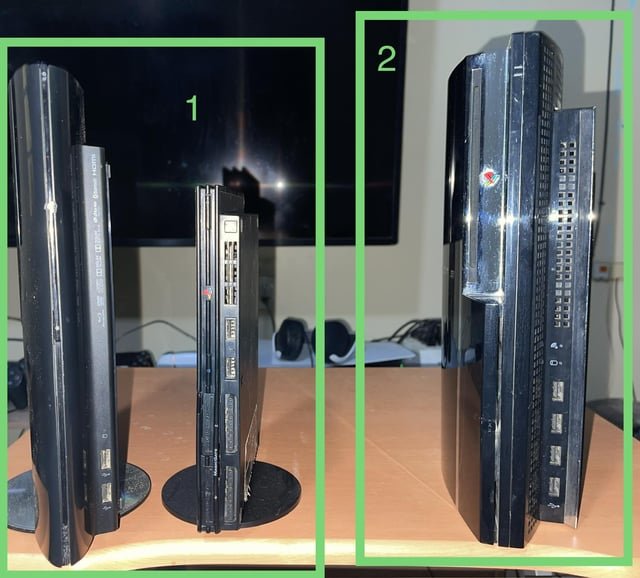
Whether or not you can play PS2 games on PS3 depends on the specific PS3 model; some early models offered backward compatibility.
Ever wondered if you could dust off your old PS2 games and play them on your PlayStation 3? It’s a question many retro-gaming enthusiasts ask. The answer to ‘can PS2 games play on PS3’ isn’t straightforward.
Some of the original PS3 models, particularly the 60GB and some 20GB versions, came equipped with the hardware necessary to play PS2 discs. However, Sony removed this feature in later PS3 models to cut costs.
So, while some PS3s embrace retro gaming, others leave you wanting more.

Can PS2 Games Play on PS3? Understanding Compatibility
The question of PS2 game compatibility on the PS3 is a common one among gamers. The answer is not a simple yes or no. It depends on the specific PS3 model.
Some PS3 models offer backward compatibility, while others do not. Understanding this difference is key.
PS3 Models and Backward Compatibility
The original PlayStation 3 came in different iterations. Knowing which one you have is crucial.
Backward compatibility varied between models. Let’s break it down.
Full Backward Compatibility: The Original PS3 Models
The first generation of PS3 consoles offered full backward compatibility. This meant they could play almost all PS2 games and PS1 games.
These models are highly sought after by retro gamers. They provide the best PS2 gaming experience on a PS3.
Model Numbers: These consoles typically had model numbers CECHAxx, CECHBxx, CECHCxx, and CECHExx.
Hardware Emulation: These models included the actual PS2 hardware inside. This allowed for near-perfect compatibility.
PS2 Chip: These models had the Emotion Engine and Graphics Synthesizer, the main components of the PS2.
Partial Backward Compatibility: Some Later Models
Some later PS3 models offered limited backward compatibility. They only emulated the PS2’s Graphics Synthesizer.
This resulted in a reduced but still decent level of compatibility. Not all PS2 games ran perfectly on these models.
Model Numbers: Look for model numbers such as CECHGxx and CECHHxx.
Software Emulation: These models relied on software emulation for the Emotion Engine.
Compatibility Issues: Some games experienced glitches, slowdowns, or simply wouldn’t load.
No Backward Compatibility: Slim and Super Slim Models
The PS3 Slim and Super Slim models removed backward compatibility altogether. These models focused on reducing cost and improving efficiency.
This means they cannot play PS2 games directly. PS1 games were still playable on these consoles.
Model Numbers: These include the CECH-2000, CECH-2100, CECH-2500, CECH-3000, CECH-4000 series.
Cost Reduction: Removing the PS2 hardware significantly lowered manufacturing costs.
Focus on PS3 Games: These models were designed primarily for playing PS3 games.
How to Determine Your PS3 Model
Finding your PS3’s model number is straightforward. It is typically located on a sticker on the back of the console.
The model number is essential for determining compatibility. You can then research its capabilities online.
Locate the Sticker: Turn off and unplug your PS3. Look for a sticker on the rear of the console.
Identify the Model Number: The model number usually starts with “CECH” followed by four numbers and two letters (e.g., CECHA01).
Research Online: Search online using your model number to confirm its backward compatibility status.
Checking PS2 Game Compatibility
Even on compatible PS3 models, not every PS2 game will work perfectly. Some games may have issues.
Checking compatibility lists can help you avoid disappointment. Several online resources provide this information.
Online Compatibility Lists: Websites and forums often maintain lists of PS2 games and their compatibility status on PS3.
User Reviews: Reading user reviews can provide insights into specific game performance.
Testing the Game: The best way to confirm compatibility is to try playing the game yourself.
Alternative Ways to Play PS2 Games on PS3 (If No Backwards Compatibility)
If your PS3 doesn’t have backward compatibility, there are still ways to enjoy some PS2 games. These methods offer limited but sometimes satisfactory alternatives.
These methods include using the PlayStation Store and PlayStation Plus. Let’s explore them.
PlayStation Store: PS2 Classics
The PlayStation Store offered a selection of PS2 Classics for download. These were digitally re-released versions of popular PS2 games.
These games were optimized to run on the PS3. However, the selection was limited.
Digital Downloads: These games are downloaded directly to your PS3’s hard drive.
Enhanced Features: Some PS2 Classics include enhanced graphics or trophy support.
Limited Selection: The number of PS2 Classics available was relatively small.
PlayStation Plus Premium: Streaming PS2 Games
PlayStation Plus Premium, the highest tier of PlayStation Plus, provides access to a library of streamable PS2 games. This allows you to play select PS2 titles without needing the original disc.
Streaming quality depends on your internet connection. The game selection may also vary over time.
Streaming Only: Games are streamed over the internet; you cannot download them.
Internet Connection Required: A stable and fast internet connection is essential for smooth gameplay.
Subscription Required: You must be a PlayStation Plus Premium subscriber to access this feature.
Technical Reasons for Compatibility Issues
Understanding the technical reasons behind compatibility issues sheds light on why some PS2 games don’t work well on the PS3. Emulation is complex.
Hardware and software differences can cause problems. Let’s examine these reasons.
Hardware Differences
The PS2 and PS3 have different hardware architectures. This makes perfect emulation challenging.
The Emotion Engine, the PS2’s CPU, is particularly difficult to emulate. Different processors handle code differently.
CPU Architecture: The PS2 uses the Emotion Engine, while the PS3 uses the Cell processor.
GPU Differences: The PS2’s Graphics Synthesizer differs significantly from the PS3’s GPU.
Memory Management: Differences in memory architecture can also cause compatibility problems.
Software Emulation Challenges
Software emulation aims to mimic the behavior of the PS2’s hardware. This is computationally intensive.
Imperfect emulation can lead to glitches, slowdowns, and crashes. Some games rely on specific hardware quirks.
Performance Overhead: Emulation requires significant processing power.
Incomplete Emulation: Software emulation may not perfectly replicate all aspects of the PS2 hardware.
Game-Specific Issues: Some games utilize unconventional programming techniques that are difficult to emulate.
PS2 to PS3 Upscaling and Visual Quality
Even on compatible PS3 models, PS2 games may not look as good as native PS3 games. Upscaling can help improve the visual quality.
However, the results can vary depending on the game. Let’s discuss upscaling.
PS3 Upscaling Capabilities
The PS3 can upscale PS2 games to higher resolutions. This can make the games look sharper on modern TVs.
However, upscaling cannot completely eliminate the limitations of the original PS2 graphics. Artifacts and blurriness may still be visible.
Resolution Enhancement: Upscaling increases the resolution of the game.
Image Sharpening: The PS3 applies image sharpening filters to improve clarity.
Limited Improvement: Upscaling cannot create detail that was not originally present.
Visual Quality Considerations
PS2 games were designed for standard-definition TVs. They may look pixelated or blurry on high-definition displays.
Some games benefit more from upscaling than others. Experimentation is key.
Pixelation: Low-resolution textures can appear pixelated.
Blurriness: Upscaling can sometimes introduce blurriness.
Game-Specific Results: The visual quality varies depending on the game’s original graphics.
Connecting PS2 Accessories to PS3
If you want to use your PS2 controllers or memory cards on your PS3, you’ll need adapters. These adapters allow you to connect these accessories to the PS3’s USB ports.
Not all adapters work perfectly. Researching compatible adapters is important.
Controller Adapters: These adapters allow you to use PS2 controllers on the PS3.
Memory Card Adapters: These adapters allow you to transfer PS2 save data to the PS3’s virtual memory cards.
Compatibility Issues: Some adapters may not work with all PS2 accessories or PS3 games.
The Future of PS2 Emulation
While the PS3 offered some level of PS2 emulation, the future of PS2 emulation lies in software-based solutions. Powerful PCs and modern consoles can now emulate the PS2 with impressive accuracy.
Emulators like PCSX2 provide a way to play PS2 games on other platforms. These emulators are constantly improving.
PCSX2: A popular open-source PS2 emulator for PC.
Improved Accuracy: Modern emulators offer more accurate emulation than the PS3’s built-in emulator.
Enhanced Features: Emulators often include features such as upscaling, texture filtering, and cheat support.
Troubleshooting PS2 Game Compatibility on PS3
Even on compatible PS3 models, you might encounter issues with PS2 games. Troubleshooting can help resolve some of these problems.
Restarting the console, cleaning the disc, and checking settings are common troubleshooting steps. Let’s explore some common issues and solutions.
Game Not Loading
If a PS2 game is not loading on your PS3, try the following:
Clean the Disc: Ensure the game disc is clean and free of scratches.
Restart the Console: A simple restart can sometimes resolve loading issues.
Check Compatibility Lists: Verify that the game is known to be compatible with your PS3 model.
Graphical Glitches
Graphical glitches can occur during gameplay. Here’s what you can do:
Adjust Display Settings: Experiment with different display settings on your PS3.
Update System Software: Ensure your PS3’s system software is up to date.
Try a Different Game: If the glitches only occur in one game, the issue may be specific to that game.
Sound Issues
Sound problems, such as missing audio or distorted sound, can also occur. Try these solutions:
Check Audio Settings: Verify that your PS3’s audio settings are configured correctly.
Try a Different Cable: A faulty audio cable can cause sound problems.
Restart the Game: Sometimes, simply restarting the game can fix sound issues.
Benefits of Playing PS2 Games on PS3
Despite the compatibility limitations, playing PS2 games on a PS3 offers certain advantages. It’s convenient.
It allows you to play your PS2 library on a more modern console. You also can upscale the graphics.
Convenience: Play PS2 games without needing a separate PS2 console.
Upscaling: Enjoy improved visual quality on high-definition TVs.
Virtual Memory Cards: Store PS2 save data on the PS3’s hard drive.
These PS2 Games Shouldn't Work Right On PS3's With Full Backwards Compatibility… But…
Final Thoughts
To sum it up, the ability to play PS2 games on a PS3 varies. Not all PS3 models offer this functionality.
Some original, “fat” PS3 models are backward compatible. These models contain the actual PS2 hardware.
However, newer, slimmer PS3s generally lack the necessary hardware. You must check your specific PS3 model.
So, can PS2 games play on PS3? It depends on the PS3 version.

