
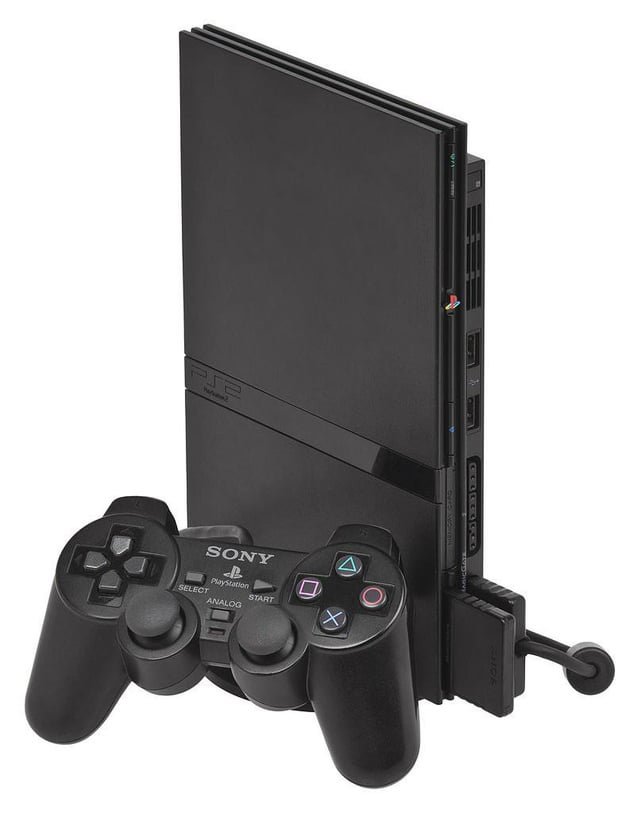
Yes, the PS2 can play PS1 games.
Many gamers wonder, can ps2 play ps1 games? The answer is a resounding yes! Sony designed the PlayStation 2 with backward compatibility in mind. This means you can enjoy your old PlayStation 1 titles on your PS2 console.
This feature allowed gamers to keep playing their favourite games without needing multiple consoles. It’s a big reason the PS2 became so popular. You just insert the PS1 disc and start playing.

Can PS2 Play PS1 Games? Exploring Backward Compatibility
The PlayStation 2, or PS2, is a super popular game console. You probably know it for its amazing games, like Grand Theft Auto: San Andreas and Final Fantasy X. But did you know it could also play games from the older PlayStation, also called the PS1? This feature is called “backward compatibility,” and it’s like having two game consoles in one! Let’s dive into how this works and what you need to know.
Understanding Backward Compatibility
Backward compatibility means that a newer console can play games made for an older console. Think of it like this: if your new DVD player can also play older CDs, it’s backward compatible with CDs. The PS2 was designed with this in mind, which was a big deal at the time. It meant you didn’t have to keep both your PS1 and PS2 hooked up to your TV to play your favorite games. You could play both PS1 games and new PS2 games all on one console!
Why Backward Compatibility Matters
This feature was super important for a few reasons:
- Saves Money: People didn’t have to buy a new console to play old favorites. This made playing fun older games much cheaper.
- Keeps the Fun Going: Players could enjoy all their favorite PS1 games even after they upgraded to the PS2.
- Convenience: It saved space and effort. No need to switch between consoles when they could play everything on one system.
How the PS2 Achieved Backward Compatibility
The PS2 was built with special hardware that could understand and play PS1 games. This wasn’t just a simple trick; it required real planning and smart design. The PS2 included components that mimicked the PS1’s processor and graphics chips. Because of this, the PS2 is able to run the older PS1 games pretty smoothly. The amazing thing is that the console could switch between using its own PS2 parts and pretending to be a PS1. It’s like having a robot that can change into another robot!
Technical Details Simplified
Let’s make this a bit easier to understand:
- The Brains: The PS2 has a processor that’s like a computer’s brain. It also has its own graphics chip to show the game visuals on your screen.
- The Translator: When you put in a PS1 game, the PS2 “shifts gears” and uses its special parts to act like an old PS1. It’s like having a translator that can understand both languages – PS1 and PS2.
- The Magic: This isn’t an easy task. The PS2 designers worked hard to make sure this translation worked smoothly without lots of problems.
Playing PS1 Games on Your PS2: What You Need
Playing PS1 games on your PS2 is pretty straightforward. Here’s what you’ll need to get started:
- A PS2 Console: Of course, you’ll need a PlayStation 2. Any version of the original PS2, even the slim model, can play PS1 games.
- PS1 Game Disc: You’ll need the physical game disc for the PS1 game you want to play. The PS2 isn’t designed to play digital PS1 games you might find online, unfortunately.
- A Controller: You can use either a PS1 controller or a PS2 controller for most PS1 games. Both work just fine!
- TV & Cables: Connect your PS2 to your television with the proper AV cables. Make sure your TV is turned on and set to the correct input.
Are There Any Limitations or Issues?
While the PS2 does a great job of playing PS1 games, there are a few small things to consider:
Compatibility Issues
Most PS1 games work very well on the PS2, but there might be a few rare exceptions. Some very early PS1 games or games with unusual technical methods could sometimes have slight problems. This can include:
- Minor Glitches: Sometimes you might see a small visual glitch or hear a sound effect that’s not quite right. These are not very common, though.
- Game Freezes: In rare cases, a game might freeze up unexpectedly.
- Loading Problems: Some games may take longer to load compared to the PS1.
The Exception: Early PS2 Models
One very specific thing to know is about the very first versions of the PlayStation 2. These consoles had a slightly different disc drive, and that meant some people had some issues with playing older black PS1 discs. These black discs were not the same as standard blue CD-ROM style discs. These black discs are used in some of the early PS1 games. However, this issue is not common, and many games on those black disks worked anyway.
Upscaling and Graphics
When you play a PS1 game on a PS2, it doesn’t magically get better graphics. The game will look like it did on the PS1, but the PS2 might handle the display in a slightly different way, which could result in a very small changes to colors or screen ratios. But overall the visuals remain faithful to the original PS1 experience.
Controller Compatibility
While both PS1 and PS2 controllers work for PS1 games on the PS2, you might notice that some PS1 games were designed specifically for the original PS1 controllers, with a different button layout or sensitivity. For example, some games used the analog sticks of the PS1 controller in a specific way and when you use the Dualshock 2 from PS2, you might have some problems in playing these specific games. Usually, most games will work just fine, but it’s something to keep in mind.
Tips for Playing PS1 Games on Your PS2
Here are a few tips to help ensure a smooth experience:
- Clean Your Discs: Make sure your PS1 game discs are clean. Scratches and dirt can make it harder for the PS2 to read the game. Wipe them gently with a soft cloth.
- Test Multiple Consoles: If a game isn’t working on one PS2, try another one. This might help you isolate if the problem is your console or the game.
- Read Online: Before you try a game, it’s a great idea to do some online research. You might discover if a certain game had problems with some PS2 consoles.
- Try a Different Controller: If you’re having trouble with one controller, try using the other type. Switching between PS1 and PS2 controllers could help.
- Update the Firmware: Although rare, sometimes a system update can help with compatibility. Make sure you PS2 is as updated as possible.
Where to Find PS1 Games
If you don’t have any PS1 games already, you can still find them at several places:
- Online Marketplaces: Websites like eBay, Amazon, and other online retailers often have used PS1 games for sale.
- Retro Game Stores: Local game stores that specialize in old video games can be a good place to look for PS1 games.
- Garage Sales and Flea Markets: You can often find old games at garage sales and flea markets. It’s like going on a treasure hunt!
- Friends and Family: Ask your friends or relatives if they have any old PS1 games they don’t play anymore.
The Legacy of Backward Compatibility
The PS2’s ability to play PS1 games was a big step forward for gaming. It showed how game consoles could keep all the previous generations games playable for a longer period. This idea of backward compatibility has continued with other consoles since. It’s a fun way to explore older games and remember great times playing the PS1. Backward compatibility helps preserve and appreciate the history of video games. The ability of the PS2 to play PS1 games is a feature that many gamers continue to value today.
In short, the PS2 can play PS1 games, and it does it very well. With just a few simple steps, you can get back into some fantastic games, experiencing all the fun of old games on an awesome console. Have fun exploring those classic PS1 games on your PS2!
Does PS2 play PS1 games
Final Thoughts
Yes, the PS2 can play PS1 games. This backward compatibility is a great feature. Players can enjoy their old PlayStation titles on the PS2 console. This capability expanded the PS2’s library, making it very popular.
‘can ps2 play ps1 games’ is confirmed. The console reads PS1 discs without any issues. You simply insert the PS1 disc and the system will load it. This functionality gives users a wealth of games to enjoy.

