
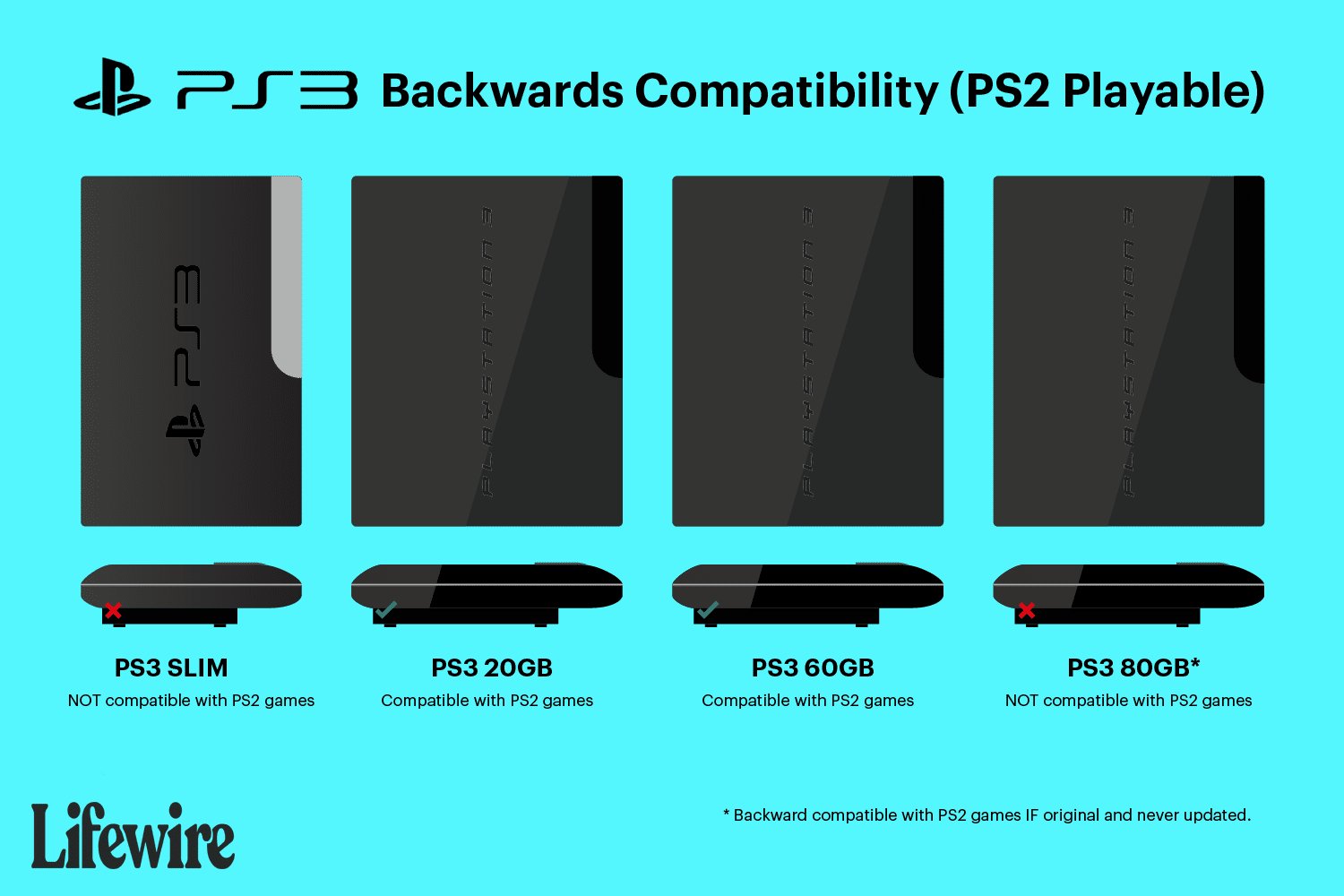
Not all PlayStation 3 consoles can play PlayStation 2 games; however, all PS3 models can play PlayStation 1 games.
Wondering if your PS3 can revisit the classics? The question of ‘can ps3 play ps2 and ps1 games’ often pops up for gamers. Early versions of the PlayStation 3 had backward compatibility for PS2 games, but this feature didn’t last for all models.
You see, cost-cutting measures led Sony to remove the PS2 hardware from later PS3 consoles. However, PS1 compatibility remained a constant throughout the PS3’s lifespan. So, dust off those old PS1 games and get ready for a retro gaming session!

Can PS3 Play PS2 and PS1 Games? Exploring Backward Compatibility
The PlayStation 3 (PS3) was a big deal when it came out. It wasn’t just about playing the newest games; lots of people wondered if they could play their older PlayStation games on it too. This is called “backward compatibility,” which is a fancy way of saying that a new console can play games from older ones. Let’s dive deep into whether the PS3 could play PlayStation 2 (PS2) and PlayStation 1 (PS1) games, because the answer isn’t as simple as you might think.
PS3 Models and Their Backward Compatibility
Not all PS3 consoles were created equal when it comes to playing older games. Sony, the company that made PlayStation, changed things up a bit over the years. The very first PS3 models were able to play both PS2 and PS1 games. However, later versions lost the ability to play PS2 games. Let’s break down which PS3 models have what kind of backward compatibility:
The Original “Fat” PS3 Consoles
The initial release of the PS3, often called the “fat” PS3 because of its bulky design, came in two main versions with backward compatibility:
- 20GB Model: This version could play both PS2 and PS1 games.
- 60GB Model: This version also played both PS2 and PS1 games.
These original PS3 models used special hardware, including parts of the actual PS2 console, built inside them. This is why they could play PS2 games so well, almost exactly like they would on a real PS2.
If you have an original “fat” PS3 with a lot of inputs on the front (like for memory cards), you most likely have a backward compatible model. These models are sought after by collectors because of their ability to play PS2 games.
Later “Fat” PS3 Models (No PS2 Compatibility)
Later versions of the “fat” PS3 console, including the 40GB, 80GB, and 160GB models, removed the special hardware that allowed it to play PS2 games. These models only play PS1 games, but not PS2 games. The reason for this change was likely to reduce the cost of manufacturing the console.
Here’s a simple table to summarize this:
| PS3 Model | PS2 Game Compatibility | PS1 Game Compatibility |
|---|---|---|
| 20GB “Fat” | Yes | Yes |
| 60GB “Fat” | Yes | Yes |
| 40GB “Fat” | No | Yes |
| 80GB “Fat” | No | Yes |
| 160GB “Fat” | No | Yes |
PS3 Slim and Super Slim Models: No PS2 Support
When Sony released the PS3 Slim and then the Super Slim models, they did not include the hardware to play PS2 games. These models could play PS1 games, just like the later “fat” models.
- PS3 Slim: Plays PS1 games, no PS2 compatibility.
- PS3 Super Slim: Plays PS1 games, no PS2 compatibility.
If you have a PS3 Slim or Super Slim, you won’t be able to play your old PS2 discs. These models are smaller, lighter, and more energy-efficient but at the cost of PS2 game support.
Playing PS1 Games on Any PS3 Model
The good news is that all PS3 models can play PS1 games. Whether you have an original “fat” model, a Slim, or a Super Slim, you can pop in your old PS1 discs and enjoy them. This is great for reliving classic PlayStation titles from back in the day.
How Does PS1 Emulation on PS3 Work?
The PS3 uses a software program called an emulator to run PS1 games. An emulator is like a translator. It allows the PS3 to understand the instructions that were designed for the PS1. This means that instead of having the actual hardware of a PS1 inside, the PS3 uses a software program to mimic what the PS1 would do. This allows the PS3 to play PS1 games without needing the actual PlayStation 1 components.
The PlayStation Store and Digital PS1 and PS2 Games
Even if your PS3 doesn’t have the hardware to play PS2 discs, there’s another way you can play some classic games. The PlayStation Store offered a selection of PS1 and PS2 games to download. These games are often emulated, meaning that they run using software instead of needing the original hardware.
How to Buy and Play Digital Games
To access these games, you need an internet connection and a PlayStation Network (PSN) account. You can buy the games from the PlayStation Store and download them directly to your PS3’s hard drive. This is a convenient way to play your favorite old games without needing the original discs.
- PS1 Classics: Many popular PS1 games were available to download. These could be played on any PS3 model.
- PS2 Classics: There were select PS2 titles available for download. However, not all PS2 games were available, so it is important to check if your specific game is there before you purchase. Also, note that even if you buy a digital version of a PS2 game, you will still need to have a PS3 that has the software to play it.
Why Did Sony Remove PS2 Backward Compatibility?
You might be wondering why Sony decided to remove the PS2 compatibility from later PS3 models. There are a few reasons for this:
- Cost: The special hardware needed for PS2 compatibility was expensive to include. By removing it, Sony could reduce the cost of producing the PS3, making it more affordable for people.
- Complexity: Including PS2 hardware added complexity to the PS3’s design, making it more difficult to manufacture and potentially more prone to problems.
- Focus on PS3 Games: Sony wanted people to focus on buying and playing the newer PS3 games. By removing backward compatibility, they encouraged people to embrace the current generation of games.
Identifying a Backward Compatible PS3
If you’re trying to figure out if your PS3 can play PS2 games, here are some things to look for:
Physical Indicators
- Model Number: Look for the model number on the back or bottom of the console. The backward compatible models usually have model numbers that start with CECHA or CECHB.
- Memory Card Slots: The original “fat” PS3 models had slots for PS2 memory cards on the front. If you see these slots, it’s a good sign that the console can play PS2 games.
- Front Panel: As mentioned earlier, if your PS3 has multiple input points on the front of the console it is likely the original version.
Software Indicators
- Start-Up Sound: The start-up sound on older PS3 models can be slightly different than newer ones. This isn’t always a reliable indicator, but can be one piece of the puzzle.
- Game Testing: If you’re still not sure, the quickest method is to try to play a PS2 game. If the game works without issue, your PS3 is backward compatible.
The Legacy of Backward Compatibility
The decision to include or remove PS2 backward compatibility on the PS3 sparked a lot of debate among gamers. For some, the ability to play PS2 games on their new console was a huge draw, and that’s why they searched to find original “fat” PS3 models. For others, the lack of PS2 support wasn’t a big deal, especially as the PS3 library grew with new and exciting games.
Even though later PS3 models didn’t support PS2 games, the fact that all PS3s supported PS1 games was a win for those who wanted to enjoy classics from the past. Additionally, the availability of some digital versions of both PS1 and PS2 games on the PlayStation Store gave players additional ways to access their favorites.
In short, some PS3 models could play PS2 games, while others could not, but all PS3s could play PS1 games. This is an important thing to be aware of when you are considering to buy a PS3 or still have one in your closet.
How to tell if your PS3 is backwards Compatible
Final Thoughts
Only specific PlayStation 3 models play PlayStation 2 games. The original, backwards-compatible PS3 consoles can play both PS2 and PS1 discs. However, later models removed this feature.
You must check your console’s model number. Most PS3s will play PS1 games. Therefore, answering the question, can ps3 play ps2 and ps1 games, depends greatly on the specific PS3 you own.

