
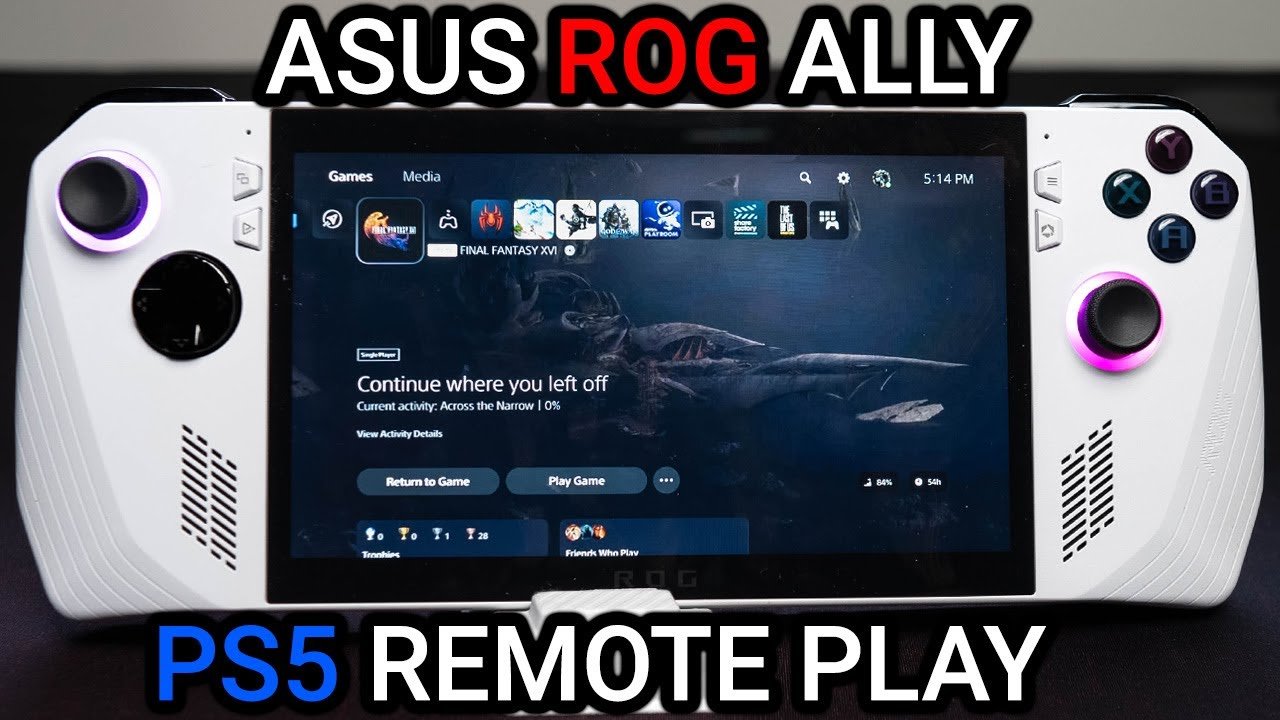
No, the ROG Ally cannot directly play PS5 games.
The burning question on many gamers’ minds: can rog ally play ps5 games? It’s a natural thought, given the Ally’s portable power. We all dream of having our favorite console experiences on the go.
While the ROG Ally handles PC games amazingly well, it lacks the hardware to natively run PlayStation 5 titles. These games are built specifically for the PS5 architecture.
You can use remote play with your PS5 and Ally. However, this requires a strong network connection, but it is not the same as playing games directly on the device.

Can ROG Ally Play PS5 Games? Exploring Your Options
So, you’ve got your shiny new ROG Ally, and you’re wondering if it can play those amazing PlayStation 5 games. It’s a great question, and the answer is a bit more complex than a simple “yes” or “no.” We’re going to take a deep dive into how you can experience PS5 games on your ROG Ally. Get ready, because we’re going on an adventure through the world of gaming tech!
Understanding the Limits: ROG Ally vs. PS5 Hardware
Let’s start with the basics. The ROG Ally is a handheld gaming PC. It’s like a super-powerful tablet designed for gaming. The PlayStation 5, on the other hand, is a dedicated game console with very specific hardware. Think of it like this: the ROG Ally is a multi-tool, good at many things, while the PS5 is a specialized tool, amazing at one specific task – playing PS5 games.
Here’s a quick comparison:
- ROG Ally: Runs on a Windows operating system, uses an AMD Ryzen processor and AMD Radeon graphics. It’s made to run PC games, but it also has the flexibility to do other things. It’s got a screen, buttons, and sticks all built in.
- PlayStation 5: Uses a custom AMD chip and a specialized graphics processor. It’s purpose-built for console gaming and needs to be connected to a TV or monitor. It uses a proprietary operating system made just for the console.
Because of these differences, the ROG Ally can’t directly run PS5 games like a PS5 can. It’s like trying to play a DVD in a CD player. They’re different kinds of discs, or in this case, different kinds of game formats.
The Cloud Gaming Solution: PlayStation Plus Premium
Okay, so the ROG Ally can’t play PS5 games directly. But don’t worry, there’s still a way! The magic word is “cloud gaming.” Sony offers a service called PlayStation Plus Premium, which includes access to game streaming. This service allows you to play games that are actually running on powerful servers somewhere else. Your ROG Ally acts like a window, showing you the game as if you were playing it locally.
How PlayStation Plus Premium Works with ROG Ally
Here’s how it all comes together:
- Subscription: You’ll need a PlayStation Plus Premium subscription to access the game streaming service.
- Internet Connection: You’ll also need a fast and stable internet connection. Since the games are being streamed, your internet has to keep up with the video data.
- PlayStation App: You’ll need the PlayStation app on your ROG Ally. This is how you connect to the streaming service and control the game.
- Game Selection: Using the app, you can choose from a library of games available for streaming. These include select PS5 titles and many games from older PlayStation systems.
- Playing: When you select a game, your ROG Ally sends your button presses over the internet. The game runs on Sony’s servers, and the video and audio are sent back to your ROG Ally screen.
Think of it like watching a movie online. You’re not downloading the movie to your device; you’re streaming it. This makes the game playable even though the ROG Ally is not as powerful as a PS5.
Setting Up Cloud Streaming on Your ROG Ally
Getting set up to play PlayStation games via cloud streaming on your ROG Ally involves a few steps. Don’t worry, it’s not too tricky! Here’s a more detailed guide:
Step-by-Step Setup
- Get the PlayStation App:
- First, make sure your ROG Ally is connected to the internet via Wi-Fi.
- Go to the Microsoft Store on your ROG Ally.
- Search for the “PlayStation” app.
- Install the app on your device.
- Log into Your PlayStation Account:
- Open the PlayStation app once it’s installed.
- Sign in to the app using your PlayStation Network account details, the same account you use on your PS5 console.
- PlayStation Plus Premium Subscription:
- If you have a PlayStation Plus Premium account already, you are ready to go.
- If you don’t, you’ll need to sign up on the Playstation website or through your Playstation console.
- Connect a Controller:
- The ROG Ally’s built-in controls can work with some games. However, for better control and compatibility, it is good to connect an external controller.
- You can connect a PlayStation DualSense or DualShock controller via Bluetooth to your ROG Ally.
- Start Playing:
- In the Playstation app, browse the games that are available to play via streaming through the Playstation Plus Premium option.
- Select the game you want to play.
- Click “Stream” to start the game.
Tips for Smooth Cloud Streaming
Cloud streaming can sometimes be tricky. Here are some tips to help things go smoothly:
- Fast Internet is Key: Make sure you have a stable and speedy internet connection, for the game to run smoothly. Ideally you want a download speed of at least 25 Mbps.
- Close Other Apps: Close any unnecessary programs on your ROG Ally to give the streaming game all the power it needs.
- Use a 5GHz Wi-Fi Band: If you have a dual-band router, try using the 5GHz band for a faster and more reliable connection.
- Wired Connection: If you have the option, consider using a wired internet connection (with a USB-C to Ethernet adapter) for the most stable and low-latency experience.
- Adjust Graphics Settings: Some games have streaming options in the PlayStation app. Lowering the graphics quality can reduce the amount of data needed and give you a smoother experience.
Game Selection: What Can You Actually Play?
Not all PS5 games are available for streaming on PlayStation Plus Premium. Sony has a rotating library of games available for streaming. It’s like a movie library; some titles come and go. The library also includes games from older PlayStation consoles (like the PS4, PS3, and even PS2). Keep in mind that the availability may vary by region.
How to Find Streamable Games:
- Check the PlayStation App: Open the PlayStation app on your ROG Ally. Look for the streaming section, and you will see the entire list of available games.
- Check the PlayStation Plus website: You can also see the catalog on the PlayStation website, which is updated often.
- Keep Checking: New games get added to the library regularly, so check back often to see what’s new!
Types of Games Available
Generally, here’s a mix of the kind of games you can expect to find:
- AAA PS5 Games: Some of the bigger, popular PS5 titles that have previously been available.
- PS4 Hits: A vast library of popular PS4 games are available to stream, and a lot of these games are still amazing.
- Classic Games: Some games from the PS3, PS2, and even PS1 eras might make their way into the streaming library.
- Indie Games: There might be a selection of smaller, indie titles in the selection.
The Limitations of Cloud Gaming
While cloud gaming is a great solution, there are a few things to be aware of:
Potential Issues:
- Input Lag: There can sometimes be a delay between when you press a button and when the action happens in the game. This is called “input lag” and can be more noticeable on slower internet connections or if the servers are busy.
- Video Quality: The quality of the video can change depending on your internet connection. Sometimes you might see a blurry picture or other types of visual artifacts.
- Game Availability: The specific titles available for streaming are not always the same as what you would see on a PS5. The availability depends on Sony’s licensing and offerings.
- Subscription Required: You need an active PlayStation Plus Premium subscription, which has a monthly fee.
Alternative Options: PC Game Pass
While PlayStation Plus Premium can give you access to streaming some PlayStation games, it is good to know that you can also use your ROG Ally to play PC games through the Xbox Game Pass service. This subscription includes a large library of PC games that you can download directly to the ROG Ally.
Benefits of PC Game Pass:
- Downloadable Games: Unlike cloud gaming, you download games from PC Game Pass to your ROG Ally. This provides better graphics and performance.
- Large Library: The Game Pass library has a huge number of games available, and they add new games regularly.
- Offline Play: Since games are downloaded, you can play many of the games even when you are not connected to the internet.
- No Streaming Issues: You don’t have to deal with input lag and quality issues like you do with cloud gaming.
Having both PC Game Pass and Playstation Plus Premium gives you access to a wide range of games on your ROG Ally.
Future of PS5 Gaming on ROG Ally
The tech world is always changing. There are a lot of discussions that maybe in the future, there will be better ways to play PS5 games on devices like the ROG Ally. As things progress, we can only wait to see how streaming tech improves or if some other solutions come up.
What Could Change:
- Improved Streaming Tech: New compression methods and faster networks could make streaming quality even better.
- Local Game Streaming: Maybe in the future, it would be possible to stream games directly from your PS5 console over your local network.
- More Game Support: The selection of games available for streaming could expand to include more current titles and maybe even more recent PS5 games.
For now, cloud gaming through PlayStation Plus Premium and exploring PC games via Game Pass are the best choices for playing a wide variety of games on your ROG Ally. With some smart planning, you can have an amazing handheld gaming experience.
So, while your ROG Ally can’t play PS5 games directly like a PS5 console would, you can enjoy a growing number of PS5 games using PlayStation Plus Premium’s cloud streaming. Combining this with the capabilities of a PC gaming device, you have access to a massive amount of gaming options on your ROG Ally.
How to Play Playstation 5 (PS5) Games on Asus Rog Ally Using Remote Play Via Chiaki
Final Thoughts
The ROG Ally cannot directly play PS5 games. It lacks the necessary hardware and software for this. You must use Remote Play, PlayStation Plus Premium cloud, or similar services to access PlayStation titles.
These methods allow you to play remotely but it depends on internet speed and stability. So, the answer is no, the ROG Ally cannot play PS5 games natively. The experience is totally different.

