
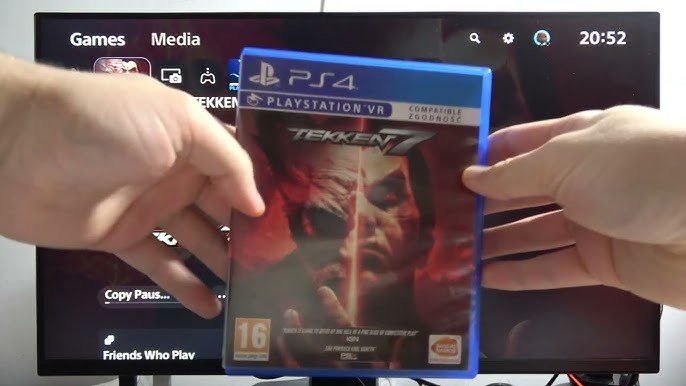
Yes, the PS5 Slim can play PS4 games.
So, you’re wondering about compatibility with the new console? Specifically, can the ps5 slim play ps4 games? It’s a common question for many gamers considering an upgrade.
The good news is, Sony designed the PS5 Slim with backward compatibility in mind. This means you don’t have to ditch your old game library when you buy the new console.
You can enjoy your favorite PS4 titles on the PS5 Slim without any hassle, meaning you can keep playing all the games you already own.

Can the PS5 Slim Play PS4 Games?
Okay, let’s get right to it! You’ve probably heard about the PS5 Slim and maybe you’re wondering if it can play your old PS4 games. It’s a great question, because nobody wants to leave their favorite games behind! The good news is: Yes, the PS5 Slim can absolutely play almost all of your PS4 games. That means you can keep enjoying your adventures, racing challenges, and epic battles even on the newer console. It’s like having two consoles in one!
The Power of Backwards Compatibility
The ability of a new console to play games from an older console is called “backwards compatibility.” The PS5 Slim, just like its bigger brother the original PS5, has this awesome feature built right in. It allows you to play a vast majority of your existing PlayStation 4 games. This is a huge deal, because in the past, when new consoles came out, you usually had to buy all new games. Now, you can bring your library with you, saving money and time.
Think of it this way: your PS4 games are like your favorite books. You wouldn’t just throw them away when you get a new bookshelf, would you? No way! You’d want to keep reading them, and that’s exactly what backwards compatibility lets you do with your games. It keeps your gaming history alive.
How Does Backwards Compatibility Work on the PS5 Slim?
So, how does the PS5 Slim pull off this cool trick? It’s a bit like having a translator built inside the console. The PS5 Slim’s hardware and software are designed to understand the instructions that PS4 games use. This allows the PS5 Slim to essentially pretend it’s a PS4 when you put in a PS4 game. It reads the game disc or downloads the digital copy, processes the game data, and then shows it on your screen just as you would expect.
This compatibility isn’t just a simple copy-and-paste operation. Sony has put a lot of effort into making sure that PS4 games run well on the PS5 Slim. In some cases, games might even run a little bit better, with smoother graphics and faster loading times compared to the original PS4.
Are All PS4 Games Playable on the PS5 Slim?
While the vast majority of PS4 games are playable on the PS5 Slim, there are a few exceptions. Sony has confirmed that over 99% of PS4 games work on the PS5 family, which includes the Slim. However, there were a handful of games that weren’t compatible at launch. This was often due to some special hardware quirks or very specific coding in those particular games. These compatibility issues are rare, but they do exist.
It’s always a good idea to check the compatibility of a specific PS4 game you really want to play on your PS5 Slim, just in case. You can easily do this by searching on the internet and checking gaming websites or forums. Most likely your game is compatible, but it’s good to double check to be certain. The PS Store also usually has a note next to games if they are playable on PS5.
Playing PS4 Games on the PS5 Slim: Physical Discs vs Digital Downloads
You can play your PS4 games on the PS5 Slim in two main ways: through physical game discs or through digital downloads. Let’s explore both of these options.
Physical Game Discs
If you have a library of PS4 games on physical discs, you can use them on the PS5 Slim with ease. Simply insert the disc into the disc drive of your PS5 Slim and the console will recognize the game. You’ll probably have to install the game to the console before you can play it, so be patient while it loads. After that, you are free to start your adventure.
- Make sure the disc is clean and not scratched to avoid any problems during installation or gameplay.
- The PS5 Slim with a disc drive is required to play physical PS4 game discs.
- Remember to keep the game disc inside the console as you will need it each time you want to play.
Digital Downloads
If you bought most of your games online through the PlayStation Store, you’re in luck! Your digital PS4 games will be available on your PS5 Slim. Make sure you log into your PlayStation account that you used on your PS4 console. You can then find your games in your game library on your PS5 Slim. Once downloaded, you can access them anytime.
- Your digital games are linked to your PlayStation account. So, use the same account you used on your PS4.
- Digital games don’t need discs, they are stored directly on the PS5 Slim’s storage space.
- Make sure you have enough space on your PS5 Slim’s storage for the downloaded games.
Enhancements for PS4 Games on the PS5 Slim
One of the cool things about playing PS4 games on the PS5 Slim is that some of them get a little bit of an upgrade. It’s not a huge change like jumping to a brand-new PS5 game, but there can be some visible improvements.
Faster Loading Times
The PS5 Slim has a much faster storage drive than the PS4. This means that many PS4 games will load much faster on the PS5 Slim compared to the original PS4. So you’ll spend less time waiting on loading screens, and more time actually playing your games! This is really good, especially when you start a new level, or jump into a new area.
Improved Visuals (Sometimes!)
In some cases, you might see slight improvements in how PS4 games look on your PS5 Slim. This is due to the more powerful hardware inside the new console. Some games may run at a higher resolution, or have smoother frame rates, making the visuals crisper and the gameplay feel more fluid. This depends on how well each game is built and optimized but some will benefit.
It’s important to know that not all games get these enhancements. Some games might look exactly the same as they do on the PS4. It really depends on the game itself and whether it can take advantage of the PS5’s improved hardware.
Using PS4 Accessories with PS4 Games on PS5 Slim
You might be wondering if you can use all your old PS4 accessories when playing PS4 games on your PS5 Slim. Well, let’s check it out:
PS4 Controllers
The DualShock 4 controller (that is the PS4 controller) will work on the PS5 Slim, when playing PS4 games only. If you want to play a PS5 game, you will have to use the DualSense controller (that is the PS5 controller), this is because the new controller has very different features. So, keep your old DualShock controller ready when you launch a PS4 game. It’s useful if you have a friend playing along and they have a PS4 controller, they will be able to play.
Other PS4 Accessories
Other accessories, like some licensed racing wheels, flight sticks, and arcade sticks that are compatible with PS4, should also work with PS4 games played on the PS5 Slim. It is important to check the individual product information to confirm compatibility.
So you can keep using your favorite gaming gadgets with the games you already own.
PS4 Games: Installation, Storage, and Play
Let’s get into the technical parts of having PS4 games on your PS5 Slim: installation, storage and play.
Game Installation Process
When you first try to play a PS4 game on your PS5 Slim, you need to install it onto the PS5 Slim’s hard drive. This is the same as when you played the game on the PS4 console. The process is simple: If you’re using a disc, put it into the console. If it’s a digital copy, find it in your library and select it to download. The PS5 Slim will take care of the rest. Once installed, you can start playing your game.
Storage Space
PS4 games, like PS5 games, take up storage space on your console. It’s important to keep an eye on how much space you are using. You don’t want to run out when you’re trying to download or install a new game. The more games you want on your console, the more storage you will need, so keep an eye on the total space your games are taking up. The PS5 Slim console comes with a good amount of internal storage, but you can add external storage to save even more games.
If you are running out of space, you can always uninstall the games you aren’t playing to free up some room. You can always download them again from the PlayStation store if you want to play them later.
Playing The Games
When you go to play a PS4 game on your PS5 Slim, simply select the game from your games library on the home screen. The PS5 Slim will launch the game, and you can play it as normal. You’ll still earn trophies, track your game stats and everything else you would expect from a PS4 game. The only major difference is that you’re playing it on a PS5 Slim.
Benefits of Playing PS4 Games on PS5 Slim
Playing your PS4 games on a PS5 Slim is a great way to relive your favorite moments and discover new games with some improvements. So let’s summarize why it’s a good idea.
- You can play almost all of your old PS4 games on your new console. You don’t have to abandon your game collection.
- Loading times are faster on the PS5 Slim compared to the PS4. Spend less time waiting and more time playing.
- Some PS4 games look and run better on the PS5 Slim with the better graphics.
- You can still use some of your old PS4 accessories, like your controllers, when playing PS4 games.
- You get to experience these awesome games again with the new console and its improved features.
In short, it’s a win-win. You get to keep your games, experience small upgrades in performance, and keep enjoying them even if you get the newest console. This ability to keep old games alive is a big deal for gamers, because we all have some games that we love and want to play again and again.
The PS5 Slim’s backwards compatibility is a big advantage for people who are just coming from the PS4 or have a great collection of PS4 games. It lets you keep playing your favorites while you start exploring new adventures on the new console. It bridges the gap between the old and the new and provides more value to the console.
So, if you’re wondering whether to upgrade to a PS5 Slim but worried about leaving your PS4 games behind, worry no more! Your PS4 game library has a home on the PS5 Slim, and will give you many more hours of fun.
PS5 Slim: Can I Use PS4 Game Disc on PlayStation 5 Slim – Play PS4 Games #sonyplaystation
Final Thoughts
Yes, the PS5 Slim plays almost all PS4 games. You can enjoy your existing library through backward compatibility. The new design doesn’t affect the PS5’s ability to run PS4 titles.
Therefore, ‘can the PS5 Slim play PS4 games’ is a definite yes. This important feature allows you to transition to the newer console without leaving behind your favorites. You can access your ps4 games easily.

