
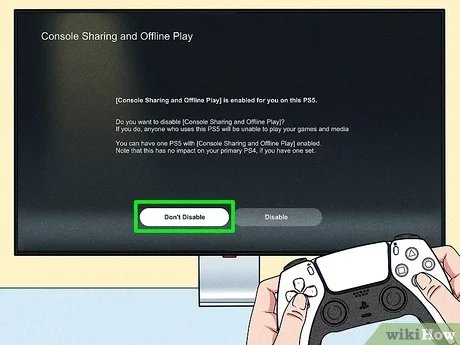
No, you cannot game share with two people simultaneously on a PS5. Game sharing is limited to one other account at a time.
Wondering if you can share your amazing PlayStation 5 game library with more than one friend? Many gamers ask “can u game share with 2 people on ps5?”. It’s a great question because who wouldn’t want to spread the gaming joy? Unfortunately, the PS5’s system only allows for one active console sharing games at any one time.
So, while you can easily set up game sharing with a pal, you’ll have to stick to just that one other person. That’s the current limitation, so you can’t simultaneously share with more than one other account.

Can You Game Share With 2 People on PS5?
The PlayStation 5 (PS5) is a fantastic console, and sharing games with friends and family can make the fun even better. But, can you share your digital game library with more than just one person? That’s a question many PS5 gamers have. Let’s dive into how PlayStation’s game sharing works and if it’s possible to share with two people at the same time.
Understanding PS5 Game Sharing
Before we tackle sharing with two people, let’s understand the basics of how PS5 game sharing works. It’s not a simple, “give your friend a disc” kind of process. Instead, it relies on the console’s primary and secondary account settings. It’s really all about letting someone else access your purchased games. Think of it like giving a guest permission to use your stuff, but with digital video games.
What is Primary and Secondary Console?
When you first set up your PS5, you are asked to activate it as your “primary console”. This essentially means, that console is the main one where you play. Any account on your primary console can play the games you purchased from the PlayStation Store, plus anything you have on disc.
So, if your brother wants to play the games you downloaded on your PS5, he can, without having to buy them for his own account. It’s super convenient. Now, every other PS5 where you use your account will be a secondary console. On a secondary console, only your account can play your games. If someone else wants to play the games that you purchased, they would need to log into your account.
How Game Sharing Works
Here’s how game sharing works in a simple steps:
- Primary console: Your main PS5. All accounts on this console can play games you own.
- Secondary console: Any other PS5 where you log into your account. Only your account can play your games.
The Reality of Sharing With Multiple People
Now, let’s get to the heart of the matter: Can you share with two people at the same time? The short answer is: not in the way you might think. The PS5 game sharing system is designed to allow only one other person access to your library at a time. It’s all controlled by the primary console setting.
Why it’s Limited to One
The way Sony has designed the game-sharing function is tied to the “Primary Console” setting. When you set a PS5 as your primary console, that console, and any users on it, can play your games. However, your account can only be a “primary” on one console at a time. When you want to set up another console for sharing, you have to change which console is your primary. This process automatically removes the first console from being your primary, meaning that sharing on the first console will no longer work.
This limitation is a deliberate design choice by Sony. It’s their way of protecting game sales. If everyone could share with multiple people, fewer games would be purchased. It’s similar to how a movie streaming service allows users to watch in the same house, but not across multiple homes on one subscription.
The “One Primary Console” Rule
It’s important to understand this “one primary console” rule. Here is a practical example:
- You have your PS5 (Console A), which is your primary console. Your family can play all your games on it.
- You have a second PS5 at your friend’s house (Console B), where you log in with your account and designate that as your primary. This now allows your friend to play the games you own. However, when you do this, you remove the primary console status from Console A. Now, the people on your original console, your family, won’t be able to play your digital games.
This system doesn’t allow you to have two consoles acting as “secondary” consoles for other users at the same time. That’s why you can’t simply share with two people at once.
Scenarios and How They Work
Let’s look at some common scenarios to make this clearer:
Scenario 1: Sharing with One Friend
You have a PS5 at home, and you want to share with a friend. Here’s what you do:
- Log in to your account on your friend’s PS5.
- Go to settings and activate your friend’s PS5 as your “Primary Console”.
- Your friend can now play your games on their PS5.
- You can still play your games on your PS5 with your account.
This allows one person other than you, to play your games. Remember that if you change the primary console again to another PS5, then your friend will lose access to your games.
Scenario 2: Trying to Share with Two People
You have a PS5 at home and try to share with two different friends. This is where the problem starts:
- You set up your first friend’s PS5 as your Primary Console. Your first friend can now play your games.
- You then set up your second friend’s PS5 as your Primary Console. The first friend, can no longer access your games, because the second friend’s console is now the primary.
- Your family at home cannot play your games, as it is no longer your primary console.
As you can see, the system limits sharing to just one person outside of your household.
Alternative Ways to Share Games (Sort Of)
While you can’t share with two people at the same time, there are some alternative ways you can sort of “share” the experience. These are not exactly game sharing in the technical sense of the word, but they can provide similar benefits:
Account Sharing
This involves sharing your entire account information (username and password) with someone else. It’s technically against the PlayStation Network’s terms of service and is not recommended, because it violates Sony’s terms of service. If caught by Sony, your account could face repercussions like suspension or even permanent bans. Furthermore, it’s a security risk to give your login details to anyone else, as they could potentially make purchases or access other sensitive information on your account.
Physical Game Discs
This is the classic way of sharing. If you have physical games on disc, you can lend them to friends. However, this doesn’t let multiple people play at the same time, as you will need to hand over the disc each time.
Playing Together Online
If you and your friends have the same game, you can play together online. You may need to buy the game for each of your accounts, however, you can enjoy playing together. It’s not direct game sharing but allows you to have fun together.
Play Together on One Console
If you have friends over, you can take it in turns to play on a single console. It’s not the same as having access on their own consoles, but it’s still fun. You can take turns, or play two-player games together using additional controllers. It’s a nice way of enjoying video games together in the same physical space.
Things To Keep in Mind
Before you try to share your games, consider these points:
- Digital Games Only: This game-sharing only applies to digital games you’ve purchased from the PlayStation Store. Game sharing doesn’t apply to disc games.
- Primary Console Changes: If you change your primary console, whoever you were sharing with before will lose access to your games. They can only access your library if you are their primary account holder.
- Online Access: Game sharing lets other accounts access games offline, but only you can access your games online.
- Account Safety: Don’t share your account credentials, as it could lead to security issues. Stick to legitimate game sharing methods.
The Future of Game Sharing?
The gaming landscape is always changing. While the current PS5 game sharing rules are limiting, it’s possible that Sony could introduce changes or new options in the future. As gaming moves more into digital, and cloud-based systems evolve, we could see different ways to share games and play with our friends. As of now, the limitation of sharing with only one other person is in effect, and we must all adhere to these terms.
While the current limitations might be a bit disappointing for those hoping to share with multiple friends, knowing the rules and boundaries can help you manage your expectations. As Sony continues to update the PlayStation platform, we hope to see more flexibility. However, until then, stick to the official methods to ensure a great gaming experience.
How to GameShare on PS5 – OverSimplified (2024)
Final Thoughts
Ultimately, you can game share with one other person on a PS5, not two. This feature allows sharing your digital library. Only one other account can access your games at a time.
Therefore, ‘can u game share with 2 people on ps5’, the answer is no. The system only supports one active game share partner. Understand this limitation when planning your gaming with friends.

