
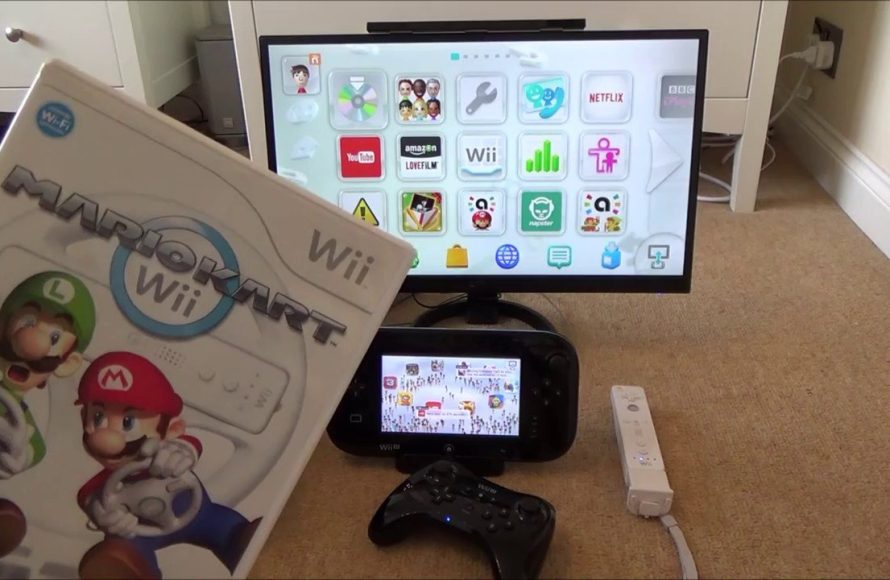
No, the Wii cannot play Wii U games.
Ever wondered if your old Wii console could handle the newer Wii U titles? It’s a common question for gamers who have both systems. Many assume there might be some compatibility, but can wii play wii u games is a question with a simple, direct answer.
The Wii U uses different disc formats and hardware architecture compared to the Wii. This makes it impossible for the Wii to read and process Wii U game discs. They simply are not designed to interact.

Can Wii Play Wii U Games? Understanding Compatibility
Let’s dive right into the question that many gamers have pondered: can you play Wii U games on a Wii console? The short and direct answer is, no, the original Wii cannot play Wii U games. These are two distinct gaming systems with different hardware and software, making them incompatible. It’s like trying to play a Blu-ray disc on a regular DVD player – it just won’t work. However, there’s more to the story than just a simple “no.” Let’s explore the reasons behind this and what it all means for you as a gamer.
The Key Differences: Wii vs. Wii U
To understand why Wii U games don’t work on the Wii, we need to look at the fundamental differences between these two consoles. They aren’t just different generations; they’re built differently. Think of them as different models of cars – they might look similar, but their engines and inner workings are unique.
Hardware Disparities
The Wii, released in 2006, used a PowerPC-based processor and a graphics chip designed for its time. It was famous for its motion controls and innovative gameplay. It ran games from standard DVDs.
The Wii U, launched in 2012, was a significant upgrade. It came equipped with a newer, more powerful IBM Power-based processor and an AMD Radeon graphics card. This hardware allows the Wii U to display much more detailed graphics at higher resolutions. It used proprietary optical discs, which are different from Wii’s DVDs.
Processor Architecture
- Wii: Utilized a PowerPC-based processor which was cutting-edge for its time.
- Wii U: Used a different generation of the IBM Power processor, which was more advanced and powerful.
Graphics Capabilities
- Wii: Had graphic capabilities that were good for its release period but comparatively lower.
- Wii U: Featured an AMD Radeon GPU, enabling a significant leap in graphics and resolution.
Disc Format
- Wii: Used standard DVDs for its games.
- Wii U: Used proprietary higher-capacity optical discs with different data structures.
Software and Operating System
Beyond the hardware, the software or operating system each console uses is completely different. Think of them like different languages. The Wii speaks one language, and the Wii U speaks another. The Wii U games are coded to work within the parameters of Wii U hardware and its specific operating system. The original Wii’s system just won’t understand this new language of the Wii U games.
The Wii runs its own specific operating system, tailored for its processor and memory capabilities, while the Wii U’s operating system is designed to support its advanced hardware and features.
This difference means that a game written for the Wii U wouldn’t be able to run on the Wii without massive alterations. These alterations are not practical or feasible, because the systems are just that different.
Backward Compatibility: A One-Way Street
Okay, so we’ve established that the Wii can’t play Wii U games. But what about the other way around? This is where it gets interesting: the Wii U actually has backward compatibility with Wii games. This means you can play your old Wii games on a Wii U console.
How the Wii U Achieves Backward Compatibility
The Wii U was designed with the ability to run older Wii software built in. It’s like a built-in emulator that can mimic the original Wii’s system. When you insert a Wii game disc into a Wii U, the console essentially boots into a “Wii Mode.” This mode is designed to operate exactly like a Wii console, enabling you to play your old favorites.
Here’s how it works:
- Wii Mode: When a Wii game disc is inserted, the Wii U switches to a special mode that replicates the Wii’s environment.
- Virtual Wii Console: The Wii U hardware is capable of running the original Wii operating system and game data.
- Limited Upgrades: While the games aren’t upscaled or enhanced, they play just as they did on the original Wii.
Keep in mind that while the Wii U can play Wii games, it won’t enhance the visuals of those games to the standards of Wii U games. You’re still playing the game as it was intended on the original hardware, but on a more powerful machine.
Why the Wii Lacks Wii U Compatibility
Now you might be wondering, “Why didn’t Nintendo make the Wii compatible with Wii U games?” There are several technological and business reasons for this decision.
Technological Limitations
As discussed, the Wii’s older hardware simply couldn’t handle the demands of Wii U games. The processing power, the graphics capabilities, and the memory were not up to the task. Trying to make the Wii run Wii U games would be like trying to run a modern computer game on a very old laptop – it’s just not powerful enough.
Cost and Development
Creating the kind of backward compatibility for Wii games on the Wii U required a very specific design, which was included during the creation of the Wii U. Attempting to make the Wii play Wii U games would require significant modification to the Wii’s design and architecture, which was not a cost-effective or practical endeavor for Nintendo. They instead decided to focus on moving the gaming experience forward with their new console.
Additionally, the cost of retrofitting older hardware to play newer games would have likely made the Wii more expensive to produce and would have been technically challenging.
Driving Sales of the New Console
Another reason that’s related to business is that if the original Wii could play Wii U games, there would have been less incentive for players to upgrade to the newer console. One of the key strategies for selling new consoles is to offer something new and exclusive that players can’t get on older models. That’s exactly what Nintendo did by creating games exclusive to the Wii U. It encouraged players to move to the Wii U and experience games with better graphics and more features.
This is a common practice in the console industry – new systems are usually designed with limited to zero backward compatibility of newer games to push adoption of the latest technology. It was a way for the company to move to the next generation.
The Impact on Game Collections
So, what does this all mean for your game collection? If you have both Wii and Wii U games, it means you need both consoles to play them. It also means you can use your old Wii discs on a Wii U, which is great for nostalgia. Let’s discuss how to play your favorite titles.
Playing Wii Games on a Wii U
If you have a Wii U, you’re in luck, it can play your entire collection of Wii games! Here’s how to do it:
- Insert the Disc: Place your Wii game disc into the disc slot on your Wii U.
- Wii Menu: The Wii U will display the original Wii Menu on your TV screen.
- Start Playing: Select the game from the menu and start playing.
You can use Wii Remotes and nunchucks to play Wii games on your Wii U. In some scenarios, it could require the Wii Sensor Bar to detect motion controls. The sensor bar can plug into the Wii U for the use of motion controls.
Playing Wii U Games
As mentioned before, the Wii U games will not work on the Wii console. You will need the Wii U console for the Wii U game to operate.
Alternative Solutions and Emulation
While there’s no official way to play Wii U games on the original Wii, there are alternative solutions that are worth mentioning. These alternative methods often tread into gray areas legally and may require advanced technical skills. Emulation software also exists for the Wii U games, which allows you to play Wii U games on a PC. While this may sound fun, it also has many hurdles.
Emulation of Wii U Games
Software for emulating the Wii U does exist. These emulators allow you to play Wii U games on a PC. However, there are some caveats to using emulation software:
- System Requirements: You need a powerful computer to run these emulators.
- Game Compatibility: Not every game works perfectly on every emulator. Some games have bugs and other graphical issues.
- Ethical Concerns: Downloading emulators or game files is often illegal, so it’s best to be aware of these issues.
- Technical Skills: Emulating these games is not as simple as starting them on a console. It requires a decent understanding of software and hardware.
Keep in mind that emulation should be used responsibly and ethically.
A Look at the Future of Gaming
Understanding why consoles are not backward compatible is not just about the Wii and Wii U. It is useful to understand how future console generations might work. New console systems, such as the Nintendo Switch, continue to evolve with each passing generation. Understanding how older systems work is very helpful for understanding the future of console gaming.
By now, you should have a good grasp on why the original Wii can’t play Wii U games. It comes down to the distinct hardware, software, and business decisions made by Nintendo. The good news is that if you have both a Wii and Wii U, you’ll be able to play games from both systems. While the original Wii cannot play Wii U titles, the Wii U does provide backward compatibility for all Wii games. You will need both consoles to experience the whole libraries of each system.
Can the Wii play other games?
Final Thoughts
The Wii cannot play Wii U games. The two consoles use different disc formats and system architectures; therefore, games are incompatible. You must have a Wii U console to play Wii U titles.
Wii games will play on the Wii U, thanks to backwards compatibility, but this feature does not work the other way around. The original question, ‘can wii play wii u games’ is definitely answered with a no.

