
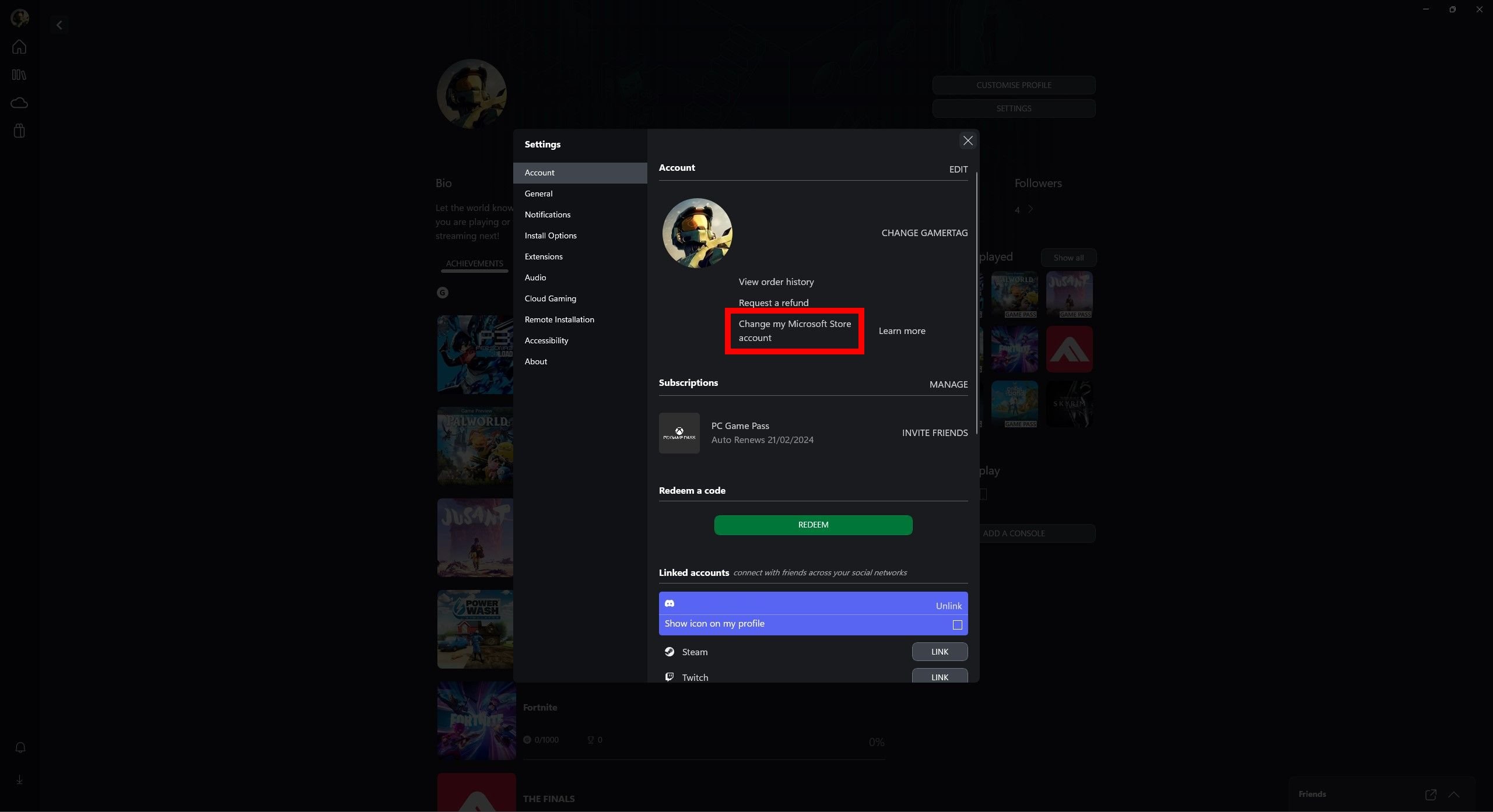
No, you cannot directly game share PC Game Pass in the same way as console game sharing.
Ever wondered if you could share your PC Game Pass with a friend? It’s a common question for gamers wanting to enjoy the library together. The process isn’t as straightforward as it might seem with console sharing. The straightforward sharing functionality present on Xbox consoles isn’t mirrored on the PC platform.
While you can have the subscription on multiple devices using the same account, this doesn’t mean simultaneous gameplay is possible. This limitation directly impacts how you experience PC Game Pass with others. So, if you are wondering can you game share pc game pass, the answer is not a straightforward yes.

Can You Game Share PC Game Pass? Exploring the Possibilities
Okay, so you’re super excited about PC Game Pass, and you’ve got a friend or family member who also wants to play all those awesome games. The big question pops up: can you share the PC Game Pass magic? The answer isn’t a simple yes or no, unfortunately. It’s more like a “sometimes, with a few twists.” Let’s dive deep into how game sharing with PC Game Pass actually works, and what you need to know to get it right.
Understanding the Basics: How PC Game Pass Works
First things first, let’s talk about what PC Game Pass is. It’s a subscription service from Microsoft that gives you access to a library of games you can download and play on your PC. Think of it like Netflix, but for video games! You pay a monthly fee, and you get to explore a whole bunch of different titles. But unlike physical games, PC Game Pass games are tied to your specific Microsoft account.
The Key Player: Your Microsoft Account
Everything with PC Game Pass revolves around your Microsoft account. This is the email address and password you use to log into your Windows computer, the Xbox app on PC, and other Microsoft services. Your Game Pass subscription is directly linked to this account. This is crucial because it dictates who can play the games under your subscription.
How Does Sharing Work in the Xbox Ecosystem?
Microsoft has a system in place for sharing games on Xbox consoles, it’s called “Home Xbox”. The idea is, you set one console as your “home” console, and other users on that console can play your games and use your subscriptions even when you’re not signed in. This is perfect for families. But the situation on PC is a little different, and this “Home Xbox” setting doesn’t directly translate to PC Game Pass.
The Challenge: PC Game Pass and the Microsoft Store
Here’s where things get tricky. Unlike the Xbox console, PC games from Game Pass are downloaded and launched through the Microsoft Store app or the Xbox app on PC. These apps are closely tied to your Microsoft account. This system makes it more challenging to share games the same way you do on an Xbox console.
Account-Based Access: Why It’s Difficult to Share Simply
Because the games are tied to your specific account, simply logging into another PC with your account won’t allow someone else to play on their own account, it would mean they are playing on your account. This is different than when you share physical copies of games. There is no “game disc” involved, and this access is linked directly to the account that pays for Game Pass. This is why the term “sharing” is a bit nuanced.
The (Limited) Options: How You Can Share (Kind Of)
Alright, so straight-up sharing isn’t possible, but there are a few workarounds and scenarios that allow some form of sharing, with different degrees of success and different limitations.
Playing on the Same PC, Different Accounts
If you and another person on the same computer want to play a game that requires separate profiles, you can log into your account, download a game with your Game Pass, then log out, and then the other person can log into their own Windows user profile (not Microsoft account). Now this other person can start the game but when you try to access the game, you won’t have access to its online or cloud feature, because you will have to access these with the account that purchased the game. This means if you want to play online multiplayer games, then both the users will need separate accounts and PC Game Pass subscriptions.
The “Sign-In Swap” Method: A Tricky Solution
There’s a workaround that some people try, but it’s not ideal, and has a lot of downsides. It involves you signing into the Microsoft Store with your account (the one with Game Pass) so the other person can download the game. Then, you sign out, and they sign into their own account to play the game. However, this can cause issues with game saves, achievements, and online play. Plus, it’s a hassle to log in and out all the time, and it’s not the way the system was designed to work.
- This method is often buggy: Games may not launch or will require you to log in with the purchasing account again
- It’s inconvenient: Constantly swapping accounts is annoying and tedious.
- Game saves and progress might not be saved: Game saves and progress are tied to the Microsoft account used to initially launch the game.
- No online play: This method only works for single-player games. Online games require the user to have the game license, which is associated with the game purchasing account.
Sharing with Xbox Cloud Gaming (Ultimate Tier)
If you have the Xbox Game Pass Ultimate tier, you get access to Xbox Cloud Gaming. This is where you stream the games from Microsoft’s servers to your device. This allows more flexibility in some ways. If you have access to cloud gaming, you can theoretically stream games on a different computer or other devices, but each person still needs to be using their own Microsoft account to play the game.
- Play on multiple devices: You can play your Game Pass games on PCs, tablets, phones, and even some smart TVs using cloud gaming. But, again, each user needs their own account and Ultimate subscription.
- No sharing between accounts: You can’t share the cloud gaming feature across multiple Microsoft accounts. It’s tied to your own individual subscription and account.
The Family Sharing Idea (but not the way you think)
Many people hope that Microsoft will create a true “Family Plan” for PC Game Pass, similar to how other subscription services work. Currently, this doesn’t exist. The closest concept we have, is that if one person signs in with their account on the computer, other local users can also play games through their user profiles, when their accounts are logged out, but only with the limitation that this method works with offline games. It is different from using an independent Microsoft account with its own subscription.
Why Can’t You Easily Share PC Game Pass?
You might be wondering why it’s so difficult to share PC Game Pass compared to other things. Here are some of the main reasons:
Piracy Prevention
One of the key reasons behind the account-based system is to help prevent piracy. If games could be easily shared, it would be difficult for the company to control who has access. It also prevents you from purchasing a single copy of the game and reselling the license to others. Microsoft is protecting the game developers as well as their service.
Subscription Model Focus
The subscription model for PC Game Pass is designed around individual access. It’s not intended to be easily shared between multiple users as a primary feature. This encourages more users to subscribe individually, and keep paying for subscription over a period of time, and this is beneficial for the company, as it generates steady revenue streams.
Technical Challenges
Technically, managing game licenses and rights across different accounts and PCs can be very complicated. The system needs to track who owns what and where they can play to ensure fairness, and this is a complex process. It would also be more complicated if they allowed you to share your entire game library across multiple accounts. So this system is easier to maintain for Microsoft.
Looking to the Future: What Could Change?
While true game sharing isn’t currently a feature, we know Microsoft is always looking at ways to improve and develop their service. Here are some ways the situation could change in the future:
Potential for a Family Plan
Many users would love to see a “family plan” for PC Game Pass, similar to how other services like Netflix or Spotify offer. This would allow multiple accounts within the same household to access the game library under one subscription. This could happen in future if they get enough request.
Improved Sharing Features
Microsoft could implement better sharing features that are designed to work on PCs and accounts in a household. This would still have some limits, but be a more user-friendly system than what exists now. This might include family groups that are linked through the Microsoft system.
Focus on Cloud Gaming
As cloud gaming gets more refined, it could become a better way to “share” the experience on different devices, while still preserving the individual account focus. This could even allow Microsoft to develop a system where you don’t have to install the game for others to play with your subscription, but this is just pure speculation and possibility.
The Verdict: PC Game Pass Sharing Isn’t Straightforward
To summarize, directly sharing PC Game Pass across multiple Microsoft accounts isn’t really possible the way you might hope. You can play on the same computer with different user profiles, but it has limitations. You can cloud game on different devices with your own account. You can try account swapping, but it’s not a smooth experience. The best current way to use PC Game Pass is with your individual Microsoft account. Hopefully, Microsoft will eventually add some better ways to share in the future.
Ultimately, the best approach now is to have each player obtain their own PC Game Pass subscription, so they can fully take advantage of the service with all its features, online, achievements and cloud gaming. While it may not be perfect, PC Game Pass still offers great value with lots of great games to play.
How to Game Share Game Pass on Microsoft Store Windows 10 and 11
Final Thoughts
Game sharing PC Game Pass presents a challenge. Microsoft accounts control access, meaning direct sharing is not straightforward like on consoles. One person’s subscription typically cannot be shared among multiple PC users.
However, family settings might allow for some level of account management, depending on your setup. This method may indirectly offer limited shared access. So, the answer to the question ‘can you game share pc game pass’ is mostly no in its traditional form but through very limited alternative workaround.

