
Yes, you can game share with 2 people, however, this usually requires specific account and console configurations, and the number of simultaneous players might be limited.
Ever wondered if you could share your digital game library with more than one friend? Many gamers ask, “can you game share with 2 people?”. It’s a common question, since everyone wants to maximize their gaming experience without overspending.
The answer is often yes, but it’s more complex than just handing out your password. Different platforms have distinct rules and limitations on how game sharing works. This article will dive into the details.

Can You Game Share With 2 People? Let’s Explore!
So, you’ve got two buddies, and everyone wants to play the same awesome game without buying three copies? You’re wondering, “can you game share with 2 people?” It’s a great question, and the answer isn’t always a simple yes or no. It really depends on the gaming platform you’re using. Game sharing allows you to share your digital games with others, so you don’t have to purchase the same game multiple times. Let’s dive into the details of how this works on popular systems like PlayStation, Xbox, Nintendo Switch, and even on PCs. We’ll explore the possibilities and limitations of sharing your games with not just one, but two other people.
Game Sharing on PlayStation: The Basics
PlayStation allows game sharing using a feature called “Console Sharing and Offline Play” on the PS5, and “Primary PS4” on the PS4. This lets one other person play games from your digital library. Here’s the trick: you can only have one primary console activated for your account at a time. The primary console allows any user on that console to play your digital games. If you have a friend you want to share with, you’ll make their PlayStation the primary console for your account, and then they can access your games on that console, even when you’re not logged in.
How to Share Games on PlayStation
- On PS5:
- Go to Settings.
- Select “Users and Accounts.”
- Go to “Other.”
- Select “Console Sharing and Offline Play.”
- Choose to “Enable” sharing.
- On PS4:
- Go to Settings.
- Select “Account Management.”
- Choose “Activate as Your Primary PS4.”
- Select “Activate.”
It’s worth remembering that if your friend’s console is the primary console for your account, you can still play your games on your console. However, you need to be connected to the internet and signed into your PlayStation Network account. This is because your own console becomes the secondary console, and it needs to verify that you own the games.
Now, about sharing with two people. You can’t directly make two different consoles the primary console for your account. This means PlayStation officially only supports game sharing with one friend, not two. Some people find creative workarounds using multiple accounts and different console configurations, but they can be risky. Also, these workarounds might not adhere to the PlayStation’s terms of service, potentially putting your account at risk. The best official way remains with one shared console.
Xbox Game Sharing: A Slightly Different Approach
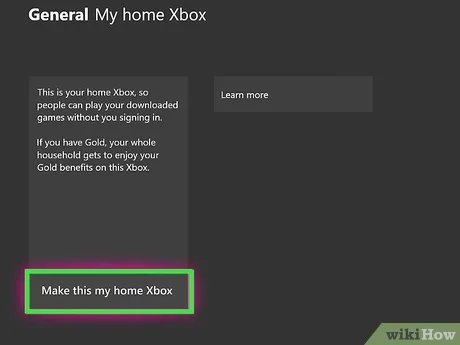
Xbox game sharing operates similarly to PlayStation, with the “Home Xbox” feature. When you set an Xbox console as your “Home Xbox,” anyone who signs into that console can play your digital games, even when you’re not logged in. As with PlayStation, you can only have one Home Xbox at a time. This makes sharing with one other person straightforward. You might be wondering, “can you game share with 2 people on Xbox?”. Officially, just like PlayStation, the answer is no, not directly with two others at the same time using only one account.
Setting Up Game Sharing on Xbox
- Press the Xbox button to open the guide.
- Go to “Profile & system.”
- Select “Settings.”
- Go to “General,” and then “Personalization.”
- Select “My home Xbox.”
- Choose “Make this my home Xbox.”
When you designate another console as your Home Xbox, your account remains able to access your digital games. But remember, it needs an internet connection to verify your ownership. The biggest difference compared to Playstation game sharing is how this system also effects game pass titles. Game pass, the subscription service of xbox, works well with the Home console feature, meaning anyone using the Home console can access the Game Pass library even if they do not have a subscription, as long as the owner of the home console does. This is a very beneficial aspect of xbox game sharing and a huge value for families and friend groups that like to play together.
Sharing with two people officially is not possible on Xbox. You can only set one console as the “Home Xbox”. Sharing with more than one friend will require creative workarounds or using additional game licenses for those extra people. These workarounds can be inconsistent, and will not always allow you to play at the same time. This means they might not always provide a great experience, and can sometimes lead to issues. It’s important to use game sharing features in accordance with platform policies to maintain your account status and gaming pleasure.
Nintendo Switch: Family Fun and Game Sharing
Nintendo Switch handles game sharing differently. Instead of using a ‘home’ console system like Sony and Microsoft, the Nintendo Switch focuses on user profiles and associated accounts. Each Nintendo account is linked to a single Nintendo Switch. The good news is that digital purchases are tied to your Nintendo account, not a particular console. This means you can download your digital games on any Switch that you’re signed into.
How Game Sharing Works on Nintendo Switch
- Primary Console: The first console you download a digital game on is designated as the primary console. On this console, anyone can access and play games you purchased with your account. You do not need to be logged in to use your purchased games on the primary console.
- Other Consoles: On any non-primary Switch console where you’ve signed in with your account, you can download and play your games. However, unlike the primary console, you do need to be actively signed into your account to access the games.
Here’s the key difference: While you can download and play games on multiple Switches, only the primary console allows any user to play your games. On other consoles, only you, the account holder, can play the games you bought. This setup allows a form of game sharing, as any users on your primary console can enjoy your library, but it has limitations if the intention is to share across three accounts.
So, “can you game share with 2 people” on Switch? Directly, not exactly, but it’s closer than PlayStation and Xbox. Imagine your family has three Switches. You can make one Switch your primary console. Now, anyone in your family can play your games on that console. The other two Switches, where you are logged into your account can access your digital library but only when you are logged in. While it does not allow the use of games by any user on two other consoles, it does offer some level of simultaneous access to digital games. Nintendo’s approach makes more sense for family sharing on multiple devices.
PC Game Sharing: Different Platforms, Different Rules
On PCs, game sharing is managed through various digital storefronts. The two most popular are Steam and the Epic Games Store. Each platform has a slightly different way of doing things. Let’s take a look at each one.
Steam Family Sharing
Steam offers a feature called “Steam Family Sharing.” This feature enables you to share your library with a group of selected people. This is usually perfect for family members, or a small group of close friends. You can share your entire library, or specific games, so they can play the titles without having to purchase each individual game. It’s an efficient way of letting your friends play your games, especially when you play different genres. However, the way that Steam Family Sharing works often limits playing together.
Steam Family Sharing has a few rules to note. First, only one person can play games from the shared library at a time, even if they are playing two different games. If you’re playing a game in your library, the person using the shared library can’t play anything until you’re done, they will be kicked out. Steam usually gives them a grace period so they can save before they are removed from the game. Also, family sharing requires you to be logged into your account to use your purchased games, meaning that you can only play your games on a non-primary device while logged into the same Steam account.
So, “can you game share with 2 people” on Steam? Yes, Steam allows it, in a way. You can allow access to multiple users, but only one of them will be able to use your games at any given time. This makes it less ideal for groups that want to play multiplayer games simultaneously from one library.
Epic Games Store and Game Sharing
The Epic Games Store doesn’t have a formal game-sharing feature like Steam Family Sharing. Instead, the Epic Games Store lets you download your purchased games on any PC where you’re logged into your account. This means you can access and play your games on multiple computers, but everyone who is playing the game must be logged into the same Epic account. This, similar to Steam’s implementation, is not ideal for sharing with multiple people that want to play simultaneously from the same library.
Can you share with two other people simultaneously? Technically, you could. However, this means that everyone needs to log into the same account. This creates lots of practical problems if you want to play simultaneously. Multiple people using the same account is generally not recommended, as it can lead to account problems. It also limits any individual personalization of settings, achievements, and progress. This makes it tricky to share with a group.
Other Considerations When Sharing Games
Regardless of the platform, a few things are important to remember when sharing games with friends:
- Internet Connection: Most platforms require an internet connection to verify game ownership when you’re not using the primary or home console. This means that if your internet goes down, you might not be able to play games from your shared library.
- Account Security: Sharing your account information can pose risks. Make sure you trust the people you’re sharing with and that you understand what it means to share your account information.
- Terms of Service: Always comply with the platform’s terms of service. Some workarounds to bypass the official limitations might get your account suspended or banned.
- Simultaneous Play: As we’ve discussed, many platforms do not allow more than one person to access a library at the same time. Make sure you understand the limitations when it comes to playing at the same time.
So, while the desire to share your game collection with multiple people is understandable, the various platform limitations can cause problems. Each platform has its own methods of implementing its game sharing services. Before deciding to share your digital game licenses, it is essential to understand the potential limitations and risks involved.
The core question of “can you game share with 2 people” requires a nuanced answer. Directly sharing games simultaneously with two others from a single account is generally not possible with the official features of most gaming platforms. Although there are some workarounds, they carry their own risks and downsides. It is better to understand your chosen platform’s rules regarding sharing and follow the best practices for sharing games safely with friends. You may find that the best option might involve individual game licenses, or a subscription to a game service that does allow multiple users. Always prioritize the security of your account and the enjoyment of everyone involved.
How to Game Share on Xbox ~The Easy Way~
Final Thoughts
Game sharing works great for one friend, but unfortunately, can you game share with 2 people is a common question with a straightforward answer: no. Platforms generally limit game sharing to a single other account. This is to prevent abuse and ensure fair access to purchased content.
Therefore, if you wish to share with more people, you must find another method. Game sharing with multiple users through standard methods isn’t possible. You can explore family account features for some platforms.

