
Yes, you can gift PS4 games, but it’s usually done through purchasing a digital code or a physical copy.
Want to share the fun with your friends? Many people ask, can you gift PS4 games? It’s a great thought to give someone their favorite PS4 title.
The process isn’t always straightforward like sending a digital file. Typically, you buy a code or the physical game itself. Then, the recipient redeems the code or plays the disc.

Can You Gift PS4 Games? A Deep Dive into PlayStation Gifting
So, you want to give a friend the gift of awesome PlayStation 4 gaming? That’s a fantastic idea! But how do you actually do it? It’s not as simple as handing over a wrapped box like the old days. Let’s explore all the ways you can share the fun and excitement of PS4 games with your buddies.
Digital vs. Physical: The Two Ways to Gift Games
When talking about gifting PS4 games, we need to remember that there are two main types: digital games and physical games. Each type has its own way of being gifted, and understanding the difference is key. Let’s break it down:
Physical Games: The Traditional Approach
Physical games come in a box, usually with a disc or cartridge inside. These are what you might think of as classic video games. Gifting these is straightforward. Here’s how it usually works:
- Buy the game: Head to your favorite store (or online retailer) and purchase the game. Make sure it is for the correct PlayStation 4 region, as games from different regions might not work on your friend’s PS4 console.
- Wrap it up (optional): Add some gift wrap and a bow to make it look extra special.
- Give the gift: Hand it over to your friend or loved one!
The benefit of physical games is that you have something to hold in your hand. You also might be able to find them second-hand and save some money. However, there are a few drawbacks, like having to go to a store and worry about keeping the disc safe. If you are thinking about gifting a used game, make sure the disc is in good condition. Scratches can make the game unplayable. The receiver would also need a physical game disc slot available on their ps4. The most obvious drawback with physical game is the fact that you can’t gift them instantly. There will always be a wait time.
Digital Games: The Modern Method
Digital games are downloaded directly onto your PS4. You don’t get a box or disc, but this approach comes with its own advantages, including being able to play games instantly and not having to keep physical copies safe. Digital game gifting works a bit differently than physical gifting, and it might seem a bit confusing at first, but don’t worry, we are going to explain all this below.
Gifting Digital PS4 Games: Navigating the PlayStation Store
The primary way to gift digital PS4 games is through the PlayStation Store. However, it’s not quite a direct ‘send a game’ button like you might expect. Here’s the breakdown:
Using PlayStation Store Gift Cards
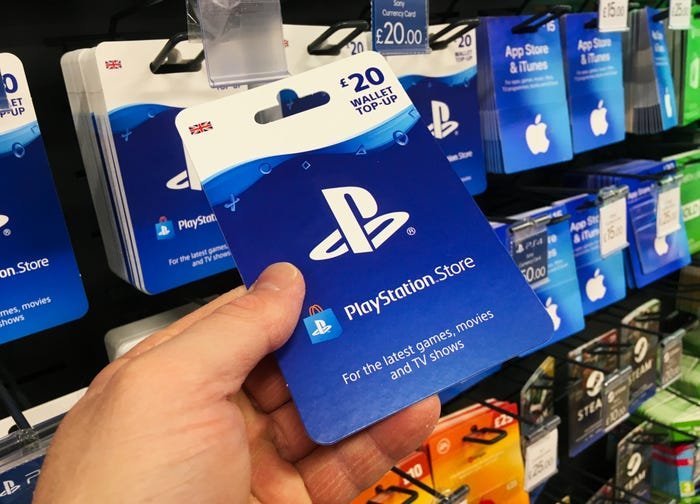
One of the easiest and most common ways to gift a digital game is by purchasing a PlayStation Store gift card. This is not quite the direct gifting, but it serves the purpose. Here’s how it works:
- Buy a Gift Card: You can find PlayStation Store gift cards in many stores and online. They come in different amounts like $10, $20, $50, etc.
- Give the Gift Card: You give the gift card to your friend. They can then redeem the code on their PlayStation 4.
- Your Friend Buys the Game: Your friend can use the credit on the gift card to buy any game they want from the PlayStation Store.
PlayStation Store gift cards are great because they are easy to purchase and can be found at most major retailers. They also let the receiver have the freedom to pick the game that they want. It is a great choice if you are not sure which game your friend would want to play.
While this method doesn’t directly gift a specific game, it lets the receiver choose exactly what they want. It is a great solution if you aren’t certain which game they would want to play. There is a small disadvantage that the receiver can spend the gift card on other things other than games, like DLC or PSN subscriptions.
Direct Gifting via the PlayStation Store (Limited)
Unfortunately, directly gifting a specific digital game through the PlayStation Store isn’t always available. Sony has not made it very easy to gift games directly. While the PlayStation store sometimes runs promotions where direct gifting is available, it is not a constant feature. This means that instead of directly gifting a game from your library to your friend’s account, you can only gift them a PSN wallet gift card that they will redeem and use to purchase the game themselves.
Sharing Digital Games via Account Sharing: A Word of Caution
Some people try to share games by using account sharing. This involves giving your account details to your friend, which would allow them to download games from your library. While this may sound tempting, it has a few major drawbacks:
- Security Risk: Sharing your account details can put your personal information at risk.
- Terms of Service Violation: It goes against PlayStation’s terms of service and can lead to a ban.
- Not Practical: You can’t play games on your account at the same time when your friend is using your account to play games.
Account sharing is not a reliable way to share games, so you would be better off going with the gifting options mentioned above.
Understanding Region Locks and Compatibility
Before you gift any game (physical or digital), it’s really important to know about region locks. What’s a region lock? It’s a way game publishers make sure games are only used in certain parts of the world.
What are PlayStation Regions?
PlayStation consoles and games are usually divided into regions like:
- Region 1 (North America): United States, Canada, Mexico, etc.
- Region 2 (Europe): Europe, Middle East, Africa, etc.
- Region 3 (Asia): Japan, Hong Kong, South Korea, etc.
If a game is from the region 1 and the receiver’s PS4 is in region 2, it might not work. While some games are region free, always be sure to check for region compatibility when gifting a ps4 game. The region is usually noted on the game’s packaging or listed in the game’s digital store page.
Why are Regions Important?
Region locks exist for a few reasons, including:
- Pricing Differences: Games might cost different amounts in different regions.
- Content Regulations: Some countries have rules about what games can include.
- Language Settings: Games may be made to work in specific languages that are used by the intended region.
Always make sure the game you’re gifting is compatible with the region of the recipient’s PlayStation 4 console. If you don’t, it may cause the game to not work.
Tips for Gifting PS4 Games Like a Pro
Want to make sure your gift is a hit? Here are some tips to keep in mind:
Consider the Recipient’s Preferences
Before buying a game, think about the types of games your friend likes. Are they into action, adventure, sports, or puzzle games? If you know they’ve been wanting a particular game, that would be the perfect choice. If you are not sure of the game that they might want, always consider the gift card option so that they can choose a game they like.
Check for Special Editions and Bundles
Sometimes, games come in special editions with extra content, like additional items or characters. These can be a bit more expensive but make for a better present. The same is true for game bundles, which offer two or more games together, which usually cost less than buying the games individually.
Don’t Forget About DLC
DLC stands for ‘downloadable content.’ This content provides extra stuff for games, like new levels, characters, or items. If the person you are gifting for already has the base game, getting them some DLC for the game they like is also a good idea. However, be sure that they have the base game because DLC alone won’t work if the user does not own the base game.
Consider Used Games to Save Money
Used physical games can be a good way to save some money. If you have a nearby store that sells used games, consider checking there. Make sure that the game disc is in good condition, and that it is the correct region for the receiver. This is not possible in digital versions, so you need to consider that if you prefer gifting games in digital format.
Personalize Your Gift
Add a personalized card or note along with the gift. It adds a personal touch to your present. Also, consider adding some gift wrap to give an experience of unboxing a gift. This will make your present more memorable. Also, you could print out a few details about the game you are gifting. This would be useful if the receiver is not aware of the game.
The Future of Gifting PlayStation Games
PlayStation’s gifting process is not perfect at the moment, but it might get easier in the future. PlayStation might eventually introduce a more direct way to gift games through the PlayStation Store, allowing players to gift games directly to their friends’ accounts without the hassle of gift cards. As technology changes and as player demand for a more simplified gifting option increases, it is more likely that a smoother way of gifting games in digital format will be introduced. Until then, the best approach for gifting games in digital format is through gift cards.
In conclusion, while directly gifting digital PS4 games through the PlayStation Store can be tricky, with a little planning, you can make someone’s gaming experience more enjoyable. Whether it’s a physical game wrapped up with a bow or a PlayStation Store gift card, the thought and effort will always make it a special gift.
PSN Update Needed : PS4 Gifting Games ! (Concept)
Final Thoughts
So, can you gift ps4 games? Yes, you can gift digital games through the PlayStation Store. The receiver will get a code to redeem the game. Physical copies make gifting straightforward as well.
Physical games can also be given as gifts. Simply wrap the game disc and give it directly. These two methods make giving the gift of video games easy.
Therefore, gifting a ps4 game is possible both digitally and physically. Ultimately, choose the method that works best for the recipient.

