
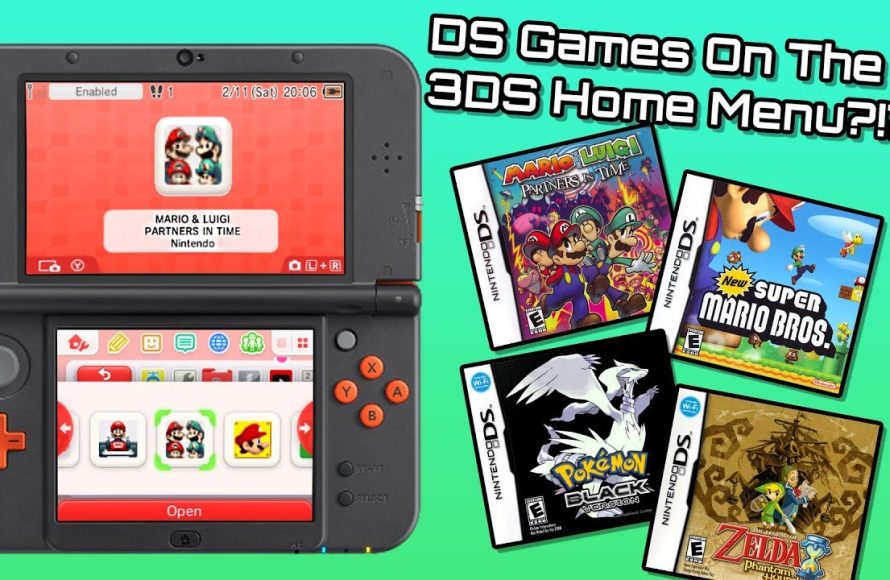
Yes, you can install DS games on a hacked 3DS.
Curious about playing your favorite DS titles on your modded 3DS? Many users wonder, can you install DS games on a hacked 3ds, and the answer is a definite yes. Hacking your 3DS opens up a world of possibilities, including playing DS games that you might not have access to otherwise.
The process involves using custom firmware and specific software to load DS games onto the 3DS system. This allows you to enjoy your whole collection on one device. Just make sure to follow a reliable guide for safe installation!

Can You Install DS Games on a Hacked 3DS?
The short answer is a resounding yes! If you’ve got a hacked Nintendo 3DS, you’re in for a treat. You can absolutely play your favorite Nintendo DS games on it. But it’s not as simple as popping in a DS cartridge, so let’s dive into the specifics of how this all works. Think of it like having a super-powered 3DS that can do even more!
Understanding the 3DS and DS Compatibility
First, let’s talk about why the 3DS can play DS games in the first place. The 3DS is backward compatible with Nintendo DS games. This means that the 3DS hardware has the capability to read and run DS game cartridges, which is super cool. This also means that your 3DS can “act like” a DS when playing DS games. However, when it comes to installing DS games without the physical cartridges, that’s where the “hacking” part comes in.
When you insert a DS game cartridge into your 3DS, the system recognizes it and starts up in a special “DS Mode”. This mode essentially uses only the bottom screen of the 3DS. But, it’s also where certain limitations kick in. You cannot use many 3DS functions while playing DS games directly from the cartridge.
The Limitations of DS Cartridges on a 3DS
Using actual DS game cards is easy, but not very flexible. Here are some things you can’t do if you only use the physical game cards:
- You can’t take screenshots of DS games in DS mode.
- You can’t suspend a game (put it in sleep mode). You need to save and exit properly each time.
- You can’t easily use emulators or other third-party apps in-game.
- You can’t benefit from many 3DS specific features like save states or enhancements.
Why Hack a 3DS for DS Games?
So, if the 3DS can play DS games anyway, why go through the trouble of hacking it? Hacking, in this context, means modifying your 3DS to allow it to run custom software. This opens the door for all kinds of things, including running DS games directly from your 3DS’s SD card. Here’s where the real fun begins.
The Benefits of Playing DS Games on a Hacked 3DS
There are many advantages to playing DS games on a hacked 3DS without using cartridges. Let’s check them out:
- No More Cartridges: You don’t need to carry around all your physical game cartridges. You can store tons of them on your SD card. Imagine having your whole DS library at your fingertips!
- Save States: This is a game changer! Save states let you save your game at any point and load back to that point instantly. This means you can undo mistakes or quickly try different strategies, something not possible with regular DS games on a 3DS.
- Screen Enhancements: Some custom software allows you to apply screen filters or enhancements to make the DS games look better.
- Homebrew Apps: Hacking your 3DS allows you to run homebrew software (apps made by people other than Nintendo) which can enhance your gaming experience in many ways.
- Faster Load Times: Loading games from an SD card is often faster than loading from a cartridge.
- Accessibility Options: Some modifications can add functions like speed up and rewind to your games.
How is it Possible to Play DS Games on a Hacked 3DS?
Okay, now for the juicy details of how you actually make this magic happen. Here is a basic overview.
A hacked 3DS can utilize custom software, often referred to as CFW (Custom Firmware), to bypass normal restrictions. This allows your 3DS to run programs that weren’t originally intended by Nintendo. These programs allow your 3DS to load DS game files (usually with the .nds extension) directly from the SD card. This process is essentially making the 3DS emulate the original DS on a software level rather than through a dedicated DS mode, which is usually only used when you put in a physical cartridge.
The primary program that allows this is called a “DS emulator” or “DS forwarder”. While a full DS emulator on the 3DS is very difficult to achieve, these programs essentially create a shortcut to a hidden DS mode without using a cartridge. Think of it like creating a virtual cartridge.
Key Components Required to Play DS Games
To play DS games on your hacked 3DS, you’ll need the following:
- A Hacked 3DS: This is crucial. You need a 3DS that has Custom Firmware (CFW) installed. There are many guides available online to help you through the process of installing CFW. Popular options include Luma3DS.
- An SD Card: You’ll store your DS games and the necessary software on your 3DS’s SD card. A bigger card is generally better for more game storage.
- DS Game Files (.nds): These are the game files you’ll load onto your SD card.
- A DS Forwarder or Emulator: You’ll need software that tells the 3DS how to launch the DS games from the SD card. TWiLight Menu++ is a very popular option and works perfectly as a forwarder or a software emulator for your DS games.
A Deeper Look at Twilight Menu++
Let’s talk about TWiLight Menu++ because it’s the most common way of playing DS games on a hacked 3DS. This homebrew application acts like a menu system for loading DS games on a 3DS. It also allows you to do things like applying save states, changing the screen filter, and adjusting the game’s scaling.
Twilight Menu++ doesn’t technically emulate DS games. Instead, it uses the 3DS’s existing DS hardware and firmware. It’s more like a powerful loader that helps the system run DS games from the SD card without requiring a physical cartridge. When you start a game through TWiLight Menu++, the 3DS still switches to a modified “DS Mode”. This is why most DS emulators will not be able to run at full speed on a 3DS because the 3DS hardware itself is not meant to emulate DS games natively, so the games are actually running in the original DS hardware.
How to Set Up TWiLight Menu++
The setup process is a bit more detailed, but it is totally achievable if you follow instructions carefully. Here’s a brief idea:
- Install CFW: If you haven’t already, install Custom Firmware (CFW) on your 3DS. This is the foundation for all your homebrew applications. There are a lot of easy-to-follow guides online which will help you with this step.
- Download TWiLight Menu++: Get the latest release of TWiLight Menu++ from its official repository, usually available on GitHub.
- Copy Files to SD Card: Extract the contents of the TWiLight Menu++ archive to the root of your 3DS SD card.
- Copy DS Games: Put your DS game files (.nds) in a designated folder on your SD card. For instance, you can create a folder called “roms” and then create a folder inside it called “nds”.
- Launch TWiLight Menu++: From your 3DS’s Home Menu, run the TWiLight Menu++ application. This will open the TWiLight Menu interface.
- Browse to Your Games: Use the menu to find the folder where you placed your DS games.
- Select and Play: Select the DS game you want and play it.
Alternative Methods and Considerations
While TWiLight Menu++ is the most common and recommended way, there are other ways of playing DS games on a hacked 3DS that are worth knowing about. These methods are usually a bit more complex and are not as widely used as TWiLight Menu++.
Using Forwarders
One of those alternative methods involves using forwarders. A forwarder is a small application that acts as a shortcut to a specific game, which you place in your 3DS Home Menu. Think of it like a shortcut you place on your desktop. The forwarder essentially points to a specific .nds file. This provides faster access to the game, and allows you to see the game icon on the Home Menu like any other 3DS game.
The process of making a forwarder is more complex as it requires you to use a third party application to generate this forwarder. It is worth remembering that, in this method, you are still launching the game using TWiLight Menu++ in the background. This method is preferred for users who want a better organization and a clean experience on their 3DS Home Menu.
Homebrew Emulators (Less Common)
There are some less common DS emulators available as homebrew applications. However, due to the 3DS’s limited power, these emulators might not run games perfectly. TWiLight Menu++ is still the ideal way to play DS games on your 3DS, as it will run them using the 3DS’s actual DS hardware capability, rather than emulating it.
Important Notes about DS Game Files
It is vital that you use legal backups of your own game cartridges. Downloading games from unofficial sources can be problematic, and it’s always best to respect the copyright of game creators. If you have a lot of old cartridges, you can use a PC to create backups of them by using a specific DS cartridge reader. This is a good option if you want to carry your games digitally without carrying around all your original physical cartridges.
Potential Issues and Troubleshooting
As with any modification, sometimes things may not work correctly. Here are some common issues you might encounter and how to fix them:
- Game Freezes or Crashes: Make sure that you are running the latest version of TWiLight Menu++. Outdated versions may have bugs.
- Games not Loading: Ensure that the file extension for the game files are “.nds”. Make sure that these game files are inside the designated game folder.
- Slow Performance: In the cases where slow performance is encountered, you can try to disable any screen filters, or try playing the game in the original screen size.
- TWiLight Menu++ not Launching: Verify that the necessary files are in the correct location on your SD card.
It’s always good to check online forums and communities for up-to-date information and solutions to any specific problems you might encounter.
The world of hacked 3DS and DS gaming can seem a little daunting at first, but once you get the hang of it, it’s incredibly rewarding! With the ability to carry hundreds of games on one small card, you will never run out of options of which games to play. This allows you to experience your old favorite games in a new light with features that were not possible before!
By utilizing Custom Firmware (CFW) and clever software like TWiLight Menu++, playing DS games on a hacked 3DS is not just possible; it’s an amazing way to make use of the 3DS’ hardware. You’ll have a whole library of games at your disposal with enhanced functionality and features that bring a new twist to the old game you love!
How to Play DS Games on 3DS Homebrew
Final Thoughts
Yes, you can install DS games on a hacked 3DS. Custom firmware allows direct installation of DS ROMs, essentially turning your 3DS into a DS emulator.
This process does require some technical steps. But, with proper guidance and files, it’s achievable. It is vital to follow reliable tutorials when doing this.
Therefore, the answer to ‘can you install ds games on a hacked 3ds’ is a definite yes. This expands the handheld’s gaming library greatly.

