
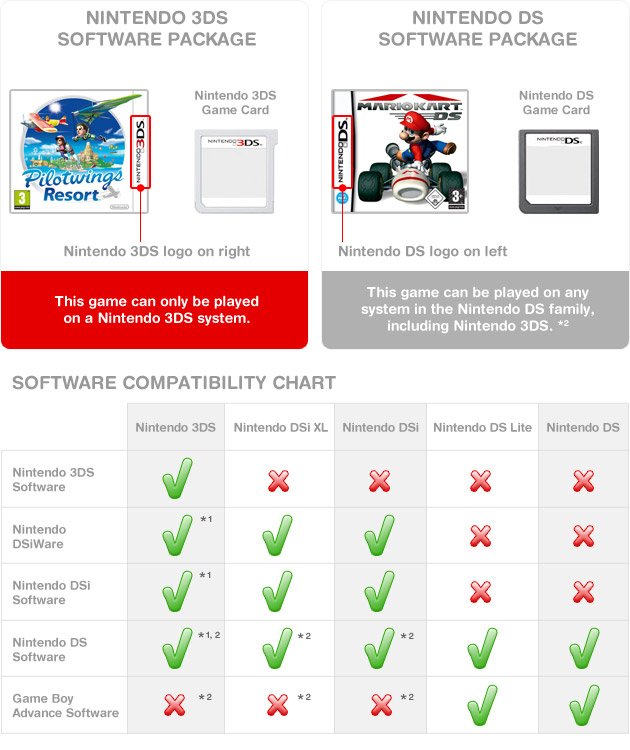
Yes, you can play DS Lite games on a 3DS.
Ever wondered if your old favorites from the DS Lite era would work on the newer 3DS? It’s a common question, and thankfully, the answer is good news for those with a library of classic DS titles. The 3DS console possesses backward compatibility, which allows it to play Nintendo DS cartridges.
This means you can enjoy your old DS games without having to hold on to your old console. The 3DS is designed to accept the original DS game cartridges. This makes it simple to experience all the great titles from both generations of Nintendo handhelds on one system. So, yes, you can play ds lite games on 3ds.

Can You Play DS Lite Games on 3DS? Exploring Compatibility
So, you’ve got a shiny new Nintendo 3DS, and maybe you’ve still got a stack of your favorite games from your old Nintendo DS Lite. The big question is: can you actually play those classic DS games on your 3DS? The short answer is a big YES! But there’s a little more to it than just popping in a cartridge. Let’s dive into the details and explore everything you need to know about playing DS Lite games on your 3DS.
The Good News: Backwards Compatibility
Nintendo designed the 3DS with a fantastic feature called backwards compatibility. This means that the 3DS can play games designed for older Nintendo systems. In this case, the 3DS is designed to be compatible with Nintendo DS and DS Lite game cartridges. This clever decision from Nintendo allowed players to enjoy their extensive libraries of DS games on the newer handheld console, without needing to keep their old systems. Think of it like having two game systems in one. You can play all the newer 3DS games, and still enjoy your favorite classic DS games!
This is great for you because you don’t have to go out and buy a whole new collection of games, or find your old DS. You can just grab your DS game cartridges, put them into the 3DS, and start playing right away. It’s a brilliant way to transition to a new console without leaving your past favorites behind. Now, the main point is that not every handheld supports older games like this, so the 3DS is definitely a nice device to have that way.
How to Play DS Lite Games on 3DS
Playing your DS Lite games on your 3DS is pretty straightforward. It’s as easy as 1, 2, 3! Here are the simple steps:
- Power Off Your 3DS: Make sure your Nintendo 3DS is completely turned off before inserting any game cards.
- Locate the DS Game Slot: On your 3DS, there’s a slot located on the right side of the console (when holding the console facing towards you). This slot is where you insert your Nintendo DS and Nintendo DS Lite game cartridges. The cartridge is slightly wider than the 3DS games.
- Insert the Cartridge: Gently push the DS game cartridge into the slot. You will feel a slight click when it is correctly inserted. Make sure you are not forcing it; it should go in fairly easily.
- Power On the 3DS: Once the game is in, turn on your 3DS. The 3DS menu should pop up.
- Select the Game: Your DS game should show as a game icon in your 3DS menu. It might appear as a generic DS game icon. Tap on the game icon to start playing.
That’s all it takes! It’s a super simple process, and you are on your way to replaying all your favorite DS games on a new console.
Differences Between Playing on a DS Lite and a 3DS
While the 3DS can play DS games, there are some differences you might notice when playing these games on the 3DS versus on an actual DS Lite console. Let’s check these differences:
Screen Size and Resolution
The 3DS has a larger screen than the DS Lite. This means your old DS games, which were made for a smaller screen, are displayed at a slightly lower resolution. The screen will look stretched out slightly, so the games won’t appear as sharp as they did on the DS Lite. This can be slightly noticeable but not enough to cause a huge issue in the gameplay. Some gamers may find the bigger screen and slightly stretched graphics an improvement since it makes everything a little easier to see, while others will find that the image quality is a bit diminished.
Two Screens vs. One Larger Screen
The 3DS, especially the original model, has two screens just like the DS Lite. The top screen is a widescreen 3D screen, and the bottom screen is the touch screen. However, when playing a DS game, the game will be displayed on only the top screen. The bottom screen will be inactive unless it’s used for gameplay in specific games.
In some games on the original DS, one screen might have displayed the main game action while the other screen may have displayed important information like maps or inventory. While playing these games on a 3DS, the bottom screen doesn’t function the same way as the original DS. The game is normally focused on the top screen only and uses the bottom touchscreen if necessary. You will still have all the game content, but the two screen layout works slightly differently. If you are using a New 3DS or New 3DS XL, both screens will be used for displaying the DS game.
Touchscreen Functionality
The touchscreen works mostly the same way on the 3DS as it does on the DS. You can still use the stylus to interact with the game on the touchscreen in the same manner as you did on the DS Lite. There may be some very minor changes in touch sensitivity due to the updated hardware, but most players will find that it is largely the same experience.
3D Feature
It’s important to know that the 3D effect of the 3DS won’t work with your DS games. DS games were never designed to be played in 3D, and so they will display in standard 2D mode on the top screen. The 3D slider on the 3DS has no effect when playing DS games. Only 3DS games are capable of showing gameplay in 3D.
Button Mapping
The button layout for the 3DS is mostly identical to that of the DS Lite. The A, B, X, and Y buttons are there, as are the Start and Select buttons, and the directional pad. If you’re already used to the layout on a DS Lite, you will have no problem adjusting to the 3DS controller layout.
Advantages of Playing DS Games on a 3DS
Even though there are some differences, playing DS games on a 3DS comes with many advantages:
- Convenience: You don’t need to carry two different consoles to play both 3DS and DS games. This is a huge plus for travel or even just saving space at home.
- One Charger: If you play both 3DS and DS games, you only need one charger because the 3DS charger works for the 3DS family of systems. You don’t need to keep track of an extra charger.
- Larger Screen: The 3DS screen is bigger than the DS Lite screen, which may make some games easier to see, and a more enjoyable experience.
- Headphone jack: Both the DS Lite and the 3DS have a headphone jack, so you can enjoy gaming without disturbing others.
- Backwards Compatible Game Library: You can replay all of your favorite DS games, without purchasing a brand-new copy.
Are There Any DS Games That Won’t Work on the 3DS?
Generally, most DS games will work perfectly fine on a 3DS. However, there are some extremely rare edge cases of DS games that might not work on the 3DS due to certain hardware limitations of the consoles, or compatibility issues. Here are some issues you might encounter:
Extremely Rare Compatibility Issues
While incredibly rare, there are a very small handful of DS games that may have compatibility issues with the 3DS. These issues are usually due to the way specific games use special hardware, or due to slight hardware differences between the two systems. If you happen to own one of these very few games that does not work, the chances are it may be a problem with the cartridge, or due to some internal error of your console.
Software updates
Like any other electronic device, both the DS and 3DS consoles may get software updates from the manufacturer. These updates occasionally fix small compatibility issues, so you might want to check that your 3DS is updated to the most current software version to enjoy the optimal playing experience.
Damaged Cartridges
Sometimes, when a DS game does not work on your 3DS, the issue might not be the 3DS itself. The game cartridge might be damaged, such as due to a damaged connection on the cartridge. Check to make sure the cartridge is clean, and free of debris. You can also try other DS game cartridges to ensure your 3DS is working correctly.
The Importance of Backwards Compatibility
The backward compatibility of the 3DS is a testament to Nintendo’s consideration for its fans. It demonstrates a commitment to allowing players to enjoy their previous library of games. This is especially important as game collections grow over time. The possibility of revisiting older games on a newer system is beneficial, and increases a console’s lifespan. This also builds community, because you are able to enjoy games that others enjoyed on older consoles. The ability to play DS games on the 3DS enhances the overall gaming experience by giving you access to a greater variety of games in a single console.
Exploring the 3DS Family
The 3DS actually comes in many different models, from the original 3DS to the 2DS, 3DS XL, New 3DS, and the New 3DS XL. While all of these systems play Nintendo DS and DS Lite games, you might find some differences in the display resolution, screen size, and even game controls. It’s important to note that the 2DS is the only system that does not have the 3D capability, while all of the other 3DS models do.
Original 3DS and 3DS XL
The original 3DS and 3DS XL can play DS games, but they display the games on the top screen, with the bottom screen used only for touch screen input. While the screen may look slightly stretched on both the smaller and larger screen of the 3DS and 3DS XL, both consoles are fully capable of playing Nintendo DS games.
New 3DS and New 3DS XL
The New 3DS and New 3DS XL both play DS games, and in this case the DS game is displayed across both screens. These systems have an improved screen resolution and a more powerful processor when compared to the original 3DS systems, but this does not make much difference when playing DS games. If you have a New 3DS or New 3DS XL you will be able to play DS games without any issues.
Nintendo 2DS
The Nintendo 2DS, as it name suggests, does not have 3D capability, but it is fully compatible with DS games. It plays the games exactly as the other 3DS systems. This is a great budget-friendly option if you would like to play both DS and 3DS games without paying for 3D capability. When playing DS games on the 2DS, the screen will be displayed on the top screen, with the touchscreen below.
In conclusion, the Nintendo 3DS is very much a worthy successor to the DS Lite, giving you the option to play all of your favourite DS games, along with a whole collection of new 3DS titles. The backwards compatibility of the 3DS is something that gamers truly appreciate, and it allows them to enjoy their old favourites on a newer, modern console. Overall, you can absolutely play DS games on your 3DS! So go ahead, dust off those old DS cartridges, and dive back into your favorite games.
Do THIS when playing DS Games on 3DS
Final Thoughts
Yes, you can play ds lite games on 3ds. The 3DS has backward compatibility. This means it plays games from the older Nintendo DS and DS Lite systems.
You simply insert the DS game cartridge into the 3DS game slot. The 3DS system will then load the DS title. You can enjoy your old favorites on the newer handheld.

