
Yes, you can play EA games without EA Play by purchasing them individually.
Wondering if you can enjoy EA’s titles without a subscription? Many gamers ask, “can you play ea games without ea play?” It’s a valid question, considering the popularity of subscription services. Fortunately, owning games outright is still an option, offering access to specific titles whenever you want.
Choosing to purchase individual games means you don’t have to pay a monthly fee for access. This can be a better choice if you play only certain EA games rather than their entire catalog. So, yes, direct purchase of EA games is definitely an available alternative to the EA Play subscription.

Can You Play EA Games Without EA Play?
Let’s dive into the big question: can you really enjoy EA games without signing up for EA Play? The simple answer is, yes, absolutely! EA Play is like a special club, giving you extra perks and access. But, you don’t need a membership to play many awesome EA titles. It’s kind of like having a library card. You can still buy books (games) individually, but a library card (EA Play) gives you a lot more for a small price.
Understanding EA Play: What It Is and What It Offers
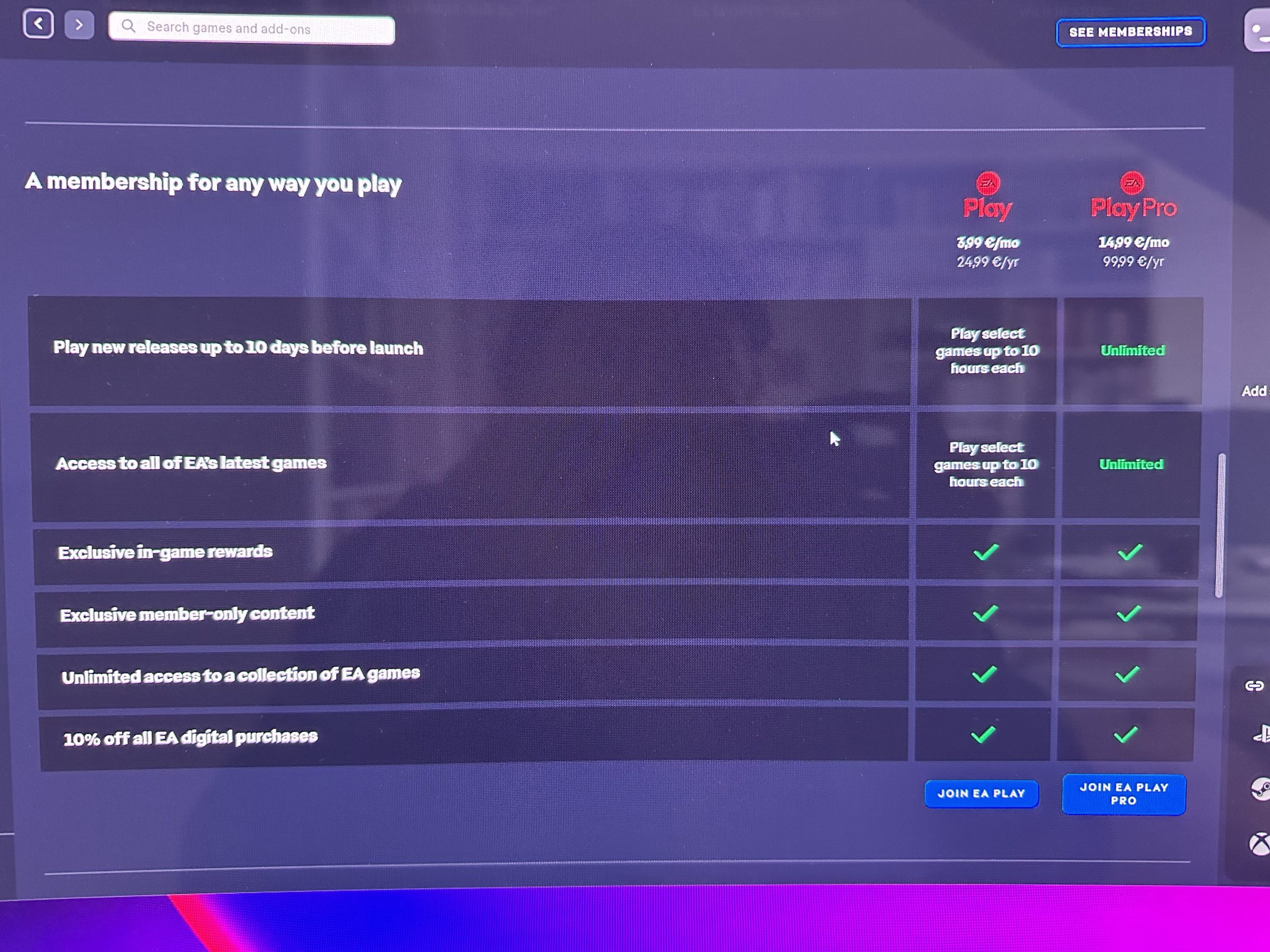
Before we explore how to play without it, let’s understand what EA Play actually is. Think of EA Play as a subscription service. For a monthly or annual fee, it gives you a bunch of cool stuff like:
- Access to a library of EA games you can download and play.
- Early trials of new EA games before they are released.
- Discounts on EA game purchases and downloadable content (DLC).
- Exclusive in-game rewards and content.
There are two tiers: EA Play and EA Play Pro. Pro offers even more, like early access to deluxe editions of games.
The Benefits of EA Play
Having EA Play definitely has its advantages. It’s great if you love trying many different games or want early access to new releases. You will likely get a discount on most EA titles if you get the subscription service. Here is a quick recap:
- Game Library: Play a wide variety of games without purchasing them separately. It’s like a Netflix for games.
- Early Access: Play new games before their official release date, giving you a head start.
- Member Discounts: Save money on full game purchases and DLCs.
- Exclusive Rewards: Get in-game perks and content that other players might not have.
For avid gamers who frequently play EA games, the subscription can be a cost-effective way to enjoy a large collection of games.
Buying EA Games Individually
Now, let’s talk about playing EA games without a subscription. This is totally possible! You can purchase EA games individually, just like you buy any other game. You get to own the game outright, and you can play it whenever you want, without the need for a continuing subscription. You purchase the title and it is yours forever!
Where to Buy EA Games
You can find EA games at many places:
- Digital Stores: Platforms like Steam, the Epic Games Store, the PlayStation Store, the Xbox Store, and the Nintendo eShop all sell EA games digitally.
- Physical Retailers: You can buy physical copies (discs or cartridges) at stores that sell video games like GameStop, Best Buy, Target, and Walmart, or online stores like Amazon.
Buying games individually is perfect if you have a few favorite games you want to play regularly, or if you like collecting physical copies. It also means you won’t have to worry about losing access to a game if you cancel a subscription service.
Playing EA Games on Different Platforms
EA games are available on many different gaming platforms. Whether you are using a console or a PC, you can typically find your favorite EA titles. Here’s a breakdown:
PC Gaming with EA Games
On PC, you can play EA games via:
- EA App: The official launcher from EA, similar to Steam or Epic Games Store. You purchase and manage your games through it.
- Steam: Many EA games are available on Steam, where you can purchase, download, and play them just like any other game.
- Epic Games Store: Like Steam, the Epic Games Store also features many EA games available for individual purchase.
When you buy a game on any of these stores, it is directly linked to your account. You do not need a subscription to play the game.
Console Gaming with EA Games
For console gamers, EA games are available on:
- PlayStation (PS4/PS5): You can purchase EA games through the PlayStation Store or by buying physical discs for both PS4 and PS5.
- Xbox (Xbox One/Xbox Series X|S): Similarly, purchase EA games from the Xbox Store or via physical copies for Xbox One and Xbox Series X|S.
- Nintendo Switch: While fewer EA games are available on the Switch, some titles are still available both digitally via the Nintendo eShop or physically in cartridge format.
Each console allows individual purchases, which means you don’t need an EA Play subscription to play games you’ve purchased. You own the game and have the right to play without a membership.
Which Method Is Right For You? Subscription vs. Individual Purchase
Deciding between EA Play and buying games individually really depends on your gaming style and preferences. Here’s a little guide to help you figure out what works best for you:
When to Consider EA Play
- You love trying new games: If you like to play many different games and frequently enjoy trying out new titles, EA Play is probably the perfect option for you.
- You want early access: Do you always want to play new games as soon as they come out? Then having a membership to EA Play will benefit you, and give you a head start in the gaming world.
- You are a frequent EA gamer: If you play EA titles regularly, the subscription can be cheaper than buying each game separately.
When to Consider Individual Purchases
- You prefer a few favorite games: If you tend to stick with only a few games, buying them individually is a better deal.
- You like owning physical copies: If you love collecting game cases and physical discs, purchasing individual games is better for you.
- You want long term access: If you want to be able to play a game for many years without worrying about your subscription expiring, purchasing the title is the only option.
- You don’t need all the extras: If you aren’t interested in the extra perks of a subscription, purchasing each title is the way to go.
Think about your personal playing style. Are you someone who loves to play a wide variety of games? Or are you someone who plays a few favorites? This will help you choose between a subscription and individual game purchases.
What About Games Leaving EA Play?
One important thing to keep in mind with EA Play is that games can sometimes leave the service. This means that a game that was previously available for you to play might disappear from the service. If you want to play the game again, you will have to purchase it individually, because your subscription will no longer grant you access to the game. If you purchase a game however, it’s always yours. This can influence the way you choose between a subscription and purchasing your favorite games.
Keep an Eye on the Game List
If you are using EA Play, you should frequently check to see which games are leaving the service, so that you can plan accordingly and purchase the game ahead of time if you feel the need to. You can usually find the list on EA Play’s website, on game store forums, or on gaming news websites.
Free-to-Play EA Games
There are also a number of free-to-play EA games that do not need a subscription or a purchase! You can simply download these games and start playing. Some of the most popular free-to-play titles from EA include Apex Legends. These games are supported by in-game purchases of cosmetic items and add-ons, but you can play them entirely without spending any money.
How to Get Free Games
You can typically find free-to-play EA games on:
- The official EA website or the EA app.
- The respective console store (PlayStation Store, Xbox Store, Nintendo eShop).
- PC game stores like Steam and the Epic Games Store.
If you’re looking for an affordable way to enjoy some EA gaming, these free titles are an excellent place to start.
Using EA Play Trials
EA Play has free trials to check the service out. These trials give you a limited time to check out the game library, early game trials, and all the added perks. This is an opportunity for you to experience the service before committing to a paid subscription. You can play a variety of games, and test out the service, and then decide if it’s right for you!
How to Access the Trial
The methods to access a free trial may vary, but you can typically find them:
- On the EA Play official website.
- Via offers on console stores (like PlayStation Store or Xbox Store).
- Through promotions with other games or services.
If you are on the fence, a free trial can be a great opportunity to see what you think of EA Play and make an informed choice about whether to subscribe.
Game Ownership: Digital vs Physical
When you buy a game, you are faced with two options: buying digital games or physical copies. Both have their advantages and disadvantages.
Digital Game Benefits
- Convenience: You can instantly download and play the game. No need to wait for shipping or to go to the store.
- No physical clutter: If you are not into physical copies, then this is the perfect option.
- Easy access: Your game is always available as long as you have access to your gaming accounts.
- Game deals: Digital stores often have special promotions and discounts on games.
Physical Game Benefits
- Collectible value: Some gamers enjoy collecting physical game copies and cases.
- Resale value: You can resell or trade physical copies of games, which is not possible with digital games.
- Ownership: Many feel a sense of ownership that cannot be matched with digital copies.
It really boils down to your preference for the way you acquire and keep games. If you like digital copies for convenience, then they are ideal. If you enjoy physically owning a copy of your game, then going with physical copies is the way to go.
Managing Your EA Games
Regardless of if you have EA Play or if you buy the game individually, it is important that you know how to manage your EA game account. Here is a brief guide on managing it, if you are not using the subscription service.
EA App (PC)
If you are a PC gamer, you will most likely be using the EA app. Through the app you can:
- Download the game.
- Update the game.
- Manage DLCs.
Console Game Management
On consoles you will typically manage games through the console’s game menu. Here is how:
- Download the game.
- Update the game.
- Manage DLCs.
Whether you opt for the subscription service through EA Play, or choose to buy individual titles from their wide selection of games, you are set to have a great time! There are a multitude of options available, and there is no right or wrong way to enjoy these games. Think about your playing style, the type of games you want to play, and choose a method that is ideal for you!
EA is replacing Origin with their EA app #eaplay #origin #ea
Final Thoughts
You can absolutely play many EA games without an EA Play subscription. Purchasing games individually on platforms like Steam or PlayStation allows you to play them without a separate subscription. Therefore, owning games grants access independently.
However, EA Play offers a game library and benefits. Many players choose to subscribe for these extras but it’s not a must.
So, yes, can you play EA games without EA Play? The answer is a resounding yes. You just need to purchase games separately.

