
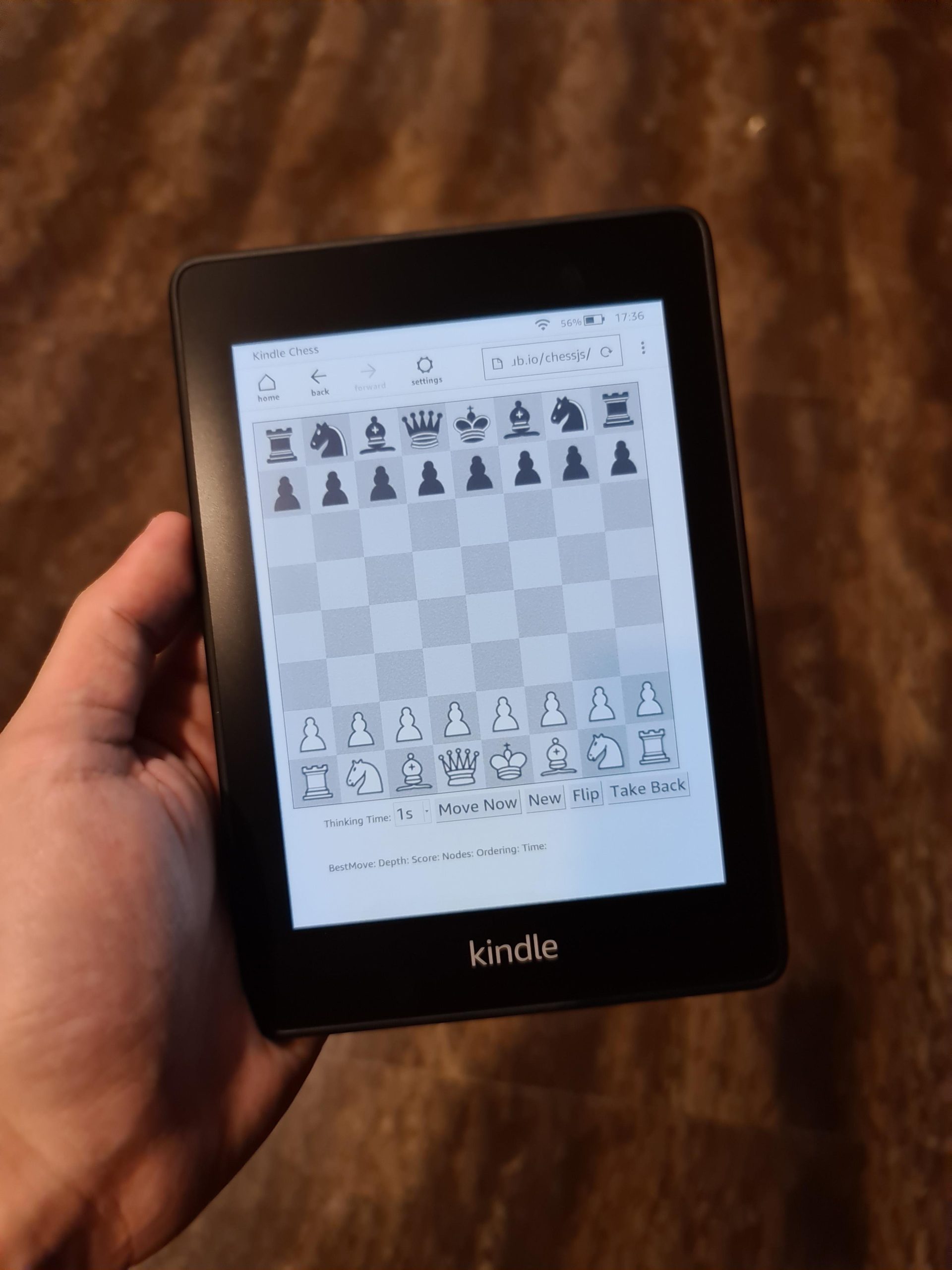
Yes, you can play some very simple, basic games on the Kindle Paperwhite, but don’t expect complex gaming experiences.
Ever wondered, can you play games on the Kindle Paperwhite? It’s a common question for those thinking about buying one of these e-readers. While mainly designed for reading, the Paperwhite does have a few hidden tricks up its sleeve.
You won’t find graphically intensive titles, but simple puzzle games and basic word games are often available. These provide a fun break from reading and can be surprisingly engaging.

Can You Play Games on the Kindle Paperwhite?
So, you’re wondering if your Kindle Paperwhite can do more than just display words? You’re curious if it can also be a portal to fun, little games? That’s a great question! The short answer is, yes, kind of! But it’s not quite like playing games on your phone or a gaming console. Let’s explore what kind of gaming experience you can expect on your Kindle Paperwhite.
The Kindle Paperwhite: Designed for Reading
Before we jump into games, let’s remember what the Kindle Paperwhite is really all about: reading. It’s designed to give you a fantastic reading experience with its e-ink screen that’s easy on the eyes, even in bright sunlight. The focus is on long-lasting battery life and a comfortable reading experience, not high-powered graphics or speedy game processing. It’s made to be a lightweight and portable book replacement, and it does that job incredibly well.
E-Ink Technology and Gaming
The biggest thing that separates the Kindle Paperwhite from your smartphone or tablet is the e-ink screen. This type of screen is amazing for reading because it doesn’t emit light directly into your eyes, mimicking the look of a real book. However, this also means it’s not great for fast-paced action games. E-ink screens are optimized for displaying still images and text, with slow refresh rates compared to traditional LCD screens. When you see movement on an e-ink display, it can sometimes look blurry or leave behind “ghosting” effects. This is why the gaming experience on a Kindle Paperwhite is so different from what you might be used to.
What Kind of Games are Available?
So, knowing about the e-ink screen, what kind of games can you actually play? Don’t expect to find the latest action-packed titles or anything requiring fast reflexes. The games available on the Kindle Paperwhite are typically simpler and focus on things like:
- Puzzle Games: Think word games like Sudoku, crossword puzzles, or simple logic puzzles. These work well because they don’t require rapid animations.
- Simple Card Games: Basic card games like Solitaire are a common option. These have low graphical requirements and usually involve simple movements on the screen.
- Text-Based Adventures: These are games where you read a story and make choices that change the outcome. They’re less about visual action and more about reading and decision making.
Where to Find Games
You won’t find a dedicated “app store” for Kindle Paperwhite games. Most of the games you can play come as part of a book or as a standalone option that Amazon adds to the device. To see if you have any games, you’ll usually find them in your library, or as hidden “Easter eggs” within settings. Let’s check in detail on the way to find these games:
- Check Your Library: Some books have interactive elements which can be fun and sometimes are considered as a basic game. These are mostly simple, choose-your-own-adventure style of things.
- Look in Settings: Amazon sometimes includes hidden games within the device itself. These are usually very basic. To check it, go into the device’s settings and see if they’ve included any of the hidden little mini games.
The Gaming Experience: Manage Expectations
It’s important to have realistic expectations about gaming on your Kindle Paperwhite. The focus is not on complex graphics or speedy gameplay. Here’s what you can expect:
- Slow Refresh Rate: Remember, the e-ink screen refreshes slowly, which means animations aren’t smooth. This can make some games feel a bit jerky.
- Limited Graphics: The games are typically very basic, with minimal animation or color. Most are in black and white or shades of gray.
- Simple Controls: Most games use the touch screen or basic button clicks for navigation, not complex directional pads or joysticks.
- Designed for Relaxation: Games on a Kindle Paperwhite are best suited for when you want to unwind and engage your mind without requiring fast paced actions.
Not for Competitive Gamers
If you’re a fan of action games, intense multiplayer games, or graphically advanced titles, the Kindle Paperwhite is not for you. This device is not a gaming console. However, if you enjoy a relaxing, low-key gaming experience, you’ll find something to like. Think of it as an addition, not the main feature.
Why Play Games on a Kindle Paperwhite?
If the games are so simple, why even bother? Well, there are a few good reasons:
- Brain Teasers: These kinds of simple games can help you keep your mind sharp and relaxed.
- A Change of Pace: Sometimes, you might want a small break from reading. Simple games offer a quick distraction without needing a different device.
- Quiet Entertainment: Since the e-ink display doesn’t require backlighting, you can play these games in bed without disturbing others.
Examples of Games You Might Find
Let’s take a closer look at some specific examples of games you might encounter on your Kindle Paperwhite:
Sudoku
Sudoku is a classic number puzzle, and it’s well-suited for the Kindle Paperwhite. You’ll be presented with a 9×9 grid where some numbers are already filled in, and you have to fill the rest based on simple rules. It is simple, engaging, and doesn’t rely on rapid screen changes.
Solitaire
A basic version of Solitaire might also come bundled with a specific book or found within the settings. You’ll organize cards in columns based on suit and rank. The game is slow-paced and ideal for the e-ink display.
Text-Based Adventures
Text-based adventures or interactive fiction titles, will immerse you in a story where your choices determine the plot. These are more like interactive books than traditional video games. They focus on text, decision-making, and logical thinking.
Games through Amazon FreeTime/Kids+
If you use Amazon FreeTime (now called Amazon Kids+) on your Kindle, you will have access to an extensive library of age-appropriate books, videos, and some basic educational games. These games are simple, designed for younger users, and help them learn while having fun. While not the high-graphics games you see on tablets, they provide an engaging experience for children.
Benefits of Games for Kids
Using these types of games in Amazon Kids+ offer a good way for children to engage with their devices without just focusing on reading:
- Interactive Learning: Games can help kids learn new skills, concepts and develop problem solving without being too overwhelming
- Change of Pace: Even with Amazon kids+ books, games offer the opportunity to switch up activities and prevent boredom.
- Controlled Environment: Amazon Kids+ allows parents to control the content their kids can access, ensuring they only see age-appropriate material.
Do Kindle Games Consume Battery Life?
One of the best features of the Kindle Paperwhite is its incredible battery life. But, you might be wondering if playing games will drain it quickly. The good news is that, generally, the type of games available on the Kindle Paperwhite doesn’t consume a lot of battery. Because they are simple, and don’t require the screen to refresh constantly, they shouldn’t drain your battery significantly more than reading would. However, playing a lot over a long period will definitely make the battery drain, but not as much as, say, on your phone.
Optimizing Battery Life
Here are some general tips for maximizing the battery when you use your Kindle, whether reading or playing games:
- Turn off Wi-Fi When Not Needed: Keeping Wi-Fi on while you’re reading or playing offline games can use up battery, turn it off to save some.
- Lower the Screen Brightness: This helps with better battery, also making reading easier on your eyes.
- Don’t Use the Screen Saver Constantly: If the screen saver has motion or animations, it can use more battery than if you just put it in sleep mode.
Is Gaming on the Kindle Paperwhite Worth It?
Whether gaming on a Kindle Paperwhite is worth it is really down to what you are expecting. If you anticipate using it as a full-fledged gaming device, you will be disappointed. However, if you like the idea of having some simple games available that can provide a little distraction while being easy on the battery, then the answer is probably yes. These games are a nice addition, adding a little extra functionality to your ereader.
Here’s a quick summary to help you decide:
- If you are looking for complex games or fast-paced action, then the Kindle Paperwhite is NOT the right device for it.
- If you want a basic distraction, brain exercise with word or logic games, then you may enjoy gaming on Kindle Paperwhite.
- If you would like an added activity to reading and want something low key that isn’t taxing on the eyes, or battery, then the gaming features on the Paperwhite would be suitable.
The Kindle Paperwhite remains primarily an e-reader, and its gaming features are a small added function. Think of them as a nice little bonus, rather than a primary function. When you are traveling, or simply wanting to relax, simple games on the kindle may be just what you need.
Gaming on New Generation Kindle (Review)
Final Thoughts
So, can you play games on the kindle paperwhite? The answer is yes, but with limitations. It primarily supports simple text-based games and some basic puzzle titles from the Kindle store.
Don’t expect graphically intense games. The e-ink display is not built for that, and the processing power is basic. Your main focus with a Paperwhite will always be reading.
Therefore, while ‘can you play games on the kindle paperwhite’ is technically true, it is not a dedicated gaming device. It handles simple games, making it a niche option for casual players.

