
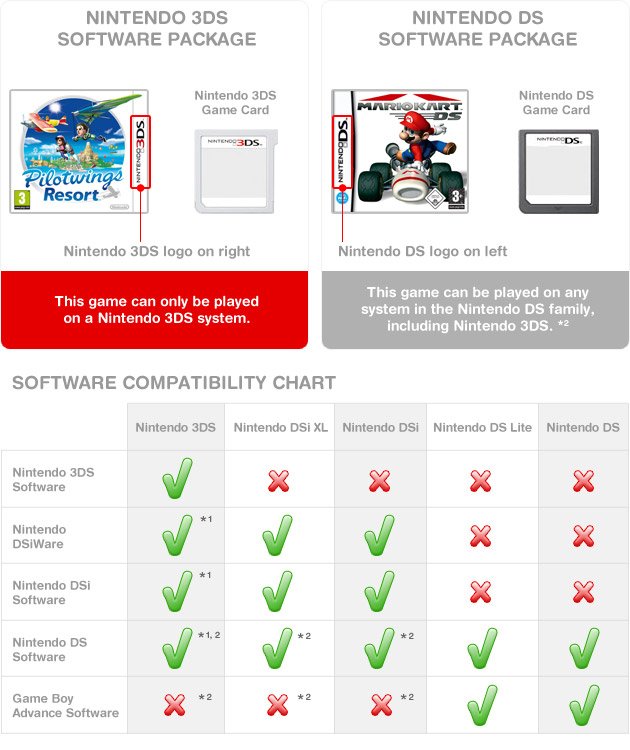
Yes, you can play normal DS games on a 3DS.
Wondering if your old Nintendo DS cartridges will work on your shiny new 3DS? It’s a common question! Many gamers are curious about backward compatibility, especially when upgrading consoles. So, can you play normal DS games on a 3ds?
The good news is that the 3DS is designed to play almost all original Nintendo DS game cartridges. This feature allows you to enjoy your previous library of games without needing an older console. It is great for those who have a big collection of DS games that they want to revisit.

Can You Play Normal DS Games on a 3DS?
So, you’ve got a shiny new Nintendo 3DS, or maybe you’ve had one for a while, and you’re wondering if it can play those classic Nintendo DS games you love. It’s a great question, and the answer is a big YES! The Nintendo 3DS is designed to be backwards compatible with Nintendo DS games. That means you can play almost all of your old DS games on your 3DS, which is awesome.
Understanding Backwards Compatibility
Backwards compatibility means that a newer console can play games made for an older console. Think of it like this: your new 3DS can understand and play the “language” of old DS games. Nintendo did a great job making sure that when they released the 3DS, you wouldn’t have to leave your old favorites behind. This was a huge plus for gamers, since many people had large libraries of DS games they loved. This feature allowed you to keep playing these older games without needing to hold on to your old DS system. You will be saving some space at your home by not having two separate consoles. You just need to use the one console, that is 3DS, that’s capable of playing two generation games.
Why is Backwards Compatibility Important?
Backwards compatibility is important for several reasons:
- Keeps Old Games Alive: It allows people to keep playing games they already own and enjoy. Without it, you might have to dig out your old console just to play an old game.
- Saves Money: You don’t have to re-purchase games you already own, or buy an old console just to play old games.
- Preserves Gaming History: Backwards compatibility helps preserve the history of video games and lets new gamers experience older games without difficulty.
How to Play DS Games on a 3DS
Playing your DS games on a 3DS is really straightforward. It’s just like playing a 3DS game, but with a few small differences. Let’s walk through it:
Inserting the Game Cartridge
The first step is easy: look for the game card slot on your 3DS. It is located on the top or side of your 3DS, depending on the model you have. It’s a different slot from the one for 3DS games. The DS game slot is usually smaller and shaped slightly differently than the 3DS game slot.
Gently slide your DS game cartridge into this slot. Make sure it’s facing the correct way. You shouldn’t have to force it; if it doesn’t slide in easily, try rotating it. Once the cartridge is in, you will feel it click into place.
Starting the Game
Turn on your 3DS. It will likely go straight to the 3DS home menu. From there, you should see the DS game icon show up on the bottom screen. Tap the icon, and then press “Start” or “A” to launch the game.
It is similar to starting a 3DS game, but the 3DS will run the game in the DS mode. It will use the original DS hardware that’s present inside the 3DS. The screen ratio of 3DS may also slightly change to match the original DS display ratio.
Visual Differences and Considerations
While the 3DS can play DS games, you might notice some slight visual differences:
Screen Resolution and Stretching
The screens on the 3DS are different from the screens on the DS. The 3DS has higher resolution screens and a wider screen ratio (more wide screen type). When you play a DS game on a 3DS, the game will be displayed in the original DS resolution, but sometimes, the image may appear slightly stretched on the wider 3DS screen. It’s usually not a big issue, but some players might prefer the original aspect ratio.
The 3DS top Screen
Another minor change is that when playing DS games, the game will be shown on the bottom screen of the 3DS, as the original DS uses the bottom screen. The top screen on the 3DS may remain black or display other information. This can be slightly different from what you might expect if you’re only used to 3DS games, which generally use both screens.
No 3D Effect
Keep in mind, playing DS games on a 3DS does not add a 3D effect to the old games. The games will play as they did on the original DS, without any 3D elements. The 3DS console’s 3D capability won’t be used with DS games since these games weren’t created with 3D in mind.
Sound and Controls
The sound and controls for DS games on a 3DS remain the same as they were on the original DS. You will hear the game’s music and sound effects just like you did on your old DS. Touch screen controls for DS games will work exactly as expected. All the buttons on 3DS will function the same as DS buttons.
Touch Screen Compatibility
The touch screen on the 3DS works perfectly with DS games. This means any DS game that needs touch screen input will function flawlessly on the 3DS touch screen. So, you can tap, drag, and draw as usual on games that require it.
Using Buttons
All the button controls from DS games are mapped to the correct buttons on the 3DS, so you will feel familiar when you play those games on the 3DS. For example, if the DS game used the L and R buttons, the corresponding L and R buttons on the 3DS will work exactly as expected.
Limitations: Games That May Not Work
While almost every regular DS game works on the 3DS, there are a few exceptions. These exceptions are quite rare but it is important to be aware of them.
Games That Use GBA Cartridge
Some specific DS games that use special GBA cartridges for enhanced features might not function correctly on the 3DS. This is rare because most games that have GBA functionality usually require the GBA hardware.
Specialized DS Accessories
Certain DS games that relied on specific accessories (like special controllers or unique peripherals) that are not available with the 3DS may also not work or may have limited functionality. However, the majority of DS games should be completely compatible with the 3DS without issues.
Benefits of Playing DS Games on a 3DS
There are several good reasons to play your DS games on a 3DS:
Convenience
The most obvious benefit is convenience. You only need one handheld system to play games from two generations. This simplifies your gaming setup and means you only have to carry one device.
Better Screen Quality
The 3DS screens, while they might stretch the DS image, are generally of better quality than the DS screens. This can make your old DS games look a little bit better with their sharper screen.
Access to Digital Titles
With a 3DS, you can also access Nintendo DS games on the Nintendo eShop (if you already have it). This allows you to play DS games even if you don’t have the physical game cartridges.
Troubleshooting: What if a Game Doesn’t Work?
If you encounter issues playing a DS game on your 3DS, here are some things you can check:
Clean the Cartridge
Sometimes, the issue is just a dirty cartridge. Try gently cleaning the gold connectors on the bottom of the game cartridge with a dry, soft cloth. This can remove dust or debris that may prevent the console from reading the game.
Check for Updates
Make sure your 3DS system software is up to date. Sometimes, system updates include fixes for compatibility issues. Connect your 3DS to the internet and look for system updates in the system settings.
Try Another Game
If one game doesn’t work, try another. If other DS games work properly, then the problem might be specific to that game’s cartridge and not your 3DS console.
Contact Nintendo Support
If you’re still having trouble after trying these steps, it might be best to contact Nintendo’s support team. They can provide additional assistance or information about compatibility issues.
The Legacy of DS on 3DS
The ability to play Nintendo DS games on the 3DS is a testament to Nintendo’s approach to backward compatibility. It’s great that players can revisit their old favorites without the need to hold onto older hardware. This feature is a major part of the 3DS’s appeal and helps connect different eras of Nintendo handheld gaming. The legacy of the DS lives on through the 3DS. Players can enjoy the amazing experiences that these classic games offer. You can appreciate the advancement made by Nintendo over the years from DS to 3DS.
Playing your DS games on a 3DS is an excellent way to revisit classic games and take full advantage of your 3DS console’s capabilities. By understanding how it works, the minor visual differences, and some rare exceptions you will have a great time playing your favorite DS games on your 3DS console.
Do THIS when playing DS Games on 3DS
Final Thoughts
Yes, you absolutely can play normal DS games on a 3DS. The 3DS console is designed with backward compatibility, this means you can enjoy your library of DS titles. This functionality makes the 3DS a great device for playing both generations of games.
The 3DS system reads DS game cartridges. ‘can you play normal ds games on a 3ds’ is a frequently asked question, and the simple answer is yes! You will find that the dual-screen gameplay of the DS translates perfectly to the 3DS.

