
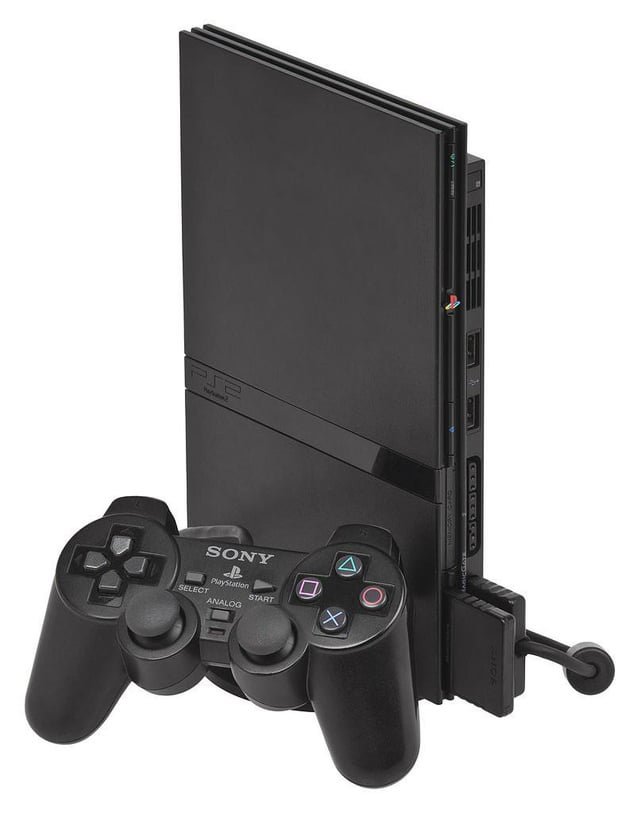
Yes, you can play PS1 games on a PS2.
Ever wondered if that stack of classic PlayStation 1 games could find new life on your PlayStation 2? The answer is yes, most PS2 consoles possess the ability to play PS1 game discs. This backward compatibility is a great feature for those who want to experience older titles without having to get out the original console.
So if you’re wondering, can you play PS1 games on a PS2, it’s good to know you don’t need to dig out your old system for those retro gaming sessions. Dust off those old games and relive those memorable moments on your PS2!

Can You Play PS1 Games on a PS2? The Ultimate Guide
Yes, you absolutely can play PlayStation 1 (PS1) games on a PlayStation 2 (PS2)! This is fantastic news for gamers who love the classics or have a collection of PS1 games they want to keep playing. The PS2 was designed with backward compatibility in mind, which means it can play games from the previous PlayStation generation. This feature was a big hit when the PS2 came out, and it still makes it a great console to have even today. Let’s dive deeper into how this works and what you need to know.
How Does PS2 Play PS1 Games?
The magic behind the PS2’s ability to play PS1 games lies in its hardware. Sony included the necessary components from the PS1 inside the PS2. Essentially, the PS2 has a built-in PS1 “emulator” that allows it to read and play the older game discs. This means that unlike some modern consoles that emulate older games through software, the PS2 can play PS1 games natively. This native playback makes the gaming experience smoother and more accurate to how the games originally ran on a PS1.
Understanding Backward Compatibility
Backward compatibility is a term used to describe when a new console can play games designed for an older console. In the case of the PS2, it’s backwards compatible with the PS1. This means it can read the game discs and understand the game’s instructions, just like a PS1 would. Think of it like a DVD player that can also play CDs, they are different formats, but the same machine can understand and process both.
Why is Backward Compatibility Important?
Backward compatibility is very important for several reasons. First, it allows gamers to keep playing their favorite older games without needing to keep multiple consoles hooked up. It also helps preserve gaming history, letting people enjoy classic titles years after their initial release. It provides great value to consumers, as they can invest in a new console and still access the catalog of games from their previous one, saving money and time. Backward compatibility ensures that your previous investment in games is still usable.
What PS1 Games Can You Play on a PS2?
You might be wondering if all PS1 games will work on a PS2. The good news is that, for the most part, almost all PlayStation 1 games are compatible with the PlayStation 2. You’ll find that the vast majority of PS1 game library runs flawlessly. There may be a small number of exceptions, particularly some very early releases or unusual peripherals, but for the most part, your old collection will work just fine. This extensive compatibility makes the PS2 an excellent option for both enjoying your old games and exploring more if you missed any titles from the PlayStation 1 era. Here’s a look at what you can expect:
Almost All Games Work: The vast majority of PS1 games work without issue on the PS2. You can expect to play your favorite RPGs, platformers, racing games, and more without problems.
Few Exceptions: There are a handful of games that might have minor glitches or not work at all, but these are rare. These are usually very early PS1 releases or games with unusual control schemes.
Region Locking: This is something to consider. The PlayStation 2 has region locking, just like the PS1. This means that a game bought in Europe might not work on an American PS2. Generally, games from the same region as your PS2 will work without issues.
How to Play PS1 Games on PS2
Playing PS1 games on your PS2 is quite simple and straightforward. You don’t need any special software or complicated steps. The PS2 makes it easy to jump right into playing those classic games. Here’s a step-by-step guide:
1. Turn on your PS2: Make sure your PlayStation 2 is plugged in and connected to your TV. Power it on.
2. Open the disc tray: Press the eject button to open the disc tray.
3. Insert the PS1 game disc: Place your PS1 game disc in the tray. Make sure the shiny side of the disc is facing down, like you would when inserting a PS2 game.
4. Close the disc tray: Gently push the disc tray back in.
5. Turn on the console: Turn on the PlayStation 2 console if you haven’t already.
6. Wait for the game to load: The PlayStation 2 will read the disc. It might take a few moments, so be patient. Soon you should see the PS1 logo appear on screen, then the game will start like it would on a PS1.
7. Start Playing: Once the game starts, you are good to go! Grab your controller and enjoy playing your PS1 game.
Using PS1 Memory Cards on PS2
If you want to save your progress in PS1 games while playing them on the PS2, you will need a PS1 memory card. The PS2 memory cards won’t work for saving PS1 games. You need to use the actual PS1 memory card to store the saved data. Here’s a look at how the memory cards work with the PS2:
PS1 Memory Cards Required: To save your progress in PS1 games on the PS2, you must use a PS1 memory card. The PS2 memory cards are not compatible with PS1 game saves.
Insert into PS1 Slot: Insert your PS1 memory card into one of the memory card slots on the PS2. They are located on the front of the console, and there are usually two slots available.
Saving Progress: During gameplay, when the game prompts you to save, choose to save the data to your PS1 memory card.
No Automatic Conversion: The PS2 does not automatically convert PS1 saves to PS2 saves, or vice-versa. The save data are completely separate.
Multiple Memory Cards: If you have many games that require different save data, you might want to have multiple PS1 memory cards.
Memory Card Compatibility: PS1 memory cards come in several sizes like 1MB, 2MB, and 4MB, and all of them should work just fine with your PS2 when playing PS1 games.
Benefits of Playing PS1 Games on PS2
Playing your favorite PS1 games on your PS2 offers a range of advantages. You get to enjoy classic games on an upgraded system while taking advantage of various conveniences. Here are a few advantages of playing PS1 games on your PS2:
Convenience: Having one system capable of playing both PS1 and PS2 games saves space and reduces clutter. Instead of having two consoles, you only need one.
Improved Video Output: Depending on your connections, the PS2 can often output a slightly better signal than the PS1. This can result in slightly sharper and less blurry images when you are playing PS1 games.
Upscaling: Some PS2 models can upscale the image to a higher resolution through various methods, which makes PS1 games look better on modern TVs.
One Place For Both: With your PS2, you can keep all your games organized and in one place.
Reduced Clutter: Instead of keeping two consoles and their associated cables, you only need to keep one, which is much more convenient.
Potential Issues and Troubleshooting
Although the PS2’s backward compatibility is excellent, there might be some rare issues. Knowing about them beforehand can save you some headaches. Here are some common problems and how you can solve them:
Game Doesn’t Start: If a PS1 game doesn’t start when you put it in the PS2, make sure the game disc is clean and free from scratches. Try gently cleaning the disc with a soft cloth. Also, make sure the PS2 disc drive is working correctly by trying a PS2 game. If the problem persists, you might be dealing with a rare compatibility issue or a corrupted game disc.
Sound Issues: You might experience sound issues like missing audio or crackling noises with a very small percentage of games. This could be due to the game itself, an issue with your PS2’s audio output, or your TV’s audio settings. Check that the sound cables are connected properly to both the PS2 and the television. Also, try adjusting the sound settings on both your PS2 and television.
Freezing: If a game freezes while you’re playing, it might be caused by an issue with the game disc, or potentially the PS2 itself. Try cleaning the disc, or try a different game. If freezing continues, check to see if your PS2 has enough air circulation and is not overheating, and make sure your disc drive is in a good condition.
Compatibility Issues: While rare, some games simply do not work on the PS2. This can occur for very early or obscure titles. The list is very small. In this case there isn’t a good solution except to try playing the game on an actual PS1, if possible.
Region Issues: If your game is from a different region than your PS2, it will not play. Always make sure you’re using games from the same region as your console. For example, a North American PS2 (NTSC) won’t play European PS1 games (PAL), and vice versa.
Troubleshooting Steps
Here are the troubleshooting steps you should try if you are experiencing a problem playing PS1 games:
1. Clean the disc: Gently clean the game disc with a soft cloth.
2. Try another disc: Try a different game, whether it is a PS1 or PS2 game to see if the issue is only with one specific disc.
3. Check connections: Make sure all the cables are connected correctly, especially the video and audio cables.
4. Check memory cards: Make sure the memory cards are inserted correctly.
5. Reset the Console: Sometimes resetting the console and restarting the game can resolve some issues.
6. Console Ventilation: Ensure your PS2 is not overheated and is properly ventilated.
7. Consult online forums: Try researching if other people are having the same problem, maybe a fix has been found.
PS1 Games That Shine on PS2
While most PS1 games work great on a PS2, some particularly stand out due to their quality and how well they play on the system. Whether it’s action, strategy, or puzzle games, these titles are must-plays:
Final Fantasy VII, VIII, and IX: The Final Fantasy series are all-time classics. These epic RPGs shine beautifully on the PS2 with their engaging stories and long playtime. These are worth playing for countless hours.
Metal Gear Solid: This game brought a whole new approach to action and stealth games. Playing on a PS2 is a great way to revisit or experience for the first time.
Resident Evil 2 and 3: These games are all-time classics that are a must-play for any fan of horror games. Playing these survival horror games on the PS2 provides a great nostalgic experience.
Crash Bandicoot series: This famous platformer series is a lot of fun and will keep you engaged for hours on end.
Spyro the Dragon Series: Much like Crash Bandicoot, the Spyro series is a classic 3D platformer that was one of the most iconic games of the PS1 era.
Tekken 3: This is one of the greatest fighting games of all time and is a must play. This iconic fighting game with its huge roster of characters, and deep fighting mechanics is best experienced on the PlayStation.
Tips for the Best PS1 Experience on PS2
Here are some quick tips to get the best gaming experience playing your PS1 games on the PS2:
Use Original Controllers: Use the original PS1 controllers for that authentic feel, but PS2 controllers also work for PS1 games. The PS2 controller has more buttons, however.
Consider Component Cables: If your TV supports component video input, using component cables instead of composite (standard red/white/yellow cables) can provide a slightly clearer picture.
Keep Memory Cards Handy: Have PS1 memory cards ready if you want to save game progress. The PS2 cards will not work with PS1 games.
Clean Your Discs: Always ensure your game discs are clean and scratch-free to prevent issues while playing.
Adjust Screen Size: Check your PS2’s system menu to see if you can adjust the screen size for PS1 games.
Experiment with Upscaling: Some PS2 models have options to upscale PS1 games. This might make them look better on modern TVs. Experiment with this feature if your console provides it.
Playing PS1 games on a PS2 is a great way to relive classic gaming moments. The backward compatibility of the PS2 allows you to experience older titles without needing to have another console. It’s easy and, most importantly, it allows you to keep your old PlayStation memories alive.
The PlayStation 2 offers a convenient and user-friendly experience for playing your PS1 games. By understanding how the system works and knowing some troubleshooting steps, you can enjoy a large library of classic games without any problems. Enjoy your gaming and have fun exploring all the PS1 games available on the PS2. Remember to always take care of your discs and hardware to ensure your games continue to work.
Does PS2 play PS1 games
Final Thoughts
Yes, you can absolutely play PS1 games on a PS2. The backward compatibility feature allows you to enjoy your older PlayStation titles on the newer console without any problems. This is a key benefit for many gamers.
Your PS1 discs will load and play just as they would on the original system. This means you can relive classic gaming experiences easily.
So, the answer to ‘can you play ps1 games on a ps2’ is a definite yes. The PlayStation 2 is an amazing option to enjoy your classic collection.

