
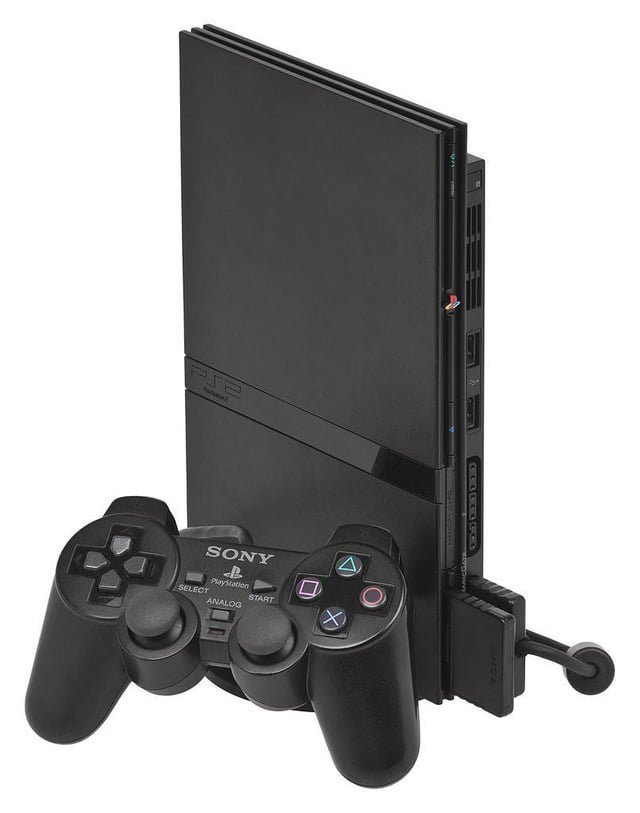
Yes, you can play PS1 games on a PS2 Slim. The console is backward compatible.
Have you ever wondered if your old PlayStation 1 games will work on the slimmer PlayStation 2? It’s a common question for those with a collection from the previous generation. Many gamers are curious, can you play ps1 games on ps2 slim, considering the different hardware.
Luckily for fans of retro gaming, the PS2 Slim retained the backward compatibility found in its chunkier predecessor. This means you can dust off those classics and enjoy them on your PS2 Slim.

Can You Play PS1 Games on PS2 Slim?
So, you’ve got a cool PlayStation 2 Slim, and you’re feeling a little nostalgic for those classic PlayStation 1 games? That’s awesome! Maybe you remember playing Crash Bandicoot, Spyro the Dragon, or Final Fantasy VII. The big question is: can you actually play those awesome PS1 games on your PS2 Slim? The answer is yes, with a few important details we need to check out. This article will walk you through everything you need to know about playing those classic PS1 games on your PS2 Slim.
The PS2 Slim’s Backward Compatibility
Let’s start with the good news: the PlayStation 2, including the Slim model, has a very cool feature called “backward compatibility.” This means it’s designed to play games from its older sibling, the original PlayStation (PS1). That means, you can, with no modifications, usually just pop in a PS1 disc and it should start up no problem.
How it Works
Think of your PS2 Slim like a super talented actor. It can play the roles of both PS2 and PS1. When you insert a PS1 game, the PS2 Slim figures out what kind of disc it is and switches to a special mode to play that game correctly. This special mode allows the console to understand the older game’s software and graphics and get them working smoothly.
Checking Your PS2 Slim Model
While most PS2 Slims have the ability to play PS1 games, it’s always a good idea to check your specific model number to be absolutely sure. The model number can be found on the back of your console, usually on a sticker. It’ll be something like SCPH-7XXXX, where the X’s are numbers.
Here’s a quick guide:
- Most SCPH-70000 series Slim models: Play PS1 games without any issue.
- SCPH-90000 series Slim models: These also generally support PS1 games.
Essentially, nearly every version of the PS2 Slim has been built to support backward compatibility. However, it is always smart to double check.
What You Need to Play PS1 Games
Getting ready to play your old PS1 games is pretty straightforward. Here’s what you’ll need:
- Your PS2 Slim Console: Of course, you need the console! Make sure it’s plugged in and working well.
- A PS1 Game Disc: Choose your favorite PS1 game. Make sure it’s clean and not too scratched. Scratches can cause problems during gameplay.
- A Controller: Your PS2 controller works just fine for PS1 games. No need for an older PS1 controller.
- A TV or Monitor: Make sure your television screen is connected properly, so you can see the game.
Setting Up Your PS2 Slim
It’s super easy to set up your PS2 Slim to play PS1 games. Here’s how to do it:
- Connect Everything: Make sure your PS2 Slim is connected to your TV, and that your controller is plugged in.
- Turn On: Power up your PS2 Slim.
- Insert the PS1 Game: Gently place the PS1 disc into the disc tray.
- Close the Tray: Push the tray closed or let the console close it if it’s an automatic one.
- Start Playing: The PS2 should automatically recognize the PS1 game, and it should start loading shortly.
Potential Issues and How to Fix Them
Sometimes, things might not go as smoothly as we would like. Let’s talk about some potential problems and what to do if they come up.
Game Not Loading
If the game doesn’t start loading, here are some things you can check:
- Clean the Disc: A dirty or scratched disc is a common issue. Use a soft cloth to gently wipe the disc from the center out to the edges.
- Check the Console: Make sure your PS2 disc tray is working properly. It might need a cleaning or repair.
- Try a Different Game: If you have another PS1 game, try that to see if the problem is with the console or a specific game.
Game Freezing or Glitching
If the game starts but freezes or glitches, these steps can help:
- Console Ventilation: Make sure your PS2 has plenty of airflow around it, so it doesn’t get too hot. Overheating can cause glitches.
- Disc Condition: Again, check the disc for scratches or damage that could interfere with play.
- Console Issues: If you keep having problems with different games, there might be something wrong with your PS2. It might be time to have a professional take a look at it.
Compatibility Issues
While the PS2 Slim is great at playing most PS1 games, there are a tiny number of games that might not work perfectly or at all. These are very rare, but just be aware it can happen. Most of these are very obscure titles or games released much later in the PlayStation 1’s life cycle.
- Game list resources: You can sometimes find lists online that detail which PS1 games have compatibility issues with the PS2 consoles. Checking them out might be helpful.
Why PS1 Games Still Hold Up
Even though they are from the 90’s, many PS1 games are just as fun today as they were back then. Here’s why they’re still worth playing:
Classic Stories and Characters
PS1 games gave us some amazing characters and storylines. Think of Cloud Strife from Final Fantasy VII or Solid Snake from Metal Gear Solid. These characters and stories remain popular to this day.
Unique Gameplay
Many PS1 games had very creative gameplay ideas. They were trying things that had never been done before! Games like Crash Bandicoot or Tomb Raider were pioneers in the 3D gaming space.
Nostalgia
Playing these games now can bring back lots of good memories. If you played them when you were younger, getting back into them can be a really fun and emotional experience. It’s like stepping back in time.
Simpler Times
Compared to many of today’s games, PS1 games are often simpler to play. It’s easy to pick them up and jump right in. No super complicated tutorials to go through. Just pure simple gaming fun.
Tips for the Best PS1 Gaming Experience
Want to make your experience even better? Here are some quick tips:
- Use a Good Controller: While a standard PS2 controller works great for all PS1 games, you can always pick up a PS1 controller if you prefer. Some people really like how the PS1 controller feels.
- Adjust TV Settings: Some older games may look a little blurry on modern TVs, Adjust your TV’s display settings to make the game sharper, if possible. Sometimes using a display mode like ‘game mode’ can reduce input lag.
- Sound Check: Ensure the audio cables are connected properly, so that you can fully enjoy the music and sound effects of the PS1 games.
- Game Guides: If you’re having some trouble with a particular game, don’t be shy about looking for a game guide online, whether it is text based or video based.
Exploring the PS1 Game Library
The PlayStation 1 has a massive library of games, spanning different genres like action, adventure, racing, role-playing games (RPGs), and more. Here are a few you might want to try:
Action and Adventure
- Crash Bandicoot Series: Fun platforming games with a crazy main character.
- Tomb Raider Series: Explore ancient ruins with Lara Croft.
- Metal Gear Solid: Stealth action gameplay with a deep story.
Role-Playing Games (RPGs)
- Final Fantasy VII, VIII, and IX: Epic storylines and characters that you will never forget.
- Legend of Dragoon: A classic RPG with a unique combat system.
- Chrono Cross: A very stylish and unique game with a beautiful soundtrack.
Racing
- Gran Turismo: A very realistic car racing simulation.
- Crash Team Racing: A very fun and frantic kart racing game.
Other Great Titles
- Spyro the Dragon Series: Charming platforming games for everyone.
- Resident Evil Series: Survival horror with zombies and puzzles.
- Silent Hill: Another very scary and atmospheric horror game.
There are countless PS1 games out there, so be sure to explore and find some games that you like!
So, if you’re wondering, “can you play PS1 games on PS2 Slim,” the answer is a definite yes! The PS2 Slim is fantastic for experiencing classic games from the PlayStation 1 era. There are many ways to find them, and a whole lot of titles to try. Just remember to handle your discs with care and check out some of the guides available to get the most enjoyment out of your experience. Have fun exploring all of those classic games!
What Happens When you play PS1 games on PS2 Slim #Shorts
Final Thoughts
Yes, you can play PS1 games on a PS2 slim. The console maintains full backward compatibility. Just insert your PS1 disc, and it will run.
This feature works reliably. No special modifications are required. You can enjoy your old PlayStation games using your PS2 slim.
Therefore, can you play ps1 games on ps2 slim? The answer is a clear yes. This adds great value to the console.

