
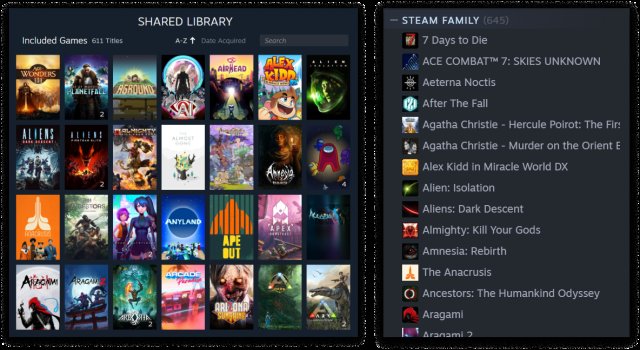
No, you cannot play the same game on Steam family share simultaneously. Only one person can play a shared game at any given time.
Ever wondered if everyone in your family can jump into the same Steam game at once? The concept of sharing games with loved ones is appealing, but there are limitations. A common question is, “can you play the same game on Steam family share?” It’s great to share your library, yet understanding the restrictions prevents disappointment.
Steam’s family sharing feature is a neat way to share titles. However, concurrent play of the same game isn’t allowed. This means only one person can play the game at any single moment.

Can You Play the Same Game on Steam Family Share?
The big question for many gamers who use Steam Family Sharing is this: can you and your family members play the same game at the same time? It’s a common scenario. You want to play your favorite co-op title, while your brother or sister wants to jump into the very same game. Let’s explore this together! It’s important to know how Steam Family Share works before answering the question, so let’s start there.
How Steam Family Sharing Works
Steam Family Sharing lets you share your library of games with other Steam accounts. This can be fantastic if you have a family, or a close group of friends, who all love video games but don’t want to purchase every title individually. Here’s a simple breakdown of how it functions:
- Authorization: You need to authorize the computers or devices that will access the shared library. This is done by logging into your Steam account on the desired computer.
- Library Access: Once authorized, the other Steam account on that computer can access your game library. They don’t get full access to your account; just to the game library.
- Playing Games: The authorized accounts can install and play the shared games, just as if they owned them.
It’s important to remember that Family Sharing is not a way to give away copies of your games. You are simply allowing others access to your library.
The Limitation: One Player at a Time
Now, here comes the crucial part – and the direct answer to the main question, Can you play the same game on Steam Family Share? The quick answer is usually no. You cannot both play the exact same game at the same time.
Here’s why:
Steam only allows one user to play a game from a shared library at any given time. If the primary account (the one that owns the game) is playing a game, anyone using a shared library is locked out. This prevents situations where multiple people are simultaneously playing the same game using just one purchase. It’s a measure designed to protect game developers’ work and encourage purchases, even within a family or close-knit group.
How Steam Handles Multiple Players Trying to Use the Same Game
Let’s say you’re playing “Awesome Game X,” and your brother tries to launch the same game from your shared library. Here’s what will happen:
- Game Interruption: You might see a message that someone else is trying to play your game.
- Limited Options: Your brother might have a limited time frame to get in. He can try to wait until you have finished or buy their own copy of the game.
- Primary Account Takes Priority: If the primary account tries to play a game from its library, it takes precedence, and any shared library users may lose access.
Exploring Scenarios and Exceptions
While it’s generally impossible to play the exact same game simultaneously, there are some subtle scenarios and exceptions that are worth discussing. These instances can provide some flexibility in shared game playing.
Scenario 1: Playing Different Games Simultaneously
Even if you cannot play the same game at the same time, Steam Family Sharing still lets you play different games simultaneously. Let’s say you want to play ‘Action Game A’, and your brother wants to play ‘Puzzle Game B’. Both games are in the same primary library. You both can happily play these games at same time. The key point is that each person needs to be playing a different game, not the same title. This is one of the key benefits of Family Sharing, allowing everyone to engage with different parts of the library at the same time.
Scenario 2: Offline Mode
Steam’s offline mode offers an interesting twist. If the owner of the primary account is playing a game offline, someone else might be able to play a different game from the shared library online. However, only one user can be actively online with the primary account’s games. It can be a useful workaround, but requires careful planning and knowing how to enter and exit offline mode.
Scenario 3: Games with Separate Server Access
Some games operate with their own servers or launchers external to the Steam platform. These games may have different rules depending on how they are managed. The Family Share restrictions may be less strict in these cases. However, such exceptions are on a per-game basis and not something to rely on for a shared gaming experience. Usually, when a game uses it’s own servers, it would need a separate license for a different player to join the game.
Scenario 4: Family Share and Multiplayer Games
Steam Family Share primarily focuses on sharing single-player games. Multiplayer games can become complex. Let’s say a game has both single-player and multiplayer mode. You might be able to play single-player modes of the game, if the primary owner is not playing same game. But for multiplayer, generally, both players need their own game copy. Steam does not provide a loophole for multiple players to play using one license.
What You Can Do Instead
While you can’t simultaneously play the same title using Family Share, there are alternatives for enjoying games together:
- Buy a Copy for Each Player: The most direct solution is for each person who wants to play a game simultaneously to own their own copy. This not only allows for shared play but also supports the game developers.
- Use Steam Remote Play Together: For local multiplayer games, Steam’s Remote Play Together feature lets you share the game with friends and family online. Only one person needs to own the game for this functionality. It can give you the feeling of playing co-op together even when you’re not in the same room.
- Coordinate Playing Times: If you’re not interested in playing the same game at the same time, you can work out a schedule where you can use the shared game library during different periods.
Frequently Asked Questions
Let’s tackle some common questions that you might have about sharing your Steam library:
Can I share games with all of my friends?
While there is a limit on how many computers you can authorize, you can share your library with family and friends. You have to authorize the computers from your Steam account. The Steam limit is a maximum of 5 accounts on 10 devices. This is for the purpose of stopping the misuse of the system by resellers. When you are sharing it with multiple people, they can all enjoy your games. The key is that each player needs to be playing a different title at any given time, and you cannot play the same game at the same time.
What about DLC? Is it shared too?
Generally, yes. If the base game is in the shared library, then the associated downloadable content (DLC) is often accessible. However, there can be exceptions. Some DLC might be linked to the primary account and not shareable.
Can I revoke access for someone if I change my mind?
Yes, you have full control over your sharing settings. You can deauthorize any computer or user from your shared library any time you wish.
Does sharing games impact my progress or save files?
No, your save files and game progress are separate. Each Steam account stores its own saved data. Your progress is not affected by anyone else playing from your shared library.
Is Steam Family Share available for all games?
Most games are eligible for Family Share, but some may not. Game developers do have the option to opt out of Family Sharing. So, there are some games that will never be available to share. Always check before relying on family sharing for a specific title.
Can I earn Steam achievements in shared games?
Yes, you can earn Steam achievements while playing games through a shared library. The achievements are connected to your personal Steam account, and not the primary owner’s account.
Understanding the Intent of Steam Family Sharing
It’s beneficial to understand that Steam Family Share is designed for family or small close-knit groups to share their games without buying the same titles multiple times. It’s not intended as a method for mass-sharing or bypassing the need to purchase games for multiple users playing at once. The fact that only one player can play one game, means the Steam Family Share model is fair, honest, and supportive of game developers.
In conclusion, while Steam Family Sharing is an awesome way to share your game collection, you can’t play the exact same game simultaneously with someone else using your library. There are a few workaround options, and you can definitely still play different games at the same time, or even coordinate your playtime to maximize the benefits of sharing your games. If you are wanting to play the same game with others, the best solution is often to purchase the game on your own account.
How to Share Games on Steam 2024 – Steam Family
Final Thoughts
Ultimately, sharing games via Steam Family Sharing has limitations. You cannot play the same game simultaneously with the owner. This means only one person can enjoy a title from the shared library at a time.
The borrowed library becomes unavailable when the owner plays any game. Therefore, the answer to the question “can you play the same game on steam family share” is no. Coordinating with the owner remains essential.

