
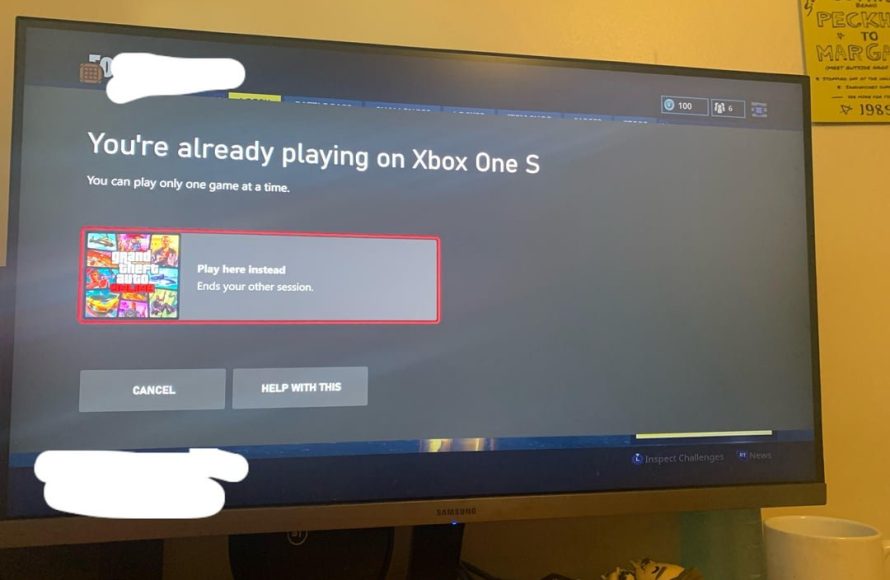
Yes, you can play the same game while game sharing Xbox, but not simultaneously on the same account.
Have you ever wondered about the possibilities with Xbox game sharing? Maybe you and a friend or family member want to enjoy the same titles without buying multiple copies. So, can you play the same game while game sharing Xbox? The answer is yes, but with a few key details to know about how it works. You both can access the shared library of games on your own consoles.
Only one person can play on the same account at a time even while game sharing. This is to prevent unauthorized access. This restriction applies even if both of you own the physical game copies or have a different account associated. You will always need to make sure that you’re using your own account while enjoying the shared game library.

Can You Play the Same Game While Game Sharing Xbox?
The question of whether you can play the same game simultaneously while using Xbox game sharing is a common one, and it’s a great question! Game sharing on Xbox is a super way to let family and friends enjoy your digital games without needing to buy multiple copies. It works by setting one console as your “Home Xbox,” making your game library available on that console for anyone who uses it, with all their own accounts.
How Xbox Game Sharing Works: The Basics
Before we dive into playing the same game simultaneously, let’s go over how Xbox game sharing functions in a straightforward manner. You have a primary Xbox account – this is the account that owns all the games. When you designate a specific console as your “Home Xbox,” your games become accessible on that console for other user accounts that sign in on it. This means your brother, sister, or friend could use your games on your designated “Home Xbox” even when you’re not around or logged into another console.
Here’s a simple way to think about it:
- Your Primary Account: This account owns all the digital games.
- Home Xbox: This is the console where your games can be played by anyone.
- Other Consoles: You can still use your games on other consoles if you log in with your primary account.
Playing the Same Game: The Key Limitation
Now, here’s the core of our question: can you and another person on your Home Xbox play the same game at the same time? The short answer is: No, not generally. There are some important limitations on game sharing. The Xbox’s game sharing feature is primarily designed for different players to access your games, not for two people to play the same game simultaneously on one account.
Here’s what happens when two accounts try to play the same game simultaneously under a single shared game license:
- When the primary account is playing a game: If the primary account is playing a particular game on one Xbox console or PC. Another account on your Home Xbox cannot play that exact same game at the same time. The second user will encounter a message prompting them to buy the game or sign into the profile that owns the game license.
- If the primary account isn’t playing the game: If the primary account is not playing the game or even online. Another account on the “Home Xbox” can play the games that the primary account owns. This is how game sharing is meant to be utilized, with different players enjoying the game library at different times.
Think of it like owning a single physical copy of a game. You can’t play that same copy on two different consoles at the same time. The game sharing limitation is similar.
Exceptions: Games with Separate Purchase Requirements or Multiplayer
While the general rule is that you can’t play the same game simultaneously on different accounts through game sharing, there are some notable exceptions. These usually boil down to situations where the game itself permits separate instances of play or uses a different approach to digital licensing.
Games with Separate Purchase Options or Free-to-Play Status
Some games, even those available through a digital game library that is being shared, might have additional in-game purchases or different account linkages. For instance:
- Free-to-play games: If a game is free-to-play on Xbox like Fortnite or Rocket League, the restriction doesn’t apply since it’s freely accessible to anyone, regardless of game sharing status. Therefore, multiple players on the Home Xbox can play these games simultaneously without issues. The license is not tied to just one account.
- Games with separate in-game purchase: Some games have a base game available through game sharing, but specific in-game content may need to be purchased separately on individual accounts. This means that even if the base game is shared, two accounts can play it simultaneously because each might be using its own purchased content, making them distinct instances of the game.
Multiplayer Game Scenarios
Multiplayer games add another layer to the discussion. Even if you can’t play the same instance of a single-player game simultaneously, multiplayer games often allow multiple players on different accounts to join the same game session (as long as the base game is available). Here’s how this might work:
- Online Multiplayer: When playing a game like Call of Duty or Minecraft where multiple users can join an online server, one player can be playing on the primary account (on any console) and someone else can be playing the same game using a different account on the Home Xbox. These are generally treated as different instances of the game with unique online IDs.
- Local Multiplayer: Some games also support local multiplayer which allows multiple players on the same console to play simultaneously through split screen or with separate controllers. In these cases, even the user on the home Xbox can log into their individual profiles and play local multiplayer with someone on the main account
Important Note: Even in multiplayer, only one account can play on your main Xbox account and it can be any Xbox (not the Home Xbox only). The others can play using the shared library, on the home console and logged in to their own separate accounts. But two users can’t use the same account to play the same game, as it is a different scenario.
Game Sharing and Xbox Game Pass
The situation gets a little bit more interesting when you bring Xbox Game Pass into the mix. Xbox Game Pass grants access to a library of games through a subscription. Here’s how game sharing affects access to games through this feature:
- Game Pass on Home Xbox: If your primary account has an active Game Pass subscription, that subscription benefits everyone using the Home Xbox. Anyone using an account on the Home Xbox can play the games available with that Game Pass. However, all the shared limitations apply, they cannot play the same game at the same time as the account that owns the pass.
- Game Pass on other consoles or PC: The main account that owns the game pass subscription can also access the game library on any console that the owner is logged in, as well as on PC. And same limitation still apply as above for game sharing.
In a nutshell, Game Pass enables a wider range of games to be shared on the Home Xbox. However, it does not bypass the fundamental restriction of not being able to play the same game simultaneously through game sharing. Two accounts cannot access the same game title on one account subscription.
Practical Game Sharing Scenarios and Tips
Let’s look at some practical scenarios where you might use game sharing and some tips to make sure everything works smoothly:
Scenario 1: Family Game Night
Imagine a family where a parent has the primary Xbox account and two children have their own accounts on the Home Xbox. The parent can play one game on their own account while the children play other games from the shared library on the Home Xbox, but they can’t play the same game simultaneously unless its a multiplayer session. So, the parent might be playing Forza on one Xbox while the kids are playing Minecraft or another game at the same time on the Home Xbox.
Scenario 2: Friends Playing Together
Suppose you and your friend want to play a game together. You could both sign into your own accounts, with one player having the game on his main console and other playing on his console from the shared library on his Home Xbox. But remember that both will be different instances of the same game, but different accounts playing the same game is allowed as long as they are not using the same account.
Tips for a Smooth Game Sharing Experience
- Set the correct Home Xbox: Double-check which Xbox is set as your Home Xbox. Only that console will be able to access the full benefits of game sharing.
- Manage your subscriptions: Keep track of your Xbox Game Pass or other game subscriptions. This will prevent accidental purchase or conflicts on different accounts.
- Regularly Update Games: Keep all the games on both your Home Xbox and your primary Xbox up to date. This prevents compatibility errors.
- Communicate with other users: Talk to other people using the shared library to avoid conflicts when choosing the games to play.
Why the Restriction Exists
The limitation of not playing the same game simultaneously using the shared library is mainly to protect game developers and the digital license of the games. This model helps ensure fair access to games while also providing revenue for game developers. It prevents widespread abuse of shared game libraries. If multiple users could play the same game on the same account simultaneously, the game publishers would see significant decreases in their revenue.
Alternatives to Simultaneous Play
Although you can’t play the exact same game at the same time using a single game license, there are other ways to play games together:
- Multiplayer sessions: Many games offer online or local multiplayer modes. Use these to play together with different accounts.
- Game Pass Ultimate: Consider Xbox Game Pass Ultimate which allows access to game library on both consoles and PC. While it still does not allow a shared library use for the same instance of the game, it offers different avenues to enjoy games together by having a full set of library.
- Purchasing games: If two players constantly want to play the same game at the same time, purchasing separate copies of the game is a solution.
Game sharing on Xbox is a fantastic feature to share the joy of gaming. While it may have some restrictions, they are designed to ensure fairness and keep the gaming ecosystem healthy. By understanding how game sharing works and its limitations, you can make the most out of it for your household or circle of friends.
Understanding the rules and practicalities of Xbox game sharing can significantly enhance your experience, offering a more enjoyable and efficient way to manage your digital game collection.
While it doesn’t allow two people to play the exact same game simultaneously, it is a powerful way to share the library between family members. When thinking about it, remember that shared access means different people using the library at different times and not at the same time. Use this feature to explore a variety of games, making the gaming experience even more enjoyable for everyone involved.
So next time when someone asks if can you play the same game while game sharing Xbox. You can confidently explain the rules and limitations.
How to play at the same time Xbox game share.
Final Thoughts
Yes, you can play the same game while game sharing Xbox, but not simultaneously. Only one person can actively play a specific game at any time. This is a must when sharing your game library.
Sharing allows you to expand your gaming options affordably. Remember, only one account can use a shared game at a time. This limitation prevents concurrent gameplay of the same title.

