
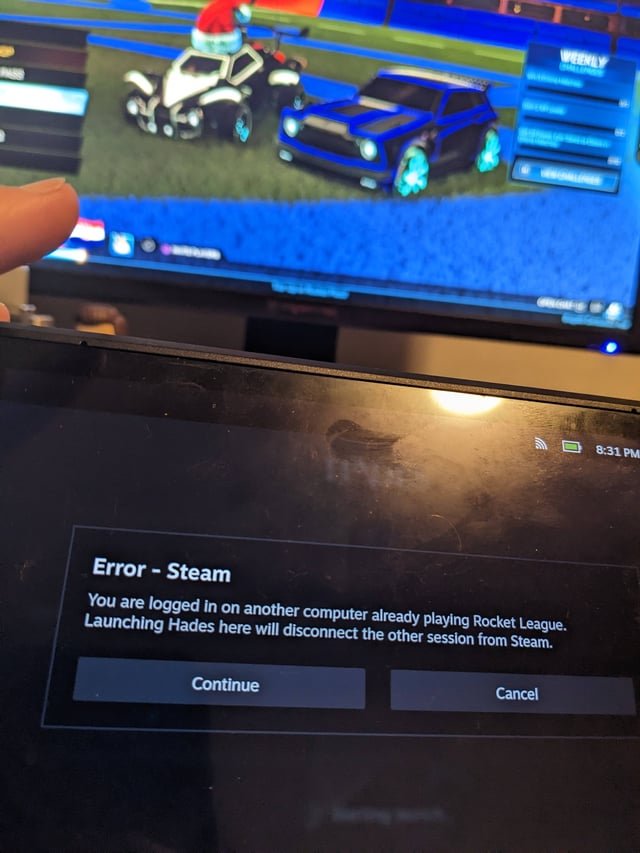
No, you cannot play two games at once on Steam using a single account.
Ever wondered if it’s possible to juggle multiple gaming worlds simultaneously? Specifically, can you play two games at once on Steam? This is a common question among PC gamers with a large library of games.
The temptation to dive into one adventure while another is loading can be strong. But Steam’s system is designed around a single active game session.
Unfortunately, the technical restrictions prevent playing two different titles concurrently on the same account, requiring you to finish one game session before launching another.

Can You Play Two Games at Once on Steam? A Deep Dive
Okay, so you’re a gamer, right? And sometimes, just one game isn’t enough. You’ve got that urge to jump into a totally different world while your other game is running in the background. Maybe you’re waiting for a friend to log on, or you’re grinding in one game and just want something else to occupy your brain. The big question is: can Steam let you play two games at the same time? The simple answer is, it’s tricky, and mostly, the answer is no. But there are ways around it and a lot of different things to understand. Let’s explore this world of multi-gaming on Steam together!
The Basics: Why Steam Doesn’t Want You Playing Two Games at Once
Steam, at its core, is designed to keep things simple. When you launch a game through Steam, it does a few important things. It checks if you own the game, makes sure the game is up to date, and starts the game process. Normally, Steam only wants one game running at a time because of how it manages these processes. Think of it like a librarian who only lets you check out one book at a time. They want to keep things organized, and prevent conflicts. If you try to start a second game directly from Steam, it usually stops the first one that was running. This is because Steam needs to communicate properly with games, and having two games fighting for its attention can lead to problems. These problems can range from games crashing to slowdown of your computer. It is like trying to pour water into two cups at the same time with one container – usually one overflows or it just creates a big mess.
Steam’s Single Game Focus: A Technical Look
Technically, Steam uses something called “game locks”. When a game is running, Steam applies a lock, meaning no other game can be started using your Steam account. This also has to do with things like your playtime tracking, and how it is managed with cloud saves. If two games are running at once with your account, Steam might get confused on these kinds of things. Steam is very protective of its processes. It wants everything to run perfectly. That means tracking your gaming time, your achievements, and managing your save files correctly, and these things are designed for one game at a time per account. If you could play several games at once, it would be like trying to juggle too many balls at the same time – something would probably get dropped!
Circumventing the Single Game Limit: Potential Workarounds
Okay, so Steam doesn’t want you to play two games at once. But the gaming world is full of resourceful people who have found workarounds. These methods are not officially supported by Steam, so proceed with a bit of caution. These also might not work for all games. Here’s a look at some of the most popular ways people try to get around the one-game-at-a-time limit.
Using Multiple Steam Accounts
One of the most common and safest methods is to use multiple Steam accounts. Here’s how it works:
- Create a second Steam account.
- Log in to your main account on the Steam client.
- Log into the secondary account using Steam through a web browser (or using another device) on your computer.
- Launch a game on each account.
This method will work for most games. It’s simple, and it uses Steam in a way that it allows, even if it’s not exactly what the developers originally intended. You’re essentially treating each account as a separate gaming device and there are no conflicts between them. The main drawback is you need to purchase games twice, which can become expensive. Also, you can’t share games between the accounts, like with Steam’s Family Sharing system.
Employing Steam Family Sharing (with Caveats)
Steam’s family sharing allows you to share your games with different accounts logged into the same system. It sounds like a great solution, right? The tricky part is that Steam Family Sharing still only lets one user play a shared game at a time. If you and someone you share a game with both want to play the same game, you can’t do it simultaneously with family sharing. The way you could use family sharing to potentially run two games is with two separate games on the same computer. If your primary account is playing a game, you could switch over to the second account on that same computer and play a shared game. However, both of these games would need to be different from each other. There are also other requirements that prevent most users from doing this, such as needing to authorize a computer on each account. Here’s a summary:
- Sharing Requires Authorization: You must authorize the computer to be able to play games from the shared library.
- Shared Library is Locked: When one account is using the shared library, nobody else can play games from that library.
- Works only for separate games: you cannot use family sharing to play the same game at the same time.
It’s still not a true solution for playing two games simultaneously. It just lets you switch between two different games with two different accounts.
Using Sandbox or Virtual Machine Software
This method is a bit more complex and it’s intended for advanced users, but it has its merits. You can install sandbox software that creates a virtual environment where an application can run completely isolated from other applications and the operating system. You can also use virtual machines. Here’s how it generally works:
- Install a program that is used for sandboxing or creating virtual machines (examples are Sandboxie or VMWare).
- Install Steam on both your main computer, and your sandboxed or virtual machine.
- Log in to a different steam account on each of the instances.
- Launch a game on each of the instances.
Sandbox software or virtual machines act like a separate computer all within your main computer. This allows you to run multiple instances of Steam, each using a separate account. However, this method requires more computer processing and memory, so it may not work well with older or less powerful computers. This can also be a headache if you aren’t tech savvy.
Playing Games from Other Platforms
While not a Steam-specific solution, it’s worth mentioning. You could be playing a game on Steam while having a completely different game running on a different platform. For example, you could be playing a game on Steam while also running a game on the Epic Games Store, GOG, or even playing a console game at the same time. This allows you to easily multitask across platforms, which might just solve your desire to play more than one game. This is probably the easiest method to run two games simultaneously on your computer, but it doesn’t really mean you are using two Steam games. Here’s a quick list of potential platforms:
- Epic Games Store
- GOG
- Origin (EA App)
- Microsoft Store
- Console systems like Xbox, PlayStation or Nintendo Switch.
Understanding Game Requirements and Potential Issues
Before you jump into trying any of these methods, it’s essential to understand that running two games at once – even if you can – can strain your system. Here are some things to consider:
System Resources: CPU, RAM, and GPU
Every game requires a certain amount of processing power. This includes the Central Processing Unit (CPU), Random Access Memory (RAM), and the Graphics Processing Unit (GPU). If you try to run two games simultaneously, you are effectively doubling the requirements for these resources. If your system is not powerful enough, you will probably experience:
- Slowdowns and lags
- Game crashing
- Overheating of computer components
- Reduced overall performance
Make sure that your system meets the minimum or recommended specs for running two games at the same time, which might involve researching the specs of both games and checking your own computer’s resources. If you aren’t careful, you could damage your computer and the experience will not be very fun.
Network Bandwidth Concerns
Online games require a stable internet connection. Running two online games at the same time can strain your network bandwidth, which leads to issues like increased latency or lag in the game. This can make games unplayable if your internet connection is already slow. So if you have bad internet you may want to think twice before trying this. A better internet connection can be a requirement for doing this effectively.
Conflicts with Game Files and Steam
Running two instances of the same game, even on different accounts, can sometimes cause conflicts with game files. Games often use shared libraries or files, and if two games are trying to access these files at the same time, it can cause a lot of issues. This could lead to:
- Crashes
- Corrupted game files
- Loss of game progress
This is why it is generally not recommended to play the same game simultaneously on multiple accounts. Be prepared for some unexpected errors or problems.
Are There Any Benefits to Playing Two Games at Once?
With all the possible complications, why would anyone want to play two games at once? Well, here are a few possible reasons:
- Multitasking: If you’re doing something repetitive in one game, you can have another game running to keep you entertained and occupied. This means you are less likely to be bored.
- Waiting for Friends: You can get into a different game while waiting for your friends to finish a match or become available. This way you are not just staring at a menu.
- Grinding: If you need to do a lot of grinding in a game, you can do it while having another more engaging game on the side. This will make the time go by faster.
- Experimenting: It can just be fun to see if you can push your computer to the limits. Testing how many games you can run at the same time.
These reasons can make playing two games at the same time seem like a great idea. If you have the computer that is up to the task, why not do it?
Ethical and Legal Considerations
While it’s tempting to explore ways around limitations of using multiple accounts, it’s important to consider that this can potentially be against the game’s terms of service. Most developers don’t like multiple people using one game license at the same time, because it can affect their sales and player base. While using multiple accounts is usually accepted by Steam, if it is a big problem in a specific game, it could be against that game’s rules. It’s best to always check the game’s terms of service. However, in most cases, having multiple accounts is usually allowed.
The biggest concern is usually with sharing licenses. Using a workaround to essentially share a license for a game could lead to problems. Here is what you need to be aware of:
- Game’s Terms of Service: Review the game’s terms of service to avoid any legal problems.
- Fair Play: Be mindful of how your actions affect other players. If you are doing anything that might give you an unfair advantage, you may be penalized.
- Copyright: Don’t use any methods that could infringe on copyright.
With these considerations in mind, it’s always best to respect the rules of the platform and the games you are playing.
In summary, while playing two games at once on Steam isn’t directly supported, there are methods that might work for some users. Each method has its own drawbacks, requirements, and potential issues to be aware of. Whether or not you choose to do so is something you should think carefully about, so you don’t damage your computer or potentially have problems with Steam and game companies.
How to play two games on Steam at the same time
Final Thoughts
The short answer is no; you cannot play two games at once on Steam using one account. Steam’s design only permits one game active at a time per account. If you attempt launching a second game, Steam will typically close the first.
Thus, the question ‘can you play two games at once on steam’ has a negative answer. While features like remote play exist, they facilitate playing on another device, not simultaneously on the same account.

