
No, you cannot play Wii U games on Wii.
So, you’re wondering, can you play Wii U games on Wii? It’s a common question for those with both consoles. The Wii and Wii U are from the same family but have different hardware. This means they use different game formats.
Unfortunately, the Wii’s technology is not powerful enough to run Wii U games. Each system is designed for specific game types. You’ll need a Wii U console to enjoy its exclusive titles.

Can You Play Wii U Games on Wii?
Alright, let’s get right to it. You’ve got a trusty old Wii, and maybe you’ve seen some cool-looking games on the Wii U. You’re probably wondering, “Can I play those Wii U games on my Wii?” It’s a great question, and the answer is not as simple as a yes or no. Think of it like trying to fit a big puzzle piece into a smaller puzzle – they just don’t quite match. Let’s dive deep into why.
The Hardware Hurdle: Why Wii U Games Don’t Work on Wii
The main reason Wii U games won’t work on the Wii is because they are two very different game consoles. It’s like comparing a regular car to a sports car – both are cars, but they have very different insides. The Wii U has more advanced parts, better graphics processing, and more memory than the original Wii. These differences mean the games designed for the Wii U are built to use this extra power and special features that the original Wii just doesn’t have.
Understanding the Technological Differences
To truly understand, let’s break it down. Imagine a game as a recipe. The Wii U’s “recipe” calls for certain “ingredients”— powerful processors, more storage space, better graphics cards, and a specific type of disc. The original Wii’s “kitchen” just isn’t equipped with these items. It has older equipment and can’t process or understand the game’s complex instructions.
- Processor: The Wii U has a much faster processor, letting it handle more complex game data and faster gameplay. The Wii’s processor is older and not as capable.
- Graphics: The graphics on the Wii U are way better. The Wii U can display games in HD (high definition), which looks much sharper and clearer than the Wii’s standard definition.
- Memory: The Wii U has more RAM (random access memory), letting it hold more game information at once. This is like a bigger workspace for the game to function smoothly. The Wii simply has less memory to work with.
- Discs: Wii U games come on special high-capacity Blu-ray discs, while Wii games use regular DVDs. The Wii disc drive can’t read Blu-ray discs at all.
Wii Games on the Wii U: A Reverse Compatibility Success
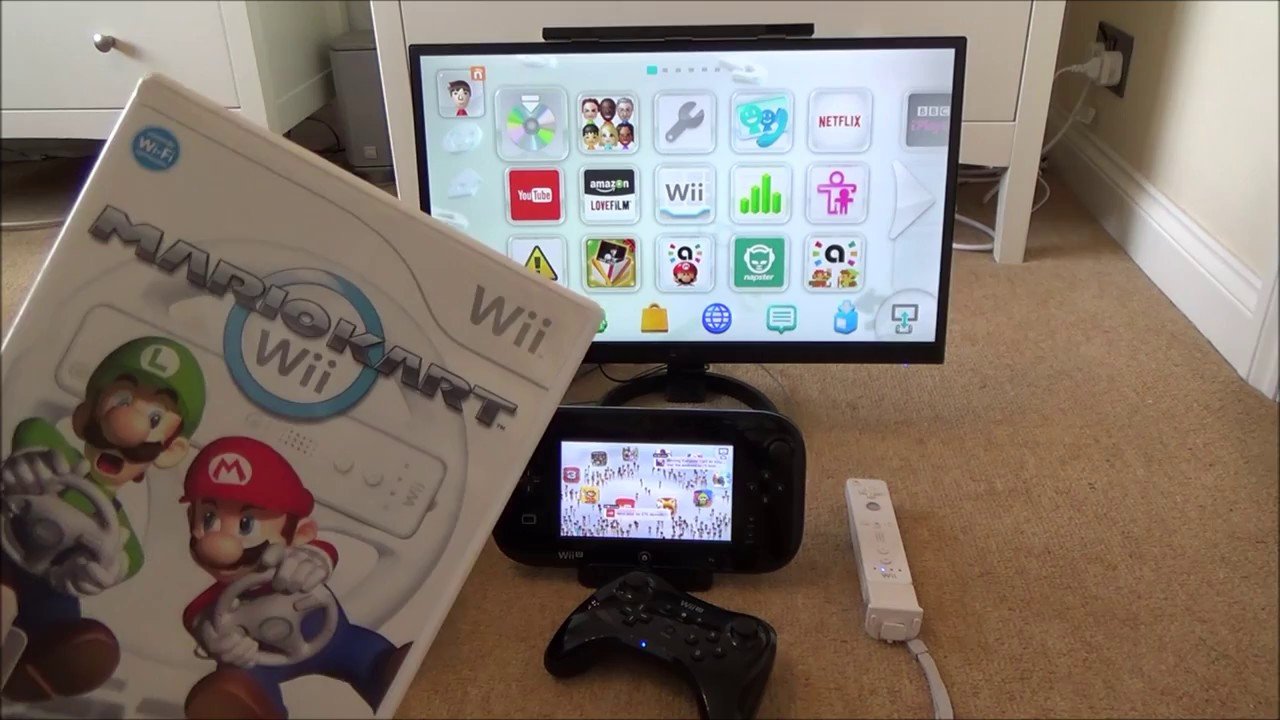
Okay, so you can’t play Wii U games on the Wii. But here’s a bit of good news: the Wii U can play Wii games! This is called “backward compatibility.” It’s like having a video game player that can play its own games and also games from the older system. Think of it like a new phone that can still play your old music – handy, right?
How the Wii U Handles Wii Games
The Wii U is built with the older Wii hardware inside. When you put in a Wii game, the Wii U sort of switches over to “Wii mode.” It uses the same processing power and other things to read and play the older game perfectly. This is very different from trying to get the Wii to play Wii U games. It’s important to remember, though, that the Wii U plays Wii games in the same resolution as the original Wii; it doesn’t make them look like Wii U games.
- Wii Mode: The Wii U has a hidden “Wii Menu.” To play Wii games, you switch over to that mode. It feels just like you’re using a regular Wii.
- Controllers: You’ll use your Wii Remotes and Nunchuks to control Wii games on the Wii U. The Wii U GamePad can’t be used as a controller in Wii mode.
- Same Experience: The game experience is exactly the same as if you were playing the Wii game on the original Wii console.
Why This Difference Matters for Gaming
This difference in compatibility is crucial for how game developers make games. The games are created to work with a particular set of hardware, and when that hardware is different, the game might not work, or even could break the console. Imagine trying to use a PC game on an old Nintendo – it just wouldn’t work the same way, or maybe not at all! The games are programmed with the console in mind. This is why the Wii and Wii U can’t just swap game libraries.
The Importance of Game Design
Game designers create games with the specific hardware of the console in mind. They choose specific graphics options and program the game to work best with the given processing power and memory of the system. A Wii U game is designed to take full advantage of its specific abilities, so it won’t be compatible with a system that has different, weaker hardware like the original Wii.
- Optimized Performance: Games are designed to run smoothly on their intended console. If you tried playing a Wii U game on a Wii, the console would struggle, making the game either not work at all or run poorly.
- Hardware Limitations: The original Wii’s hardware simply isn’t designed to handle the complexity of a Wii U game. It’s like asking a small scooter to pull a big truck – it’s just not built for that task.
- Avoiding Issues: Trying to play a game on the wrong console could lead to crashes, glitches, or, in rare cases, even damage the console.
What About Emulators?
You might have heard about emulators, which are special programs that allow you to play games from one console on a different device, like a computer. While there are emulators for different consoles, including the Wii and Wii U, they often aren’t the best way to play these games. They can be very tricky to set up, might not work properly, and often violate copyright laws by using illegally downloaded game files. Because of this and the difficulty of doing this, it’s not a good option for most people.
Why Emulators Aren’t Recommended
Emulators seem like an easy workaround, but here are the problems with using them:
- Complexity: Setting up an emulator can be complicated. You need to be a bit tech savvy, and it can take a lot of time and effort to get it working correctly.
- Legality: Often, emulators require you to download game files illegally, which can cause you legal trouble.
- Performance Issues: Emulated games can run poorly. They might be slow, have bugs, or crash often, which makes them not very fun to play.
- Technical Skills Required: Emulators can be very technical. If you don’t know exactly what you’re doing, you can end up not getting them to work, or you could risk harming your computer.
Exploring Other Options for Playing Wii U Games
So, you know that Wii U games won’t work on the Wii, and using emulators isn’t the best idea. What are your other options if you really want to play those Wii U games?
Investing in a Wii U Console
The most straightforward way to play Wii U games is to buy a Wii U console. Although Nintendo no longer makes them, you can often find them used at a reasonable price. It’s the best way to get the best and most authentic experience of Wii U games.
- Authentic Gameplay: You’ll experience the games exactly as they were meant to be played, without any of the technical problems that come with using emulators.
- Full Game Library: You will have access to all the amazing games that were made specifically for the Wii U.
- Controller Options: You can experience the games with the Wii U GamePad and other Wii U controllers.
Considering Nintendo Switch
Many of the games that were originally made for the Wii U have been re-released on Nintendo Switch. If there’s a specific game that you really want to play, check to see if it’s available on the Switch.
- Modern Console: The Switch is Nintendo’s current console. It has better graphics, newer features, and a much wider selection of games.
- Upgraded Versions: Often, the Switch versions of Wii U games come with added features or improvements.
- Access to New Games: In addition to being able to play old favorites, you’ll also get to experience all of the brand new games coming out for the Switch.
Watching Gameplay Videos
If owning a new console isn’t possible, you can watch gameplay videos online. It might not be the same as playing it yourself, but it lets you see what the games look like and enjoy other people’s experience with them.
- Easy Access: Many videos are available on YouTube and other streaming services, so it’s easy to find what you’re looking for.
- Low-Cost Option: It’s free to watch other people play games online, so it’s a great way to see what games you might enjoy.
- Learn More: It’s also a good way to get a better sense of if you want to spend the money on a game and a system to play it on.
While you cannot play Wii U games on the Wii because of different hardware, you do have other choices. Understanding the reasons why these systems aren’t compatible helps us see how video game consoles and the games made for them are developed, as well as helps us choose which ones are right for our style of gaming. Hopefully, this has answered all your questions about playing Wii U games on a Wii, and now you can make the best choice for you and your gaming adventure!
What Happens When you play a Wii game on the Nintendo Wii U
Final Thoughts
The simple answer is no, you cannot play Wii U games on Wii. The Wii U uses different game discs and a separate architecture than the original Wii console. They are not compatible with each other.
This lack of backward compatibility means Wii U games won’t work on the older system. The technology is different; therefore, you must use the intended console. To play Wii U titles, you will need a Wii U system.

