
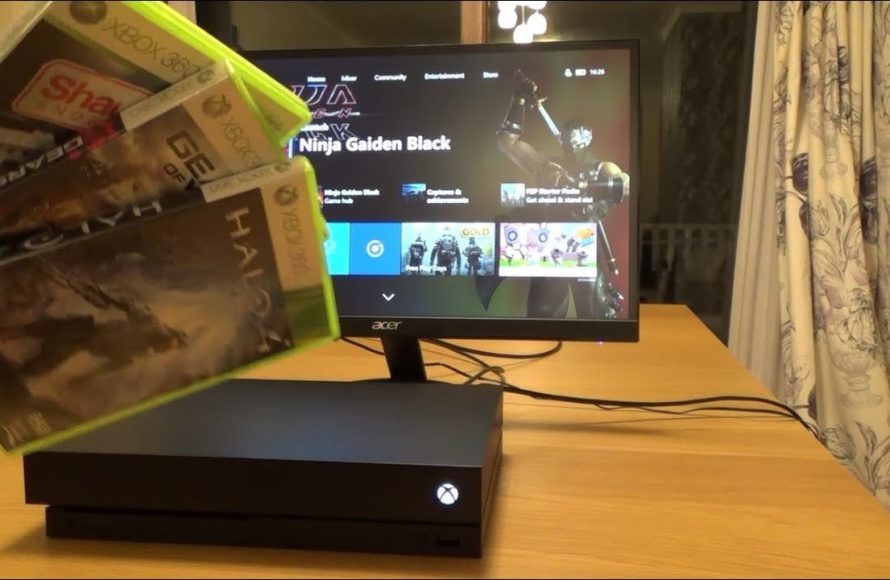
Unfortunately, you cannot directly play all Xbox 360 disc games on Xbox One. A limited number of titles are supported through backward compatibility.
Wondering if you can dust off those old Xbox 360 games and play them on your Xbox One? It’s a common question, “can you play xbox 360 disc games on xbox one,” and it’s understandable why many gamers are curious.
While the Xbox One offers backward compatibility, it doesn’t extend to every single Xbox 360 title. Some games are supported, but you’ll find a significant number are not. This means you might need to check a list to see if a particular game will work.

Can You Play Xbox 360 Disc Games on Xbox One?
So, you’ve got your shiny Xbox One, ready to dive into some gaming action, but you’ve also got a stack of old Xbox 360 games sitting nearby. You might be wondering, “Can I use those Xbox 360 discs on my Xbox One?” It’s a question a lot of gamers have, and the answer isn’t a simple yes or no. Let’s explore this in detail.
The Reality of Backwards Compatibility
The Xbox One does something pretty cool called “backwards compatibility.” What that means is that it can actually play games made for older Xbox consoles. However, it doesn’t work for every single game, and it’s not as simple as just popping in any old disc. There are some important points to understand about how this works.
How Backwards Compatibility Works
The Xbox One doesn’t actually run the Xbox 360 games as if it were an Xbox 360. Instead, Microsoft developed software that makes the Xbox One act as if it was running the older console’s software in an emulation environment. This clever trick allows the Xbox One to understand and play select Xbox 360 games without needing the original hardware. Essentially, it’s like having a virtual Xbox 360 inside your Xbox One, but it only works with certain game titles.
Not All Games Are Compatible
Here’s the key part to remember: not every Xbox 360 game works on the Xbox One. Microsoft specifically selected titles to be compatible, and this list isn’t constantly growing. This is because of various reasons including the game’s original code and licensing issues. Games must be specifically added to the compatibility list by Microsoft. The game disc itself acts as the key to allow the Xbox One to download the compatible version from the store.
Checking If Your Game is Compatible
So, how do you know if your favorite Xbox 360 game is on the list? It’s actually quite easy. Here are a few ways you can check:
- Online List: The quickest way is to search online using your favorite search engine. Typing “Xbox backwards compatibility list” will bring up Microsoft’s official list. This is kept updated and is the most reliable source. You can also find several gaming news websites and blogs that keep track of the full list of compatible games.
- Xbox Store: Another way is to check the Xbox Store on your console or through a web browser. If a game is backwards compatible, it usually shows up as a title you can buy and download. The store may even specifically say “works on Xbox One and Xbox Series X|S.”
What Happens if your Game isn’t compatible?
If your game isn’t on the compatibility list, unfortunately, you can’t play it on your Xbox One using the disc. The disc will not work on your console. You have a few options at this point.
- Keep your Xbox 360: If you want to play those older games, you’ll need to keep your Xbox 360 connected. This is the only way to play those particular discs.
- Look for Remasters: Sometimes, games that weren’t originally backwards compatible are re-released with enhanced graphics and features on the Xbox One. These are known as “remasters”. Check the Xbox Store if a remastered version is available.
- Digital Purchases: If a game is backward compatible, and you originally owned it on disc, you can often find it to purchase digitally through the Xbox store. If you purchase the game digitally, you won’t need your old disc.
How to Play a Backwards Compatible Game
If you’ve confirmed that your Xbox 360 game is on the compatibility list, here is the process on how to play it on your Xbox One:
- Insert the Disc: First, turn on your Xbox One and put the Xbox 360 game disc into the disc drive.
- Xbox Store Download: Once you’ve inserted the disc, the Xbox One recognizes the game and will either begin downloading the compatible version of the game or prompt you to download it. The disc works as proof of ownership. This version is optimized to run properly on your Xbox One.
- Keep the disc in the console: You’ll need to keep the game disc in the console to play. Your Xbox One needs to verify that you own the game each time you play it. The disc acts as a key to start the game.
- Enjoy the Game: After downloading and ensuring the disc is inserted in the console, you are free to start playing and enjoy your classic Xbox 360 game on your Xbox One.
Internet Connection Needed
It’s important to note that you will need an internet connection to download the backward compatible games. This download only occurs the first time you play a game. The console only needs the disc inserted to verify game ownership, but the game itself is running from the version downloaded onto the console. If the game needs updates or additional downloadable content, these can also be downloaded through your Xbox One’s connection to the internet.
Benefits of Backwards Compatibility
While there are some limitations to backward compatibility, it comes with several good advantages. Here are some of the ways players benefit from the function.
Preservation of Games
Backwards compatibility ensures that great games from the past aren’t forgotten. You can still enjoy some older games that might be hard to find these days. Some great games only existed on Xbox 360, and with backwards compatibility, a player can still access these games. This helps preserve gaming history and allows new players to experience these classic titles.
Save Money
Instead of having to buy a new version of a game, you can use your old Xbox 360 discs. This can save you a lot of money. Instead of needing two consoles, you can also just have your newer Xbox console and still enjoy the game that you love.
Play with Friends
Sometimes, if your friends also have an Xbox One and the backward compatible version of a game, you can play online together, even if the game originally came out on the Xbox 360. This can let you enjoy classic games with friends. This functionality is not available for every single game, so you’ll want to check game specifics to be sure that online play is available.
Limitations and Challenges
While backwards compatibility is a fantastic function, it does have its limitations. Here are a few things to keep in mind.
Disc as License
You need the disc in the console to play, even after downloading the compatible version. The disc itself acts as proof you own the game. If you lose or damage your disc, it’s no longer possible to play the game on your Xbox One. It’s important to keep the disc safe and stored properly when it’s not being used.
No Improvements for Every Game
Although some games are optimized to run better on Xbox One, this isn’t true for every single game. Some backwards compatible titles will run as they did on the original console. You won’t see any graphical improvements on these games. Some, though, will be enhanced and show some visual improvements. It’s also true that some old games can look a bit dated on modern high-resolution screens.
No Support for Kinect Games
Xbox 360 games that use the Kinect sensor don’t work on the Xbox One because the Kinect sensor is different on each console. This means that titles like Kinect Sports or Dance Central that used to rely on the Kinect are not compatible with Xbox One and are unable to be played on the console.
The Future of Backwards Compatibility
Microsoft has stated that the Xbox backwards compatibility program for the Xbox One and Xbox Series X|S has ended. No new titles will be added to the list. While it’s great that so many classics are still available to play, it’s important to remember that the current list is finite and will no longer be expanded. This doesn’t mean that games on the current list will cease to work. As of this writing, they will still be playable.
What about the Xbox Series X|S?
The Xbox Series X and Xbox Series S also support backwards compatibility. If a game is playable on the Xbox One, it will also be playable on the Series X|S consoles. The Xbox Series X|S consoles can sometimes further enhance these games. You can typically expect that any compatible game disc you play on your Xbox One will also be playable on the newer console.
While it’s not a perfect solution for all your Xbox 360 games, the backwards compatibility feature is a great addition that lets you play some older games without needing the old console. While not every game makes the cut, the ability to experience a good chunk of Xbox 360 library is very appealing and allows you to access past games.
How to transfer Xbox 360 games to Xbox One
Final Thoughts
Unfortunately, you cannot directly play all Xbox 360 disc games on Xbox One. Microsoft implemented backward compatibility for certain titles. Therefore, only specific Xbox 360 games work on the newer console.
The supported games are a select list. This means your favorite older game might not be playable, even with the physical disc. You must check the official list to see if a particular title is supported before trying.
So, can you play xbox 360 disc games on xbox one? The answer isn’t a simple yes or no. It depends on the game.

