
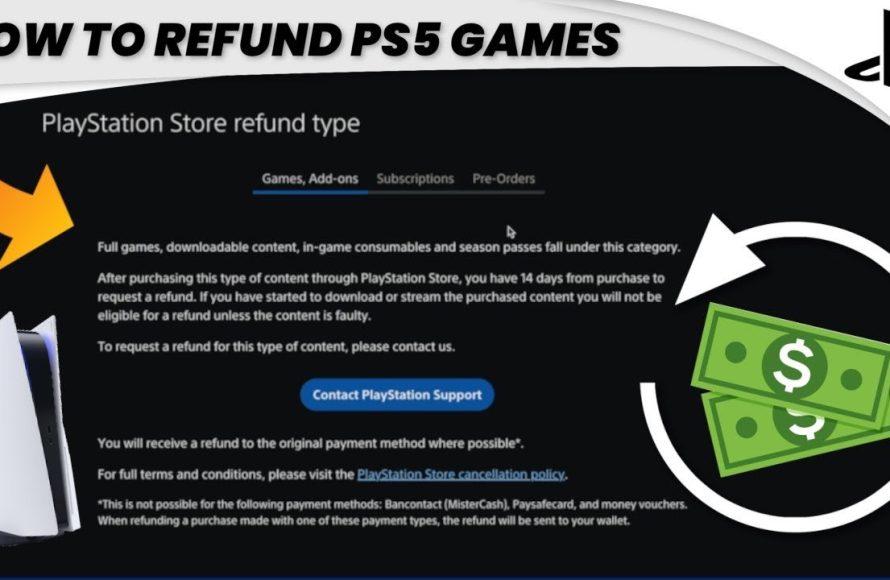
Unfortunately, you can’t typically refund a PS5 game once you’ve downloaded or started playing it, unless there’s a significant fault.
Ever purchased a PS5 game, only to realize it’s not quite what you expected? We’ve all been there. The question then pops into your head: can you refund a ps5 game? It’s a common concern for gamers diving into new digital worlds.
Navigating Sony’s refund policy can feel like a game itself. While physical copies might offer more flexibility, digital downloads have specific rules. Understanding these rules is key to managing your game library and your budget.

Can You Refund a PS5 Game? A Deep Dive
Getting a new game for your PlayStation 5 is super exciting! But what happens if you buy a game and it’s just not what you expected? Maybe it’s too hard, too boring, or it doesn’t work right. The big question is: can you get your money back? Let’s explore the world of PlayStation 5 game refunds and see what the rules are.
Understanding PlayStation Store Refund Policies
The first place to start is the PlayStation Store. This is where you buy most digital games for your PS5. Sony, the company that makes the PlayStation, has specific rules about refunds. They don’t just hand out refunds for any reason, so it’s good to know what their policies say. It’s like knowing the rules of a game before you play!
The 14-Day Rule
One important rule is the 14-day window. Generally, if you bought a game from the PlayStation Store, you might be able to get a refund if you ask for it within 14 days of buying it. This is a common policy with many digital stores. But, there’s a catch, which we’ll talk about next.
The Download and Play Exception
Here’s the main catch: you can’t usually get a refund if you’ve already started to download or play the game. Once you begin downloading the game or start to play it, Sony will consider you using the game, and you cannot get refund for it. Think of it like opening a bag of chips – once you open it, you can’t return it to the store. There are some very specific exceptions to this rule, which we’ll discuss below.
Pre-Orders and Refund Options
Pre-ordering a game is exciting! You’re getting a game as soon as it comes out. What if you change your mind though? Good news is, usually, if you pre-order a game on the PlayStation Store, you can request a refund. You can ask for your money back before the game launches, and you can get refund before the game launches even if you’ve started downloading a part of it before the official release. If you decide to ask for refund after the game has been released, then the standard 14 day rule applies. Remember, that if you start playing the game after release date, you won’t get a refund.
How to Request a Refund on the PlayStation Store
Now that we know the rules, let’s talk about how to actually ask for a refund. It’s a little different from returning a physical game to a store.
Using the PlayStation Support Website
The best way to ask for a refund is usually through the official PlayStation support website. Here are the basic steps:
- Go to the PlayStation support page on your computer or phone.
- Look for the “Refunds” or “PlayStation Store refunds” section.
- You’ll probably need to sign in to your PlayStation account.
- Find the game you want to get a refund for.
- Follow the instructions and send in your request.
Playstation support website usually has a form or a specific process to guide you through it, making it easier for you to get the refund in an organized manner.
Contacting PlayStation Support
If you can’t find what you need on the website, you can also try contacting PlayStation Support directly. They have people who can help you with your refund request. You can contact them via phone, live chat, or email, but live chat is usually the fastest way to get help. The exact contact methods may vary depending on where you live.
When Refunds Are More Likely to Be Approved
While they don’t give refunds very easily, there are some situations where you have a better chance of getting your money back:
Technical Issues
If a game doesn’t work right because of a problem with the game itself, then you have a better chance of getting a refund. If the game crashes all the time, has severe bugs, or just won’t run on your PlayStation 5. When the problem is on the developers part, they will be more cooperative. Always keep your screenshots or any short video clip to be safe in these cases.
Game Is Not as Advertised
If you bought a game thinking it was one way but turned out to be completely different, you can have a strong case. If you bought a game for multiplayer and there are no players online, or the main element of the game is not available, you can ask for a refund based on this.
Accidental Purchases
Sometimes, people accidentally buy games. Maybe you were looking at a demo and accidentally clicked “Buy.” If this happens to you, and you quickly ask for a refund, PlayStation might consider it. If a kid in your family purchased a game without knowing about it, then Sony may issue you a refund.
Physical Games and Refunds
What about physical games that you buy at a store? These are the games that come in a box with a disc. The refund rules are a little different for these types of games.
Retail Store Policies
When you buy a physical game, you’re usually dealing with a store like Amazon, Target, Walmart, or GameStop. Each store has its own refund rules. Some stores might let you return a game if it’s unopened within a certain amount of time (usually 15 or 30 days). Some stores will not accept returns on opened games unless there is a hardware problem.
Used Games
If you purchase a used game from a retail store or a third party seller, then the refund policy of that seller applies. These types of refunds are more varied, and it really depends on the seller’s policy.
Tips for Avoiding Refund Issues
It’s always better to avoid having to ask for a refund in the first place. Here are some tips to help you do just that:
Read Reviews
Before buying a game, read reviews from other players. This can help you get a good sense of whether a game is good or not for you. Check for the content, or what features other players like or dislike about the game.
Watch Gameplay Videos
Watching a video of someone actually playing the game is even better than reading reviews. This will show you how the game looks and plays, giving you an accurate idea of what to expect before you buy.
Try Game Demos
When possible, try a demo version of a game before buying the full version. This gives you the chance to test it out before you pay for it. If a game is available for free on PlayStation Plus, you can try it to see if you would like to buy it or not.
Ask for Opinions
Talk to your friends who have played the game or read opinions online, to find out what other gamers think of it. This will help you make a good decision before you buy.
Important Things to Remember About Refunds
Here are a few final things to remember when thinking about getting a refund for a PS5 game:
- Each request is looked at by PlayStation on a case-by-case basis, meaning, every single refund case is unique and may be handled differently.
- Always be polite and clear when you ask for a refund. The more polite you are, the better response you may get.
- Keep your purchase receipts, codes, and records. These will be handy if you need them for the refund process.
- Sometimes the refund may be given as store credit, rather than returning the money. This means that you can use that money on the PlayStation store in the future.
The Bottom Line
Getting a refund for a PS5 game isn’t always easy, but it’s not impossible. Knowing the rules, such as the 14-day limit and the exception for downloaded and played games, helps you understand the process. And if you still need help with refunds, reaching out to Playstation customer support is always a good option.
While getting a refund on PS5 games is possible, it’s not automatic. Be sure to do research and make informed purchases. This helps in avoiding disappointment and making sure you have a positive gaming experience!
How to request a refund for a PS5 game?
Final Thoughts
Ultimately, getting a refund for a PlayStation 5 game depends greatly on where you purchased it. Sony’s PlayStation Store has specific criteria, often requiring the game to be unplayed.
Retailers usually have their return policies which you must check. They may accept a return on a physical game if it’s still sealed. ‘can you refund a ps5 game’ is therefore not always a simple ‘yes’.

