
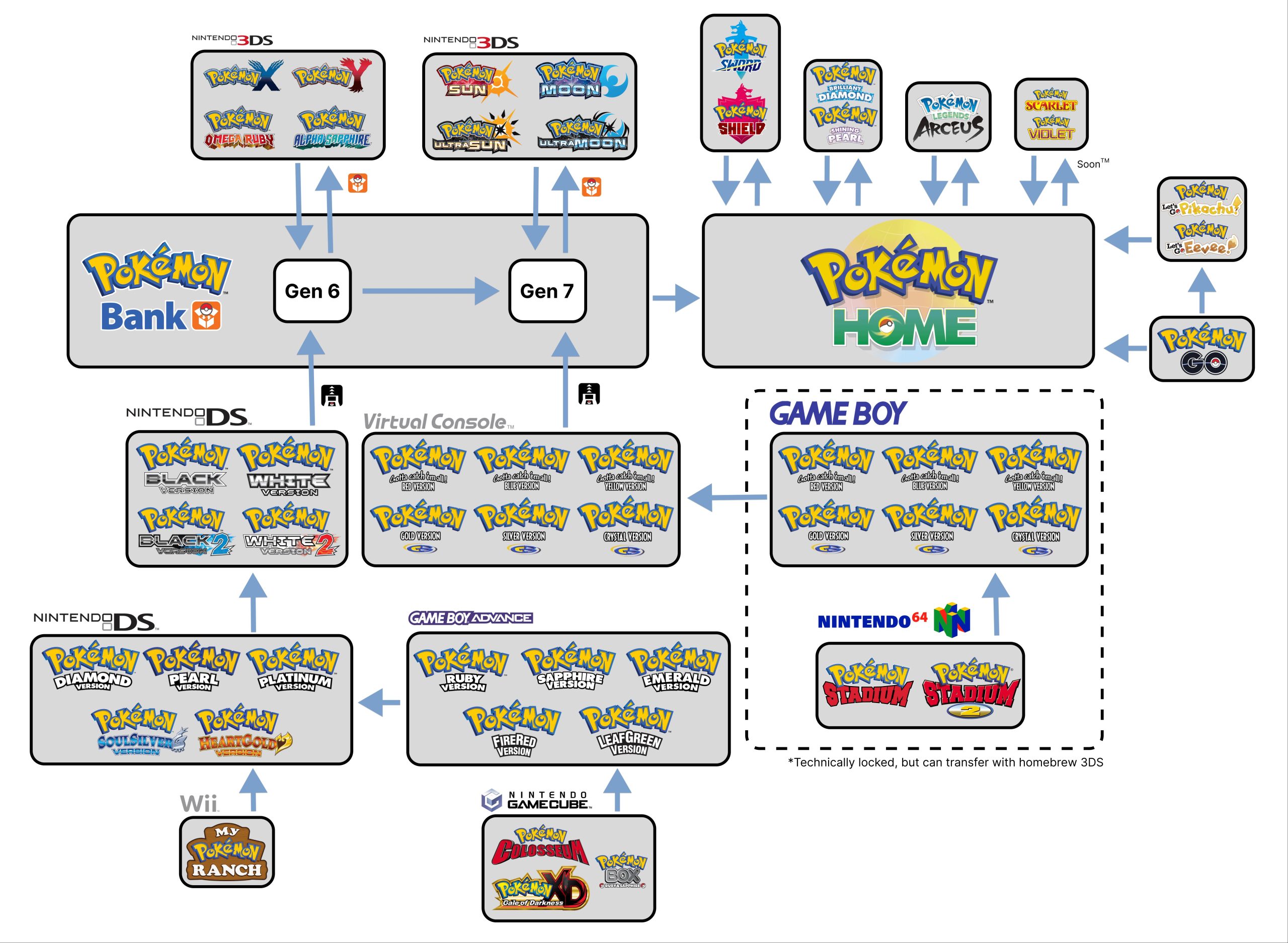
No, you cannot directly trade between older Pokémon games (like those on the original DS) and the 3DS Pokémon games.
Ever wondered if your team from Diamond, Pearl, or Platinum could join your adventures in X, Y, or even the later Sun and Moon? Well, the question of “can you trade with old pokemon games 3ds” pops up often for trainers who have enjoyed the classic entries. The short answer can be disappointing for some players.
Unfortunately, Nintendo did not make the DS and 3DS systems directly compatible for trading purposes. This means moving your Pokémon requires specific transfer methods, not direct trading. You need to use the Pokemon Bank app and it’s associated transfer tool.

Can You Trade With Old Pokemon Games on 3DS?
So, you’ve got a hankering to revisit your old Pokémon adventures, maybe dust off a copy of Pokémon Diamond or HeartGold, and you’re wondering if you can bring those trusty old Pokémon into your newer 3DS games. It’s a question many trainers have, and the answer is a bit like exploring a hidden cave – it’s complex but rewarding when you know the way. Let’s dive deep into the world of trading across generations and see what’s possible with your 3DS!
Understanding the Generations: The Key to Trading
First, we need to understand the different generations of Pokémon games. Think of them like different eras in Pokémon history. Each generation introduces new Pokémon, new regions, and sometimes, new ways to play. The Nintendo DS and 3DS families of consoles are home to several generations, and not all of them connect perfectly. Here’s a quick breakdown:
- Generation III (GBA): Games like Ruby, Sapphire, Emerald, FireRed, and LeafGreen. These are on the Game Boy Advance (GBA) and are generally the oldest games we’ll talk about.
- Generation IV (DS): Games like Diamond, Pearl, Platinum, HeartGold, and SoulSilver. These are on the Nintendo DS and are where trading between games became a big deal.
- Generation V (DS): Games like Black, White, Black 2, and White 2. Still on the DS, these games connect well with Gen IV.
- Generation VI (3DS): Games like X, Y, Omega Ruby, and Alpha Sapphire. These are on the 3DS and started new mechanics.
- Generation VII (3DS): Games like Sun, Moon, Ultra Sun, and Ultra Moon. Also on 3DS, they introduced a new region and more Pokémon.
Why is this important? Because trading between games is usually limited to games of the same or neighboring generations, with certain mechanisms in place to bridge these gaps. The main obstacle you’ll face is trying to connect the GBA games directly to your 3DS.
The Challenge: Connecting GBA Games to 3DS
Unfortunately, straight trading between GBA games (Generation III) and 3DS games (Generation VI and VII) isn’t directly possible. The technology is simply too different. The GBA games relied on a different connection method, and the 3DS doesn’t have the ports or the software to communicate directly with GBA cartridges. Think of it like trying to use a record player on your smartphone – the two systems simply weren’t designed to interact.
But that doesn’t mean all hope is lost! There is a way to get those Pokémon from GBA games up to the 3DS, it’s just a bit of a process.
The Pal Park: Bridging the Gap
The good news is that Pokémon cared enough to find a method to transfer Pokémon from Gen 3 to later games. The solution for transferring those beloved Pokémon from the GBA to the DS was via Pal Park in the Gen IV games. This isn’t direct trading but a one-way trip for six Pokémon at a time. If you want to do this, here’s what you’ll need:
- A Nintendo DS or DS Lite (the original DS consoles). The 3DS family of consoles do not have a slot for GBA games, so you must use an old DS model to connect with them.
- A GBA game containing the Pokémon you wish to move.
- A Generation IV game (Diamond, Pearl, Platinum, HeartGold, or SoulSilver).
Here’s how the process works:
- Start the Gen IV Game: Begin playing your Generation IV game.
- Unlock Pal Park: You have to play through a small amount of the game to reach Pal Park for the first time. In Diamond, Pearl, and Platinum, this is after you get the National Pokedex, and in HeartGold and SoulSilver, it is after you defeat the Elite Four.
- Enter Pal Park: In Gen IV, the Pal Park is a location where you transfer Pokémon from GBA games.
- Insert GBA Game: Put your GBA game into the GBA slot on your DS.
- Choose Pokémon to Transfer: In your Gen IV game, you’ll be able to select which six Pokémon to migrate. Once you pick the six and confirm the move, they go to the Pal Park.
- Catch Pokémon in Pal Park: In the Pal Park, the transferred Pokemon will be free to move about the area. You have to capture them in the park using your Gen IV game. Once you catch them, they are fully transferred to the game.
Important Notes About Pal Park:
- Pokémon transferred through Pal Park cannot be moved back to the GBA game. The transfer is one-way.
- Items held by your Pokemon are removed during the process. Make sure to unequip all items from the Pokémon before transfer.
- You can only transfer six Pokémon at a time, once per day. So plan the ones you want to move carefully.
Trading Between DS Games (Generation IV and V)
Trading between Generation IV and V games is much more straightforward. These games were designed to connect with each other. You can trade using the Wireless Club found in the Pokémon Centers in each of the games. Here is a breakdown of how that works.
- Wireless Communication: Generation IV and V games use the wireless communication on the DS or 3DS to find and interact with each other for trading.
- Trading within the Game: You meet in the Pokemon center and you can trade as you would within the game.
- No Specific Restrictions: Barring the normal rules of trading, no special conditions apply when trading between these games.
Moving Pokémon from DS to 3DS: The Pokémon Bank
Now, let’s tackle the big question: how to get your Pokémon from the DS games up to the 3DS games. Here’s where things get a bit more interesting, and it involves an app called Pokémon Bank.
What is Pokémon Bank?
Pokémon Bank was a Nintendo 3DS application which served as a cloud based storage system for your Pokemon. It worked as a sort of middle ground between different generations of games that would have otherwise been disconnected. It is used to move Pokemon from the DS generation games up to the 3DS games.
Important note: In 2023, the service was discontinued and was made free for everyone. Although you can no longer subscribe to this service, anyone can use it with their Nintendo Network ID, which is required to use the app. To download the service, you must go into the eShop.
Steps for Using Pokémon Bank
If you have your DS pokemon moved to a DS game, you can follow this process:
- Download Pokémon Bank: Go to the eShop on your 3DS and download the application and it’s partner app, Poketransporter
- Poké Transporter: In order to use Bank with your DS games, you must download Poketransporter. This app allows you to use DS games to upload Pokémon to the Pokémon Bank.
- Launch Poké Transporter: Open the Poké Transporter on your 3DS.
- Insert Your DS Game: Insert your Gen V (Black, White, Black 2, or White 2) game.
- Select Pokemon for Transfer: In the Poketransporter App, you select the Pokémon to be moved to the Pokémon Bank.
- Open Pokémon Bank: Go back to the 3DS menu and open the Pokemon Bank app.
- Select Game to Transfer to: Select the Gen VI (X, Y, Omega Ruby, Alpha Sapphire) or Gen VII (Sun, Moon, Ultra Sun, Ultra Moon) game to transfer the Pokémon to.
- Move Pokémon to your new game: In the Pokémon Bank you will have access to the boxes of Pokémon from the Poké Transporter app. Select the box you want, and move the Pokémon to your newer game.
Important Notes about Pokémon Bank and Poké Transporter:
- Transfer is one-way: Once a Pokémon is transferred to Pokémon Bank, it cannot go back to older games.
- Items Don’t Transfer: Pokémon will lose any held items during the transfer.
- Game Compatibility: Poké Transporter can only be used with Generation V games. If you want to transfer pokemon from the Gen IV games, you must trade them to Gen V first.
- Pokémon Bank Compatibility: The Pokémon can be transferred from Pokémon Bank to Gen VI or VII games. They cannot be sent to any other game.
Trading Between 3DS Games (Generation VI and VII)
Trading between Generation VI and VII games is fairly straightforward as the games were built for trading with each other. Here’s a quick rundown:
- In-Game Trading: You can trade using the Festival Plaza in Sun, Moon, Ultra Sun, and Ultra Moon, and the Player Search System (PSS) in X, Y, Omega Ruby, and Alpha Sapphire.
- Wireless Connection: These games use the 3DS’s wireless connection to find trainers near and far to trade with.
- No Special Requirements: Aside from being in a location where you can trade, there are no special requirements to trading between these games.
The Modern Era of Pokémon: Pokémon Home
For those looking to trade into the newest games, the Pokémon Company created Pokémon HOME. This is a cloud based storage system and trading system used to transfer Pokémon from the 3DS era of games to the Nintendo Switch era. Let’s discuss how to move from Pokémon Bank to Pokemon HOME.
Moving From Pokemon Bank to Pokemon HOME
Although Pokemon Bank is free to use, it is no longer being supported by Nintendo, so at some point, access to this service might be discontinued. Therefore, if you have Pokémon in the bank that you want to use in modern games, it is best to move them now.
Here is the step-by-step:
- Download Pokemon Home: Download the app on your Nintendo Switch from the eShop. It is also available as a mobile app, but you will need the Switch version in order to move from the Bank to the HOME app.
- Transfer using 3DS: In the main menu of the Pokemon HOME Switch app, you will see the option to transfer from your Nintendo 3DS. Select this option and choose the method you wish to use (There is a general method and a method that is specific for special Pokemon).
- Open Pokemon Bank on 3DS: On your 3DS, open the Pokémon Bank app and start the transfer process as instructed in the HOME app on the Switch.
- Move the Pokemon: Select the Pokémon you wish to move and they will be moved to the HOME app on the Switch.
Important Notes About Pokémon Home:
- One-Way Transfer: Once Pokémon are in HOME, they cannot go back to the Pokémon Bank or any 3DS game.
- Game Compatibility: Pokémon can be moved from Pokémon Home to the Nintendo Switch games, including Pokémon Sword and Shield, Pokémon Brilliant Diamond and Shining Pearl, and Pokémon Legends: Arceus, Pokémon Scarlet and Violet.
- Paid Service: Pokémon HOME requires a paid subscription to use some of the functions and to move Pokemon from older games.
Summary of Trading Possibilities
Let’s recap what we’ve learned, and how games from different generations can connect.
| Source Game | Target Game | Method | Key Points |
|---|---|---|---|
| GBA (Gen III) | DS (Gen IV) | Pal Park (in Gen IV) | One-way transfer of six Pokémon at a time. |
| DS (Gen IV) | DS (Gen V) | Wireless Trading | Regular trading through wireless communication. |
| DS (Gen V) | 3DS (Gen VI/VII) | Poké Transporter and Pokémon Bank | Transfer through cloud storage (one way) |
| 3DS (Gen VI) | 3DS (Gen VII) | In-Game Trading | Regular trading using the 3DS’s wireless connection |
| 3DS (Gen VI/VII) | Nintendo Switch (Modern Era) | Pokémon Bank -> Pokémon HOME | Transfer through cloud storage (one way) |
This table shows a general overview, there are details to be aware of with each connection process, so make sure to read the details on the generation you wish to move from and to.
Moving your Pokémon between older and newer games can be a bit of a journey, but it’s definitely achievable. By using Pal Park, Pokémon Bank, and other tools, you can take your favorite Pokémon with you through all of the Pokémon Adventures.
Remember to plan your transfers carefully, as moves are often one-way. Make sure your Pokémon are holding nothing when transferring, as items are lost along the way. Have fun bringing your old favorites along to all of your future Pokémon adventures!
Trading a 3ds for Switch Games
Final Thoughts
Trading between older Pokémon titles and 3DS games is generally not possible. The games utilize different hardware and online systems. You can’t directly transfer Pokémon from, say, a Game Boy Advance game to a 3DS title.
This limitation exists because of the technological gap. Each generation of games brought significant changes. Direct trading between generations was never intended by design.
Therefore, regarding the question ‘can you trade with old pokemon games 3ds’, the simple answer is mostly no. You need specific transfer tools like Poke Transporter for specific older games.

