
No, you cannot completely turn off your Xbox while downloading a game. It needs to remain in standby or sleep mode for the download to continue.
Ever wondered, can you turn off xbox while downloading game? It’s a common question for many gamers eager to jump into their new titles. Turning your console completely off will halt any ongoing downloads.
You will need to keep your Xbox in a power-saving standby mode, this allows the console to download even when you’re not actively using it. This ensures you get your game as quickly as possible.

Can You Turn Off Xbox While Downloading Game? Exploring the Ins and Outs
So, you’ve just picked out a cool new game on your Xbox and it’s downloading. You’re excited to play, but maybe it’s getting late, or you need to head out. The big question pops up: “Can I turn off my Xbox while it’s downloading?” It’s a question many Xbox gamers have, and the answer isn’t always straightforward. Let’s dive deep into what happens when you try to shut down your console mid-download, and how to handle it the best way.
Understanding Xbox Download Processes
Before we talk about turning off your console, let’s understand how Xbox downloads work. When you start downloading a game, your Xbox is essentially talking to Microsoft’s servers to get all the necessary data. This data is then stored on your Xbox’s hard drive. Your console is actively processing information, pulling it down from the internet, and saving it at the same time. This whole process requires power and a stable internet connection. It’s more like your Xbox is actively working and not simply on idle mode.
The Role of Xbox Power Modes
Your Xbox has different power modes, and each mode handles downloads differently:
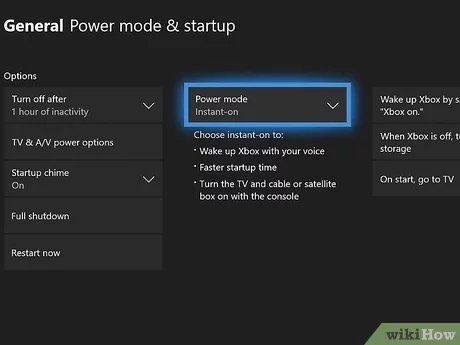
- Instant-On Mode (also known as Sleep Mode): This mode allows your Xbox to quickly turn back on and resumes downloads in the background, even while it seems to be off. It keeps a small amount of power running, so downloads can continue.
- Energy-Saving Mode (also known as Shutdown Mode): This mode completely shuts down your console, saving more energy. However, it will interrupt downloads.
The mode you select influences if downloads will continue when your screen is off.
What Happens When You Turn Off Your Xbox in Different Ways
Now, let’s get into the specifics of what happens when you try to turn off your Xbox during a download:
Turning Off Using Instant-On Mode
If your Xbox is set to Instant-On mode, you’re in luck! This mode is designed to let downloads continue even when the console seems to be turned off. It keeps your Xbox in a low-power state, allowing it to continue accessing the internet and saving download data to the hard drive. This means you can start a download, turn off your TV, walk away, and the download will keep progressing. This is a very convenient way for gamers who don’t want to leave their console on with the screen lit up all night.
Benefits of Instant-On for Downloads:
- Downloads continue uninterrupted.
- Faster game access after the download.
- No need to keep the console and the TV actively running.
So, when using Instant-on mode, the answer to “Can you turn off Xbox while downloading a game?” is yes, absolutely! Well, mostly. The screen is off, but the console is still active.
Turning Off Using Energy-Saving Mode
Things are different with Energy-Saving mode. In this mode, when you turn off your Xbox, it completely shuts down, cutting all active processes, including downloads. If you use this mode, any ongoing downloads will be paused. The next time you turn on your Xbox, the download will have to resume from where it left off. It won’t start the download again, but it can add extra time if you have large game files to download. This mode is helpful for energy saving and is also preferred when you’re not in a hurry or don’t expect to play anytime soon.
Drawbacks of Using Energy-Saving Mode for Downloads:
- Downloads are paused.
- Downloads will take longer if you frequently shut down in the middle.
- You’ll have to wait for the process to resume each time you turn on your Xbox.
So, if you’re using Energy-Saving mode, the answer is technically yes, you can turn off your Xbox, but the download will not progress while it’s off. You’ll need to resume the download later.
How to Check and Change Your Power Mode
Knowing your Xbox’s power mode is essential for making download decisions. Here’s how to check and change it:
- Press the Xbox button on your controller to open the guide.
- Go to Profile & system, and then select Settings.
- Go to General, and then select Power mode & startup.
- Under the Power options you can see your current power mode and change it between Instant-On or Energy-Saving.
Pick the power mode that suits your lifestyle and download needs. If you download a lot of games and want them to finish quickly, go with Instant-On. If you are trying to save power and you have a slower download speed anyways, Energy-Saving may be better. It all depends on your priorities.
Tips for Optimal Game Downloads
To make the most of your game downloads, here are a few tips:
- Use a Wired Connection: A wired connection (Ethernet cable) is generally more stable and faster than Wi-Fi. This reduces potential interruptions during downloads and allows for faster download speeds.
- Avoid Peak Internet Hours: Try to schedule your downloads during off-peak hours when the internet traffic is lighter. This can also help in getting a quicker download process.
- Check Your Internet Speed: Make sure your internet is running at optimal speed before initiating downloads. If your internet is too slow it will take a lot of time to download a game, and it might be useful to upgrade.
- Do not use your internet for heavy usage while downloading: Avoid heavy use of your internet for streaming or multiple downloads, when you download large game files. This can hinder download speed.
Potential Problems and Solutions
Sometimes, you might face issues with game downloads. Here are some common problems and their solutions:
Download Stalls or Gets Stuck
If your download seems stuck, here’s what you can try:
- Pause and Resume: Try pausing the download and resuming it. This sometimes restarts the download process and it will start going again.
- Restart Your Xbox: A full restart of your console can fix minor glitches. Turn it off completely and then turn it back on.
- Check Your Internet Connection: Ensure your internet is working properly. Try resetting your router if needed.
Slow Downloads
If your downloads are taking too long, here are some possible fixes:
- Switch to a Wired Connection: If you’re using Wi-Fi, try a wired connection for better speed.
- Close Background Apps: Close any background games or apps that might be using internet bandwidth.
- Upgrade Your Internet Plan: If all else fails, you might need a faster internet plan.
Downloads Not Starting at All
If your game won’t start downloading, try the following:
- Check Storage Space: Make sure you have enough space on your console for the game.
- Restart Your Console: Try restarting the console. Sometimes it will fix the minor problems.
- Check Xbox Network Status: Ensure there are no Xbox network outages.
Best Practices for Downloading Games on Xbox
Here’s a recap of some practices to keep in mind to ensure smoother game downloads:
- Use Instant-On Mode: When you want to download a game and turn your console off, use this mode for smooth and quick downloads.
- Use a stable internet: A strong internet connection is very important for a quicker download. Try using an ethernet connection.
- Don’t do other heavy usage activities on your internet: Close any apps or games or any heavy work that uses your internet bandwidth, to get a good speed.
- Keep an eye on the storage: Before downloading games make sure that you have the available storage.
- Keep your Xbox updated: Having the latest updates can improve your download speed.
By following these tips you will have a very good experience with your game downloads.
In short, the question “can you turn off Xbox while downloading game?” has a nuanced answer. It largely depends on the power mode you have selected on your console. Instant-On mode lets you continue downloads even when the console looks off, while Energy-Saving mode pauses downloads when you shut it down. By understanding your Xbox’s power settings and following good download practices, you can ensure your new games are ready to play with minimal wait time.
Download Games While Xbox Turned Off? Do THIS! How To Download & Install Games When Xbox Is Off!
Final Thoughts
Yes, you can turn off your Xbox while downloading a game. The console will enter a low-power standby mode, continuing the download process. This allows you to conserve energy and not leave your screen on.
It is important to note, though, if you cut the power source completely the download will stop. Therefore, just pressing the power button for standby is ideal for downloading. Remember this, can you turn off xbox while downloading game, yes you can and this is beneficial.

