
Yes, you can use GameCube games on Wii consoles, but only on original Wii models, not the Wii Mini.
Ever wondered if that collection of GameCube classics you have can still get some playtime? The question “can you use GameCube games on Wii” pops up often for those dusting off old consoles. Many gamers fondly remember the days of playing titles like Super Smash Bros. Melee on their cubes.
The good news is that the original Wii had the ability to play GameCube games. The design included the ports for the GameCube controllers and memory cards. However, keep in mind that this compatibility does not extend to every iteration of the Wii console.

Can You Use GameCube Games on Wii?
So, you’ve got a bunch of awesome GameCube games gathering dust, and you’ve also got a shiny Wii. The big question buzzing in your head is, “Can I play my GameCube games on my Wii?” The short answer is a resounding YES, but with a few important details. Let’s dive into all the fun facts about playing GameCube games on the Wii.
Wii and GameCube: A Special Connection
The Wii wasn’t just a revolutionary console for its motion controls; it was also cleverly designed to be backwards compatible with the GameCube. This means that early versions of the Wii had the ability to play GameCube games. Think of it like your parents letting you play with their old toys – super cool, right? This special link made the Wii even more appealing to gamers who loved their classic GameCube titles.
How Does Wii Play GameCube Games?
The early Wii models had hardware built right in that let them handle GameCube games. This wasn’t some magical software trick; the Wii literally had the same guts inside that could run the GameCube software. This is also why the Wii had those extra controller ports, and memory card slots for Gamecube peripherals.
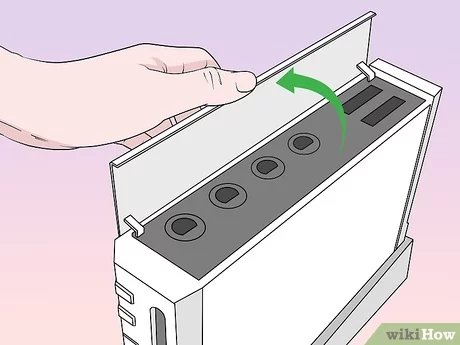
- Controller Ports: On the top of the Wii, under a little flap, you’ll see four ports for GameCube controllers. These are the same ports you used on the GameCube itself.
- Memory Card Slots: Right next to those controller ports, you’ll find two slots for GameCube memory cards. These are needed to save your progress in GameCube games.
- Game Disc Compatibility: The Wii’s disc drive was designed to read both Wii game discs and smaller GameCube game discs. So, you can pop your old GameCube discs right in!
The Key Thing: Not All Wiis Can Play GameCube Games
Here’s the important part: Not every Wii model can play GameCube games. Nintendo made a change later on and removed the hardware needed to play GameCube games. This is a major consideration when thinking about playing your old classics. To know if your Wii has this backward compatibility feature, you need to look at your console.
Identifying a GameCube Compatible Wii
How do you tell if your Wii is one of the lucky ones? It’s quite easy to identify.
- Look for the Ports: The easiest way is to look for the four GameCube controller ports and the two memory card slots on the top of the Wii, under the small flap. If you see them, you’re good to go! If they aren’t there, your console cannot play the games.
- Model Number: Generally, original Wii consoles with a model number that starts with RVL-001 can play GameCube games. The Wii Family Edition and Wii Mini do not have this functionality.
If your Wii doesn’t have the ports, it means the internal hardware needed for playing GameCube games isn’t there, and you will not be able to play them on that console. This is why checking your specific model is really important. The Wii’s model number can usually be found on a sticker on the bottom of the console. Don’t confuse it with the serial number which is also on the sticker!
Why Did Nintendo Remove GameCube Compatibility?
Nintendo decided to take away GameCube compatibility from later Wii models to reduce the cost of production. As the popularity of the Wii increased, it made sense to focus on making the console more affordable for new players, and so, removing the older technology allowed them to accomplish this. Removing the additional ports also made the console design more compact and gave them some small savings in packaging. So, while it’s a bummer for fans of GameCube games, it did help bring the price of the Wii down.
What You Need to Play GameCube Games on a Compatible Wii
If you’ve got a Wii that can play GameCube games, you’ll need a few key items to start your retro gaming adventure.
Essential Equipment
- GameCube Games: First, obviously, you’ll need your original GameCube game discs.
- GameCube Controllers: You cannot use Wii controllers to play GameCube games. You must use official GameCube controllers.
- GameCube Memory Cards: To save your game progress, you need GameCube memory cards. You’ll need these as the Wii’s internal memory won’t save GameCube game data.
- Compatible Wii: Make sure your Wii has the necessary ports and model number that indicate GameCube compatibility.
Setting up Your Wii for GameCube Games
Now, let’s get to the fun part – getting set up to play!
Step-by-Step Guide
- Power Off Your Wii: Always turn off your console before plugging or unplugging accessories.
- Connect GameCube Controllers: Plug your GameCube controllers into the ports on top of your Wii.
- Insert Memory Cards: Insert your GameCube memory cards into the slots on top of the console.
- Insert Game Disc: Put your GameCube game disc into the Wii’s disc drive.
- Power On: Power on your Wii, and the game should start automatically. If the disc doesn’t boot, check that your console is compatible and that the disc is clean.
- Enjoy! Start playing your favorite GameCube game!
Remember that while your Wii can play these games, it will not enhance the graphics or the functionality of these older games. You’ll be playing the games exactly as they were on the original GameCube, so don’t expect any modern improvements. These games will play in standard definition and the screen format may vary.
Benefits of Using Your Wii for GameCube Games
While you might be tempted to dust off the old GameCube, using your Wii to play these games has some advantages.
Advantages of Wii Gaming
- Convenience: The Wii might already be hooked up to your TV, so you don’t need to set up an additional console. This saves some space and hassle.
- One-Stop Gaming Hub: With the Wii being able to play both Wii and GameCube games, it’s a convenient way to access both your retro and modern library all in one place.
- Cost-Effective: If you don’t have the old GameCube anymore, using a compatible Wii to play GameCube games saves you the expense of buying an older console.
Potential Issues with GameCube Play on Wii
While the experience is generally smooth, there are a few things to keep in mind when playing GameCube games on the Wii.
Potential Problems to Watch Out For
- Disc Read Errors: Older game discs can sometimes have scratches or damage that could lead to read errors. Clean your game discs using appropriate methods.
- Memory Card Issues: Be sure to check that the memory cards are in good condition. Damaged memory cards may not save data correctly and could lose your saved game.
- Controller Malfunction: It is always advisable to test the controller on a different console to see if the controller is at fault before assuming the problem is with the console.
- Wii Overheating: Old consoles that haven’t been cleaned or had maintenance may be prone to overheating. Make sure to check your Wii is well ventilated when it is in use.
- Game compatibility: While the vast majority of games are compatible, a very tiny minority may experience issues when being played on a Wii console.
Popular GameCube Titles to Revisit
Now that you know you can play GameCube games on your Wii, you might be wondering what some of the must-play games are. Here are a few popular titles that gamers often love to return to:
Fan-Favorite GameCube Games
- The Legend of Zelda: The Wind Waker: Explore a vibrant world in this classic Zelda adventure.
- Metroid Prime: A thrilling first-person shooter with incredible atmosphere and exploration.
- Super Smash Bros. Melee: A fast-paced fighting game that’s still incredibly popular today.
- Resident Evil 4: A classic survival horror game that is an absolute joy.
- Mario Kart: Double Dash!!: A fast paced and thrilling Mario racing experience with team mechanics.
These are just a few of the fantastic games available for the GameCube. Playing them on your Wii is a great way to relive those old memories or to experience them for the first time!
The End of an Era
The ability to play GameCube games on the Wii was a very popular feature that many players enjoyed for many years. While later models of the Wii removed this functionality, many early adopters of the Wii have been able to enjoy their old games. If you have a compatible Wii, then you can continue to enjoy these games. With the Wii being so affordable and readily available, it’s easy for a new generation of gamers to experience the fun of GameCube games.
In conclusion, yes, you can play GameCube games on some Wii consoles. The ability to play GameCube games on the Wii was a fantastic example of Nintendo bridging the gap between generations of gaming and allowing fans to enjoy titles from both their old and their more modern libraries. For players lucky enough to own an early compatible Wii console, playing these old games is a joy that can bring back great memories and introduce a new audience to old classics. So if you’ve got the right setup, go ahead, dust off your old games, and have some fun!
Can You Play GameCube Games on the Wii?
Final Thoughts
Yes, you can play GameCube games on original Wii consoles. The Wii’s hardware includes the necessary components to run these older games. You just need a GameCube controller and memory card, if needed, to enjoy your favorites.
Make sure your specific Wii model has the gamecube ports on top. ‘can you use gamecube games on wii’ is a question many players ask, and luckily, the answer is a straight yes, for compatible models. Enjoy your gaming!

