
No, Snapchat did not take away games completely. While they removed the dedicated games platform, some games still exist within chat windows.
Remember those fun games inside Snapchat? The question ‘did snapchat take away games’ has been on many minds recently. It’s true, the dedicated games section is gone, and you can’t access a separate tab for them anymore.
However, it’s not entirely over. You can still find some interactive games directly within specific chat windows. These smaller games are mostly accessible with friends, which might be a good thing for a more personal experience.

Did Snapchat Take Away Games?
Okay, let’s talk about something many Snapchat users have been wondering: did Snapchat actually remove games? You might remember spending hours playing those little games with your friends right inside the app. It was a fun way to pass the time, and now you might be missing them. So, what exactly happened? Well, it’s not as simple as a clear yes or no. It’s more like a change of scenery within Snapchat.
Snapchat’s Gaming History: A Quick Trip Down Memory Lane
Before we dive into the details of what happened to the games, let’s quickly look back at how games became part of the Snapchat experience. Remember when Snapchat was mostly about sending disappearing photos and videos? Then came the introduction of features like filters and Lenses. Soon, Snapchat decided to add a gaming experience into the app, and that’s when it became a hub for more than just chatting and sharing. Snapchat had a feature called “Snap Games”, which offered a range of different games, from simple, quick challenges to longer, more involved games. These games were developed by third-party developers and accessed within the chat window. It was like a mini gaming platform built right into Snapchat!
The Rise of Snap Games
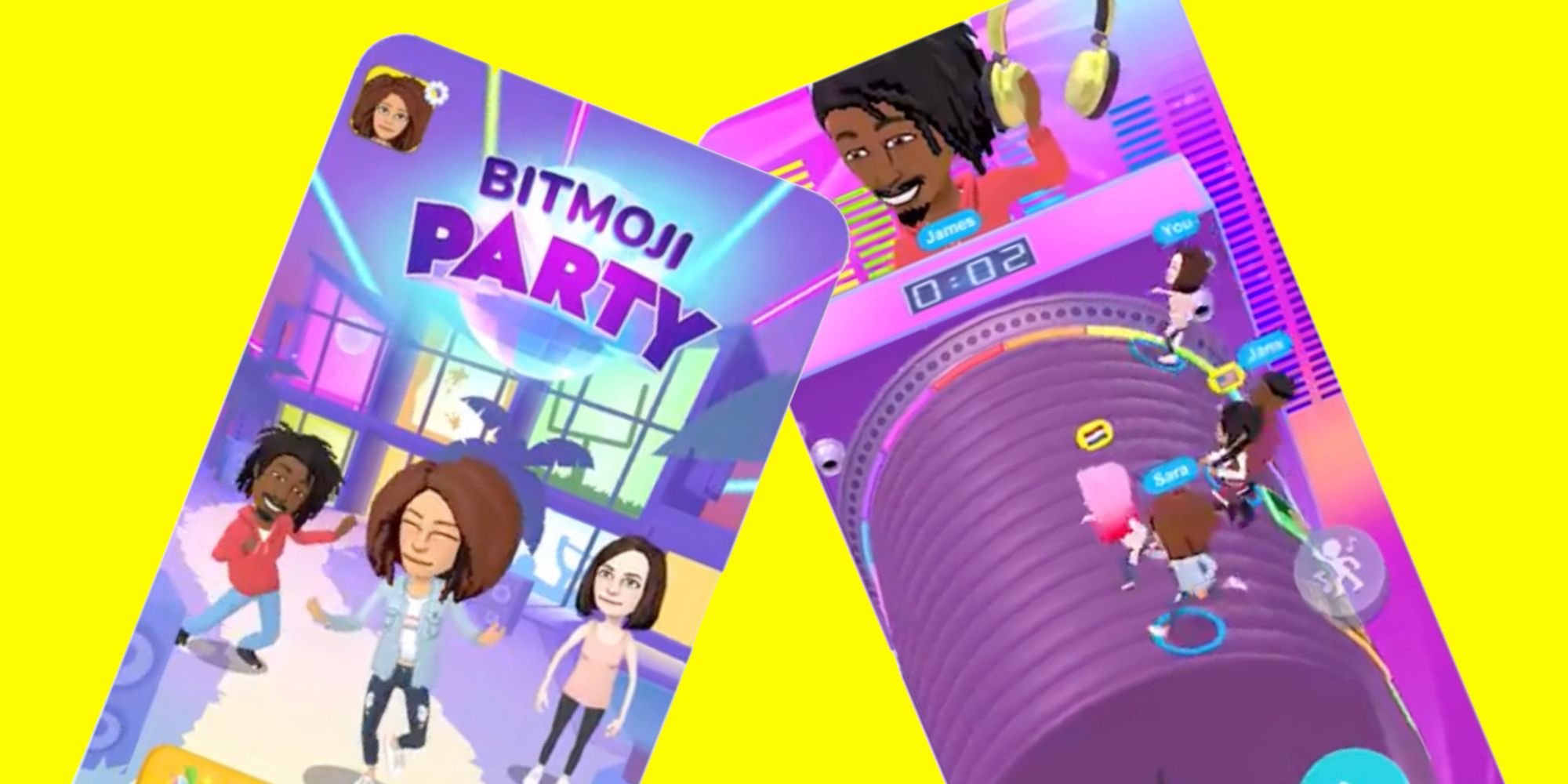
The introduction of Snap Games was exciting. It allowed you to play against your friends, share high scores, and just have some fun with a unique set of casual games. These games weren’t designed to be super complex; they were all about quick, engaging play, making them perfect for those spare moments throughout the day. You could be waiting for a bus, hanging out with friends, or just relaxing at home, and easily jump into a game. This feature made Snapchat more than just a messaging app; it was a place for entertainment and connection. Games like “Bitmoji Party,” “Ready Chef Go,” and “Zombie Rescue” became popular for quick and easy fun. The ability to see your friends’ Bitmojis in the games made it even more fun, creating a shared gaming experience.
Popular Games That Made Their Mark
Several games gained significant popularity within Snap Games. These games often included your Bitmoji and other fun interactions, such as:
- Bitmoji Party: This was a collection of mini-games that were often collaborative, allowing you and your friends to compete or work together.
- Ready Chef Go!: This game challenged your speed and coordination skills as you prepared food.
- Zombie Rescue: A game that tested your reflexes as you rescued cute bitmojis from hungry zombies.
- C.A.T.S.: Crash Arena Turbo Stars: In this game you designed and upgraded fighting machines to battle against other users.
- Aquapark.io: This fun water slide race became popular for its simple mechanics and engaging competition.
These games made Snapchat even more engaging, and many users got used to the gaming platform. It also made Snapchat a place to connect in a light and fun manner.
So, What Happened to Snap Games?
Now, let’s get to the heart of the matter: the “removal” of Snap Games. The truth is, Snapchat did not completely eliminate games, instead, they made a big change to how they worked. In 2022, Snapchat transitioned away from the original Snap Games platform. They didn’t remove the games completely; rather, they moved them to a different part of the app and integrated them in a new way. Instead of being a distinct section inside chats, they now exist as part of Snapchat Minis.
Introducing Snapchat Minis
Snapchat Minis are small, third-party applications integrated into the chat window that allow users to perform different tasks without having to leave the app. Think of them like tiny apps within the big Snapchat app. These Minis can be used for different activities, like making plans with friends, doing quizzes, listening to music, and yes, playing games! The games that were part of Snap Games were transitioned into the Minis format. So, they are still there; they are just located in a different place. You will find them inside the Chat window, under the “rocket ship” icon.
Why the Change?
You might be wondering why Snapchat decided to move games into Minis. Well, several factors contributed to the shift:
- Better Integration: By putting games inside the chat section as Minis, Snapchat made them feel more integrated into the conversation experience. It’s now easier to start a game with your friend after chatting.
- Focus on Platform: Minis allows third-party developers to build different apps that go beyond just games. This means Snapchat can provide a greater variety of experiences for its users.
- Enhanced User Experience: By integrating the games into chat, Snapchat aims to make the experience more seamless and enjoyable, encouraging users to interact with each other more often.
- Monetization: The new format allows for easier monetization opportunities for both Snapchat and its third-party developers. This can make the platform sustainable in the long run.
The overall idea was to enhance the user experience and provide a wider variety of options while keeping things integrated and connected. The changes also helped Snapchat develop more strategic ways to continue to be a top platform.
How to Find and Play Games Now
So, where can you find your beloved games within Snapchat now? They are not gone, they have just changed spots. Here’s a simple guide on how to access them:
- Open the Chat Window: Go to the chat section with the friend you would like to play with.
- Look for the Rocket Icon: At the bottom of the screen, you will see a little icon that looks like a rocket ship. Tap on this.
- Browse Minis: Tapping the icon will open a screen with various Minis. Some of these are indeed the games you used to play in the Snap Games section.
- Select a Game: Choose the game you would like to play, and you are ready to start gaming!
It might take a little getting used to, especially if you were used to the old system. Once you figure out the new process, it’s very easy to find and play the games with your friends. The user interface might look different, but you are still able to enjoy the similar gaming experience you remember. You will notice that in the process, Snapchat actually made the games a better part of a conversation.
Finding Your Favorite Games
If you have a particular game in mind, you can scroll through the Mini options available in the chat. Keep an eye on the icons to identify the game you want. Some games might have different names, but the general gameplay should be very similar. If you cannot find the exact game that you remember, you will probably find something similar to what you want to play. Also, different games are frequently added to the Minis section, so make sure to check back to find new entertainment options.
The Impact of the Change
The shift from Snap Games to Minis had a few noticeable impacts on how users interact with games in Snapchat. Here’s a deeper look at these effects:
User Adjustment
For some users, getting used to the new way of accessing games took a little time. When things move in an app, it is easy to get confused. The location change meant people had to learn a new way to access the games they used to love. Some users also missed the dedicated games section, feeling it was more straightforward than the current Mini format. While the change initially confused some people, many have now gotten used to the new way of accessing games.
Integration with Chat
One of the most significant impacts of the move to Minis was how games now feel more like part of the overall chat experience. You are in your chat and you can seamlessly jump into a game without ever leaving the conversation. This integration creates a more unified and engaging interaction between friends. It’s easier to go from chatting to playing, and this integration encourages users to use these features together. This means that if you want to play a game with a friend, you are already in the chat window, and the game is just a couple of taps away.
New Discoveries
The Minis section includes not only games but also other types of small apps. This creates opportunities to discover things you may not have looked for before. While you are looking for a game you can also find other useful apps. This feature has expanded the functionalities of Snapchat, making it a more versatile platform than just a messaging app. Users are not only finding games to play but are also exploring different features, such as quizzes and plan-making tools, which they otherwise might not have discovered.
Are Snap Games Gone Forever?
To be clear, the short answer is no; games are not gone forever. They are not completely gone from Snapchat. They have only been relocated within the app. The transition from Snap Games to Minis means that the games are now integrated into the chat window in the form of small apps. Some people still feel confused by the change. However, once you get used to the process, you can enjoy the same gaming experience in a new and better way.
The Evolution of Snapchat
It’s crucial to view these changes as part of Snapchat’s evolution. Like other apps, Snapchat tries to constantly grow and change to become a better experience for users. As new features are introduced, Snapchat tests what works best, and when things change, it can sometimes be a little confusing for users at first. The shift from Snap Games to Minis demonstrates this. Although some users might miss the dedicated gaming area, the current setup gives a much better user experience by integrating games into the chat window. Snapchat is an evolving platform, and these changes highlight its commitment to becoming a more engaging platform.
The Future of Games on Snapchat
The integration of games within the Minis format suggests a potential for more complex and engaging games down the road. The platform can grow to include more varied options, such as strategy games, collaborative projects, or even more personalized gaming. The current structure also creates opportunities for more frequent game updates and additions. This way Snapchat can keep the gaming experience fresh and engaging. By giving developers a way to create different small apps, Snapchat allows for innovation and continued growth. It’s also very likely that more mini-games will be added in the future, keeping the experience of finding new games enjoyable and fun.
Tips for a Better Gaming Experience on Snapchat
If you are a gamer using Snapchat, here are a few tips to get the most out of the current games inside the Minis section.
- Stay Updated: Make sure you are using the latest version of the Snapchat app. Updates often include bug fixes and the newest features, including more games.
- Explore Minis: Take the time to scroll through all of the different Minis. You might find a new favorite game or even a cool new mini app that you will find helpful.
- Play with Friends: Games are often more fun when played with friends. Try to engage your friends by inviting them to play with you.
- Check Back Frequently: New games and mini-apps are often added to the Minis section. Make sure to check the Minis section frequently to try new features.
By following these simple tips, you will enhance your gaming experience and find that it’s easy to play games with your friends on Snapchat.
A Quick Recap
Let’s recap what we discussed. Did Snapchat remove games? No, not entirely. They moved them. The shift from Snap Games to Minis has changed how we access and play games on Snapchat. The games are now within the chat section as mini-apps that you can access by clicking on the rocket ship icon. They are just relocated in the app. These changes are part of Snapchat’s ongoing efforts to improve the user experience and provide more diverse and engaging activities. This change to Minis has expanded Snapchat’s overall functionality while still keeping games a key part of the platform. The future of gaming on Snapchat is likely to involve more diverse and engaging games that will continue to grow and evolve. By learning how to navigate the new system, you can keep enjoying fun games with your friends.
In conclusion, while it might seem like Snapchat took away games, they simply evolved the way games are presented and integrated within the app. The shift to Minis is part of a broader effort to create a more versatile and engaging user experience. So, the games you love are still there; you just need to know where to find them.
did u know this?! 😱 #shorts #lifehacks #snapchat
Final Thoughts
Snapchat removed games, yes. The app decided to focus on other features. Many users miss playing within the platform.
So, did snapchat take away games? The answer is clearly yes. The change affected many who enjoyed them. They now must use other apps for that kind of entertainment.

