
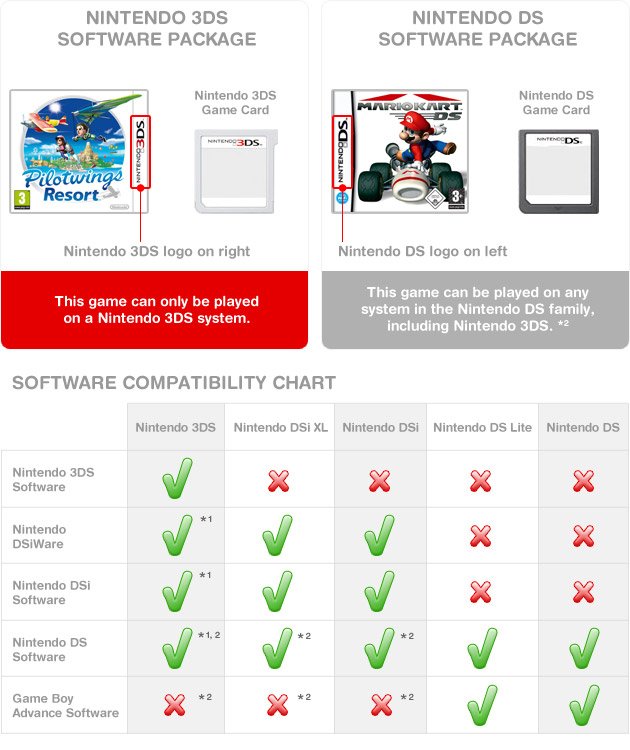
Yes, 3DS games work in 2DS consoles.
Wondering if you can enjoy your 3DS game collection on a 2DS? It’s a common question, and you’re not alone in asking, “do 3ds games work in 2ds”.
Many players have both consoles, or are thinking of getting a 2DS. It’s great to know that 2DS consoles can play all the games made for the 3DS family of handhelds. You won’t miss out on any titles.
So, grab your 3DS cartridges and enjoy them on your 2DS, it is great news for handheld fans.

Do 3DS Games Work in 2DS? A Deep Dive
Okay, so you’ve got a Nintendo 2DS and you’re itching to play some awesome games. Maybe you’ve heard about all the cool titles available for the Nintendo 3DS, and you’re wondering if you can join the fun. The big question is: Do 3DS games work on the 2DS? The short answer is a resounding yes! But let’s not just stop there. Let’s really get into all the details, so you know exactly what you can expect.
Understanding the Nintendo 2DS and 3DS
Before we dive deeper, it’s helpful to understand what makes the 2DS and 3DS different. Both are handheld gaming consoles from Nintendo, and they are part of the same family. The Nintendo 3DS, which came first, had a signature feature: 3D viewing without the need for glasses. That’s right, you could see images pop out of the screen! It was pretty cool at the time. The 2DS was designed as a more affordable option. It kept all the great gaming features of the 3DS, but it removed the 3D screen function and changed the design into a single slate form.
Key Differences at a Glance
- 3D Screen: The 3DS has a screen that can display games in 3D; the 2DS does not have this feature.
- Design: The 3DS has a clamshell design, meaning it folds closed. The 2DS is a single slate design that doesn’t fold.
- Price: The 2DS was launched as a less expensive option, making it more accessible to more people.
- Internal Components: Internally both consoles are very similar and use same processors and have same capability, the major difference between the 3DS family is their different screens.
These are the main differences between the two. But these variations don’t hinder game compatibility – thankfully!
Game Compatibility: The Good News
Now for the most exciting part – game compatibility! You can play almost all the games designed for the Nintendo 3DS on your 2DS console. When you put a 3DS game cartridge into your 2DS, it will play just like it would on a 3DS but without any 3D effects. Think of it as playing a game in 2D. The gameplay, story, and all the fun remain exactly the same. This is because both consoles are very similar internally, with most of their hardware being identical. They share a similar processor, graphics chip, and memory – that’s why the games work well on both systems. The main distinction, the 3D display of the 3DS, doesn’t have any bearing on the core gameplay of the titles.
What This Means for You
- You have access to a massive library of games.
- You don’t need to miss out on incredible titles, even without the 3D screen.
- You can save money and still have a blast.
How to Play 3DS Games on a 2DS
Playing games designed for the 3DS on your 2DS console is very straightforward. It’s just like playing any other game on your system. Here are the steps:
- Get the Game: Make sure you have a physical game cartridge for the 3DS game or that the game is downloaded on your system.
- Turn on your 2DS: Press the power button on your 2DS system.
- Insert the Cartridge: If you have the game on a physical cartridge, gently insert it into the game card slot on your 2DS. Be sure to put it in the right way.
- Select and Play: After you put in the cartridge, the game should show up on the system’s home screen. Use the stylus or the direction buttons to select the game, press A to start the game, and you’re ready to play!
Are There Any Exceptions?
You may be wondering if there are any exceptions to this rule. Are there any 3DS games that won’t work on a 2DS? Generally, no. Every game for the 3DS will play without any issues on your 2DS. The only games that will not work on both 3DS and 2DS are the games which are designed exclusively for the new nintendo 3DS and New 2DS systems.
3DS Games and 2DS Features
Because the 2DS does not have a 3D screen, you won’t see any 3D elements when you play 3DS games on it. This does not cause any problems or missing gameplay features. Your games will simply be rendered in 2D. You might be thinking about how some games rely on 3D. The truth is, most games are designed to be played both with and without 3D, so it never impacts the overall game experience. When you play a game, which might have 3D capability on the 3DS, the 3D effect will be turned off automatically by the game when you play on the 2DS. All the game graphics and interface will be as same on both the consoles. You won’t miss any gameplay element, story, or content because you are playing on a 2DS and not on a 3DS.
Controls and Gameplay
The controls and gameplay of 3DS games are the same when played on a 2DS. All buttons, the circle pad, and the touch screen all function exactly as they should. You’ll have the same smooth and engaging game play experience. You will still have complete access to all the parts of the game, even on a 2D screen.
Why the 2DS is a Great Option
The Nintendo 2DS is a great option for many reasons. It’s more affordable than the 3DS, making it accessible to more people. It’s also more durable, as it doesn’t have a hinge that could potentially break. And since it plays all 3DS games, you don’t have to compromise on the gaming experience just to save some money. The 2DS is a great option for younger children and families. The absence of the 3D option is also beneficial for many, as some people experience discomfort or eye strain when using 3D screens for extended period. The design is simple and durable making it a very good choice for those who prefer simplicity.
Top 3DS Games to Play on Your 2DS
Now that you know you can play 3DS games on your 2DS, let’s talk about some must-play titles. Here are a few popular games you should check out:
- The Legend of Zelda: Ocarina of Time 3D: A timeless classic that’s even more amazing on a handheld. The gameplay is so addictive that you can spend hours playing this fantastic game.
- Pokémon X/Y, Omega Ruby/Alpha Sapphire: Embark on an exciting journey in the Pokémon world. Catch all your favorite Pokémon and become a champion trainer.
- Animal Crossing: New Leaf: Create your own happy place in this charming life simulation game. This game is all about fun and making new friends.
- Super Mario 3D Land: A perfect mix of classic Mario fun and cool 3D platforming action. You will definitely enjoy jumping and running through each level.
- Mario Kart 7: Race through exciting courses with your favorite Mario characters. You can even play with your friends online or locally.
- Fire Emblem Awakening: A tactical RPG that’s full of strategy and engaging story. Every move counts in this game.
- Luigi’s Mansion: Dark Moon: An adventure where you explore haunted mansions as Luigi. You will need to use your wits to solve some very fun puzzles.
Navigating the 2DS User Interface
The user interface (UI) on the 2DS is very similar to that of the 3DS, so if you’ve used one, you will instantly be comfortable with the other. When you turn on the console, you’ll be greeted with the HOME Menu. This is your starting place, where you see all of your game titles and settings. You can move between the icons using the direction pad or your stylus. Tapping the icons lets you choose the game to play or settings you want to adjust. The UI is also designed to be very user friendly, that even young users can use it easily. The games will show up on the home screen when you insert a physical cartridge or download it from the Nintendo eShop. You can also arrange the icons and customise the home screen according to your preferences.
Common 2DS Menu Items
- Game Icons: These icons represent your games. You can select one to start playing.
- Nintendo eShop: This is the place where you can purchase and download digital games for your console. You can browse a massive library of games and download them directly to your system.
- Settings: This allows you to configure console-related settings, like network connectivity, date and time, and sound levels.
- StreetPass: This lets you connect with other players and share in-game data through wireless communication, when you pass other players in the street, you can interact and get rewards in the games.
Digital Games and the Nintendo eShop
In addition to physical game cartridges, you can also download games digitally from the Nintendo eShop. This online store is easily accessible on your 2DS console, through the home screen. You can find many classic games and new games there for purchase and download. You can browse through many different categories of games and search for specific titles you wish to play. To purchase games, you will need an internet connection and a Nintendo account. The eShop has a wide range of games that you can download easily. They often have sales and discounts, so it’s always a good idea to check it out frequently. Digital games work just the same as the physical game copies you purchase. The advantage of digital games is that, you don’t need to carry the cartridges around, your games will be available with you whenever you power on the console.
Battery Life and Charging
The 2DS has a good battery life for gaming. On average, you can expect to get around 3 to 5 hours of continuous play, but this may vary based on brightness setting, usage pattern, and other factors. To charge your 2DS, you can use the included AC adapter. You plug one end into the charging port on your 2DS and the other into a wall outlet. A red light will appear when the system is charging, and the light will go off when the system is fully charged. Make sure to charge your system completely before starting a long gaming session. You can check the battery level on the home screen on the top right side of the screen. Also, It’s always a good idea to have your 2DS fully charged before traveling, so you’re ready to play whenever you want.
Maintaining Your 2DS
Taking good care of your 2DS will make sure it will last for a long time and ensure that you can play many games. Here are some simple care tips:
- Keep it clean: Clean your console and the screen with a soft microfiber cloth. You can also use a specialized screen cleaning solution if needed.
- Avoid extreme temperatures: Don’t keep your 2DS in very hot places, like in direct sunlight or a hot car. Also avoid storing in very cold place.
- Use a case: When you are carrying around your console, always use a protective case. This will prevent damage from any bumps and scratches.
- Avoid water or moisture: Do not keep water or moisture near the console. If some liquid falls on the console, quickly wipe it with a dry cloth.
- Charge properly: Only use the proper charger to charge your 2DS. Avoid using the console while charging.
Parental Controls on the 2DS
Nintendo provides parental controls on the 2DS so parents can manage the gaming experience of their children. You can restrict access to games based on age rating, limit how much time your children can spend playing games, and even control access to online features. The parental control settings are very simple to set up, and it will help to keep your kids safe while they are playing games. You can put a PIN code on the console so kids can’t change the settings without your permission. This way, you can control the type of content they will have access to and ensure they only play appropriate games. You can always modify these setting whenever you want.
Where to Find 2DS Consoles and Games
Even though Nintendo has stopped production of the 2DS, you can still find them easily at various locations. You can look at websites like Amazon, eBay, and other online market places for both new and preowned consoles. Preowned consoles are usually available for a cheaper price. You can also find them in video game stores, pawn shops, or at garage sales. It is important to make sure that the console is in good working order before you buy it. If you decide to buy it from a online marketplace, always make sure the seller has a good reputation and lots of positive feedback. You can also find many games for both the 2DS and the 3DS easily through these platforms, so start looking today and have fun!
In summary, you can absolutely enjoy the wide variety of 3DS games on your Nintendo 2DS console. It is a very good option for those who are looking for an affordable, durable, and fun gaming experience. So, go ahead and immerse yourself in a fantastic selection of video games without worrying about compatibility.
Does The Nintendo 2DS Play 3DS Games? #Shorts
Final Thoughts
Yes, 3DS games work perfectly fine on a 2DS system. You can play all your favorite titles without issues. The 2DS is designed to be compatible with the entire 3DS game library.
Therefore, you don’t need to worry about compatibility when considering playing 3DS games on a 2DS. Do 3ds games work in 2ds? Absolutely. The main compatibility is not a problem.

