
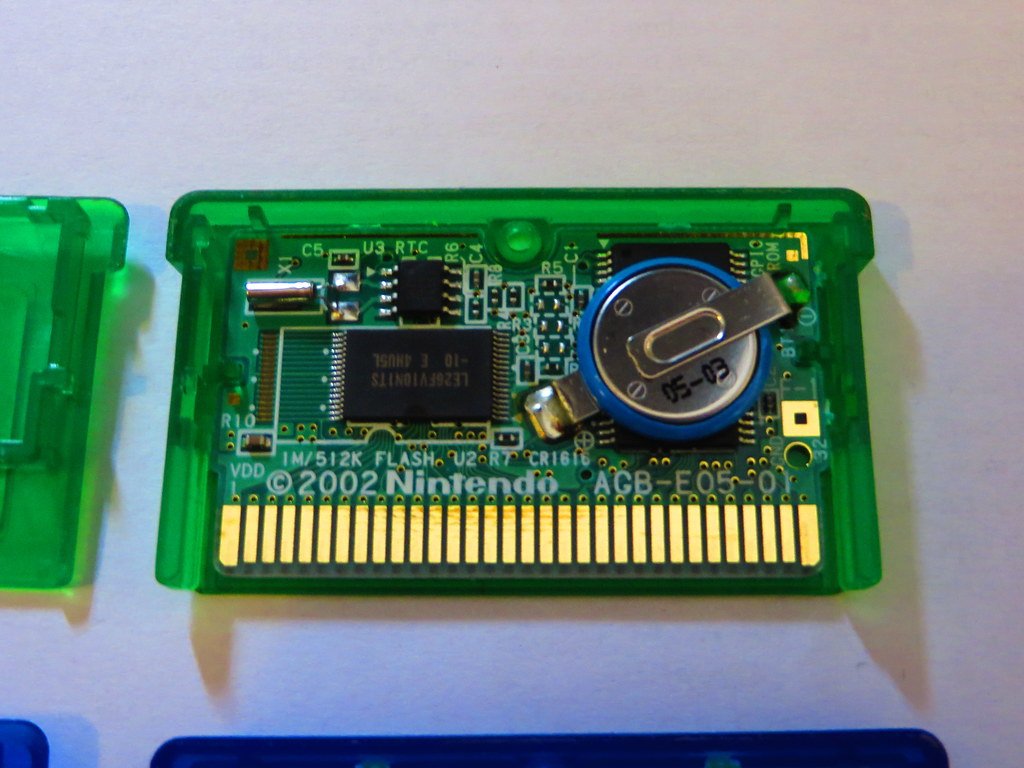
Most Game Boy Advance cartridges do not have batteries; instead, they use flash memory to save game progress.
Many people wonder, do Game Boy Advance games have batteries? It’s a common question for retro gaming fans. While some older game consoles used batteries for saving, the GBA took a different path.
Most cartridges you’ll find don’t require a battery. This means that the saved games are quite safe and will not be lost due to a dead battery.

Do Game Boy Advance Games Have Batteries?
Alright, let’s get straight to the heart of the matter – do those cool Game Boy Advance (GBA) games you love have batteries inside? The short answer is: it’s a bit complicated! Not all GBA games use batteries, but some definitely do. Understanding why and which ones is key to keeping your games alive for a long time and knowing when to start thinking about replacing them. So, let’s dive deep into the world of GBA cartridges and their power sources.
The Role of Batteries in GBA Games
You might wonder, “Why would a game need a battery anyway?” Good question! The batteries in some GBA games are used for one very important thing: saving your progress. Think about it, some games like Pokémon or role-playing games (RPGs) often take many hours to finish. You need a way to save where you are in the game, your items, your character’s level, and all the other stuff that makes each play-through special. That’s where the battery comes into play.
SRAM and Battery-Backed Saves
Many GBA games use a special kind of memory called SRAM (Static Random Access Memory). SRAM is very fast, which is great for gameplay, but it needs power to hold onto the information. That power comes from a small, button-cell battery, often a CR1616 or CR2025. These tiny batteries sit right inside the game cartridge and are responsible for keeping your save data safe even when you turn off your Game Boy Advance.
Imagine you’re playing a huge RPG. You’ve leveled up your character, collected rare items, and advanced through a complex storyline. If there wasn’t a battery and SRAM working together, all that hard work would vanish as soon as you powered down your GBA. Thanks to battery-backed saves, you can pick up exactly where you left off and keep enjoying your adventure!
Games That Typically Use Batteries
So, which types of games are more likely to use batteries? Generally, games that require persistent save files are the main ones. Here’s a breakdown:
- Role-Playing Games (RPGs): These are the main culprits. Games like Pokémon (Ruby, Sapphire, Emerald, FireRed, LeafGreen), Final Fantasy, Golden Sun, and Fire Emblem rely heavily on battery-backed saves to keep track of your character’s progress, your items, and the world’s status.
- Action-Adventure Games with Saving Features: Some action-adventure games with large maps and progress tracking also use batteries. For example, certain Legend of Zelda titles might need them.
- Simulation Games: Games where you build or manage things that require saving.
It’s also good to remember that not every game in these categories will always have a battery. It depends on how the game was programmed and how it saves progress. Some games save to a different type of memory that does not require a battery, which we’ll look at next.
Games That Typically Don’t Use Batteries
Now that we’ve looked at the games that do usually have batteries, let’s explore which games usually do not need a battery for saving:
- Action Games: Many action games that feature levels that can be completed within a single play session, often don’t need battery powered saves. For example, many platformers, beat ’em up games, and puzzle games. They typically either don’t have save functionality or they use another memory type.
- Arcade-Style Games: Games designed for short play sessions that record high scores instead of in-depth progress are unlikely to have a battery.
- Games With Password Save Systems: Some older-style games on the GBA use password systems instead of battery-backed saves. In these types of games, you are given a code that you write down, and when you load the game, you enter the code to pick up where you left off. This type of game doesn’t use a battery.
It is also important to remember that it may be possible for a game in the above mentioned category to still use a battery, but it’s less common than the games mentioned in the earlier section of this article.
How to Tell If Your Game Uses a Battery
Alright, now let’s figure out how to know if a specific game you have uses a battery. Sadly, there isn’t always a super easy way to tell just by looking at the cartridge. Here are some things you can try:
Checking the Cartridge Label
Look carefully at the game cartridge label. It won’t always tell you, but sometimes, there might be a small symbol or note indicating that it uses a battery-backed save system. However, this isn’t very common, as labels often don’t indicate the battery usage, and labels can easily be swapped, so it isn’t reliable, and this method is not very accurate.
Looking Up the Game Online
A much more effective method is to simply do a quick search online. A great place to start is a dedicated gaming wiki, or a site that lists game information. Search for the name of your game, add “battery save,” to the search term and you’ll likely find the answer very quickly. Many fan-made resources will also have this information readily available.
Trying a Simple Test
A simple in game test can sometimes tell you whether or not your game uses battery-backed save functionality. Start up the game and play it for a few minutes, make sure you save your progress (if that option exists) and then exit out of the game. Turn off your Game Boy Advance, then turn it back on, reload the game, and see if the progress you made was saved. If the progress is saved, the game might have a battery, if it is not saved, the game could either not use a battery or have a dead battery. If your game uses a battery, and the save is not saved, that’s a good indication your battery has died and needs replacing.
The Importance of the Save Type
Some games save to flash memory, which does not require a battery, and will still save even if the battery dies. Flash memory is a type of non-volatile memory, meaning that is does not require power to hold onto saved data. This also means that some games that use flash memory instead of SRAM might not actually have a battery in them at all. For some game enthusiasts, knowing what type of save is used is an important factor in game selection. As we previously stated, the game box or label often doesn’t indicate what type of save is used.
Why Batteries Die
Like any battery, the ones in GBA cartridges don’t last forever. These batteries typically have a lifespan of about 10-20 years, depending on usage and storage conditions. Factors that can make the battery die sooner include:
Age
One of the most significant factors is simply age. These batteries do degrade over time, regardless of how much you use them. Think of it like this; even if the game is just sitting on a shelf untouched, the battery is still slowly losing power.
Storage Conditions
Extreme temperatures or humidity can affect the battery and cause it to degrade faster. It’s best to keep your games in a cool, dry place. Avoid storing them in damp areas or in direct sunlight, as this could cause irreversible damage. If you live in a very humid area, consider using some sort of desiccant when storing them, as it helps remove moisture from the air, keeping your cartridges safe.
Usage
While they don’t wear down quite like a battery that’s constantly powering something, frequent saving and loading of the game can contribute to shortening its lifespan, but in the context of a handheld game battery, this is probably not a significant factor compared to the other factors mentioned here.
How to Replace a Dead Battery
If you discover a game with a dead battery, don’t worry. It is possible to replace the battery. You’ll need a few things, but it’s a job you can do at home if you are careful. Here are the basic steps and considerations:
Tools and Materials
Before you start, you’ll need a few things:
- The correct button cell battery: Usually a CR1616 or CR2025. Make sure you get the right one for your game.
- A Tri-Wing screwdriver: This special screwdriver is needed to open most GBA game cartridges.
- A soldering iron and solder: To remove the old battery and attach the new one, you will need some soldering equipment.
- A desoldering wick or solder sucker: To remove the old solder when detaching the dead battery.
- Tweezers or small pliers: To handle the small battery.
Step-by-Step Guide
- Open the Cartridge: Use the Tri-Wing screwdriver to carefully open the game cartridge. Take your time and be gentle so you don’t damage the game or the screws.
- Locate the Battery: Once opened, you’ll see a small battery soldered onto the circuit board.
- Desolder the Old Battery: Use the soldering iron and desoldering tool to carefully remove the old battery from the circuit board, being careful not to damage the board. You might need to add a little bit of new solder to help the old solder melt.
- Solder the New Battery: Place the new battery in the same position as the old one, making sure the positive (+) and negative (-) sides are aligned correctly. Solder the battery to the board using the soldering iron and solder. Make sure to not use too much solder, and ensure the joints are clean.
- Reassemble the Cartridge: Put the game cartridge back together, making sure all the pieces are properly aligned and secure all of the screws.
- Test the Game: Play the game for a few minutes, save your progress, then turn it off and back on to check if the save is working.
Important Considerations
Replacing a battery can be tricky and requires some basic soldering knowledge. If you’re not comfortable doing it yourself, consider taking it to a professional who is experienced with this type of work. If you are confident in performing the work yourself, do your due diligence and research the process, as not doing it correctly can damage your game permanently. When buying replacement batteries, purchase them from a reputable vendor, so that you can be sure of the quality and condition of the battery. It is very important to make sure to orientate the battery correctly, as installing it the wrong way can damage it and the game, as well.
Protecting Your GBA Games
To ensure your GBA games last a long time, whether they use batteries or not, there are a few things you can do:
- Store Them Properly: Keep your games in a cool, dry, and dark place to protect the cartridges and their batteries from extreme temperatures and humidity.
- Handle with Care: Avoid dropping your games or exposing them to excessive shock.
- Keep Them Clean: Gently clean the game cartridge contacts with isopropyl alcohol and a cotton swab if they get dirty. This will help prevent problems with gameplay.
By taking these small steps, you can keep your favorite GBA games working for many years to come.
Understanding whether your Game Boy Advance games use batteries and what those batteries do can help you keep your games running and ready for play. While some games do have batteries for saving your progress, not all do. Knowing the difference is essential for any serious GBA enthusiast. Now you know what to look for, how to test your games, and what to do if a battery dies! Happy gaming!
Replacing Pokemon Emerald Dry Internal Battery Game Boy Advance
Final Thoughts
No, Game Boy Advance cartridges do not contain batteries for saving game progress. They use flash memory to retain save data. This means you don’t have to worry about replacing internal batteries.
Therefore, the answer to the question “do gameboy advance games have batteries” is a definitive no. The flash memory technology allows for save function without any battery power requirements.

