
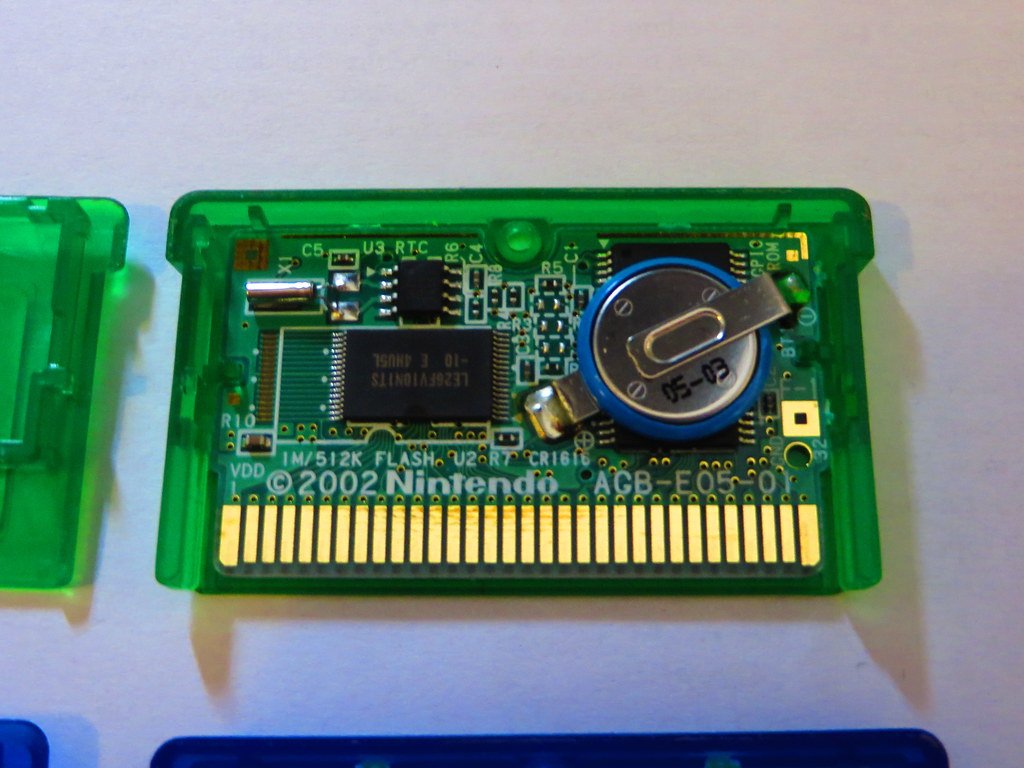
Some GBA (Game Boy Advance) games do have batteries; these are primarily for saving game progress.
Ever wondered about the inner workings of your old Game Boy Advance cartridges? You might have pondered the question, “do gba games have batteries?”. It’s a valid point, given that many older games rely on them for storing progress.
Not all GBA games use batteries, some use other methods for saving. But, quite a few cartridges house a small battery to maintain your saved games. This is something you’ll want to know before purchasing vintage cartridges.

Do GBA Games Have Batteries?
Let’s dive right into the world of Game Boy Advance (GBA) games and settle a very common question: Do these awesome little cartridges have batteries inside? The short answer is: sometimes! It’s not as straightforward as a simple yes or no. Some GBA games use batteries, and some don’t. The presence of a battery depends heavily on what the game is designed to do.
Why Some GBA Games Need Batteries
The main reason some GBA games have batteries is to save your game progress. Think of it like this: when you’re playing a game like Pokémon, you spend hours catching them all, raising their levels, and exploring the world. You wouldn’t want to lose all that hard work every time you turn off your GBA! That’s where the battery comes in.
Saving Games: The Role of SRAM
Many GBA games use a special kind of memory called SRAM (Static Random Access Memory). SRAM needs a constant power source to hold onto the game data. Without power, it would forget everything, like losing a file from your computer if you suddenly pulled the plug. That’s where a tiny button cell battery comes into play. This battery provides the necessary power to keep the SRAM alive and store your game saves. It’s like a tiny backup generator just for your game progress!
- SRAM needs power to remember saved data.
- A small button cell battery provides this power.
- Without the battery, game saves will be lost when the console is off.
Real-Time Clock Features
Another key use for batteries in GBA games is for real-time clock (RTC) features. Games like Pokémon Ruby, Sapphire, and Emerald include an in-game clock. This clock allows for time-based events, such as day and night cycles, which can impact gameplay. In these cases, the battery ensures the clock continues running even when the GBA is powered off. These internal clocks make the game world feel more alive. For example, certain Pokémon might only appear at night, or certain shops may only be open during the day. All of this is possible because of the battery.
- Some games use batteries for real-time clock functions.
- This enables day/night cycles and time-based in-game events.
- Pokémon Ruby, Sapphire, and Emerald are examples of games with this feature.
Think about it like having a mini-watch inside your game that keeps ticking even when you’re not playing!
Games That Don’t Need Batteries
Not all GBA games need batteries. Many games, particularly those that are arcade-style or have simple save systems, use a different type of memory called Flash Memory. Flash memory is like a long-term storage locker that can keep the saved data even without any power source. This means that games using Flash memory don’t need any battery to store save data. Once the save data is written to flash memory, it is safe and will not be erased when you shut down the device.
- Games using Flash Memory don’t need batteries for saves.
- Flash Memory can keep saved data without a constant power source.
- Many arcade-style or simpler games use Flash Memory.
The Magic of Flash Memory
Flash memory is quite clever. It retains information even without electrical current. Imagine it like writing with a permanent marker on a whiteboard; the writing stays there until you actively erase it. Many of the action, platformer, and puzzle games on the GBA used Flash memory for saving. This helps keep game costs down because it eliminates the need for a battery. It also ensures save files will last as long as the flash memory itself holds up, which, usually, is quite a long time.
This use of Flash memory gives us so many games that don’t need the extra hassle of batteries that could eventually run out of power.
How to Tell if a GBA Game Has a Battery
So, how can you tell if your GBA game has a battery? There isn’t a simple “battery” label stamped on the cartridge. However, there are some clues and tests that can help you figure it out.
Checking Game Lists and the Internet
One of the easiest ways to check is by using the power of the internet. There are many online databases and fan websites dedicated to cataloging GBA games. You can usually find out if a specific game uses a battery or flash memory just by searching for it. This is a great place to start your research if you are curious about your collection.
You can try a simple search on your favorite search engine for “[Game Title] GBA battery” and see what you find. Fan forums dedicated to specific games or consoles can also give you valuable information.
- Online databases and fan websites often list battery info for GBA games.
- Search engines can quickly provide this information.
- Game-specific forums can be great sources of knowledge too.
Physical Inspection of the Game Cartridge
Another way to check is by closely inspecting the game cartridge itself. Usually, games that use batteries have a specific look to the printed circuit board inside. You won’t be able to see this without disassembling the game, and I don’t recommend opening up a game unless you know what you are doing. Instead, try to compare the physical size of the GBA cartridge. Many games that used batteries are larger than games that use flash memory. This is because the battery needs space.
It may be difficult to see these differences with the naked eye, and you don’t want to risk damaging your precious game cartridge! But, if you have a GBA cartridge that seems larger than others, there is a possibility that it houses a battery inside.
The Game Saving Test
Here is an easy way to determine if your game has a battery or not: if the game has saved progress that isn’t just for things like high scores, or menu settings but also things like game progress, it’s likely to be using a battery. If you have a game that lets you save your adventures and continue from that saved point, and that save data disappears when you turn off the power, then the battery inside the game cartridge may have died.
- Try saving a game and turning off the GBA.
- Turn it back on and see if the saved data is still there.
- If the save data is gone, the battery may be dead, if the game is supposed to use a battery, or the game might use RAM without a battery
What Happens When a GBA Game Battery Dies?
GBA game batteries, like all batteries, don’t last forever. Over time, they will eventually run out of power, and they usually last for a decade or even longer. When this happens, you might notice some problems with your game. Here’s what to expect when a GBA game battery dies.
Lost Save Data
The most common and frustrating issue when a battery dies is that you lose all of your saved data. This means you’ll have to start your game from the beginning, which can be quite disheartening if you’ve made significant progress. Imagine losing all those awesome Pokémon you worked so hard to catch – definitely not ideal!
A dead battery essentially wipes your save files from the game’s memory. All those hours you spent playing might have been for nothing.
- The most common problem is lost save data.
- This means starting the game from the beginning.
- This can be very frustrating for dedicated players.
Clock-Based Events No Longer Work
If your game uses a real-time clock, it will stop working when the battery dies. Day and night cycles will no longer change, time-based events won’t happen, and any Pokémon that only appear during certain times will be difficult to obtain. Games like Pokémon Ruby, Sapphire, and Emerald rely on the internal clock for various aspects of the game. For example, berries that grow over time will stop doing so, and the time cycle will stop, meaning Pokémon that only appear at night will no longer show up unless you use workarounds. Essentially, parts of the game become inaccessible.
- Real-time clock features will stop working.
- Day/night cycles and timed events will not occur.
- This is a significant problem for certain games, especially some of the Pokémon titles.
Can You Replace a GBA Game Battery?
Yes, you can replace the battery in a GBA game! It’s not a super easy task, but it is doable with some tools, patience, and knowledge. While GBA cartridges are not designed to be easily opened, it’s often possible for those who are comfortable with some basic electronics work.
What You Need for Replacement
To replace the battery, you’ll need a few specific tools and materials. This includes:
- A Tri-Wing screwdriver (to open the cartridge).
- A replacement CR1616 or CR2025 button cell battery (depending on the game).
- Soldering equipment (a soldering iron, solder, and flux).
- A steady hand and some patience.
- Optional: Battery holder (for easier future replacements).
The Replacement Process
The first step is carefully opening the game cartridge with the Tri-Wing screwdriver. Be very careful not to damage the case. Then, carefully desolder the old battery from the game board. Use a small amount of solder and flux on the leads of the old battery. Then, you’ll attach the new battery by soldering it into place. It is very important to solder with care and make sure that the polarity is correct, in other words, ensure the positive and negative sides of the battery are attached correctly. Some people use a battery holder, which makes the process easier next time. If the battery is placed correctly, the game should function as normal again, and you should be able to save your progress.
This process does require some skill and experience with soldering. If you’re not comfortable with this kind of work, it is often a good idea to seek help from someone with experience.
- Carefully open the game cartridge.
- Desolder the old battery.
- Solder the new battery in place, making sure the polarity is correct.
- Test the game to confirm it’s working.
Professional Help
If you’re not comfortable replacing the battery yourself, you can always seek professional help. There are many retro game stores and online repair services that can replace the battery for you. This is a great option if you want to ensure the job is done correctly without taking the risk yourself.
They have the tools, expertise, and equipment to make sure your GBA game is back to its best, and you can continue playing your game!
In summary, while not all GBA games have batteries, many of them do, especially those that need to save progress or have a real-time clock. These batteries, while small, play a big role in the functionality of these cartridges. If you notice your GBA game is no longer saving or the real-time clock is no longer functioning, then chances are the battery has run out. If that happens, it is usually possible to replace the battery so you can get back to enjoying your games. Remember to treat your old games with care, and you can play them for many years to come.
Replacing Pokemon Emerald Dry Internal Battery Game Boy Advance
Final Thoughts
Most Game Boy Advance cartridges do not use batteries for saving game progress. Instead, they typically use flash memory. Certain older GBA games, particularly those ported from older systems, might use battery saves.
These cartridges with batteries usually house the battery inside for keeping save files. So, the answer to ‘do gba games have batteries’ isn’t a simple yes or no. It depends on the specific game.

