
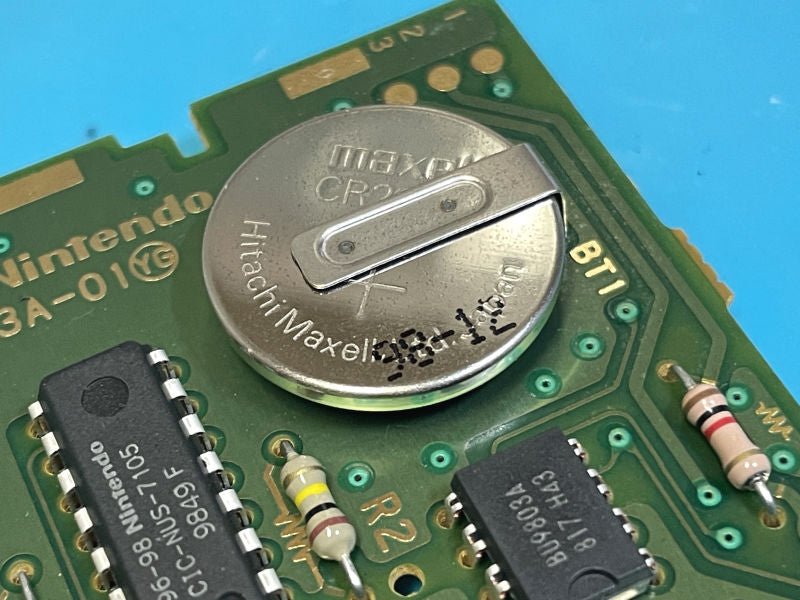
Yes, some N64 games do have batteries, primarily for saving game progress.
Ever wondered if your old Nintendo 64 games need batteries to keep your precious progress intact? The question “do n64 games have batteries” often pops up among retro gaming enthusiasts. It’s a valid concern considering many older consoles relied on battery power for saves.
While not all N64 cartridges used them, certain titles did depend on battery-backed memory. These batteries enabled players to continue adventures where they left off, without having to start all over again each time they powered on their console.

Do N64 Games Have Batteries?
That’s a great question, and it’s one that many Nintendo 64 (N64) fans have asked! The short answer is: yes, some N64 games do have batteries inside, but not all of them. These batteries play a super important role in saving your game progress. Let’s dive deeper and explore exactly which N64 cartridges use batteries and why.
Why Do Some N64 Games Need Batteries?
Back in the day, game cartridges didn’t have fancy internal storage like modern consoles. So, how did they remember your progress? That’s where batteries come in! Certain N64 games required a battery to power a small chip called Static Random Access Memory (SRAM). This SRAM chip holds onto your saved games even when you turn off the console. It’s like a tiny electronic notebook that needs a little bit of power to keep writing.
How SRAM Works
Think of SRAM like a chalkboard. You can write on it (save your game), and it remembers what you wrote. But if the light goes out (no battery power), the writing disappears. The battery provides a small, constant flow of electricity to the SRAM, so your game saves stay safe and sound. Without a battery, you’d have to start a game over from the very beginning each time you play. That would be a real bummer!
Why Not All Games Use Batteries?
So, why didn’t every N64 game need a battery? Well, some games were designed differently. They didn’t require saving large amounts of data. Other games used different methods for saving, like using a memory card plugged into the controller. This is why you don’t find batteries in every single N64 cartridge. It really depended on the game and what the developers needed it to do.
Which N64 Games Use Batteries?
Identifying which N64 games have batteries can be tricky because it’s not always obvious just by looking at the cartridge. However, certain game genres were more likely to include them. Generally, games with complex storylines, large worlds, or a lot of player progress to track were most likely to rely on battery-powered saving.
Examples of N64 Games with Batteries
Here are some examples of popular N64 games known to use batteries for save data:
- The Legend of Zelda: Ocarina of Time
- The Legend of Zelda: Majora’s Mask
- Pokémon Stadium 2
- Harvest Moon 64
- Animal Crossing (Japan only release on N64)
- Ogre Battle 64: Person of Lordly Caliber
- Stunt Racer 64
- StarCraft 64
- Gauntlet Legends
Examples of N64 Games Without Batteries
Many N64 games did not rely on battery power. Here are a few examples of games that saved in other ways, like through the controller pak:
- Super Mario 64
- Mario Kart 64
- Star Fox 64
- GoldenEye 007
- Banjo-Kazooie
- F-Zero X
- Mario Party Series
- Perfect Dark
Please remember that this is not an exhaustive list. There are many other N64 games, and some may be hard to find information on about whether they contain batteries or not.
The Battery Type and Its Lifespan
Most N64 cartridges that use batteries rely on a small, circular type of battery called a CR2032. These are the same type of batteries used in things like watches and car key fobs. The life span of these batteries can vary. They typically last for several years, but eventually, they will run out of power and need to be replaced.
Factors Affecting Battery Lifespan
Several things affect how long a battery in an N64 game cartridge will last. Here are a few:
- Age: Like any battery, the older it is, the more likely it is to fail.
- Frequency of Use: Even if you don’t play a game often, the battery is always supplying power to the SRAM. Frequent playing will use power, but even not playing at all, the battery is discharging slowly.
- Storage Conditions: Storing your games in extreme heat or cold can shorten a battery’s lifespan.
Signs Your N64 Game Battery Might be Dying
Here are some common signs that the battery in your N64 game cartridge might be on its last legs:
- Save Data Loss: This is the most obvious sign! If your saved games suddenly disappear, it’s very likely the battery is dead.
- Inability to Save: If you can’t create new save files, it could also indicate a dying battery.
- Save File Corruption: Sometimes a battery on its way out might make your saves glitchy and unplayable.
Replacing N64 Game Batteries
The good news is that you don’t need to throw away your favorite game if the battery dies! You can replace the battery, but it does require some basic tools and a bit of care. While you can find tutorials online, if you’re not comfortable working with small electronics, it’s best to seek help from someone who is.
What You’ll Need
Here’s a basic list of what you will need for a battery replacement:
- A new CR2032 battery
- A 3.8mm gamebit screwdriver or similar screwdriver to open N64 cartridges
- A soldering iron and solder (if you plan to solder the new battery in directly)
- Electrical tape (optional, for securing the battery)
The Replacement Process
The process to change a battery is complex, here is a generalized step-by-step procedure. It is critical to be very careful with all of the internal components of the N64 game cartridge. Always research your specific game online before you do a battery replacement to avoid any errors or issues.
- Open the Cartridge: Carefully use the gamebit screwdriver to open the N64 cartridge case.
- Locate the Battery: The battery is usually a small, circular object attached to the circuit board with small metal tabs.
- Remove the Old Battery: Depending on how it’s attached, you may need to gently use a soldering iron to remove the old battery from the circuit board if it is soldered in. Other times, batteries are held in by plastic or metal tabs.
- Insert the New Battery: Either solder the new battery in using the soldering iron, or carefully place the new battery in the plastic or metal clips. Make sure you have it in the correct position. Some people prefer to use electrical tape to hold it in place.
- Close the Cartridge: Carefully put the cartridge back together and screw it back shut.
- Test: Turn on your N64 and play the game to make sure your save data is back to normal.
It is vital to be extremely careful when doing battery replacement in N64 game cartridges. If you are not confident in your technical ability, it is strongly recommended to consult an experienced professional or seek guidance from a repair specialist.
Alternative Saving Methods
As mentioned, not all N64 games use batteries. Many games utilized the Nintendo 64 Controller Pak, a memory card that plugs into the back of the controller. This allowed players to save progress for multiple games onto one memory card. These controller paks also have a battery, but this battery has a much easier time lasting as it is not always actively saving and working like in the case of the cartridge batteries.
Benefits of Controller Pak
- Multiple Game Saves: You can use one controller pak for many different games, saving space and money.
- Easy Transfer: You can take your save data with you to a friend’s house by moving the controller pak from one controller to another.
Limitations of Controller Pak
- Requires a Controller Pak: You have to have the memory card itself, which was an added expense to play some games.
- Limited Memory: While useful, these cards could only hold so many save files.
Preserving Your N64 Games
Keeping your N64 games working well involves some care. Here are some tips to keep those cartridges running for as long as possible:
- Store them in a cool, dry place: Avoid extreme temperatures and humidity.
- Keep them clean: Gently clean the cartridge contacts with a cotton swab and isopropyl alcohol if needed.
- Handle with care: Don’t drop the cartridges or force them into the console.
- Check saves regularly: If you’ve got games with batteries, check them from time to time to make sure your saves are still there, and you know if any need replacing sooner rather than later.
By taking good care of your games, you’ll keep the memories they hold alive for many years to come.
In conclusion, while not all N64 games have batteries, those that do rely on them to save your progress. These batteries will eventually need to be replaced. Knowing the signs of a dying battery and how to replace it helps to keep your beloved N64 games running. Whether it’s a battery in the cartridge, or a memory card in your controller, that little bit of tech helps to keep the adventure alive for you and others in your household. It’s important to understand and care for your N64 cartridges, so you can continue to enjoy those classic games for years to come.
N64 Battery Change in Seconds!
Final Thoughts
Yes, some N64 games use batteries for saving progress. Cartridges needing to retain data when powered off utilize coin cell batteries. These batteries allow saving game data internally, a crucial function for titles featuring lengthy campaigns.
Therefore, whether or not ‘do n64 games have batteries’ depends on the specific title. You will find many cartridges without batteries, usually saving using controller pak.

