
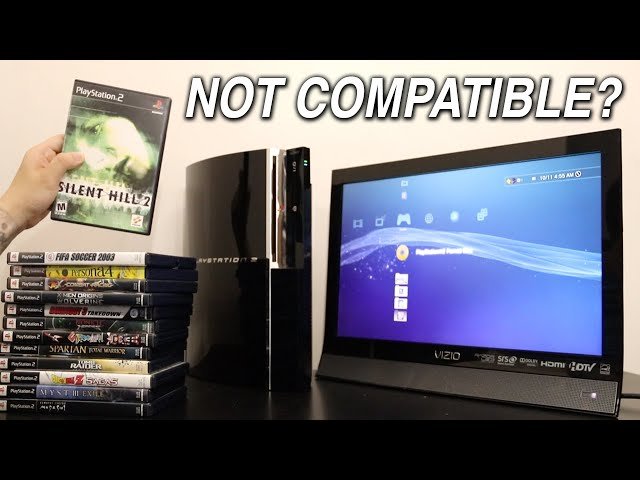
Some PlayStation 3 models can play PlayStation 2 games, but not all. It depends on the specific PS3 version.
Ever wondered if you could dust off your old PlayStation 2 classics and play them on your PlayStation 3? The question “do PlayStation 2 games work on PlayStation 3” is surprisingly nuanced. Not every PS3 is created equal, and backward compatibility is the key here.
Early versions of the PlayStation 3, especially the fat models, often included the hardware necessary to play PS2 discs. Later slim and super slim models removed that compatibility to reduce manufacturing costs.

Do PlayStation 2 Games Work on PlayStation 3?
Okay, let’s talk about something that’s been on the minds of gamers for years: can you actually play your old PlayStation 2 games on a PlayStation 3? It’s a question with a somewhat complicated answer, and we’re here to break it all down for you so you know exactly what to expect when it comes to your PS2 game collection and your PS3 console.
The Short Answer: It’s Complicated
The short answer is: it depends. Not every PlayStation 3 can play every PlayStation 2 game. Sony, the maker of PlayStation, changed some things when they built the different models of the PS3, which impacts what older games the console can play. Some of the very first PS3 consoles were built with special hardware that allowed them to play PS2 games, but later models removed this hardware to make the consoles cheaper and focus on newer technology. Let’s dig into this further and figure out why this is the case.
Understanding PlayStation 3 Models
To understand if your PS3 can play PS2 games, you first need to know what kind of PS3 you have. There were three main types of PlayStation 3 consoles that Sony released over the years:
Original “Fat” PS3
These were the very first PlayStation 3 consoles. They are often called the “fat” PS3s because of their bigger size. Here’s what you should know about them:
- Hardware Emulation: The earliest versions, particularly the 20GB and 60GB models, contained the actual chips from a PlayStation 2 inside them. This allowed them to play almost all PS2 games perfectly. Think of it like having a whole PS2 computer built right into your PS3! These are often referred to as being “backwards compatible” with PS2 games.
- Identifying them: Look for the 20GB or 60GB model number on the bottom of the console. The model number will usually start with CECH. If you see CECHA or CECHB, you have one of the models that has the hardware to play PS2 games. These models also usually have a glossy black finish on the top panel.
- Features: These are the most sought-after models if you want to play PS2 games on a PS3, but they are often harder to find and may be more expensive.
Slim PS3
The second main type of PS3 was the Slim model. Here’s what makes these different:
- Software Emulation: These models do not have the actual PS2 hardware inside them. Instead, they use a different technique called software emulation. This means the PS3 tries to imitate the way the PS2 works using computer code rather than the actual PS2 chips.
- Limited Backwards Compatibility: While these can play some classic PlayStation games through the PlayStation Network (PSN), they cannot play physical PS2 discs. So if you own the actual disc, you cannot use the disc to play on your PS3.
- Identifying them: The slim PS3s are smaller and have a more matte look. Look at the model number, these usually start with CECH-20xx or CECH-21xx. These models do not have hardware for playing PS2 games and cannot play PS2 discs.
Super Slim PS3
The final PS3 version was the Super Slim model. Here’s the lowdown on this version:
- No PS2 Compatibility: The Super Slim PS3 models were never built to play any PS2 games using either hardware or software emulation. They were designed to focus purely on PS3 games and online content.
- Identifying them: The Super Slim is easy to spot, it is even smaller than the slim model and often has a sliding disc tray on top rather than the slot loading mechanism. The model numbers usually start with CECH-40xx. These cannot play PS2 games from the physical discs.
Hardware vs. Software Emulation: Why it Matters
You might be wondering why some PS3s use hardware and others use software to play older games. Here’s the simple explanation:
- Hardware Emulation: This is like having the real PS2 inside your PS3. It’s the best way to ensure games play exactly like they did on the original console with few glitches or problems. The early “fat” PS3s used this method, which is why they have the highest success rate with PS2 games.
- Software Emulation: This method uses computer code to imitate the PS2. It can be cheaper to implement and require less space, but it is also less accurate and can cause some games to have bugs or run poorly. Slim and Super Slim PS3 models never used any kind of software emulation for PS2 games and did not have the ability to play them.
How to Identify Your PS3 Model
To figure out if your PS3 can play PS2 games, you need to find the model number. Here’s how you can do that:
- Look at the Bottom: Turn your PS3 over and look at the label on the bottom. There should be a model number listed, which usually starts with “CECH.”
- Check Your Manual: If you still have the original box or manual, the model number will also be listed there.
Once you find the number, compare it with the list we’ve talked about above. This is the most reliable method to know if you have backwards compatibility.
PS2 Games on the PlayStation Network
Even if you don’t have one of the original “fat” PS3 models that can play PS2 discs, you might still be able to play some PS2 games. Here’s how:
PlayStation Store
Some popular PS2 games were made available digitally through the PlayStation Store (PSN). You can download these games directly to your PS3 and play them without needing the original disc. However, not all PS2 games are available on the PlayStation store.
Remastered Games
Sometimes, game companies release updated versions of classic PS2 games called remasters. These games have been improved with better graphics and sometimes additional features to make them work better on the newer console hardware. While not the original game, they do provide a way to experience some of the PlayStation 2 classics on your PlayStation 3.
Limitations
Remember, buying games through the PSN means you don’t actually own the disc, only the right to play the game. If you have a PlayStation store account linked to a particular region, you will likely need to purchase games from that region only. Not every PS2 game will be available on the PlayStation network. Also, be aware that Sony has periodically closed the online stores for older consoles, which can affect access to some games. So, you might find yourself having a difficult time getting them now on the PS3 even if you wish to download the games.
Troubleshooting Playback Problems
Even if you have an original “fat” PS3, there might be times when a PS2 game doesn’t work as you expect. Here are a few things to consider:
Game Compatibility
While the original “fat” PS3 consoles are very good at playing PS2 games, they are not perfect. Some games are more complicated or were made later in the PS2’s lifespan and might have some small issues. It is important to note that the compatibility for the original fat PS3 is around 90 to 95%, which means some games may have issues. In rare cases, they might not work at all. You can try searching online to see if other people have reported issues with a specific game.
Disc Condition
Make sure that your PS2 game discs are clean and free of scratches. Scratched discs can be difficult for the console to read, and the game may not play correctly. Gently wipe the disc with a soft cloth from the center outwards. Never rub in a circle, as you can scratch the disc more easily.
Console Maintenance
Keep your PS3 in a cool place, don’t block the air vents and clean dust out of the vents from time to time. If your PS3 gets too hot, the hardware might not work perfectly, and it may have a negative impact on playing games. This could lead to problems reading game discs or having games crash. If you notice the fan is unusually loud, it may be a sign that you need to clean the vents.
Software Updates
Keeping your PS3 software updated can sometimes solve issues with game playback. Go to the PS3 system settings and check for updates. Sometimes the updates will include improvements for playing older games. Sometimes, if you are having some errors while playing a PS2 disc, updating the software will fix the issue.
Finding PS2 Games and Consoles
If you are looking to buy games or consoles, here are a few tips:
Used Game Stores
Game stores that sell used games may have a good selection of PS2 games. You can sometimes find PS2 discs at a good price at local game stores. It can also be a good way to find a PS2 game if you’re looking for a specific game title. Some online used game sites are also an option.
Online Marketplaces
Online marketplaces like eBay and Amazon may have older PS2 consoles or games for sale. Keep an eye out for good deals. Be sure to check the seller’s reputation and ask questions about the items. Make sure the seller has a good feedback score. Ask questions about the condition of the disc or console, and check the return policy before purchase.
Thrift Stores and Flea Markets
You can sometimes find hidden gems at thrift stores and flea markets. Keep an open mind, you never know what treasures you might uncover. Be sure to inspect items closely before buying, and always check the return policy if there is one.
The Allure of the PlayStation 2
Even though the PlayStation 2 came out a long time ago, people still love playing its games for many reasons. The PS2 era has many classic games that people still enjoy playing today. It was also a time of great creativity for game developers. Many game series that we know today were born on the PS2. The library of games available on the PS2 is vast and diverse, so there is sure to be something for everyone. This is why many gamers wish to play PS2 games on their PS3 consoles.
And that’s a wrap! Hopefully, this has helped to clear up the sometimes confusing topic of playing PlayStation 2 games on the PlayStation 3. Remember, if you want to play your old PS2 discs on your PS3, you’ll need an original “fat” model. The other models have very limited or no PS2 game compatibility, but some PS2 games may be available on the PlayStation Network if you’re ok with the digital versions of these games instead.
What happens when you put a PS2 Game in a PlayStation 3
Final Thoughts
The ability to play PlayStation 2 games on a PlayStation 3 is limited. Not all PS3 models offer this backwards compatibility. Specifically, only early versions of the console can play PS2 discs.
This makes model selection crucial for those seeking to revisit their older games. Later PS3 versions removed the hardware needed for PS2 game compatibility.
Therefore, do PlayStation 2 games work on PlayStation 3? The answer is yes, but only on specific, older console models. If backwards compatibility is a must, do research before buying a PS3.

