
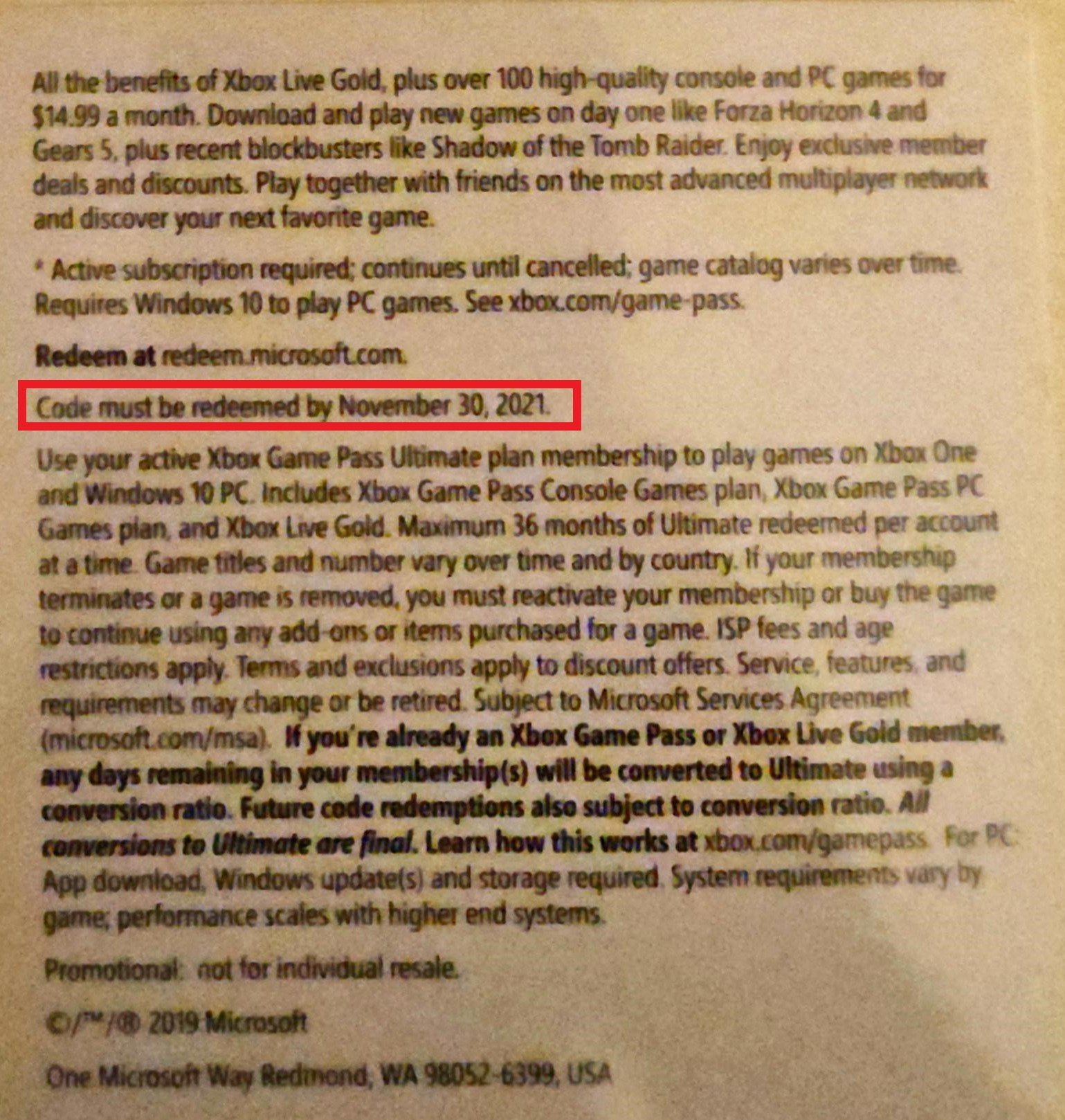
Yes, Xbox Game Pass codes do expire; their validity period varies depending on where you obtain them, so it’s essential to check the terms.
Ever snagged a sweet Xbox Game Pass code and wondered if it’ll last forever in your digital wallet? It’s a common question – do xbox game pass codes expire? They certainly do, and knowing how long you have to redeem them is pretty important, so you don’t lose out on playing some amazing games.
The expiry dates can be different depending on the retailer or promotion where you got the code. So pay attention to the fine print. Usually these codes have a date limit attached, you need to activate them within the period.

Do Xbox Game Pass Codes Expire? Let’s Find Out!
So, you’ve got your hands on an Xbox Game Pass code, maybe as a gift or from a promotion, and you’re itching to play some awesome games. But then a little worry creeps in: do these codes have a shelf life? Do they expire? That’s a super important question, and the answer can be a little bit tricky. Let’s dive deep into the world of Xbox Game Pass codes and figure out exactly what you need to know.
Understanding Xbox Game Pass Codes
Before we talk about expiration, let’s make sure we all understand what an Xbox Game Pass code actually is. Think of it like a special ticket that gives you access to a whole bunch of games. These codes come in different forms; sometimes you’ll get them printed on a card, sometimes they’ll be digital codes sent via email, and other times they might be included with other products. There are a few different types of Game Pass subscriptions as well. Here’s a breakdown:
- Xbox Game Pass Ultimate: This is the big kahuna! It includes all the benefits of the other Game Pass options, plus Xbox Live Gold (needed for online multiplayer) and access to cloud gaming.
- Xbox Game Pass for Console: This one gives you access to all the games on your Xbox console but does not include PC games, online multiplayer, or cloud gaming.
- Xbox Game Pass for PC: This version gives you access to the library of PC games but does not include console games, online multiplayer, or cloud gaming.
Each code usually corresponds to a specific type and duration of Game Pass subscription, like one month or three months. Once you redeem a code, it adds the subscription time to your Microsoft account.
The Short Answer: Yes, They Can Expire
Now for the most important part: Yes, Xbox Game Pass codes absolutely can expire! The expiry dates vary, so it’s not a simple “all codes expire after six months” situation. Many codes have an expiration date, meaning you can’t wait forever to redeem them. Once a code has expired, it becomes unusable, and you won’t be able to access the Game Pass benefits it’s meant to provide.
Where to Find the Expiration Date
Figuring out when your code expires is super important, and finding the date isn’t usually difficult. Most of the time, the expiration date is printed directly on the card, in the email, or on the product packaging with your code. This can be in the form of a full date like “December 31, 2024” or a shorter version like “12/31/24.” Keep in mind that the location and specific wording can differ based on how you got the code.
Here are the most common places to look:
- On a Physical Card: The date is usually printed clearly near the code itself, sometimes on the back or bottom of the card.
- In an Email: If you received your code via email, check the body of the message carefully. The expiration date should be stated clearly.
- On a Product Packaging: Codes bundled with a console, controller, or other product will have the date either on the box or inside the packaging.
- Digital Receipts: Check any receipts of online purchases. The expiration date will usually be listed with the digital code.
Why do Xbox Game Pass Codes Expire?
You may wonder why these codes don’t last forever. Here are a few reasons:
- Promotional Offers: Sometimes, Xbox Game Pass codes are given as part of limited-time promotions. These codes have shorter expiration periods to encourage quick redemption during the campaign.
- Partnerships: When the codes are part of a collaboration with other companies, like a fast food chain or another product, those offers can have specific end dates.
- Inventory Management: Keeping track of codes and managing them can become complicated. The expiration dates help the company maintain control over code distribution and prevent stockpiling of codes.
Different Expiration Periods
The timeframe on how long a code stays valid can differ a lot. Some codes might expire within a few months, while others have a longer validity period, sometimes up to a year from purchase. Here’s a very general idea of what you might find, though it’s very important to check the specific date on your code:
- Short-Term Codes: These are often for free trials, promotions, and codes bundled with a product, they can expire in one to three months.
- Standard Codes: Codes purchased as stand-alone subscriptions usually have a longer timeframe. They are often valid for six to twelve months.
- Region-Specific Codes: Keep in mind that codes can sometimes be region specific, meaning they only work in certain regions or countries. If you try to redeem a code from a different region than your account’s region, it might not work.
What Happens if My Code Expires?
Sadly, if your Xbox Game Pass code expires, it simply won’t work. You won’t be able to use it for a subscription. Attempting to redeem an expired code often results in an error message stating that the code is no longer valid. This means you would need to purchase a new subscription to get access to Game Pass.
How to Avoid Expiration Issues
The best way to avoid having your code expire is to redeem it as soon as you get it. There is no advantage to waiting unless you are attempting to strategically stack your subscriptions and you know exactly how long your codes are valid for.
If you need a little more advice, here are some helpful suggestions for making sure you use your code before it’s too late:
- Redeem Immediately: The most straightforward way is to redeem the code right away when you receive it. This is particularly important for promotional or free codes that tend to have shorter expiry periods.
- Check the Date: Double check to confirm the exact date on your code and if you need time before redeeming, set a reminder to make sure you redeem the code prior to the expiration.
- Store It Safely: If you don’t plan to redeem the code right away, store it somewhere safe, like a note in your phone or a special drawer, so you don’t lose the code or its expiration.
- Share Carefully: Be very careful if sharing your code with others. If you are gifting the code to someone, tell them the expiry date to avoid any issues.
Can Expired Codes Be Reactivated?
Unfortunately, expired Xbox Game Pass codes can’t be reactivated. Once the expiration date has passed, the code becomes inactive and cannot be used to get access to Game Pass. There’s no way to get it to work again. If you have an expired code, your only option is to buy a new subscription. This is why it’s so important to be aware of the expiration date and to redeem the code promptly.
Redeeming Your Xbox Game Pass Code
Now that you know all about expiration dates, let’s talk about how to redeem your Xbox Game Pass code. It’s a pretty simple process. Here’s how:
Redeeming on Your Xbox Console
- Turn on your Xbox console and log into your Microsoft account profile.
- Press the Xbox button on your controller to open the guide menu.
- Go to the “Store” tab.
- Select “Redeem.”
- Enter the 25-character code.
- Follow the on-screen prompts to confirm and activate your Game Pass subscription.
Redeeming on a PC
- Open your web browser and go to the Microsoft website or open the Xbox app on your computer.
- Sign in to your Microsoft account.
- In the Microsoft Store, look for “Redeem” (usually at the top or in the menu).
- Enter the 25-character code.
- Follow the prompts to activate your Game Pass.
Redeeming on a Mobile Device
- Open the Xbox app on your phone or tablet.
- Sign in to your Microsoft account.
- Tap on your profile.
- Select the “Redeem Code” option.
- Enter the 25-character code.
- Follow the steps to complete the process.
What if Redemption Doesn’t Work?
Sometimes things don’t go as planned. If your code doesn’t work, check the following things:
- Double Check the Code: Confirm that you’ve entered the code correctly. It’s easy to mistake a letter for a number or get something slightly out of order, so it’s worth checking carefully.
- Check Expiration Date: Make sure your code hasn’t expired. If it has, it’s, unfortunately, not going to work.
- Confirm Region: Make sure the code is valid in your region and the region associated with your account.
- Check Subscription Type: Make sure the code is compatible with your existing subscription and if you can stack different types of subscriptions.
- Contact Support: If everything seems correct but the code still isn’t working, contact Xbox support for help.
Buying Game Pass Codes
If you are looking to buy a Game Pass code, it’s always best to buy from reliable and trustworthy retailers. When purchasing a digital code, the code should be sent to you immediately after your purchase. Be careful and do your research before purchasing codes from third-party sellers online because you may end up with an expired code. Always check the code validity period before making a purchase.
So, there you have it. Xbox Game Pass codes do expire, but being aware of this and taking the right steps helps you ensure that you can play the amazing games included in the subscription. Just remember to check your expiration date and redeem the codes promptly to make the most of the great games offered by the Xbox Game Pass!
Do Xbox Live codes expire?
Final Thoughts
Yes, Xbox Game Pass codes do expire. It’s important to check the fine print. You must redeem them within a specified timeframe. Ignoring this can lead to missing out on gaming benefits.
Always verify the expiration date before purchase. These codes often come with a validity period. After this date, they become unusable.
So, remember do xbox game pass codes expire, and to avoid frustration, carefully note the expiry. Always activate codes promptly.

