
Yes, the 2DS plays almost all 3DS games.
So you’re wondering does 2ds play 3ds games? It’s a common question for Nintendo handheld fans. Many are curious about the compatibility of these two devices. They look similar, but are they interchangeable with their games?
The 2DS is designed to play nearly every game available for the 3DS. This gives you a very large library to explore. You can enjoy both 2D and 3D titles on the 2DS, the 3D part just won’t show.

Does 2DS Play 3DS Games? Exploring Compatibility
Okay, let’s dive right into the heart of the matter. You’re probably here because you’re wondering if that cool 2DS you have (or are thinking about getting) can play games made for the 3DS. It’s a common question, and the answer is a resounding YES! The Nintendo 2DS is designed to play most of the same games as the 3DS. This is great news for anyone who loves handheld gaming!
Understanding the Nintendo 2DS and 3DS Family
To really grasp why the 2DS can play 3DS games, it helps to understand the relationship between these consoles. Both are part of the same family of handheld systems made by Nintendo. Think of it like different models of the same car – they have some differences, but they share many of the same key parts and functions. The 3DS came first, offering a glasses-free 3D gaming experience, while the 2DS was designed as a more budget-friendly alternative that removed the 3D feature.
Key Differences: 3D vs. No 3D
The most obvious difference between the 3DS and 2DS is the 3D screen. The 3DS has a top screen that displays games in 3D without the need for special glasses. The 2DS, however, has a flat, 2D screen. This is why it’s called the “2DS”. The absence of the 3D function helped to make the 2DS more affordable and more durable (less complicated parts). But here’s the key point: removing the 3D aspect doesn’t change what games it can run. The consoles both use the same core hardware, which is why they can play the same games.
Physical Design
Another notable difference is their physical design. The 3DS has a clamshell design, meaning it folds closed. The 2DS, on the other hand, is a single, solid unit. It does not fold. This design difference might seem small, but it affects how you hold and carry each console. The 2DS is often considered more child-friendly due to its rugged, non-folding design.
Game Compatibility: What You Can Play
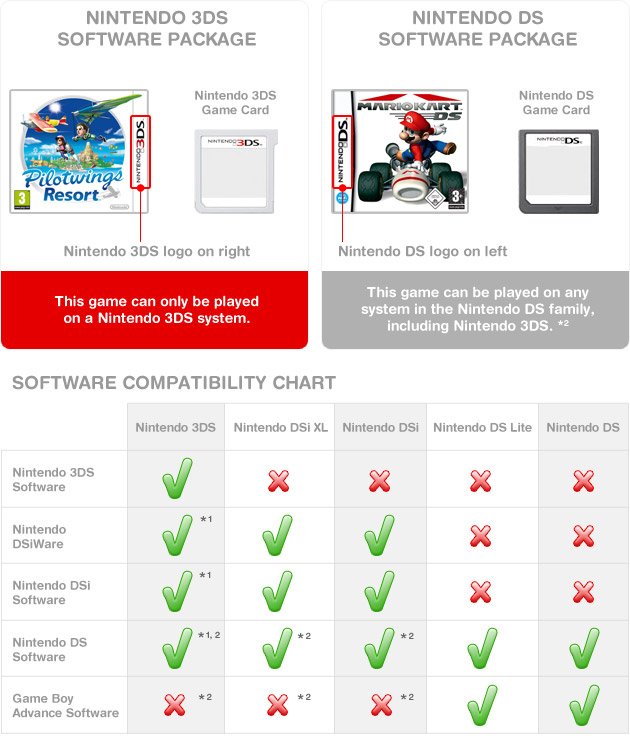
Now that we’ve looked at the differences between the 2DS and 3DS, let’s get to the games. The 2DS can play the vast majority of Nintendo 3DS games. This means you have access to an enormous library of fantastic titles. This includes games from all genres: action, adventure, puzzle, strategy, RPGs – everything you love and more! You’ll find classics like:
- The Legend of Zelda series
- Mario Kart 7
- Animal Crossing: New Leaf
- Pokémon series
This compatibility also applies to a large digital library of games that you can download from the Nintendo eShop. You have a huge variety of games to explore on your 2DS. There are so many choices, it’s hard to be bored!
Exceptions to Compatibility: What You Can’t Play
While the 2DS plays most 3DS games, there is one important exception to be aware of – 3DS games which specifically require 3D functionality do not work well on 2DS, meaning you’ll have the game, but will not experience any 3D elements. However, these types of games are rare. The 3D effect was an optional feature, and developers didn’t make it a requirement for playing most games. So, even games with a 3D mode will work perfectly fine on your 2DS, you’ll just be playing it in 2D. Also you can not play Nintendo DS games which used a GBA Slot on Older Nintendo DS Systems; the 2DS Does not have a GBA Slot.
How to Play 3DS Games on a 2DS
Playing 3DS games on your 2DS is simple. If you have physical copies of the games, just insert the game card into the game card slot on your 2DS system. If you have digital copies, you can download them from the Nintendo eShop using your Nintendo Network ID. The 2DS’s menu system is the same as the 3DS, making navigating games a breeze.
Physical Game Cartridges
Using physical game cartridges is very straight forward. Locate the cartridge slot on your 2DS, which is located on the top right area, and gently insert your game. The system will recognize it and you’ll be able to launch the game in the system menu. Ensure that the game card is fully pushed in for the console to read it.
Digital Downloads
Digital downloads are also easy to manage. If you are using an existing or new Nintendo Network ID, you can access and download 3DS games directly from the eShop. You’ll be able to manage and access these digital games in the same manner as other games on the console. Remember, you must have enough space on your SD card to save the games. The 2DS uses an SD card for digital game storage.
Benefits of Using a 2DS for 3DS Games
Choosing a 2DS to play your 3DS games can come with a few benefits. Here are some advantages of choosing a 2DS:
- Cost-Effective: The 2DS is generally less expensive than the 3DS family of consoles. This means you get access to the same large library of great games without spending as much.
- Durability: The solid design of the 2DS makes it more durable compared to the foldable 3DS. It can handle rougher use and is great for younger players.
- Comfort: Some people find the single form-factor of the 2DS to be more comfortable for extended gaming sessions, particularly for those with larger hands.
- Access to a huge Library: It gives you access to all the same fantastic 3DS games. There’s no shortage of experiences you can have playing on the 2DS, from first-person puzzle games to epic adventure games.
Exploring 2DS Models
Even though the 2DS is the base model, there are still some fun variations on this model. The original 2DS came out in 2013, with a traditional form factor. Later Nintendo released the 2DS XL/LL (depending on region) This model is still a 2DS with some minor changes. The 2DS XL/LL model adds in a clamshell design, this model still does not have a 3D screen, but is more ergonomic.
The Original 2DS
The original 2DS features a wedge-like design, with the screens connected together in one main area. The console is very robust, and can withstand more punishment than a console with moving parts. The design can be off-putting to some, however, others love the unique design, that is quite comfortable in the hand.
The New 2DS XL/LL
The New Nintendo 2DS XL/LL, which was released later, has a different design from the original 2DS. The new model features a clamshell design and is more closely related to the New 3DS XL, but without the 3D component. This console includes a higher pixel density display, which some users prefer. This model is also lighter than the original 2DS and may be preferred by some.
Final Thoughts on 2DS and 3DS Compatibility
So, does the 2DS play 3DS games? Absolutely! If you’re looking for a console that plays the massive library of 3DS titles, the 2DS is a great, affordable option. You won’t miss out on any amazing gaming adventures because you do not have the 3D feature. Whether you are a new or seasoned gamer, the 2DS offers an incredibly fun and enjoyable gaming experience. It’s a solid system that lets you play some of the best games Nintendo has to offer.
Does The Nintendo 2DS Play 3DS Games? #Shorts
Final Thoughts
Yes, the Nintendo 2DS plays nearly all Nintendo 3DS games. This makes the 2DS a very cost-effective option for accessing the 3DS library.
The 2DS system lacks the 3D screen functionality of its counterpart. However, this difference doesn’t affect the gameplay of most titles.
Therefore, to answer simply: yes, does 2ds play 3ds games. It is a must have system for those wanting to play the 3DS catalogue.

