
No, deleting a game on PS5 does not delete your game progress. Your saved data remains stored separately.
Worried about losing your hard-earned achievements? Many gamers wonder, does deleting a game on ps5 delete progress? It’s a valid concern before freeing up space on your console.
The good news is, the PS5 separates game installations from save data. This means you can delete a game without losing your progress, and pick right back up where you left off if you reinstall it later. Your saves are stored either on the console’s storage or in the cloud.

Does Deleting a Game on PS5 Delete Progress?
Okay, let’s talk about something that probably crossed every PlayStation 5 gamer’s mind: you’ve got a game you’re done with, or maybe one you need to make room for something new. You want to delete it, but a little voice in the back of your head whispers, “Will I lose all my hard work?” It’s a totally fair question! The good news is, usually, deleting a game doesn’t mean kissing your progress goodbye. But it’s not always that simple. Let’s break down how it really works so you can feel confident when cleaning up your digital library.
Understanding Game Data on Your PS5
Think of your PS5 like a big filing cabinet. Inside, there are two main types of information related to your games: the game itself and the save data.
What is the Game Data?
This is the actual game – the files that make the characters move, the worlds appear, and the challenges exist. These files are big, and take up lots of space on your console’s storage. Deleting the game removes all these files from your PS5.
What is the Save Data?
This is where your progress lives! It’s like a little digital notebook where the game remembers how far you’ve gone, what levels you’ve completed, what items you’ve collected and what characters you’ve unlocked. Save data files are much smaller than the game itself. These files are not usually deleted when you remove the game from your console, as you may choose to reinstall it later to continue from where you left.
How Save Data is Handled
The PS5 has a system to keep your save data separate from the game data. It does this so that if you delete a game and then reinstall it later, you can jump right back into your progress without having to start from the beginning. This is a great feature because if you’re like many players, you will often reinstall and replay games you’ve completed in the past.
Save Data Storage Location
Your game saves are stored in the console’s internal storage. They are not stored directly with the game files. This separation is key to how you can delete a game without losing your save data. Because they’re kept separate, your progress is safe even if you remove the game files themselves. This means you could delete the digital copy of the game, purchase a physical copy and load your save data, and resume progress.
Cloud Storage for PS Plus Members
If you’re a PlayStation Plus member, you also get cloud storage. This means your save data is backed up online automatically. This is another layer of protection for your progress. This is a smart strategy if you’re worried about losing saves or something happening to your console’s storage. Think of it as a digital safety net.
- Automatic Backups: When you are signed into PSN (PlayStation Network) your game saves will usually automatically back up.
- Manual Backups: You can choose to manually back up saves to the cloud from your PS5 storage menu.
- Accessing Backups: If you need to restore from cloud backups, you can access them through the game save management settings on your console.
The Process of Deleting a Game on PS5
So, how do you actually delete a game, and what options are you presented with during the process?
Deleting Directly From The Home Screen
The most common way to delete a game is directly from your PS5 home screen. Here are the typical steps:
- Navigate to the game icon on the home screen.
- Press the “Options” button on your controller.
- Select “Delete.”
- A message will show, usually stating that the game files will be deleted, but save data will not be impacted.
- Confirm your choice to delete the game.
This method is simple and quick, and you can be sure your save data will not be impacted in the process.
Managing Storage Through Settings
You can also delete games through the storage settings on your PS5.
- Go to Settings.
- Select “Storage.”
- Choose “Console Storage.”
- Select “Games and Apps”
- Select the game you want to delete.
- Select the “Delete” button.
This way you can see all the games installed on your console, what size they are, and what the total space is remaining on the internal SSD of your PS5. It allows you to review all of your installed games in one screen. Again, it also highlights that deleting a game will not remove your saves.
What Happens When Deleting a Game
When you delete a game, you’re only removing the game files. The system will remove all the files needed for the game to run, freeing up space on your PS5. Your save data remains untouched, and is still accessible from your console. It is only when the user specifically takes actions to delete save data from the console, it will be removed.
When Save Data Might Be Affected
While usually your save data is safe, there are a few things to keep in mind where it may be impacted, or you need to take special care:
Accidental Save Data Deletion
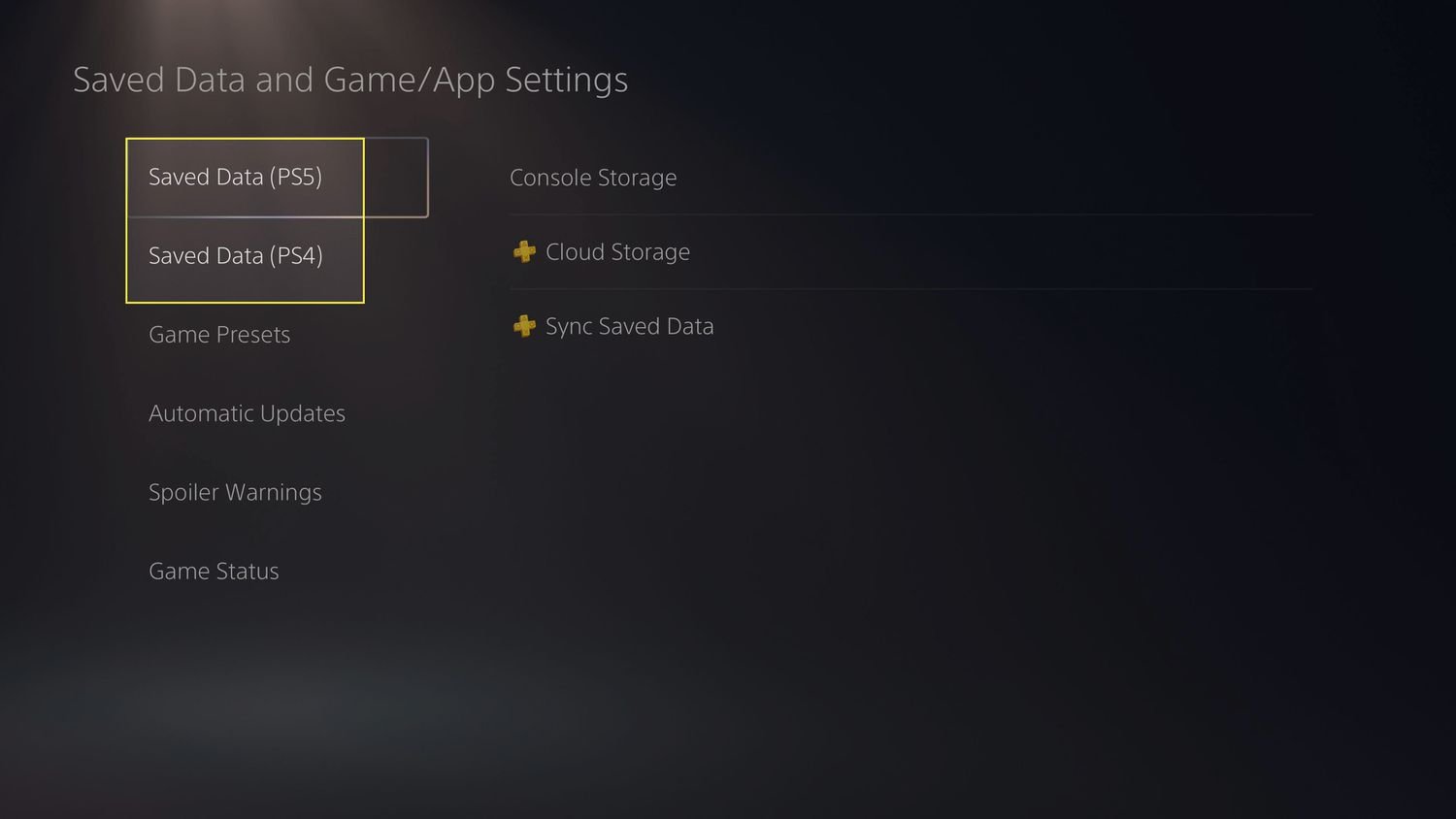
There are ways to delete save data, if you wish to start a game completely from scratch. You must specifically choose to delete it. Here’s where you can manage saves:
- Go to Settings.
- Select “Saved Data and Game/App Settings”
- Select “Saved Data (PS5)”
- Select “Console Storage” or “Cloud Storage”
- Select the game for which you want to manage save data.
- Select the save you want to delete.
Be careful when navigating these menus as you could accidentally delete progress that you intended to keep. If you intend to delete saves, always be certain of your choice.
Game-Specific Save Systems
Some games might use their own save systems, often games that use their own servers for progress tracking. In these cases, saves are not stored locally on your PlayStation 5, so the games are not affected by the deletion of the files on your console. Some games save progression to a user profile on the games server and can usually be recovered through logging in through the game itself.
Game Corruption
While rare, there is a chance that save data can become corrupted due to some error occurring on the PS5, or when the game is not properly closed down. This usually results in a message indicating that the save file has been corrupted, and the game will offer to start a new save. If you do not use cloud backup of your game saves and this occurs, it can be impossible to recover the progress.
Tips for Managing Game Data and Saves
Here are some tips to help you keep your games and your progress safe, and make the process of managing games on your PS5 even easier.
Regular Cloud Backups
If you are a PlayStation Plus subscriber, keep your cloud backups on. This provides additional security for your game saves. When you have cloud backups enabled, you do not have to worry if your PS5 has an issue, or if you plan to upgrade to a newer PlayStation model. Your saves will be available for you to restore.
Use External Storage
If your PS5 is running out of space, consider using an external hard drive to store games. Note: PS5 games cannot be played directly from an external drive, you will have to move the game onto the internal SSD before you can play it. PS4 games can be run from external storage.
- Move Games: You can move games to and from your external drive.
- Archive: This helps keep your favorite games ready to go, even if you’re not playing them all the time.
Check Save Data Before Deleting
Before deleting a game, double-check the confirmation message. Ensure you understand that you’re only deleting the game and not the associated save data. It may seem obvious, but it is worth double-checking to avoid accidental loss of game data.
Use Folders To Organize Games
Organizing your games into folders can make navigating your library much easier.
- By Genre: Grouping games together by genre (e.g. Sports, Action, Puzzle) can make selecting games easier.
- By Play Status: You could also create folders for games you have completed, or ones you are currently playing.
- Custom: You are free to create any folder naming convention that works for you.
So, you can delete games on your PlayStation 5 without being concerned about losing all your hard work. The PS5 manages game data and save data separately. If you’re careful and use the cloud backup options provided by PS Plus, your progress is safe. Don’t be afraid to delete games to make space for new adventures. You can always come back to your favorites later and pick up right where you left off.
How to Delete Game Progress on PS5
Final Thoughts
Deleting a game from your PS5 does not typically erase your saved game progress. The console keeps your save files separate from the game’s installation data. You must manually delete the saved data if you want to remove it.
Therefore, the answer to “does deleting a game on ps5 delete progress” is usually no. Game progress is generally safe unless you explicitly remove it. Enjoy your gaming!

