
Yes, downloading games does slow internet speeds because it uses a significant portion of your bandwidth.
Ever noticed your internet crawling when you’re grabbing that new game? It’s a common frustration. The question “does downloading games slow internet” pops up in many households, and rightly so. It absolutely can impact your online experience.
The large file sizes of modern games consume considerable bandwidth. This bandwidth is essentially the capacity of your internet connection to transmit data. When downloading, this capacity is largely used up by the game download.

Does Downloading Games Slow Internet?
Ever been super excited to play a new game, only to find your internet grinding to a halt? You’re not alone! Many of us have wondered, “Does downloading games slow down my internet connection?” The short answer is yes, it can, but the long answer is a bit more complicated. Let’s explore what’s really going on when you download a game and why it might be making your internet feel like it’s moving through molasses.
Understanding Bandwidth: The Internet’s Highway
Imagine your internet connection as a highway. This highway has a certain number of lanes, and these lanes represent your bandwidth. Bandwidth is essentially how much data can travel down your internet connection at one time. When you’re just browsing websites or checking emails, you’re using only a few lanes of that highway. However, when you start downloading a big game, you are using many more lanes, possibly even all of them! This can cause congestion, and that’s when things start to slow down for everyone else on your network and for you as well.
What is Data Consumption?
Think of data consumption as the amount of fuel your car uses. Downloading games, especially large ones, consumes a lot of data. The more data you consume, the more of your internet “highway” is used. If you have a limited data plan, downloading large games can quickly use up your monthly data allowance. This can also affect your internet speed if your provider slows down your speed once you’ve used a certain amount of data.
How Game Size Affects Download Speed
Game sizes vary greatly. Some games are just a few megabytes (MB), while others can be over 100 gigabytes (GB)! The larger the game, the more data needs to be transferred over your internet connection. This means it will take longer to download, and during that time, your internet speed may suffer. Think of it like trying to move a small box versus a huge container; it will definitely take longer to move the big container!
The Role of Your Internet Plan
Your internet plan plays a significant role in how downloading games affects your overall experience. If you have a high-speed, unlimited data internet plan, you might not notice much of a slowdown. However, if you have a slower plan with limited data, downloading games can feel like an eternity, and the impact on other devices using the internet will be much more noticeable.
Internet Speed Tiers: Understanding Mbps and Gbps
Internet speeds are measured in megabits per second (Mbps) and gigabits per second (Gbps). Think of these as the speed limits on your internet highway. Mbps is the speed at which data travels, while Gbps is much faster, meaning more data is moving at a quicker rate. A higher speed tier usually means faster downloads and less impact on your overall internet speed when you download games. If you have an internet plan with a slower Mbps speed, downloading larger games will naturally take longer and strain your network more than with a plan that has high Mbps or Gbps speeds.
Data Caps and Throttling: The Speed Bumps
Many internet service providers (ISPs) enforce data caps, which are limits on how much data you can use in a month. Once you hit your data cap, your ISP might slow down your internet speed significantly – this is called throttling. Downloading large games can quickly push you over your data cap, resulting in much slower speeds, not only for downloads but for everything else you do online. So be careful to track how much data you’re using when you download new games!
How Downloading Affects Other Devices on Your Network
When you download a game, you are essentially asking your internet connection to focus on one very data-heavy task. This means less bandwidth is available for other devices connected to your network. For example, while you’re downloading a new game, someone else might be trying to watch a video or make a video call, and they may experience buffering or interruptions because much of the bandwidth is used for your game download. Imagine sharing a single straw among multiple people – when one person takes a large gulp, the others have to wait!
The Impact on Streaming Services
Streaming video or music uses quite a bit of bandwidth itself. Downloading a large game while someone is streaming video on your network could lead to buffering or reduced video quality for the streamer. This is because the game download is competing for the available bandwidth. To avoid this you can download games when no one is watching video, or you can limit the download speed, so everyone has some bandwidth to use.
Online Gaming While Downloading
Downloading a game at the same time as trying to play an online game is usually not a great idea! Downloading requires a large portion of your bandwidth, leaving less for your online gaming. This can cause high latency (lag) or disconnects in your game. It’s best to avoid downloading games while playing online, or you can try limiting your download speed, so the download is slow, but your online gaming experience is still good.
Factors That Impact Download Speed
It’s not just about your internet plan or the size of the game. Several other factors can influence how fast your games download and how much they might slow down your internet connection.
Network Congestion
Just like rush hour on a highway, sometimes the internet is just more crowded! Network congestion occurs when many people in your area are using the internet at the same time. This can be common during peak hours, like evenings. During these times, your download speed may be slower, not because of your actions, but because everyone is sharing the same network resources.
Wi-Fi vs. Ethernet Connection
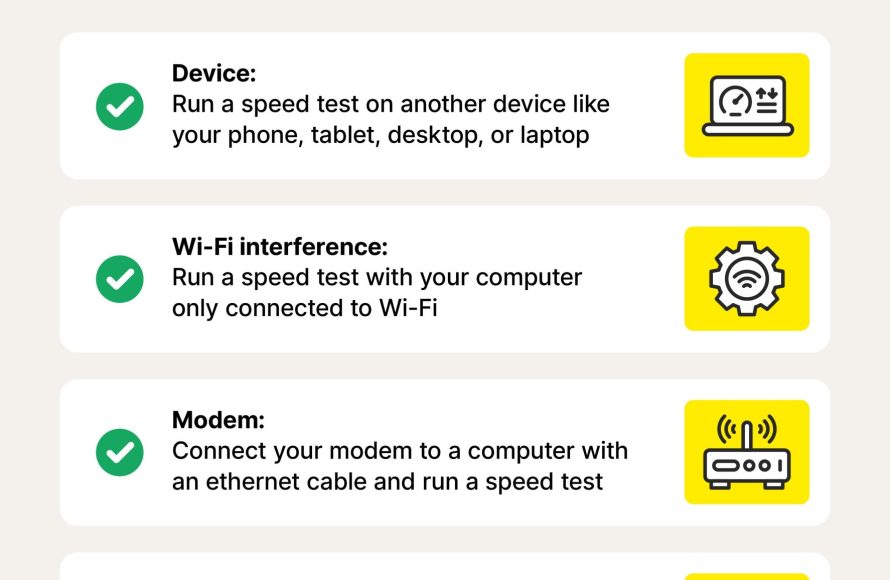
Wi-Fi connections are convenient, but they can be affected by interference from walls, other electronics, or the distance from your router. An ethernet connection, which uses a physical cable, provides a more stable and often faster internet connection. If possible, using an ethernet cable to download large games can help speed up the download process and reduce the impact on other devices on your network. Think of Wi-Fi like a radio signal – it can be interrupted. An Ethernet cable is like a direct wire, which provides a more reliable and stable connection.
Router Quality and Placement
Your router is the device that manages your internet traffic. An old or low-quality router might struggle to handle the demand of a large game download. Upgrading to a newer, higher-quality router could significantly improve your download speeds and overall network performance. The location of your router also matters. A router placed in a central, open area can provide better Wi-Fi coverage. Putting your router behind a wall, in a closet, or on the floor can weaken its signal.
Background Applications
Even if you’re not actively using certain programs on your computer, some of them may be using your internet connection in the background. Automatic updates, cloud storage synchronization, and other processes can consume bandwidth and slow down your game downloads. Close unnecessary programs during large downloads to free up bandwidth and improve download speeds.
Tips to Minimize the Impact of Downloading Games
So, what can you do to reduce the impact of downloading games on your internet connection? Here are some tips:
- Download during off-peak hours: Try to download games when fewer people in your household or neighborhood are using the internet, such as late at night or early in the morning.
- Use an Ethernet connection: If possible, connect your computer or console directly to your router using an ethernet cable for a faster and more stable connection.
- Pause other downloads: Pause any other downloads or updates that are running on other devices while downloading a game.
- Close unnecessary applications: Close any programs that might be using your internet connection in the background.
- Limit download speeds: Many game platforms or download clients allow you to set a limit on your download speed, which can prevent one download from hogging all of your bandwidth. You might slow your download but keep the other devices running well.
- Upgrade your internet plan: If you often download large games and experience frequent slowdowns, you might consider upgrading to a faster internet plan with more bandwidth.
- Update your router firmware: Sometimes, updating your router’s software can improve its performance.
- Optimize your router’s location: Ensure your router is in an open and central location.
Practical Example: A Comparative Look
Let’s take a look at a scenario to better understand the impact of downloading games on your internet.
Scenario 1: Low-Speed Internet
Let’s say you have a 25 Mbps internet plan. You’re trying to download a 50 GB game while other devices are connected:
- Download time: Will be very slow and may take several hours.
- Impact on other devices: Severe slowdown. Streaming videos buffer, online games experience lag, and websites load slowly.
Scenario 2: High-Speed Internet
Now, let’s say you have a 1 Gbps internet plan. You’re trying to download the same 50 GB game with the same number of devices:
- Download time: Will be much faster, potentially finishing in minutes.
- Impact on other devices: Minimal slowdown. Other devices may experience a minor reduction in speed, but the overall internet experience remains smooth.
When to Worry About Your Internet Connection
It’s normal for downloading games to temporarily affect your internet speed, but if you are experiencing problems very frequently or if your download speeds are always slow, then you may want to look into it more. If you are consistently experiencing severe slowdowns, or if you are facing issues like frequent disconnections, or if you are constantly going over your data limit, it’s time to check into what is going on.
Troubleshooting Tips for Slow Downloads
- Test your internet speed: Perform an internet speed test to see what download and upload speeds you are receiving.
- Restart your modem and router: Sometimes, a simple restart can help resolve minor network issues.
- Contact your ISP: If you consistently have poor speeds, contact your ISP to see if there is an issue on their end or if you need to upgrade your plan.
Ultimately, the question “does downloading games slow internet” doesn’t have a simple yes or no answer. It depends on your internet plan, the size of the game, your network setup, and how many devices are using the internet. By being aware of these factors, you can take steps to minimize any negative impacts and enjoy a better internet experience overall.
How To Fix Steam Games Slow Download Speed!
Final Thoughts
Downloading games definitely impacts your internet speed. Large game files consume considerable bandwidth. This usage can cause slower speeds for other devices on the same network.
So, does downloading games slow internet? Yes, it does because it directly utilizes your available bandwidth. Reduce the download speed in your game launcher settings for better internet performance elsewhere.

