
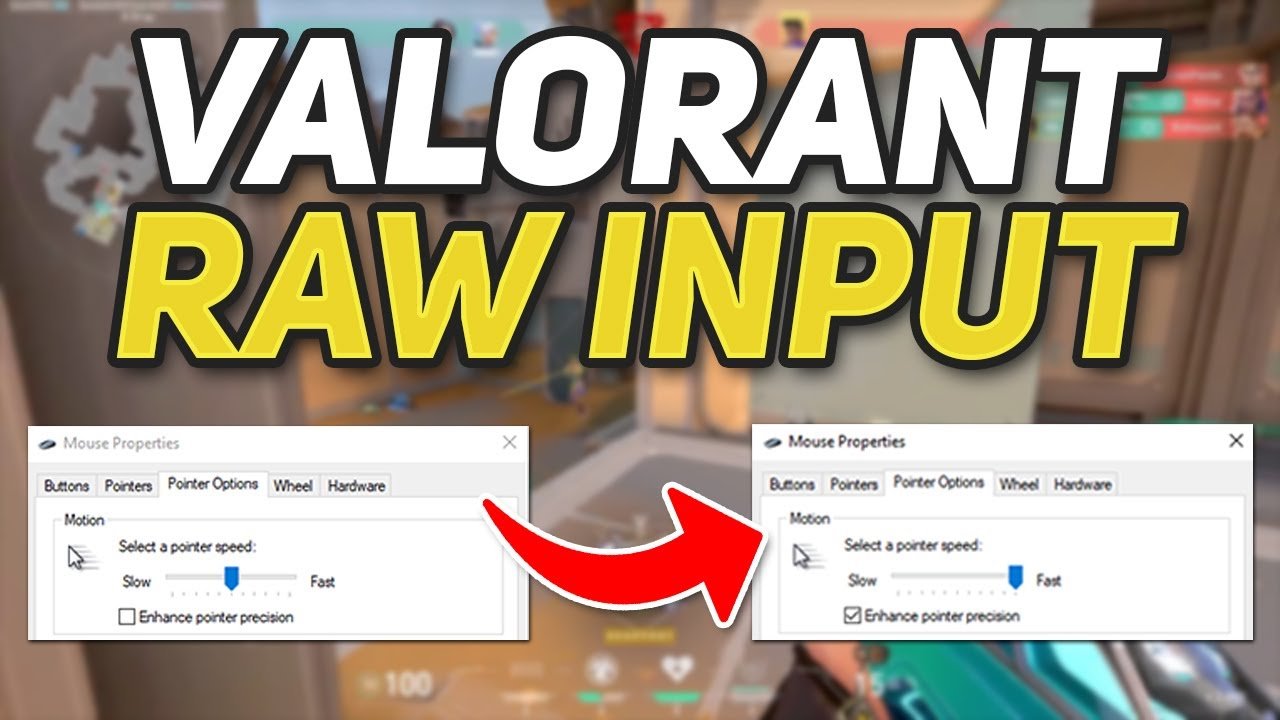
Yes, enabling enhance pointer precision can negatively affect games due to inconsistent mouse movements and acceleration.
Ever felt like your aiming is off in a game? It might not be your skills alone. Many gamers wonder, does enhance pointer precision affect games? The answer, as you might suspect, is complex and depends on the user’s game, but generally it creates an inconsistent experience with mouse input.
This feature is designed to make cursor movements feel smoother on the desktop but introduces unpredictable mouse acceleration. This can throw off muscle memory and aiming in first-person shooters or strategy games. We will discuss more about this feature and how to manage it for better gaming experience.

Does Enhance Pointer Precision Affect Games?
Okay, let’s dive into a topic that might sound a little technical but is super important for how games feel: Enhance Pointer Precision. You might have seen this setting in your computer’s mouse options, maybe even clicked it on or off without really knowing what it does. Basically, it’s a setting designed to make your mouse cursor move more accurately, or so it claims. But the real question for us gamers is: does it actually make our games better? The answer, like many things in the tech world, is a bit complicated. Let’s break it down step by step.
What Exactly Is Enhance Pointer Precision?
Enhance Pointer Precision, also sometimes called “mouse acceleration,” isn’t about making your mouse faster or slower overall. Instead, it changes how your cursor moves based on how quickly you move your actual mouse. Think of it like this: when you move your mouse slowly, the cursor moves a little on the screen. But when you quickly swipe your mouse across the pad, the cursor might move much further than you’d expect.
Here’s the key difference: without Enhance Pointer Precision, moving your mouse one inch always results in your cursor moving the same distance on the screen, regardless of how fast you move the mouse. With it on, a fast one-inch swipe will move the cursor further than a slow one-inch swipe. That’s why it’s called acceleration. It accelerates the cursor movement based on your speed.
How Does Enhance Pointer Precision Work?
Imagine you’re trying to draw a straight line with a pen. Without Enhance Pointer Precision, the connection between your hand movement and the pen on the paper is consistent. With it on, it would be like the pen sometimes moves a little more or less than your hand actually moved. It uses an algorithm (a set of instructions for the computer) that changes the relationship between your physical mouse movement and the cursor’s on-screen movement. These algorithms try to predict where you want the cursor to go based on how fast you’re moving the mouse. This is intended to make it easier to click small buttons with the mouse since small, precise movements of the actual mouse are translated into a bit bigger cursor movement, and vice-versa.
Why is It Even There in the First Place?
This feature dates back to when screens had lower resolutions and input devices weren’t always very precise. The idea was to make it easier to navigate large screens without having to physically move your mouse across your desk several times to reach the other edge of the screen. For regular everyday tasks like browsing the internet, it can be quite helpful. You can make big cursor movements with a quick swipe, and small precise ones with a slow and careful hand movement.
The Impact on Gaming
Now, let’s get to the core of the matter: how does Enhance Pointer Precision affect gameplay? In gaming, especially in games where accuracy is crucial, like first-person shooters (FPS) or real-time strategy (RTS) games, this feature can actually be detrimental. The goal in these games is to have precise and repeatable movements and have a 1:1 relationship between your physical actions and the game’s response. Let’s delve deeper into why.
Inconsistency and Muscle Memory
The main issue with Enhance Pointer Precision in gaming is its inconsistency. When the cursor’s movement changes based on mouse speed, it becomes harder to build consistent muscle memory. Muscle memory is when your hand automatically knows how far to move the mouse to perform an action because of repetition. With enhance pointer precision turned on, what should be a familiar movement can lead to your character overshooting the mark.
Imagine practicing your shots in a game. Without this setting on, if you move the mouse the same way each time, the cursor will always end up in the same place. But with Enhance Pointer Precision on, the cursor might move differently each time, because your mouse speed may not be exactly the same every time you move it. This makes it much harder to develop the precise movements you need to consistently hit targets. It’s like trying to hit a bullseye while the target is subtly moving around! This lack of predictability throws off a player’s timing and accuracy, making it harder to improve.
The Problem with Competitive Play
The problem becomes even more pronounced when playing competitively. The best players are able to make quick, accurate movements based on their muscle memory. Introduce a fluctuating variable like enhance pointer precision and their finely-honed ability is instantly thrown off balance. They have no way of knowing exactly how far their crosshair will move unless they are consistently moving their mouse at the exact same pace, and that is almost impossible. This makes a consistent aim, crucial for winning in competitive games, so much harder to achieve, giving players who have disabled this setting, a clear advantage.
Specific Game Genres
Let’s see how enhance pointer precision affects various game genres:
- First-Person Shooters (FPS): In games like Counter-Strike, Valorant, or Call of Duty, accuracy is key. Even tiny variations in mouse movement can be the difference between a headshot and a miss. Enhance pointer precision’s acceleration makes aiming less predictable and more challenging, which is why most pro players disable this setting.
- Real-Time Strategy (RTS): Games like StarCraft or Age of Empires require precise clicks and drags for unit management and base building. While precise aiming might not be as important as in FPS, the subtle changes in cursor distance may cause misclicks and cause problems.
- MOBA (Multiplayer Online Battle Arena): Games like League of Legends and Dota 2 often involve quick mouse movements and clicks for precise targeting and abilities. Having a predictable cursor movement is important for consistently executing abilities.
- RPG and Adventure Games: While aiming is not necessarily a core feature of these games, a consistent cursor movement makes menus and interactions easier to perform, and the subtle mouse acceleration can cause more misclicks while navigating menus and inventory systems.
- Casual Games: In some casual games, the impact of mouse acceleration may be negligible or not noticed by casual gamers because they’re not playing at a high-performance level, or at a level where very precise mouse movements matter.
The Case for Turning Off Enhance Pointer Precision
Given the drawbacks discussed, most gamers should turn off Enhance Pointer Precision for a more consistent and accurate gaming experience. When you disable it, you’ll notice that mouse movement directly corresponds with what’s happening on the screen. This allows you to build muscle memory that leads to more precise and more consistent aim and more accurate actions in games. Here’s a quick overview of why you should disable it:
- Consistency: Mouse movement is always the same, no matter how fast you move the mouse.
- Predictability: You’ll always know how far the cursor will move based on your physical mouse movement.
- Improved Muscle Memory: You’ll develop muscle memory for precise actions much easier.
- Better Accuracy: You’ll notice your aim and targeting improves, as you’re in direct control of cursor movement.
- More Control: You feel in better control of your character or unit movements within the game.
How to Disable Enhance Pointer Precision
Disabling Enhance Pointer Precision is usually straightforward. Here’s a general guide, but keep in mind that it may slightly vary depending on your operating system:
On Windows
- Open the Start Menu and type “mouse settings”.
- Click on “Mouse settings”.
- Click on “Additional mouse options” on the right side of the window.
- In the “Mouse Properties” window, go to the “Pointer Options” tab.
- Uncheck the box that says “Enhance pointer precision”.
- Click “Apply” and then “OK”.
On macOS
- Click on the Apple menu in the top-left corner of the screen.
- Select “System Preferences”.
- Click on “Mouse”.
- Go to the “Pointer Speed” section and ensure the slider is set according to your preference.
- There’s no option like “Enhance pointer precision” but there’s a “Mouse Acceleration” option, ensure that this setting is switched off, or set to a minimal amount.
After disabling the option, you should restart your PC, or your games to observe the change. You will need to readjust to the new setting but once you get used to it, you should see improvement in your game play, due to consistent and predictable cursor movement.
Other Factors Affecting Mouse Precision
While Enhance Pointer Precision is a big factor, there are other things that can affect your mouse’s precision in games. It’s important to understand these other factors to have the best possible experience.
Mouse DPI (Dots Per Inch)
DPI refers to how many dots your mouse cursor moves per inch of mouse movement on your desk. A higher DPI means the cursor moves more for the same physical movement. Gaming mice often let you adjust DPI, letting you fine-tune the sensitivity to your personal preferences. Finding the right DPI is crucial for precise movement.
Mouse Polling Rate
The polling rate is how often your mouse communicates its position to the computer, usually measured in Hertz (Hz). A higher polling rate, such as 1000 Hz, means that your mouse reports its position 1000 times per second. A higher polling rate can lead to a more responsive and accurate feeling. Most gaming mice have adjustable polling rates, giving the user better customization of their mouse experience.
Mouse Pad Quality
The surface you use your mouse on can also make a difference. A smooth, even mouse pad can help your mouse move more accurately than a rough surface. Gaming mouse pads are designed to provide an optimal surface for smooth movement.
Driver Updates
Keeping your mouse drivers up to date is also very important. Outdated drivers can sometimes cause issues with mouse movement and accuracy. Check your mouse manufacturer’s website for the latest drivers.
Game Settings
Many games have their own mouse settings, allowing you to fine-tune sensitivity. Ensure that sensitivity is set to your preference and is not too high or low, as this can also cause issues with precision. Some games also have smoothing options, which attempt to “smooth” mouse movement by predicting where you’re intending to go, which is best to disable if you want a direct mouse-to-cursor relationship.
By disabling Enhance Pointer Precision and paying attention to these other factors, you can drastically improve your mouse precision and have a better gaming experience overall. This is especially important when playing competitively, but also for the general enjoyment of playing video games.
In summary, while Enhance Pointer Precision might seem like a helpful feature for everyday computer use, it can actively hinder your performance in games. This feature introduces inconsistent cursor movement, making it very hard to build muscle memory, and leading to less accuracy in your gameplay. Disabling this setting and ensuring that you understand and have configured the other options mentioned above, will ensure that you are performing at your best and have the most fun possible playing video games.
Is Mouse Acceleration Good For FPS Video Games?
Final Thoughts
In conclusion, adjusted pointer precision primarily affects how accurately you move the cursor. This impact directly translates to gaming, where aiming and quick selections are crucial. Therefore, enhancing pointer precision can improve your performance in games that demand precise mouse control. Does enhance pointer precision affect games? Absolutely, by refining movement and response, it makes a noticeable difference.

