
Yes, Game Pass lets you play online, provided the game itself supports online multiplayer.
Ever wondered if your Xbox Game Pass subscription grants you access to the exciting world of online gaming? Many people ask, does game pass let you play online? It’s a valid question, given the vast library of games the service provides.
The simple answer is that a Game Pass subscription will allow you to engage in online multiplayer for games that feature it. Make sure you have the necessary internet connection and any other specific requirement from particular titles.

Does Game Pass Let You Play Online?
So, you’re curious about Xbox Game Pass and whether it lets you jump into the exciting world of online multiplayer gaming? That’s a fantastic question! The answer isn’t a simple yes or no, because it depends on a few different things. Let’s explore this in detail and make sure you understand everything you need to know about Game Pass and playing online.
Understanding Xbox Game Pass Tiers
First, it’s important to know that Xbox Game Pass isn’t just one thing. It comes in different types, or “tiers,” each with its own benefits. These tiers affect whether or not you can play games online.
Game Pass Core
Game Pass Core is the most basic tier, and it’s the replacement for Xbox Live Gold. This plan lets you play online multiplayer games, meaning you can team up with friends or battle others in different worlds! If you have Game Pass Core, you can play online. You also get access to a small, curated collection of games that rotate over time. This is perfect for gamers on a budget who still want that crucial online access and a taste of games from the Game Pass catalog. The big thing to know? Core allows for online play!
Game Pass for Console
This tier offers a wider selection of games to download and play directly on your Xbox console. But here’s the important part: while Game Pass for Console provides access to tons of awesome games, it by itself doesn’t include online multiplayer access. To play games online with Game Pass for Console, you’ll also need a separate subscription to Xbox Game Pass Core. So, Game Pass for Console gives you the games but not the online permission.
Think of it like this: Game Pass for Console is like a library full of great video games. But to play them with others online, you need the key of Game Pass Core. Having just the Game Pass for Console by itself is like borrowing a book from the library but not being able to discuss it with your friends in an online book club.
Game Pass for PC
Just like the console version, Game Pass for PC gives you access to a vast library of games, but this time for your computer. Similarly, this tier does not grant you the ability to play games online. To play games online on PC you will still need either Game Pass Core or Game Pass Ultimate. This is very important to keep in mind. You can’t jump online with your friends just using Game Pass for PC alone.
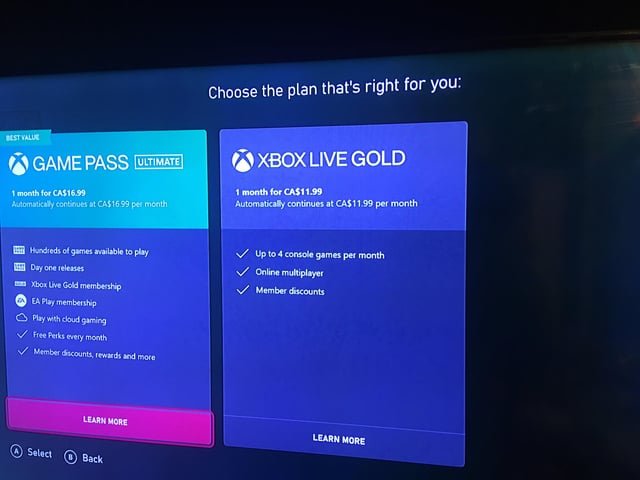
Game Pass Ultimate
Now, here’s where it gets really interesting. Game Pass Ultimate is the top-tier plan, and it includes absolutely everything! This means that if you have Game Pass Ultimate, you get:
- Access to the entire Game Pass library for console and PC
- Online multiplayer access on both console and PC. That’s a big deal!
- Cloud gaming, which allows you to play games on your phone, tablet, or even a low-powered PC.
- Xbox Live Gold benefits (now replaced by Game Pass Core, which is included in the Ultimate subscription).
In short, Game Pass Ultimate gives you the best of all worlds, including the power to play online games without needing any additional subscriptions.
Why the Different Tiers Matter for Online Play
Let’s recap and really drive home why the different Game Pass tiers are essential to consider for online gameplay:
- Game Pass Core is your entry ticket to online multiplayer, along with a basic set of games. If online play is your main priority and your budget is limited, this is an ideal choice.
- Game Pass for Console provides tons of games to download and play, but not online. It’s the game library pass without multiplayer.
- Game Pass for PC offers a massive catalog for your PC, but again, online play is not included.
- Game Pass Ultimate is the all-in-one solution, granting access to game libraries and online multiplayer on both console and PC. This is the option for the full experience.
The key point to remember is that, if you want to play online, you need either Game Pass Core or Game Pass Ultimate. Game Pass for Console and PC are only for accessing the game library without online multiplayer permission.
How To Check if A Game Supports Online Multiplayer
So you’ve figured out your Game Pass tier, but how do you know if a specific game offers online multiplayer? Don’t worry; it’s pretty straightforward. Here are a few ways to check:
On the Xbox Console
- Game Page: When you select a game on your Xbox, go to its information page. Look for the “Multiplayer” or “Online” tag. This usually tells you if the game supports online play.
- Game Description: Many game descriptions mention the online features. Look for phrases like “online multiplayer,” “co-op mode,” or “play with friends online.”
- The Xbox Store: Before you even download a game, the store page will clearly show if it has online capabilities, right underneath the title of the game.
On the PC (Xbox App)
- Game Details: When you find a game in the Xbox app, click on it to see its details. Just like on the console, you’ll find info on multiplayer capabilities there.
- Store Page: The same way the Xbox console store works, the game page on PC in the Xbox app also clearly states if there is an online feature, usually right below the title.
What About Free-to-Play Games?
You might be thinking about free-to-play games like Fortnite or Rocket League. These games have a different story! The great thing is, these games are generally free to play online. You usually don’t need Game Pass Core or Game Pass Ultimate to play these titles with your friends online.
The reason for that, it is because, games like fortnite generate income through in game purchases.
However, keep in mind that some free-to-play games might have optional in-game purchases that could enhance your experience, but they don’t affect the online multiplayer capability.
Troubleshooting Online Gaming Issues with Game Pass
Sometimes, even with the right Game Pass subscription, you might experience hiccups trying to play online. Here are some common issues and how to address them:
Problems with Network Connection
A stable internet connection is the first requirement to playing games online. Sometimes, it can be as simple as restarting your router or modem. This can fix many connection issues you are facing. Here are steps to take if you are having connection issues:
- Restart your router/modem: Unplug them from power, wait for a minute, and plug them back in.
- Check your internet speed: Online games need a good, stable internet speed. You can find many online tools that let you check your speed. Make sure it’s good enough for playing games online.
- Check your device connection: Make sure your console or PC is connected to your Wi-Fi, or that your ethernet cable is properly connected.
- Try wired connection: If using a Wi-Fi, you can try an ethernet cable directly connected from the router to the device. This can make the connection stable.
Xbox Live/Microsoft Account Issues
Your Microsoft account is how you sign into Xbox and Game Pass. Make sure you are logged in correctly. If you have any issues logging in try these steps:
- Sign out and back in: Try logging out of your Xbox or the Xbox app and then signing back in. This can fix glitches and sync up your account information correctly.
- Check for updates: Make sure your console or app are up-to-date. This sometimes impacts online capabilities.
- Microsoft account status: Always make sure your Microsoft account is in good standing, because an inactive or restricted account can lead to problems.
Game-Specific Problems
Sometimes, the problem might not be your connection or account but with the game itself. Here are things to keep in mind about game specific problems.
- Game Servers: At times, there may be issues with game servers that are temporarily down or experiencing issues. If the issue is not on your end it may be a server issue for the game, in that case you have to be patient, or check the game developers’ social media to know about server status.
- Game Updates: Make sure the game you are trying to play is updated. Sometimes outdated game versions can lead to problems connecting to online servers.
- Game Bugs: It may be that the game itself has bugs or is glitched out. Contact the game developers about this, or find a help forum with other players if this is the issue.
Problems With Game Pass Subscription
If you are facing online issue, always check if you have the right subscription. Here is how you can check your subscription:
- Check your subscription status: Double-check that your Xbox Game Pass subscription is active and has not expired. Make sure that you have Game Pass Core or Ultimate to access online gaming.
- Check for correct tier: Make sure you have the right Game Pass plan, so that you have access to online multiplayer. Remember, Game Pass for PC and Game Pass for Console do not grant access to online games on their own.
What To Do When Everything Else Fails?
If all the troubleshooting steps mentioned above are not helping, you may have to contact Xbox support for help. You can find Xbox support on their website or through your console. They may be able to help you with specific account or technical problems you are having with playing online games.
To summarize, playing online with Game Pass is an amazing experience. You can play a variety of games with other people from around the world. The important thing is to understand the Game Pass tiers and which one will help you play online.
Remember, with Game Pass Core or Game Pass Ultimate, you’re all set for online multiplayer. And even if you’re playing free games, you can jump into the online action without needing any subscription! Just keep your internet connection strong and your account updated, and you’ll be having great times playing games online in no time!
Xbox Game Pass is not $1 ANYMORE!
Final Thoughts
Game Pass Ultimate includes online multiplayer access. Therefore, if you want to play online, you must have Game Pass Ultimate. Xbox Game Pass for console does not include online play.
Regular console Game Pass only provides the library of games. You still need Xbox Live Gold, or Ultimate for multiplayer. So, does game pass let you play online? Yes, but only with Game Pass Ultimate.

