
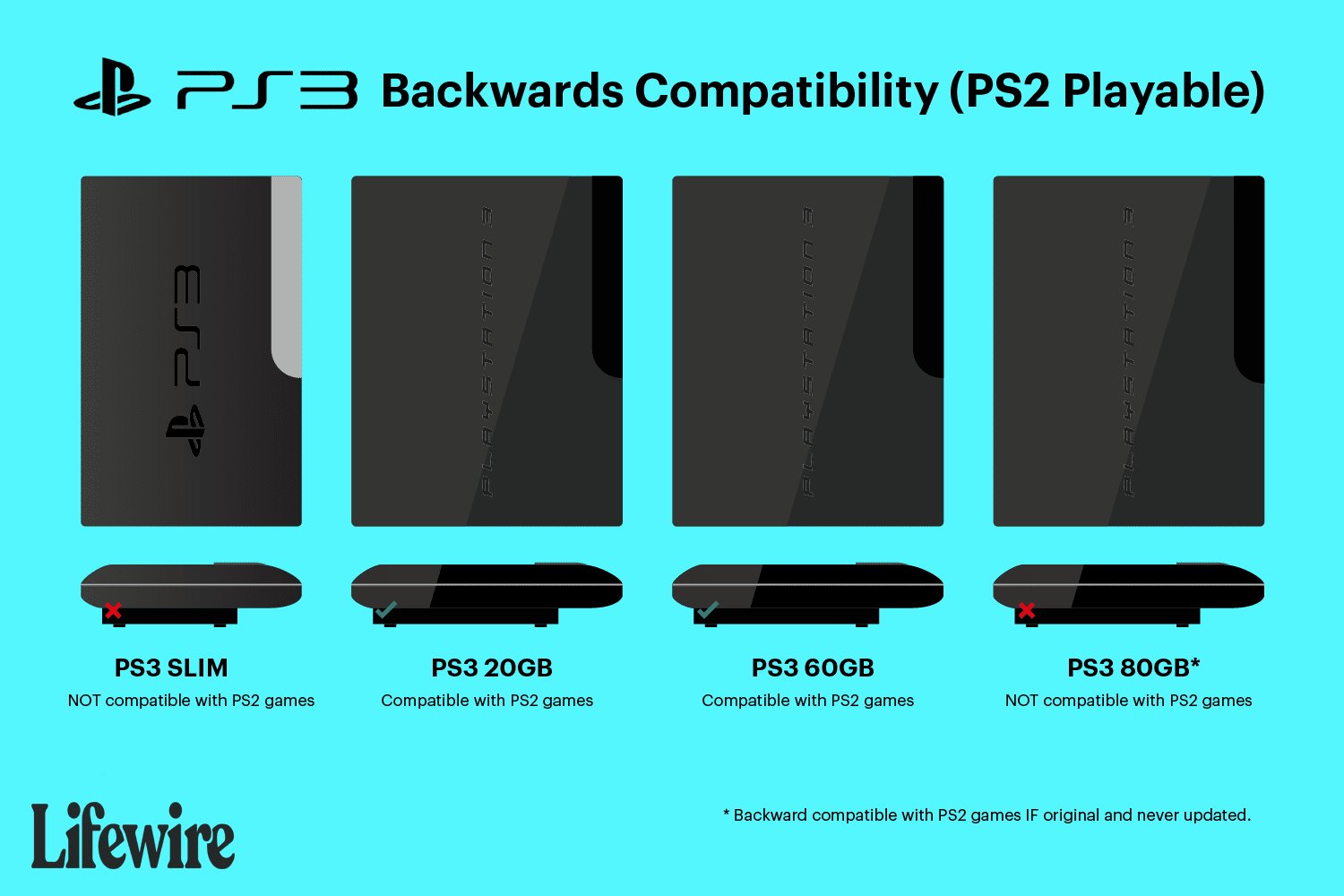
No, the PS3 Slim does not play PS2 games natively.
Many gamers ask, does PS3 slim play PS2 games? It’s a valid question, especially if you have a collection of older PlayStation 2 titles. Sadly, the PS3 Slim was designed without the hardware needed to run PS2 games.
While the very first PS3 models could play these older titles, later revisions, including the Slim, removed this backward compatibility. This change was made to reduce costs and focus on new technology.

Does PS3 Slim Play PS2 Games? The Truth Revealed
Okay, so you’ve got a cool PS3 Slim, and you’re itching to play some of those classic PlayStation 2 games. Maybe you’ve still got a stack of your old PS2 favorites gathering dust, or you’re remembering some awesome titles you missed back in the day. It’s a question that’s been around for a long time, and we totally get why you’re asking: Can the PS3 Slim actually play PS2 games? Let’s dive in and get to the bottom of this.
Understanding PlayStation 3 Models and Backwards Compatibility
To really understand if your PS3 Slim can play PS2 games, it’s important to know a little about the different PlayStation 3 models that were released. Not all PS3s were created equal, especially when it came to playing older PlayStation 2 games. The ability for a console to play games from older systems is called “backwards compatibility.”
The Original “Fat” PS3s
The very first PS3 models, often called the “fat” PS3s, were the only ones to have full hardware backwards compatibility. This means they had the actual chips inside them from the PS2 console. These chips were what allowed the PS3 to play PS2 games so well. These older fat models came in a few variations, like the 20GB, 60GB, and 80GB models. These models could play almost any PS2 game flawlessly because, essentially, they had a complete PS2 built right into them!
These models are highly sought after, because gamers love to play their PS2 games on the same console where they play PS3 games. The original PlayStation 3 units that have backwards compatibility are more expensive, and are harder to find in good condition, because they are older models and many units have failed due to age.
The PS3 Slim and its Changes
Then came the PS3 Slim. The slim model was designed to be smaller, use less power, and cost less to make. To achieve these goals, Sony had to make some changes. One of the biggest changes? They removed the PS2 hardware. This meant that the PS3 Slim, unlike its predecessors, could not play PS2 games using the old hardware. It simply doesn’t have the necessary parts inside.
Why the PS3 Slim Lost Backwards Compatibility
You might wonder why Sony decided to remove something as useful as PS2 backwards compatibility. Here’s a breakdown of the reasons:
- Cost Reduction: Including the PS2 hardware added significant cost to the manufacturing of the original “fat” PS3. To make the console more affordable, removing these components was a necessary step.
- Focus on PS3 Games: Sony’s focus began shifting towards PS3 games. They wanted players to embrace the new generation of games rather than spending time with older titles. They probably thought that people would eventually move on, and forget about their PS2 games.
- New System Architecture: The PS3 Slim had a different internal design. It was engineered to be more compact and efficient, and the older PS2 hardware didn’t fit into this new design. It was difficult, and costly, to include an entire working PlayStation 2 inside of the new, smaller console.
- Reliability: Over time the older fat PlayStation 3 models have become less reliable than the Slim and Super Slim models. The hardware inside those original models has aged and they tend to break down and fail more frequently, whereas the newer models do not suffer from the same problems.
So, Can the PS3 Slim Play PS2 Games? The Short Answer
Here it is, plain and simple: No, the PS3 Slim cannot play physical PS2 game discs. Unlike the original “fat” PS3 models that have the necessary hardware, the PS3 Slim is not equipped to run PS2 games from their original discs. If you try to insert a PlayStation 2 disc into your PS3 Slim, it will not be recognized by the system.
The PS2 Classics on the PlayStation Store
Now, just because the PS3 Slim doesn’t play the discs doesn’t mean you’re completely out of luck. Sony did release a library of downloadable PS2 games on the PlayStation Store. These are digital versions of select PS2 titles. These digital versions were specifically modified to run on the PS3’s software.
How PS2 Classics Work on PS3
These games do not use the PS2 hardware in the console, instead, they run using what is called an emulator. An emulator is a piece of software that lets your computer, or in this case, your PS3 act like another computer system. This allows the PS3 to run the older software. Not all of the original PS2 games are available on the PlayStation Store, but many well-known and loved titles were available at some point, including many in the Grand Theft Auto series.
However, it is worth noting that these downloadable PS2 games were, at one time, available for purchase from the PlayStation Store. Sony has since removed most PlayStation 2 games from the digital store, so you may not be able to purchase these any longer. This means that you can only play the digital PS2 titles on your PlayStation 3 if you previously purchased the games.
Finding and Playing PS2 Classics
If you do have some of these digital PS2 games, here’s how you can play them:
- Turn on your PS3 Slim: Make sure your console is connected to your TV and turned on.
- Sign into your PlayStation Network account: Ensure you are logged into the PSN account that made the purchases.
- Go to your Game Library: From the main menu on the XMB (XrossMediaBar), navigate to your games library.
- Find your PS2 Game: Look through the list of your purchased games. If you have previously purchased any PS2 titles, they should be there.
- Download the Game: If it isn’t already downloaded, you’ll need to download it first.
- Play! Once downloaded, you can now play your PS2 classic title.
Unfortunately, if you never bought those games, you will no longer be able to purchase them from the PlayStation Store, as they were removed from sale. This has been disappointing for fans of those classic titles.
Alternative Ways to Play PS2 Games
If you’re determined to play your PS2 games, there are a few other options to think about besides trying to get your PS3 Slim to work with your PS2 discs:
Using a PlayStation 2 Console
The most straightforward way to play PS2 games is using an actual PlayStation 2 console. These consoles are still available on the used market for prices that are typically low. They are often sold with games and accessories included. They are a great way to experience those games how they were intended. Many fans prefer the original console because it provides the most authentic experience, and there are no emulation or compatibility issues like can sometimes occur with digital software emulation.
PlayStation 2 Emulators on PC
Another option is to use a PlayStation 2 emulator on your computer. These emulators use software to replicate the PlayStation 2 console and can run PS2 games if you also have a copy of the games available to use with the emulator software. There are emulators that can be freely downloaded on the internet. These can be complicated to setup and configure, but are often very popular with computer enthusiasts. You will need a copy of the game files, called ROM files, to run them with the emulators. These files must be made by the original game owner, because they are copyrighted intellectual property and are not legal to acquire through other means.
PlayStation Network on PS4 and PS5
Sony has also made some PS2 titles available on the PlayStation Network for the PlayStation 4 and PlayStation 5. So, if you have either of those consoles, you might find some of your favorite PS2 games available for purchase there. These also run using emulation software, but they are made to be compatible with the current PlayStation consoles, and are an easy way to get into those classics if you do not want to use a PC emulator or find an original console.
The Legacy of PS2 Games
Even if you can’t pop a PS2 disc into your PS3 Slim, it’s important to remember the impact the PlayStation 2 had on the gaming world. The PS2 is one of the most successful video game consoles of all time. It offered incredible games and paved the way for the future of video games. Many popular game franchises began on the PS2, and many classic titles that still have fans today appeared on that system. It is understandable that so many gamers want to play those great titles once again, which is why emulation of the system is popular.
Making the Most of Your PS3 Slim
While it might not play PS2 discs, the PS3 Slim is still a fantastic console with a large library of great games. There are also a lot of ways to enjoy PS2 games, even without backwards compatibility. Explore the PS3’s own catalogue and you’ll find plenty of adventures awaiting you. Even though the PS3 is not the newest system, many of its games still look great and are fun to play.
PS3 Slim and PS2: A Quick Recap
To make sure we’re all on the same page, here’s a quick summary:
- PS3 Slim Cannot Play PS2 Discs: It doesn’t have the hardware needed for backwards compatibility.
- PS2 Classics on the PlayStation Store: Some PS2 games were available for digital download. But were since removed from sale on the PlayStation Store
- Alternatives: Play PS2 games on an actual PS2, through emulation on a PC, or on newer PlayStation consoles if available.
Understanding the limitations of your console can help you make the most of your gaming experience, and ensure that you are not trying to do something that the system is simply incapable of.
The PS3 Slim might not be able to play your old PS2 discs, but there are still plenty of ways to enjoy those classic games. Whether you choose to go back to the original console, or try another method, the world of PlayStation games is still available to you.
Are ps2 games compatible with the ps3 slim?
Final Thoughts
No, the PS3 Slim does not play PS2 games. Sony removed the hardware needed for backwards compatibility in this model. The original PS3 consoles initially featured this functionality.
Therefore, you can’t use PS2 discs on a Slim. Many people want this feature. So, if does ps3 slim play ps2 games is a key must for you, consider the initial generation PS3 models.

