
Yes, Quizizz offers game modes similar to Kahoot, featuring live quizzes and challenges that students can join and compete in.
Many educators and students wonder, does quizizz have games like kahoot? It’s a valid question since both platforms offer engaging ways to make learning fun. They both provide interactive quizzes and learning activities, but with unique features. Quizizz provides different game modes that can closely mimic the fun of a live Kahoot session.
Essentially, both platforms aim to make learning interactive. Both use gamified methods. So, if you are familiar with one, you’ll easily adapt to the other.

Does Quizizz Have Games Like Kahoot?
Okay, let’s dive right in! You’re probably wondering if Quizizz is similar to Kahoot, especially if you’re looking for fun and engaging ways to learn or teach. The short answer is: yes, Quizizz has games that are very similar to Kahoot! But there are some cool differences too, which we will explore. Both are fantastic platforms for making learning interactive, but they have unique approaches. We’ll look closely at how Quizizz creates game-like experiences and compare them to Kahoot, so you can see which one might be the best fit for you.
The Core of Quizizz: Making Learning Fun
Quizizz, at its heart, focuses on making learning a blast. It takes the often-dreaded task of quizzes and turns them into exciting challenges. You can think of it as turning a test into a video game! Let’s examine the key features that help Quizizz achieve this.
Quizizz Game Modes
Quizizz offers several ways to play, and each mode can give a different feel to the experience. Here are a few of the most popular:
- Classic Mode: This is very much like the traditional style of playing. Everyone answers questions at their own pace, and they see the question on their individual device. It’s great for allowing kids to work through the quiz comfortably without the pressure of everyone seeing each other’s pace.
- Team Mode: This mode allows students to join teams and compete collaboratively. They answer the question as a team, boosting team work and cooperation between them.
- Test Mode: If you need a more formal assessment, Quizizz also has a test mode. This mode is good for grading purposes because it limits the number of attempts and controls navigation. It is useful for making sure students cannot easily navigate back and forth between questions.
- Live Game: This mode is for when you are all playing together in the same place at the same time. The game progresses as everyone answers the questions, and it shows a leaderboard. This makes the game feel really lively.
Question Types
Just like Kahoot, Quizizz has more than just multiple-choice questions. You can add:
- Multiple Choice: The classic pick-the-right-answer type.
- Checkbox: When more than one answer is correct.
- Fill-in-the-Blank: Type in the missing word.
- Polls: For gathering opinions or starting discussions.
- Open Ended: Allowing kids to write their own answers freely.
- Draw: Kids can draw to answer.
The wide variety of question types means that you can create many interactive activities to keep learners on their toes.
Themes and Customization
Quizizz lets you decorate your quizzes and make them look more exciting. You can choose themes, add music, and even use memes to make your quiz even more fun and interesting for learners. You can create your own unique gaming experience by changing the background and the style of your quiz.
Quizizz vs. Kahoot: A Closer Look
Now, let’s compare Quizizz to Kahoot directly. Both are excellent tools, but there are key differences. Understanding these differences will help you decide which one fits your needs best.
Pacing and Student Interaction
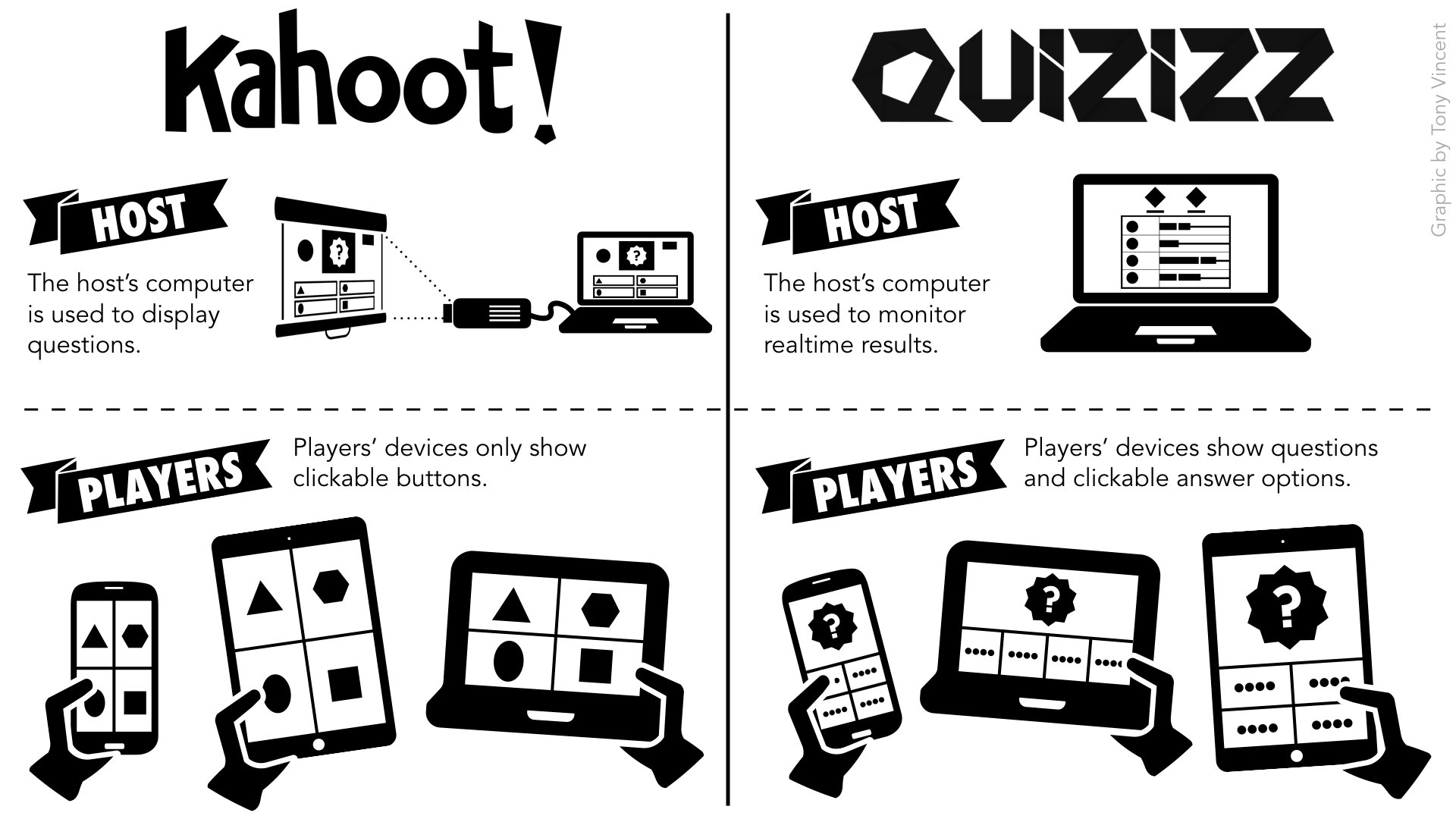
One of the biggest differences is how the pacing works. With Kahoot, the questions appear on a shared screen, and everyone answers them at the same time. This can be great for high-energy, competitive play, but it can be stressful for students who need more time. Quizizz, however, allows students to answer questions at their own speed. This is really helpful for students who learn at different paces.
Game Play Differences
Here’s a simple table to show some of the main differences between playing games on Quizizz and Kahoot:
| Feature | Quizizz | Kahoot |
|---|---|---|
| Pacing | Individual, students answer at their own pace | Synchronous, everyone answers together |
| Question Display | On students’ devices | On a shared screen |
| Game Modes | Classic, Team, Test, Live Game | Classic, Team, Challenge, and others |
| Student Pace | Students can work at their own rate | Everyone answers at the same pace |
| Control For Instructor | Has control over the pace of the quiz and can view progress in real-time | Has control over question progression, but less individual control |
Accessibility and Adaptability
Quizizz is designed to be adaptable to different learning styles. The ability for students to answer at their own pace and see the questions on their own device makes it more accessible for students with diverse learning requirements. Additionally, Quizizz has a feature that reads questions out loud, helping learners who benefit from auditory support. Kahoot, with its timed question and public display, focuses more on speed and competitiveness. But both are great for creating engaging learning experiences.
How Quizizz Makes Quizzes Game-Like
Let’s look at how Quizizz turns quizzes into exciting games. It’s not just about answering questions; it’s about engaging the players with fun elements.
Power-Ups and Bonus Points
Quizizz includes power-ups that give players extra advantages during the game. These power-ups can make the game even more engaging and fun. They add elements of chance, encouraging everyone to participate actively. Here’s how some of them work:
- 50/50: Eliminates half the answer options.
- Power Play: Doubles your points for the next question.
- Extra Time: Adds a few more seconds for answering.
Leaderboards and Competition
Even if the pacing is individual, there’s still a sense of competition. A leaderboard shows each player’s score, which encourages players to give their best shot. This can create excitement and keep the energy up. The competitive aspect can really motivate students to learn more.
Memes and Fun Elements
Quizizz uses memes and other fun elements. This keeps the game light-hearted and entertaining for learners. It creates a positive and enjoyable experience for everyone who participates in the quiz. Memes pop up between questions, making the process less boring.
Creating Your Own Quizizz Game
Making a quiz on Quizizz is super easy. You don’t have to be a tech whiz to create engaging learning games. Here’s a brief guide:
Step-by-Step Creation
- Sign up: Create a free account.
- Choose your starting point: Start a quiz from scratch, or use existing quiz.
- Add Your Questions: Enter questions and answers.
- Select Your Settings: Choose a theme and add other fun elements.
- Share It: Generate a code or a link so learners can join in.
Adding Media and Customization
When creating your quiz, you can add images, videos, and even audio to make it more engaging. This can really bring your content to life, particularly for visual or auditory learners. You can also add memes to your quiz. Customization gives you the freedom to adapt your quiz according to your learners and your subject matter.
Quizizz in the Classroom and Beyond
Quizizz isn’t just a platform for classroom quizzes. It can also be used in many different ways for learning and engagement.
Use Cases for Quizizz
- Classroom Review: Perfect for checking if students understood what they learned.
- Homework Assignments: Make homework more interactive and fun.
- Professional Development: For testing knowledge among adults.
- Team building activities: Great for collaborative activities and team building.
- Fun activities for parties: Perfect for getting everyone involved at social gathering.
Benefits of Using Quizizz
- Improved engagement: The gamified approach encourages learners to participate.
- Immediate feedback: Students receive instant results, helping them learn from their mistakes.
- Flexibility: Can be used in a variety of settings and situations.
- Easy to use: Simple to create and manage games.
- Fun: Makes learning less of a chore and more of an enjoyable activity.
In conclusion, Quizizz definitely offers game-like experiences very similar to Kahoot. While Kahoot focuses on synchronized, high-energy game play, Quizizz allows learners to move at their own speed, making it a good fit for varied learning styles. Both offer fun ways to learn, but understanding their differences will help you decide which one suits your specific situation.
Kahoot vs Quizizz – Which is the Best Online Assessment Tool for Teachers?
Final Thoughts
Quizziz offers engaging learning activities, and many users wonder if its game modes mirror Kahoot’s. While both platforms share similarities, Quizziz provides its distinct approach to quizzes and challenges. It includes game-like elements, but the experience differs from Kahoot.
Ultimately, the core question is, does quizziz have games like kahoot? Quizziz provides a different set of interaction tools, and the gameplay feels unique. Thus, although they share similar purpose of engagement, the platforms have different gameplay styles.

